
Exam.net vs IntelliAssess: lockdown in school or proctoring and marking?

By Motasem Aldiab, Technology Consultant and Trainer - Cloud, DevOps, Java, Data Science
Contents25
- The short answer
- Exam.net vs IntelliAssess at a glance
- What Exam.net is
- What IntelliAssess is
- Lockdown: where Exam.net leads
- Writing and marking: where IntelliAssess leads
- Feature by feature
- Identity
- Supervision during the exam
- Cheat detection
- Accommodations
- Integrations
- Results
- The student's side
- How far to trust AI marking
- One exam season, two ways
- Pricing
- Privacy
- Where Exam.net is better
- Where IntelliAssess is better
- Using both together
- Getting started
- Questions to ask before choosing
- Choose Exam.net if
- Choose IntelliAssess if
Key takeaways
- 1Exam.net offers three security levels, a lockdown browser and real-time teacher monitoring.
- 2It sells a school licence on quote with a 30-day trial and no free plan.
- 3IntelliAssess writes exams from your lessons and scores written answers by rubric.
- 4Its ID and webcam proctoring suits exams at home; it does not lock devices.
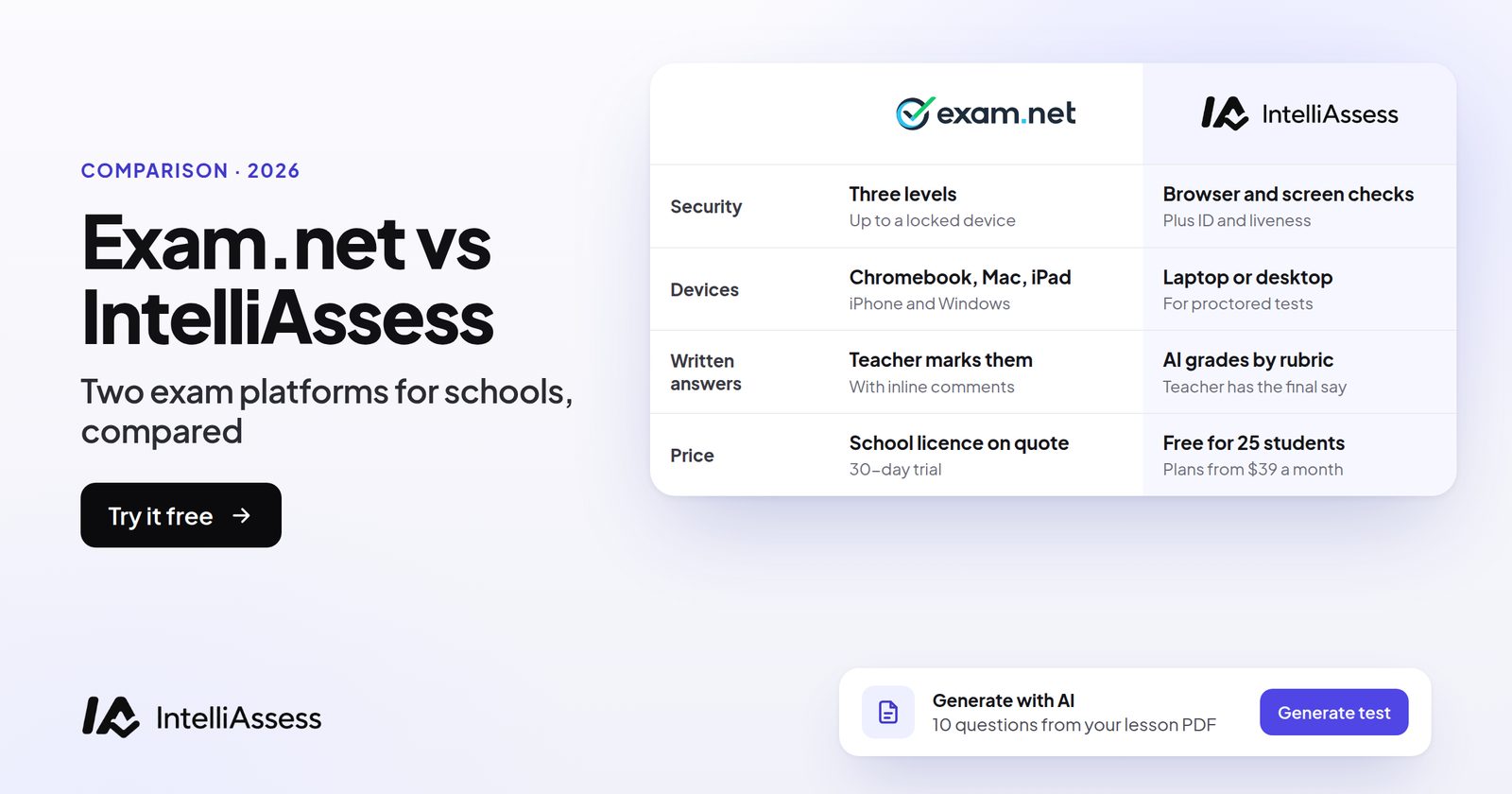
Exam.net vs IntelliAssess compares a whole-school secure exam platform with a teacher-level tool that writes, proctors and marks tests. Exam.net, trusted by over 270,000 teachers and used for national final exams in Sweden, offers three security levels including a lockdown browser, real-time teacher monitoring, an AI question generator, rule-based auto-marking, anonymised answers and accommodations, under a school licence priced on request. IntelliAssess writes exams from your lessons, scores written answers against your rubric with AI, and proctors exams at home with ID and webcam checks, free for 25 students or from $39 a month. Exam.net is better at locking school devices for exams in the classroom; IntelliAssess is better at writing and marking, and at exams sat at home.
The short answer
Choose Exam.net if your school runs exams in classrooms on school devices and wants them locked down, with real-time teacher monitoring, accommodations such as text-to-speech, anonymised marking, Google Classroom or Teams, and one licence for every teacher and subject. Choose IntelliAssess if writing exams and marking written answers take most of your time, if students sit exams at home and you need to know who is sitting them, if you want a published price or a free start, or if you teach in Arabic. Use both if you lock exams in school and proctor them at home.
Exam.net vs IntelliAssess at a glance
| Exam.net | IntelliAssess | |
|---|---|---|
| Built for | Whole schools and universities | Teachers, departments and schools |
| Writing exams | Your own questions, plus an AI question generator | AI writes up to 100 questions from your files, YouTube or a web page; answer keys checked twice |
| Security | Three levels, including a lockdown browser; background cheat detection | Browser checks, whole-screen sharing; no device lockdown |
| Supervision | Real-time teacher monitoring and student chat | ID photo, selfie, liveness and face match; webcam and microphone; report per attempt |
| Devices | Chromebook, Mac, iPad, iPhone and Windows (our 16 November read) | Any browser for unproctored tests; laptop or desktop with webcam for proctored ones |
| Marking | Auto-marking by rules; anonymised answers; collaborative grading | Choice questions marked at hand-in; written answers scored by AI against your rubric |
| Accommodations | Text-to-speech, dyslexia font, translation, extra time | Timers and attempt limits; English and Arabic |
| Integrations | Google Classroom, Microsoft Teams, Turnitin | Google Classroom |
| Privacy | GDPR, FERPA, COPPA and SOPIPA, as stated | Encrypted identity photos; no certifications listed |
| Price | School licence on quote; 30-day trial; no free plan | Free for 25 students; Starter $39 a month for 200 |
What Exam.net is
Exam.net is a secure exam platform used across schools and universities. Its homepage reports "over 270 000 teachers", "20 000+ Schools", "1000+ Universities" and "70 million Exams started", and says it is "trusted for nationwide final exams in Sweden". It offers "3 security levels, including lock-down browser", "background cheat detection", "real-time monitoring" with a student-teacher chat, an "AI question generator", "auto-marking based on the rules you set up", anonymised answers before marking, collaborative grading, and accommodation tools such as text-to-speech and a dyslexia font. It integrates with Google Classroom, Microsoft Teams and Turnitin, and states GDPR, FERPA, COPPA and SOPIPA compliance.
When we read its site on 16 November 2026, Exam.net also described pasting exams from Word or uploading a PDF exam, marking written answers with inline comments, server-side detection of virtual machines, remote desktops and split screens, and support for Chromebooks, Macs, iPads, iPhones and Windows, with students joining by exam key and no account. Its footer links to instructions for a high-security mode that its link describes as including a kiosk app for Chromebooks.
It sells one plan: "school-based licensing" that lets you use Exam.net "unlimited and for all subjects", invoiced annually and priced on request, after a 30-day free trial per school. "We don't have a free plan."
What IntelliAssess is
IntelliAssess's AI quiz generator writes exams from your PDF, Word or PowerPoint files, a YouTube video or a web page, up to 100 questions across eight types, checks each answer key a second time, and drafts a rubric for each written question. Students sit the exam online from a link or Google Classroom, with timers, scheduled starts, shuffling and attempt limits on paid plans. Choice questions are marked at hand-in, and AI grading scores each written answer against every criterion with a comment the teacher can change before release.
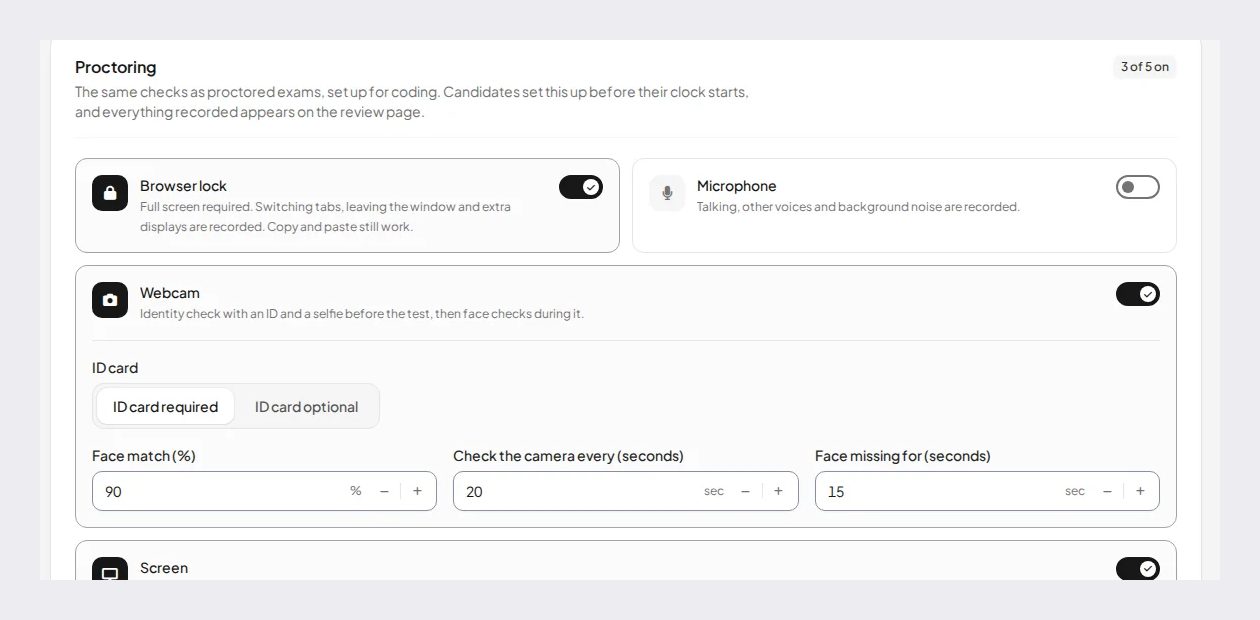
For exams at home, online proctoring checks identity with an ID photo, a live selfie with head turns, a liveness check and a face match, then watches webcam, microphone, screen and browser, with a report per attempt showing an integrity score and a timeline. It works in English and Arabic.
What it does not have: device lockdown, tablet or phone support for proctored exams, text-to-speech or dyslexia-font accommodations, Microsoft Teams integration, or security certifications on its pages.
Lockdown: where Exam.net leads
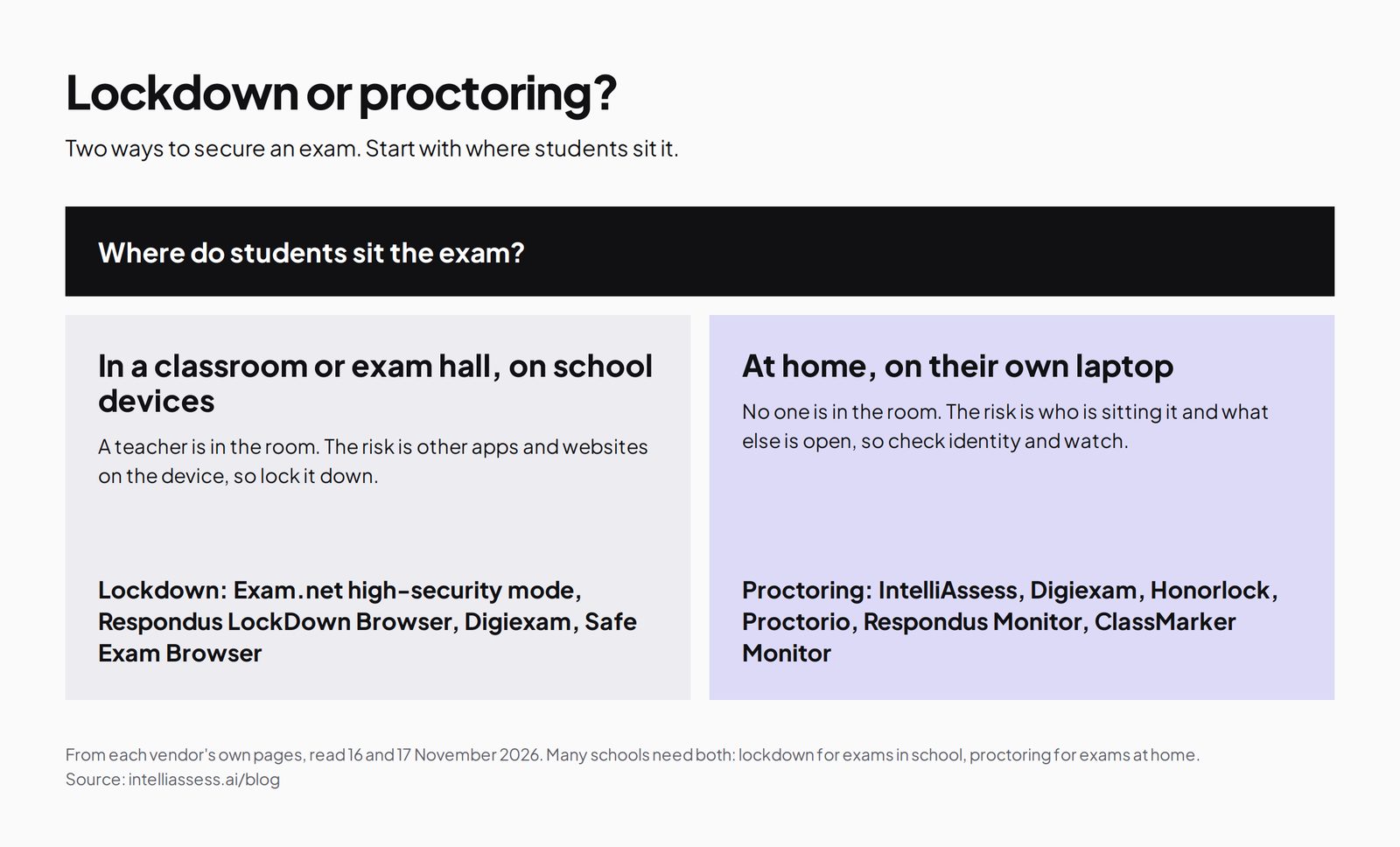
Exam.net's high-security level locks the exam device so students cannot open other apps or websites, and its background cheat detection looks for signs of workarounds. That is exactly what a school needs for exams in a classroom on school-managed devices, where a teacher is present and the risk is other software rather than another person. It is also why Exam.net is used for national exams.
IntelliAssess does not lock the device. It asks students to share their whole screen and checks the browser, so leaving the exam shows up in the report, and you decide whether that warns the student, ends the exam or is only recorded. That is a weaker barrier in a classroom, but on a student's own laptop at home, where installing lockdown software is often impractical, a recorded screen, webcam and identity check give the teacher more evidence than lockdown alone.
If your exams are mostly sat in school on school devices, Exam.net is the stronger tool for security. If many are sat at home, IntelliAssess covers what Exam.net's pages do not describe.
Writing and marking: where IntelliAssess leads
Exam.net helps with exam writing through its AI question generator and with marking through rule-based auto-marking, anonymised answers and collaborative grading; written answers are marked by teachers. IntelliAssess writes a full exam from your lesson files with answer keys checked, drafts a rubric for each written question, and scores every written answer against each criterion with a reason the teacher can review and change. For a department setting exams with many short written answers, that is where the time saving is.
Feature by feature
Identity
Exam.net lets students join by exam key without an account, and its pages do not describe ID checks. IntelliAssess checks an ID photo, a live selfie with head turns, liveness and a face match before a proctored exam.
Supervision during the exam
Exam.net lets the teacher monitor students in real time and chat with each one "without disrupting the entire class". IntelliAssess checks the webcam at intervals, listens through the microphone and records the screen and browser, producing a timeline with photo evidence for each attempt.
Cheat detection
Exam.net lists "background cheat detection"; when we read its site on 16 November 2026, it described detecting virtual machines, remote desktops and split screens from the server side, alongside the locked browser. IntelliAssess records events such as leaving the exam page, a face missing from the webcam or sound picked up by the microphone, each with a time and, for webcam events, a photo, and combines them into an integrity score for the attempt. Neither should be treated as proof on its own: a flag is a reason for a teacher to look at the evidence and talk to the student.
Accommodations
Exam.net offers text-to-speech, a dyslexia font, translation and extra time. IntelliAssess offers timers and attempt limits set per test, and English and Arabic with right-to-left display; it does not describe text-to-speech or a dyslexia font.
Integrations
Exam.net integrates with Google Classroom, Microsoft Teams and Turnitin. IntelliAssess publishes to Google Classroom and syncs grades there.
Results
Exam.net supports collaborative grading and anonymised marking. IntelliAssess analytics show results by question, topic, question type and rubric criterion, with PDF reports per exam, student and submission; on learning quizzes on Pro and up, students also get study notes and a study plan from their marks.
The student's side
On Exam.net, a student enters an exam key, with no account, and in high-security mode the device is locked to the exam. They can chat with the teacher during the exam, and students with accommodations get tools such as text-to-speech or a dyslexia font. If the connection drops, Exam.net described, when we read it on 16 November, that work is kept and the exam continues. It is a simple start, which matters for younger students and large exam halls.
On IntelliAssess, a student opens the exam from Google Classroom or a link. For a proctored exam, they photograph their ID, take a live selfie with head turns, allow the webcam and microphone and share their screen before the timer starts. Younger students without email can join with a nickname and PIN. After results are released, they see their marks and a comment for each rubric criterion, and never see other students' results. Give students a short practice test with the same settings before a real exam, so the checks are familiar.
How far to trust AI marking
Exam.net's auto-marking follows rules you set, so it is predictable but limited to answers that can be checked against a rule. IntelliAssess's AI grading reads written answers, which saves more time but needs checking. Research on AI scoring of written answers is mixed: a synthesis of 65 studies found agreement between large language models and human raters "varied substantially both across and within studies". IntelliAssess therefore shows a reason for every criterion score and lets the teacher change any score before results are released. Before using it for a real exam, run five answers you have already marked through the rubric and adjust any criterion where the AI and you disagree.
One exam season, two ways
Take a secondary school with end-of-term exams for 600 students: most sit them in exam halls on school Chromebooks, and about 40 sit them at home for medical or other reasons.
With Exam.net, the exams officer sets up each exam, students in halls join by exam key in high-security mode on locked Chromebooks, and invigilators and teachers watch in real time. Students with accommodations get text-to-speech or extra time. Answers are anonymised for marking, choice questions are auto-marked, and teachers mark the written answers together. The 40 students at home sit the same exam, but the school cannot check who is sitting it.
With IntelliAssess, departments write each exam from their unit materials and publish through Google Classroom. Students at home complete an ID and selfie check and sit the exam proctored, on a laptop or desktop. Written answers are scored against each department's rubric for teachers to review. Students in halls can sit the same exam in a browser, but their Chromebooks are not locked down, and IntelliAssess does not list Chromebooks among its supported proctoring devices, so check before relying on it there.
With both, the school keeps Exam.net for locked exams in halls and uses IntelliAssess for the students at home and for quicker marking of written answers in tests during the term.
Pricing
Exam.net sells a single school licence, priced on request and invoiced annually, after a 30-day free trial per school. It says there is no free plan and no tiers, because "we want the full range of our features to be accessible to everyone".
IntelliAssess publishes its prices: Free for 25 students; Starter $39 a month for 200; Pro $99 for 500; Intensive $249 for 2,000; yearly billing costs ten months. AI grading and proctoring start on Starter, and webcam proctoring has a monthly allowance of face checks (200, 400 or 1,200), so check that your exam weeks fit. A teacher or department can start without a school-wide contract. For the 600-student school in the example above, Intensive covers up to 2,000 students for $249 a month or $2,490 a year; a department with up to 200 students fits Starter at $390 a year. Ask Exam.net for its school licence price at the same size so you can compare like for like, remembering that Exam.net includes lockdown and accommodations that IntelliAssess does not, and IntelliAssess includes proctoring and AI grading that Exam.net's pages do not describe.
Privacy
Exam.net states that it meets GDPR, FERPA, COPPA and SOPIPA requirements; it does not collect webcam images on the pages we read, which makes its data footprint smaller. IntelliAssess's proctoring collects identity photos and webcam images, stores them encrypted and opens them only through short-lived links, and records location only if you switch that check on; its pages list no certifications or data location, so ask us if your school needs them. Tell students and families before an exam what is recorded and who reviews it.
Where Exam.net is better
- Lockdown of school devices, used for national exams.
- Real-time teacher monitoring and chat during the exam.
- Accommodations: text-to-speech, dyslexia font, translation and extra time.
- Devices, including iPads and Chromebooks, and Microsoft Teams integration.
- One licence for the whole school, with every feature included.
Where IntelliAssess is better
- Writing exams from your lesson files, with answer keys checked.
- Marking written answers against your rubric with AI.
- Identity and webcam checks for exams at home.
- A published price and a free plan for one teacher.
- Arabic exams, right to left.
Using both together
The two tools solve different problems, so many schools could use both. Keep Exam.net for exams in classrooms and halls on school devices, where lockdown and real-time monitoring matter. Use IntelliAssess for exams sat at home, where identity checks matter, and for tests during the term with written answers you want marked faster. Both work with Google Classroom, so students start in the same place. Tell each class clearly which tool a given exam uses, and run a practice test on each before exam week.
Getting started
- Keep Exam.net where it works, for locked exams in halls on school devices.
- Pick one department and one test to try IntelliAssess, ideally one with written answers and some students at home.
- Write the rubric first, or let IntelliAssess draft it, and check it against answers you have marked.
- Run a practice test with the same proctoring settings so students know what to expect.
- Compare marking time and student problems after one cycle, then decide where each tool fits.
Questions to ask before choosing
- Where do students sit most exams: in school on school devices, or at home on their own?
- Which devices do they use, and does the tool support them for the security level you need?
- How much time do teachers spend writing exams and marking written answers?
- Which accommodations do our students rely on?
- Do we use Google Classroom, Microsoft Teams, or both?
- Do we need a whole-school licence, or can a department start on its own?
Choose Exam.net if
- Most exams are sat in school on school-managed devices that should be locked.
- You want real-time teacher monitoring and student chat.
- Students rely on text-to-speech, a dyslexia font or translation.
- You want one licence for every teacher and subject, with Teams or Classroom.
Choose IntelliAssess if
- Writing exams and marking written answers take most of your time.
- Students sit exams at home and you need identity and webcam checks.
- You want to start without a school-wide contract, or see the price first.
- You teach in Arabic.
Comparing more tools? See Exam.net alternatives, scored on seven published facts, Digiexam vs IntelliAssess, or every comparison.
Frequently asked questions
Is IntelliAssess an alternative to Exam.net?
For writing and marking exams and for proctored exams at home, yes. For locking school devices during exams in class, Exam.net is stronger, and many schools could use both.
How much does Exam.net cost?
Exam.net sells a school licence priced on request, invoiced annually, after a 30-day free trial per school. It has no free plan. IntelliAssess is free for 25 students, then from $39 a month.
Does Exam.net have webcam proctoring?
Its pages describe a lockdown browser, background cheat detection and real-time teacher monitoring, but not webcam proctoring or ID checks. IntelliAssess includes both from Starter.
Does IntelliAssess work on Chromebooks and iPads?
Unproctored tests open in any browser. Proctored exams need a laptop or desktop with a webcam, so tablets and phones are not supported for those. Exam.net supports Chromebooks and iPads.
Can IntelliAssess mark essays?
Yes. It scores each written answer against every criterion of your rubric with AI, with a reason the teacher can change before releasing results. Exam.net auto-marks by rules and leaves written answers to teachers.
Does Exam.net use Safe Exam Browser?
Exam.net's footer links to instructions for its high-security mode; the support article did not load for us, so check its current setup with Exam.net. Safe Exam Browser itself is a free lockdown browser from ETH Zurich for Windows, macOS and iOS.
Can I use Exam.net and IntelliAssess together?
Yes. Keep Exam.net for locked exams on school devices, and use IntelliAssess for exams sat at home and for tests with written answers you want marked faster. Both work with Google Classroom.
Does IntelliAssess work in Arabic?
Yes. IntelliAssess writes, delivers and grades exams in Arabic, with right-to-left display.
Which is better for national or high-stakes exams?
Exam.net, which is used for national final exams in Sweden and locks school devices. IntelliAssess is better suited to classroom tests, mid-terms and exams at home where marking time and identity checks matter more than lockdown.
Does Exam.net work with Microsoft Teams?
Yes. Exam.net lists Google Classroom and Microsoft Teams integrations. IntelliAssess works with Google Classroom only, with no Teams integration yet.
Keep reading
All articles
Read next
SchoolAI alternatives: 7 AI tools for teachers and students scored (2026)
Seven AI tools scored on the same nine facts, with SchoolAI as the reference, and what each lets teachers see when students use AI.

SchoolAI vs IntelliAssess: an AI tutor for students or feedback after a test?
SchoolAI puts students in supervised conversation with AI; IntelliAssess marks their tests and uses AI to help them learn from their own answers.
Motasem Aldiab 12 min read

Jotform and ProProfs alternatives for quizzes and exams (2026)
Jotform and ProProfs side by side, then the alternatives by forms, certificates or real exams.
Motasem Aldiab 2 min read