
Exam.net alternatives: 7 secure exam tools scored (2026)

By Motasem Aldiab, Technology Consultant and Trainer - Cloud, DevOps, Java, Data Science
Contents20
- What you keep with Exam.net
- Why schools look for an Exam.net alternative
- Lockdown or proctoring?
- The scorecard: 7 Exam.net alternatives on 7 published facts
- 1. ClassMarker: browser proctoring on any device
- 2. Respondus Monitor: lockdown and automated proctoring in your LMS
- 3. Digiexam: the closest like-for-like secure exam platform
- 4. Proctorio: exam security inside your LMS
- 5. IntelliAssess: when writing and marking matter more than lockdown
- 6 and 7. Honorlock and Testportal
- Lockdown in practice: Safe Exam Browser and kiosk apps
- Marking written answers
- Accommodations and accessibility
- Privacy
- Exam.net vs Digiexam
- Prices you can see
- Moving from Exam.net in five steps
- Which alternative for which school
- Where IntelliAssess is not the right choice
- How to choose an Exam.net alternative
Key takeaways
- 1ClassMarker and Respondus Monitor lead, with published prices.
- 2Digiexam is the closest like-for-like platform, with ID checks and live proctors.
- 3IntelliAssess comes fifth: it writes and marks exams but does not lock devices.
- 4Lockdown suits exams in school; proctoring suits exams at home.
The best Exam.net alternatives in 2026 are ClassMarker for browser-based proctoring that works on phones and tablets at a published price, Respondus Monitor for lockdown and automated proctoring inside your LMS, Digiexam for the closest like-for-like secure exam platform with live proctors, and Proctorio for exam security inside Canvas, Moodle or Blackboard. IntelliAssess, which comes fifth, suits schools whose bigger problem is writing and marking exams rather than locking devices. Honorlock and Testportal complete the list. Below, seven tools are scored on the same seven published facts, with Exam.net as the reference, and we compare Exam.net with Digiexam directly.
What you keep with Exam.net
Exam.net is a school exam platform with a large following. Its homepage (read 17 November 2026) says it is "trusted by over 270 000 teachers across the world", in "20 000+ Schools" and "1000+ Universities", with "70 million Exams started", and that it is "trusted for nationwide final exams in Sweden".
Its pricing page lists "3 security levels, including lock-down browser", "background cheat detection", "real-time monitoring" and a student-teacher chat, an "AI question generator", "auto-marking based on the rules you set up", the "ability to anonymize student answers before marking", collaborative grading, accommodation tools such as text-to-speech and a dyslexia font, and integrations with Google Classroom and Microsoft Teams, plus Turnitin. When we read its site on 16 November 2026, it listed Chromebooks, Macs, iPads, iPhones and Windows among supported devices, with students joining by exam key and no account. It states GDPR, FERPA, COPPA and SOPIPA compliance.
How it charges: "school-based licensing" that lets you use Exam.net "unlimited and for all subjects", priced on request, invoiced annually, after a "30-days free trial period per school". "We don't have a free plan", and there is only one plan.
Why schools look for an Exam.net alternative
- No price on the page and no free plan. A single teacher cannot start without a school licence.
- No webcam or identity checks. Exam.net secures the device and lets the teacher watch in real time, but its pages do not describe webcam proctoring or ID checks, which matter for exams at home.
- Written answers are marked by teachers. Auto-marking follows rules you set; AI grading of essays and short answers is not described.
- LMS beyond Classroom and Teams. Canvas, Moodle and Blackboard are not named among its integrations.
Lockdown or proctoring?
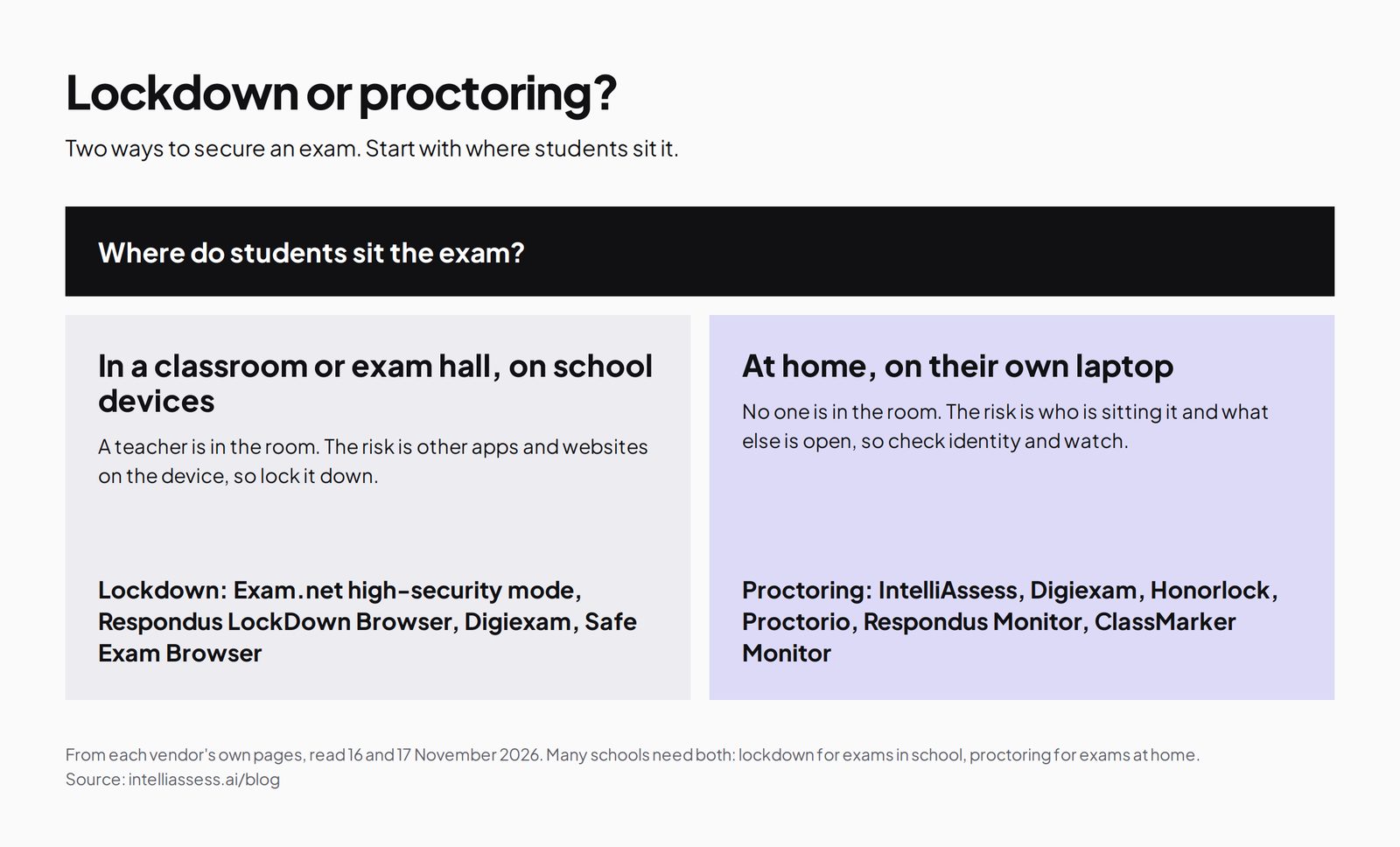
Before comparing tools, decide what you are protecting against. Exam.net's strength is lockdown: closing off other apps and websites on the exam device, which is ideal in a classroom where a teacher is present. For exams sat at home, the risk is different: who is sitting the exam and what else is open, which webcam proctoring addresses. Many schools need both.
The scorecard: 7 Exam.net alternatives on 7 published facts
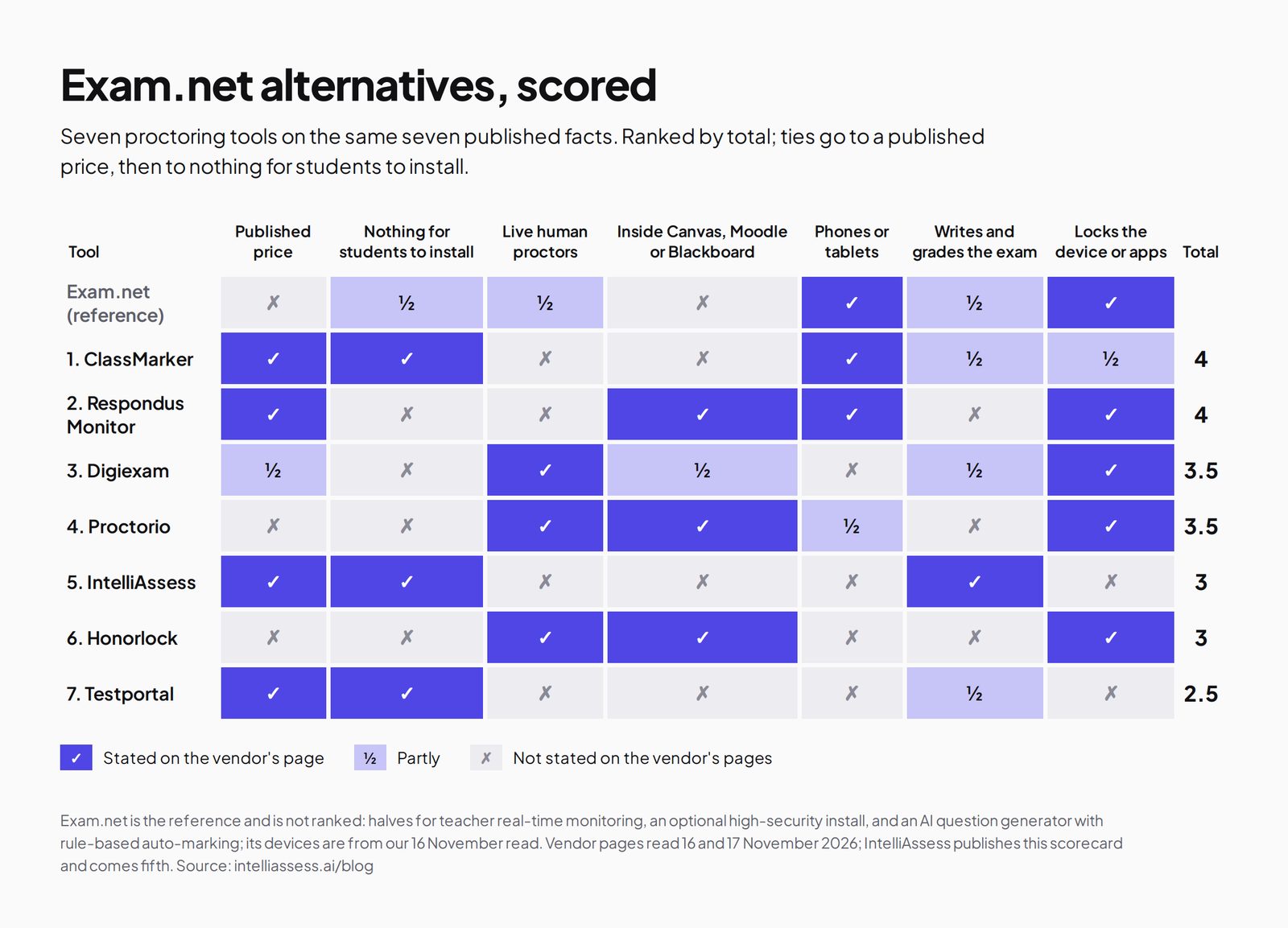
A tick means the vendor's own page says so; a half means partly; a cross means its page does not say so. The facts are a published price, nothing for students to install, live human proctors, working inside Canvas, Moodle or Blackboard, phones or tablets, writing and grading the exam, and locking the device or apps. Ties go to a published price, then to nothing for students to install.
| Tool | Published price | Nothing for students to install | Live human proctors | Inside Canvas, Moodle or Blackboard | Phones or tablets | Writes and grades the exam | Locks the device or apps | Total |
|---|---|---|---|---|---|---|---|---|
| Exam.net itself | ✗ | ½ | ½ | ✗ | ✓ | ½ | ✓ | 3.5 |
| 1. ClassMarker | ✓ | ✓ | ✗ | ✗ | ✓ | ½ | ½ | 4 |
| 2. Respondus Monitor | ✓ | ✗ | ✗ | ✓ | ✓ | ✗ | ✓ | 4 |
| 3. Digiexam | ½ | ✗ | ✓ | ½ | ✗ | ½ | ✓ | 3.5 |
| 4. Proctorio | ✗ | ✗ | ✓ | ✓ | ½ | ✗ | ✓ | 3.5 |
| 5. IntelliAssess | ✓ | ✓ | ✗ | ✗ | ✗ | ✓ | ✗ | 3 |
| 6. Honorlock | ✗ | ✗ | ✓ | ✓ | ✗ | ✗ | ✓ | 3 |
| 7. Testportal | ✓ | ✓ | ✗ | ✗ | ✗ | ½ | ✗ | 2.5 |
Exam.net's halves: an optional high-security mode to install, real-time teacher monitoring rather than proctors, and an AI question generator with rule-based auto-marking; its device support is from our 16 November read, as its support articles did not load for us on 17 November. ClassMarker's halves: it grades objective questions and enforces full screen, but does not write questions or lock the device. Digiexam's halves: its Lockdown price is published but its Exam Platform price is not; Lockdown works inside Canvas and is in early access. ClassMarker and Respondus tie at 4 with published prices; ClassMarker needs nothing installed.
1. ClassMarker: browser proctoring on any device
Best for: schools and trainers that want camera monitoring on phones and tablets as well as laptops, at a published price.
ClassMarker's Monitor, its browser-based proctoring, needs nothing installed and works on desktops, tablets and phones. It can enforce full screen, log tab switches and loss of focus, take camera photos, flag a second face and ask for a photo ID. Objective questions are graded instantly, and certificates with expiry dates and an API are available. Its pricing page charges one credit per test taken and ten with camera monitoring.
Price: Professional 1 $39.95 a month or $396 a year for 400 credits a month; credit packs from $25. Where it falls short: no device lockdown, no AI question writing or essay grading, and camera monitoring multiplies the credit cost. See ClassMarker alternatives.
2. Respondus Monitor: lockdown and automated proctoring in your LMS
Best for: schools and universities whose exams live in Canvas, Moodle, Blackboard or another LMS.
Respondus Monitor is automated proctoring built on Respondus LockDown Browser, which runs on Windows, Mac, Chromebook and iPad after a one-time install and integrates with the major LMSs (Respondus Monitor). Price: a $4,950 first-year licence regardless of institution size, or $15 per student for 12 months (pricing). Where it falls short: students install LockDown Browser, and it does not write or mark exams. See Respondus vs IntelliAssess.
3. Digiexam: the closest like-for-like secure exam platform
Best for: schools and universities that want an Exam.net-style platform plus ID checks and live proctors.
Digiexam's site offers an Exam Platform to "create, deliver, and grade secure assessments", and Lockdown, which secures Canvas quizzes and assignments through a desktop application and is currently in early access. Its proctoring page describes ID checks by "a high-resolution face photo or submitting an identification card/passport", recorded screen and webcam with behavioural tracking, a phone as a second camera by QR code, in-person proctoring where "up to 30 students can be viewed simultaneously by one exam proctor", and "automatic and anonymous grading".
Price: Lockdown $1,995 a year ($1,496 with 25% off year one) or $2.99 per student (pricing); Exam Platform on request. Where it falls short: Exam Platform price not published, Lockdown limited to Canvas and in early access, and no AI question writing or essay grading described. See Digiexam vs IntelliAssess.
4. Proctorio: exam security inside your LMS
Proctorio secures exams your LMS delivers, with a live ID check, lockdown controls, live proctoring and content-leak protection, through a browser extension in Chromium browsers and a mobile app where enabled (Proctorio). Prices are on request. Best for: universities with exams in Canvas, Moodle or Blackboard. See Proctorio alternatives.
5. IntelliAssess: when writing and marking matter more than lockdown
Best for: schools and departments that want exams written from their own material, written answers marked by AI against a rubric, and proctoring for exams at home, without a school-wide contract.
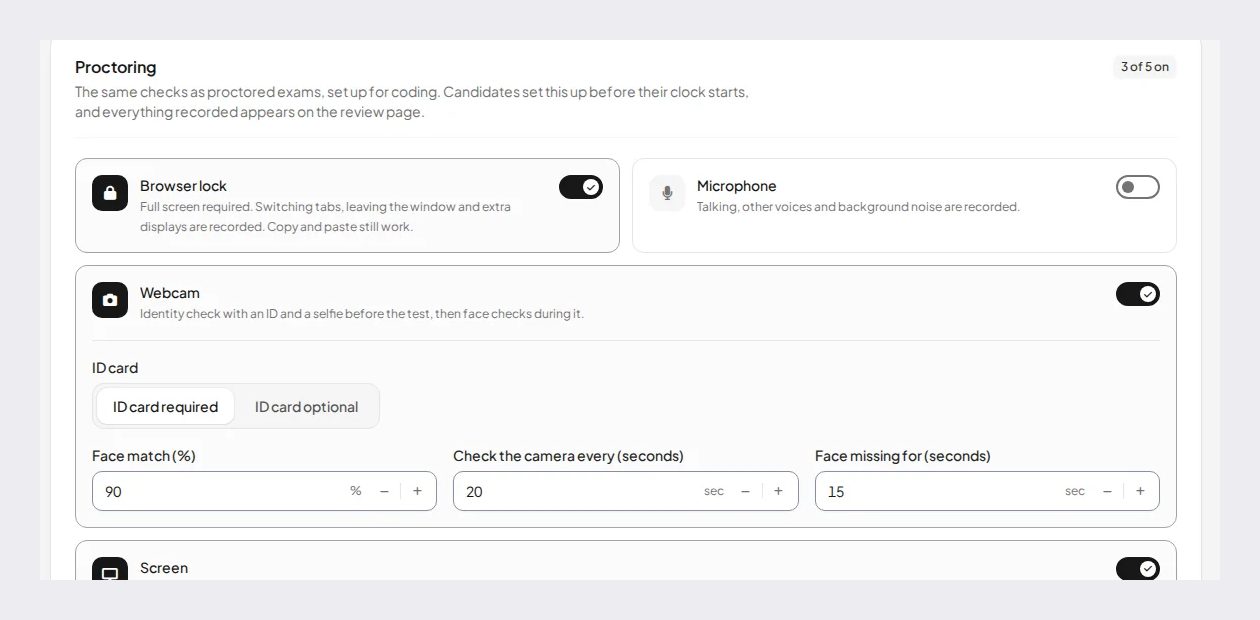
IntelliAssess's AI quiz generator writes exams from your PDF, Word or PowerPoint files, a YouTube video or a web page, up to 100 questions across eight types with answer keys checked twice, and drafts a rubric for each written question. Choice questions are marked at hand-in and AI grading scores each written answer against every criterion, with a comment the teacher can change before release. Its online proctoring runs in the browser: an ID photo, live selfie, liveness check and face match, then webcam, microphone, whole-screen and browser checks. It publishes to Google Classroom and works in English and Arabic.
Price (from our pricing page): Free for 25 students; Starter $39 a month for 200; Pro $99 for 500; Intensive $249 for 2,000, with a monthly allowance of face checks. Where it falls short: no device lockdown, no live proctors, no Canvas, Moodle or Blackboard integration, and proctored exams need a laptop or desktop, not a tablet or phone. See Exam.net vs IntelliAssess.
6 and 7. Honorlock and Testportal
Honorlock adds live pop-in proctors who can intervene by chat, inside Canvas, Blackboard, Brightspace and Moodle, through a Chrome extension; prices are quoted (Honorlock vs IntelliAssess). Testportal offers a free education plan, an EDU plan at $39 a year and a Teams app, with self-grading tests and no account needed for test takers, but its education pages do not describe lockdown or webcam proctoring (Testportal vs IntelliAssess).
Lockdown in practice: Safe Exam Browser and kiosk apps
Several tools here lock the exam device in similar ways. Safe Exam Browser, developed by ETH Zurich, is a lockdown web browser that its developers say is "completely free to use (freeware software)", with versions for Windows, macOS and iOS; many exam platforms and LMSs work with it. Respondus LockDown Browser is a custom browser installed once on Windows, Mac, Chromebook or iPad. Digiexam's Lockdown is a desktop application that students sign into with their school account. Exam.net's footer links to instructions for installing its high-security mode, including what its link describes as a kiosk app for Chromebooks; its support article did not load for us, so check the current device list with Exam.net. Lockdown works best on school-managed devices, where IT can install and test the software before exam day; on students' own devices at home, webcam proctoring is often easier to arrange.
Marking written answers
For many schools the exam itself is not the hardest part; the marking afterwards is. Exam.net helps with auto-marking by rules you set, anonymised answers so marking is fairer, and collaborative grading so colleagues can share the load; written answers are still marked by teachers. Digiexam offers automatic and anonymous grading and co-grading. ClassMarker grades objective questions instantly and leaves essays to you. Respondus, Proctorio and Honorlock secure exams that are marked in your LMS. IntelliAssess scores each written answer against every criterion of your rubric with AI, with a reason the teacher can change before results are released, and leaves an answer with no rubric for a person rather than scoring it zero. If a typical exam has hundreds of short written answers, that difference can save more time than any security feature.
Accommodations and accessibility
Exam.net lists accommodation tools such as text-to-speech, a dyslexia font and, per its homepage, translation and extra time. For exams that run inside an LMS with Respondus, Proctorio or Honorlock, accommodations such as extra time are usually set in the LMS; check how each tool handles them. IntelliAssess lets teachers set timers and attempt limits per test and works in English and Arabic with right-to-left display, but does not describe text-to-speech or a dyslexia font. If students with accommodation plans sit your exams, check each tool's support for them before switching; it is one of Exam.net's clear strengths.
Privacy
Exam.net says it meets GDPR, FERPA, COPPA and SOPIPA requirements. Respondus, Proctorio and Honorlock each publish their own privacy terms, and Honorlock states SOC 2 Type 2. Digiexam's pages we read describe strict security measures without naming certifications or data location. IntelliAssess stores identity and evidence photos encrypted, opens them through short-lived links, and records location only if you switch that check on; it lists no certifications. Webcam proctoring collects more personal data than lockdown, so tell students and families what is recorded and who reviews it.
Exam.net vs Digiexam
Exam.net and Digiexam are the two tools most often compared for school exams, and they overlap more than any others here.
| Exam.net | Digiexam | |
|---|---|---|
| What it is | Secure exam platform for schools, with three security levels | Exam Platform, plus Lockdown for Canvas (early access) |
| Lockdown | Lock-down browser in its high-security level | Desktop application that locks the device |
| Identity checks | Not described | Face photo or ID card or passport |
| Supervision | Real-time teacher monitoring and chat | Recorded screen and webcam; one proctor views up to 30 students |
| Writing questions | AI question generator | Not described |
| Marking | Auto-marking by your rules; anonymised answers; collaborative grading | Automatic and anonymous grading; co-grading |
| Integrations | Google Classroom, Microsoft Teams, Turnitin | Canvas; Google Workspace and Microsoft Entra ID for users |
| Price | School licence on quote; 30-day trial; no free plan | Lockdown $1,995 a year or $2.99 per student; Exam Platform on quote |
Choose Exam.net for whole-school exams on school devices with real-time teacher monitoring, Google Classroom or Teams, and an AI question generator. Choose Digiexam when exams are sat remotely and you need ID checks, recorded proctoring and live proctors, or when your exams live in Canvas.
Prices you can see
| Tool | Published starting price | How it is counted |
|---|---|---|
| ClassMarker | $396 a year (Professional 1) | Credits per test taken; ten with the camera on |
| Respondus Monitor | $4,950 first-year licence, or $15 per student | Institution or student |
| Digiexam Lockdown | $1,995 a year, or $2.99 per student | Students and teachers |
| IntelliAssess | Free for 25; Starter $39 a month for 200 | Students at one time |
| Testportal | Free EDU; EDU $39 a year | Stored results |
| Exam.net, Proctorio, Honorlock | On quote | Licence |
Moving from Exam.net in five steps
- Check your licence dates. Exam.net is invoiced annually, so plan any switch for the end of your licence year.
- Keep what works. If lockdown on school devices is working well, consider keeping Exam.net for in-school exams and adding a proctoring tool for exams at home.
- List accommodations and devices your students rely on, and confirm each alternative supports them.
- Pilot one exam with one class, with a practice run first so students can test their devices and cameras.
- Compare marking time and student problems before rolling out across the school.
Which alternative for which school
- A school that needs camera checks on phones and tablets: ClassMarker.
- A university with exams in Canvas, Moodle or Blackboard: Respondus Monitor, Proctorio or Honorlock.
- A school that wants an Exam.net-style platform with ID checks and live proctors: Digiexam.
- A department that spends more time writing and marking exams than worrying about lockdown: IntelliAssess.
- A teacher who wants a free self-marking test tool: Testportal.
- A school teaching in Arabic: IntelliAssess.
Where IntelliAssess is not the right choice
- You need devices locked during exams in school: keep Exam.net, or use Respondus or Digiexam.
- Students sit exams on iPads, Chromebooks or phones with proctoring: ClassMarker or Respondus.
- You need live human proctors: Digiexam, Honorlock or Proctorio.
- Your exams must stay in Canvas, Moodle or Blackboard.
How to choose an Exam.net alternative
- Decide where exams are sat, in school or at home, and so whether you need lockdown, proctoring or both.
- List your devices and check each tool's support for them.
- Count the marking time for written answers, and whether AI help would matter.
- Check integrations: Google Classroom and Teams, or an LMS.
- Pilot one real exam with a practice run for students first.
See also best online proctoring software for schools, or browse every comparison.
Frequently asked questions
What is the best alternative to Exam.net?
For browser proctoring on any device at a published price, ClassMarker. For lockdown and proctoring inside your LMS, Respondus Monitor. For the closest like-for-like platform with ID checks and live proctors, Digiexam. For exams written and marked with AI, IntelliAssess.
How much does Exam.net cost?
Exam.net sells a school licence priced on request, invoiced annually, after a 30-day free trial per school. It says, "We don't have a free plan."
Is Exam.net or Digiexam better?
Exam.net suits whole-school exams on school devices with real-time teacher monitoring and Classroom or Teams. Digiexam suits remote exams that need ID checks and recorded or live proctoring, and exams in Canvas.
Does Exam.net have webcam proctoring?
Its pages describe lockdown, background cheat detection and real-time teacher monitoring, but not webcam proctoring or ID checks. Digiexam, ClassMarker, Respondus Monitor, Proctorio, Honorlock and IntelliAssess offer webcam-based checks.
What is Safe Exam Browser?
Safe Exam Browser is a lockdown web browser developed by ETH Zurich, which says it is "completely free to use (freeware software)", with versions for Windows, macOS and iOS (safeexambrowser.org).
Which Exam.net alternative grades essays with AI?
IntelliAssess scores each written answer against every rubric criterion with AI, and the teacher can change any score. Exam.net and Digiexam describe auto-marking by rules and anonymous grading, with written answers marked by teachers.
Does Exam.net integrate with Google Classroom?
Yes. Exam.net lists integrations with Google Classroom and Microsoft Teams, and Turnitin for plagiarism checks. IntelliAssess also publishes to Google Classroom; Testportal has a Teams app.
Can I use Exam.net and IntelliAssess together?
Yes. Use Exam.net for locked exams on school devices, and IntelliAssess for quizzes and exams written from your lessons, marked by rubric, and proctored when students sit them at home.
Does IntelliAssess lock the device?
No. IntelliAssess checks the screen and browser during a proctored exam and records events, but does not lock the device. For locked exams on school devices, Exam.net, Respondus LockDown Browser or Digiexam fit better.
Is there a free Exam.net alternative?
Testportal has a free education plan, and IntelliAssess is free for 25 students, without proctoring. Safe Exam Browser is free to use as a lockdown browser. Exam.net offers a 30-day trial per school but no free plan, so a single teacher cannot keep using it without a school licence.
Keep reading
All articles
Read next
SchoolAI alternatives: 7 AI tools for teachers and students scored (2026)
Seven AI tools scored on the same nine facts, with SchoolAI as the reference, and what each lets teachers see when students use AI.

SchoolAI vs IntelliAssess: an AI tutor for students or feedback after a test?
SchoolAI puts students in supervised conversation with AI; IntelliAssess marks their tests and uses AI to help them learn from their own answers.
Motasem Aldiab 12 min read

Jotform and ProProfs alternatives for quizzes and exams (2026)
Jotform and ProProfs side by side, then the alternatives by forms, certificates or real exams.
Motasem Aldiab 2 min read