
SchoolAI alternatives: 7 AI tools for teachers and students scored (2026)

By Motasem Aldiab, Technology Consultant and Trainer - Cloud, DevOps, Java, Data Science

Contents21
- What SchoolAI does well
- Why schools look for a SchoolAI alternative
- Who talks to the AI?
- The scorecard: 7 SchoolAI alternatives on 9 published facts
- 1. MagicSchool: the broadest toolkit with supervised student tools
- 2. Brisk: teacher tools plus Brisk Boost
- 3. Gemini for Education: AI that comes with Google Workspace
- 4. IntelliAssess: AI for students after a marked test
- 5. Eduaide: a resource builder for teachers
- 6. Khanmigo: a tutor on Khan Academy content
- 7. Wayground: self-marking practice
- Student AI: what each lets a teacher see
- How far to trust AI with students
- Prices side by side
- Privacy claims compared
- What to check before giving students AI
- Using SchoolAI alongside an assessment tool
- Getting started with an alternative
- Which alternative for which school
- Where IntelliAssess is not the right choice
- How to choose a SchoolAI alternative
Key takeaways
- 1MagicSchool pairs 80+ teacher tools with supervised student tools and a published price.
- 2Brisk adds Boost activities, with teachers able to see all student chats.
- 3IntelliAssess comes fourth: AI after a marked test, not open chat.
- 4Read each vendor's privacy claims before turning on any student AI.
The best SchoolAI alternatives in 2026 are MagicSchool for the broadest AI toolkit with supervised student tools and a published price, Brisk for free teacher tools plus Brisk Boost student activities inside the apps you already use, Gemini for Education if your school is on Google Workspace, and IntelliAssess if what you want for students is not open chat but help after a marked test: explanations of each answer, a study plan and practice on what they missed. Eduaide suits teachers who mainly make materials, Khanmigo pairs free teacher tools with Khan Academy's tutor, and Wayground suits self-marking practice. Below, seven tools are scored on the same nine published facts, with SchoolAI as the reference.
What SchoolAI does well
SchoolAI is built around student-facing AI that teachers design and supervise. Its pricing page (read 17 November 2026) describes Spaces as "AI-powered learning experiences you design and assign to students", with a library of "200,000+ premade Spaces and resources". Mission Control gives "real-time and post-session visibility into student learning", teachers can "review and monitor all student AI conversations in full", and automated alerts flag "when student conversations flag safety concerns".
For teachers, "Chat with Dot" is a personal AI workspace for lesson planning, purpose-built tools cover lesson planning, rubric creation and classroom support, and assistants help with writing feedback and adapting content. Its writing analysis includes summary feedback, inline comments and revision history. PowerUps add a document editor, presentation creator, image generator, Desmos graphing calculator, flashcards and mind maps inside Spaces, and live translation covers 60+ languages. On the Scale plan, Sidekick is "a personal AI tutor that adapts to how each student learns", with student portals and an embedded Sidekick in Canvas.
On privacy, SchoolAI states "FERPA, COPPA, & SOC2 Type 2 compliant, 1EdTech certified", and says every AI provider it uses is "contractually bound never to train on or sell student data". Its homepage cites research including a two-year study of 13,882 student-AI conversations, and says it is ESSA Level III validated.
Price: a free trial with "5 Space launches per year"; Pro (unlimited Spaces, rostering, full LMS integration) and Scale (district-wide, Sidekick, student portals) on quote. No dollar prices are published.
Why schools look for a SchoolAI alternative
- No published price. Every paid plan goes through a quote, and the free trial is capped at five Space launches a year.
- Teacher tools are lighter. SchoolAI's pages do not describe a quiz generator or marking, so teachers may need another tool for assessment.
- Student chat is not always the goal. Some schools want AI to support students after an assessment, not open-ended conversations.
- Integrations are not named. Its pages mention LMS integration and an embedded Sidekick in Canvas but do not name Google Classroom or Schoology.
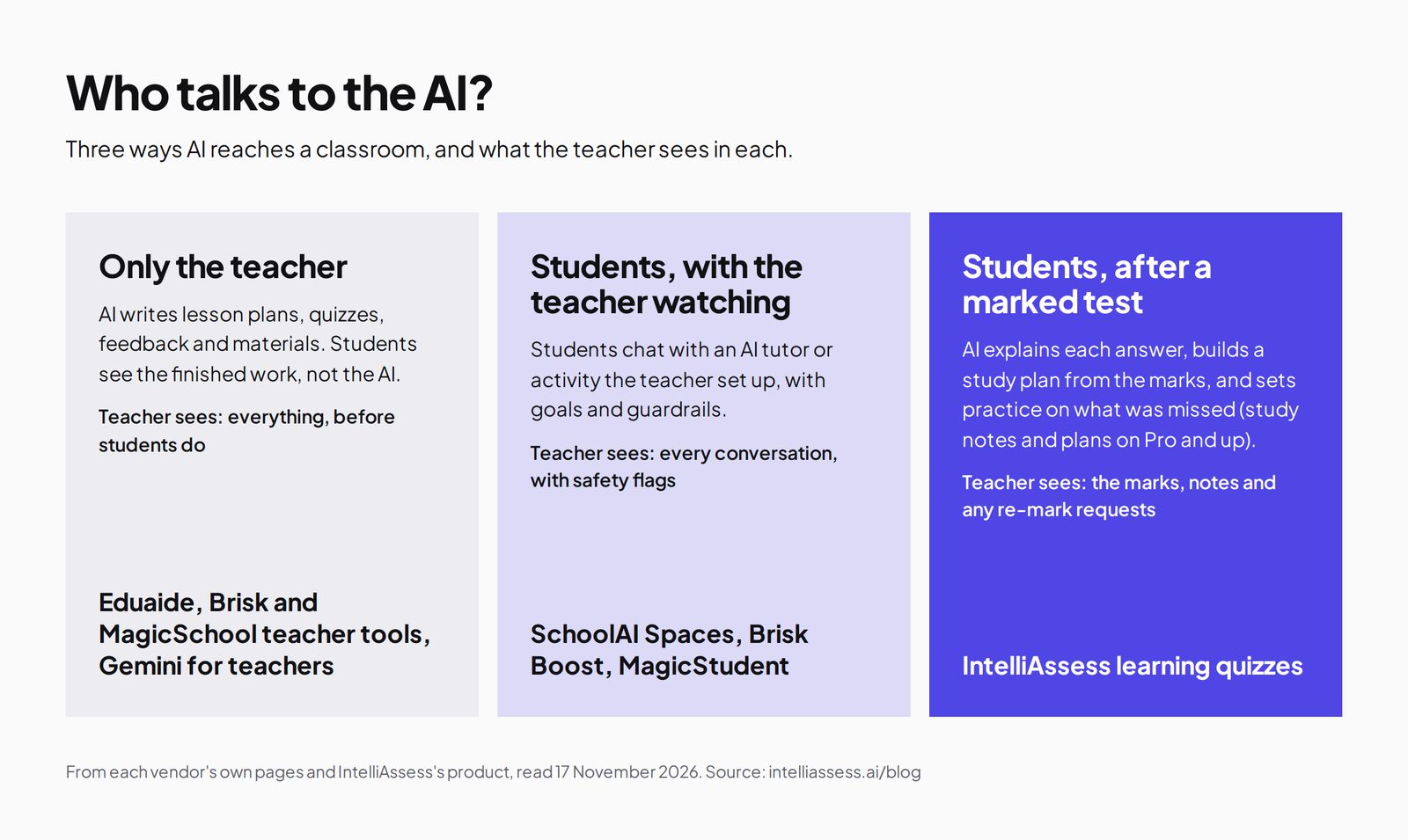
Who talks to the AI?
The clearest way to compare these tools is by who uses the AI and what the teacher sees. Some keep AI with the teacher; some let students chat with it under supervision; one uses it to help students after a marked test.
The scorecard: 7 SchoolAI alternatives on 9 published facts
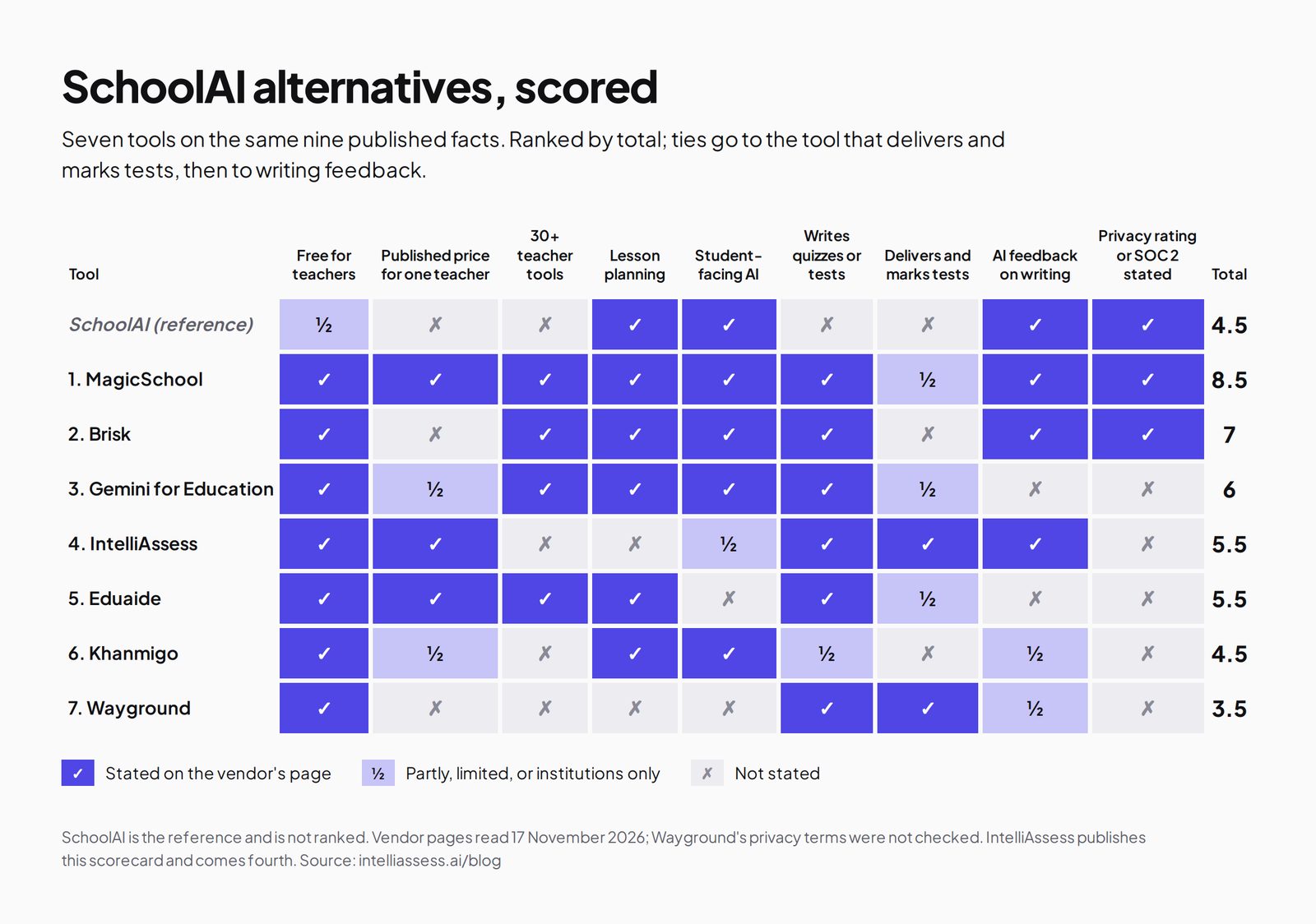
These are the same nine facts as our MagicSchool and Brisk scorecards: free for teachers, a published price for one teacher, 30+ teacher tools, lesson planning, student-facing AI, writing quizzes or tests, delivering and marking tests, AI feedback on writing, and a stated privacy rating or SOC 2. A tick means the vendor's own page says so; a half means partly, limited, or only for institutions. Ties go to the tool that delivers and marks tests, then to writing feedback.
| Tool | Free for teachers | Published price for one teacher | 30+ teacher tools | Lesson planning | Student-facing AI | Writes quizzes or tests | Delivers and marks tests | AI feedback on writing | Privacy rating or SOC 2 stated | Total |
|---|---|---|---|---|---|---|---|---|---|---|
| SchoolAI itself | ½ | ✗ | ✗ | ✓ | ✓ | ✗ | ✗ | ✓ | ✓ | 4.5 |
| 1. MagicSchool | ✓ | ✓ | ✓ | ✓ | ✓ | ✓ | ½ | ✓ | ✓ | 8.5 |
| 2. Brisk | ✓ | ✗ | ✓ | ✓ | ✓ | ✓ | ✗ | ✓ | ✓ | 7 |
| 3. Gemini for Education | ✓ | ½ | ✓ | ✓ | ✓ | ✓ | ½ | ✗ | ✗ | 6 |
| 4. IntelliAssess | ✓ | ✓ | ✗ | ✗ | ½ | ✓ | ✓ | ✓ | ✗ | 5.5 |
| 5. Eduaide | ✓ | ✓ | ✓ | ✓ | ✗ | ✓ | ½ | ✗ | ✗ | 5.5 |
| 6. Khanmigo | ✓ | ½ | ✗ | ✓ | ✓ | ½ | ✗ | ½ | ✗ | 4.5 |
| 7. Wayground | ✓ | ✗ | ✗ | ✗ | ✗ | ✓ | ✓ | ½ | ✗ | 3.5 |
SchoolAI's half for free: a trial with 5 Space launches a year. IntelliAssess's half for student AI: AI notes per question, study plans and practice after Learning-purpose quizzes, not open chat; study notes and plans are on Pro and up. Gemini: suggested writing feedback is "coming soon". IntelliAssess and Eduaide tie at 5.5; IntelliAssess delivers and marks tests. Wayground's privacy terms were not checked.
1. MagicSchool: the broadest toolkit with supervised student tools
Best for: schools that want teacher tools and student AI in one platform, with a price a teacher can see.
MagicSchool's pricing page lists 80+ teacher tools on its free plan, and Plus adds 50+ student tools. Its MagicStudent page says student interactions are stored "to support teacher visibility and classroom oversight", with "built-in moderation guided by district expectations", in Student Rooms where teachers choose tools and set goals. It states SOC 2 Type II and a 95% Common Sense privacy rating.
Price: free; Plus $8.33 a month billed annually; Enterprise on request. Where it falls short: quizzes are low-stakes checks, and marking is not described. See MagicSchool vs IntelliAssess.
2. Brisk: teacher tools plus Brisk Boost
Best for: teachers who want free AI inside Google Docs and their LMS, plus supervised student activities.
Brisk's plans page lists 30+ free teacher tools working inside Docs, Slides, PDFs, YouTube and Canvas, Schoology and Google Classroom. Its Brisk Boost activities include Tutor, Debate, Exit Ticket and Writing Coach, shared by link, QR code or class code with "no accounts, no downloads", and Brisk says "teachers have visibility into all student chats" and flags profanity, insults and violence. It reports a 95% Common Sense privacy rating.
Price: free for teachers; school and district plans custom-priced, with the student extension as an add-on. Where it falls short: no individual paid plan, and quizzes are delivered in other tools. See Brisk alternatives.
3. Gemini for Education: AI that comes with Google Workspace
Best for: Google schools that want teacher-led AI for students without another vendor.
Google's Gemini for Education page says institutions can get it at no cost through Education Fundamentals. Gemini in Classroom offers "30+ use cases" for teachers and "teacher-led AI learning experiences for students" through Gemini Notebook and Gems grounded in class materials, and students under 18 "get a distinct product experience with extra guardrails". Google says data is "not human reviewed or used to train AI models".
Price: free with Fundamentals for qualifying institutions; AI Pro add-on $15 to $24 per user a month. Where it falls short: institution-led, and the pages we read do not describe teachers reviewing every student conversation.
4. IntelliAssess: AI for students after a marked test
Best for: schools that want AI to help students learn from their own assessments, rather than open chat.
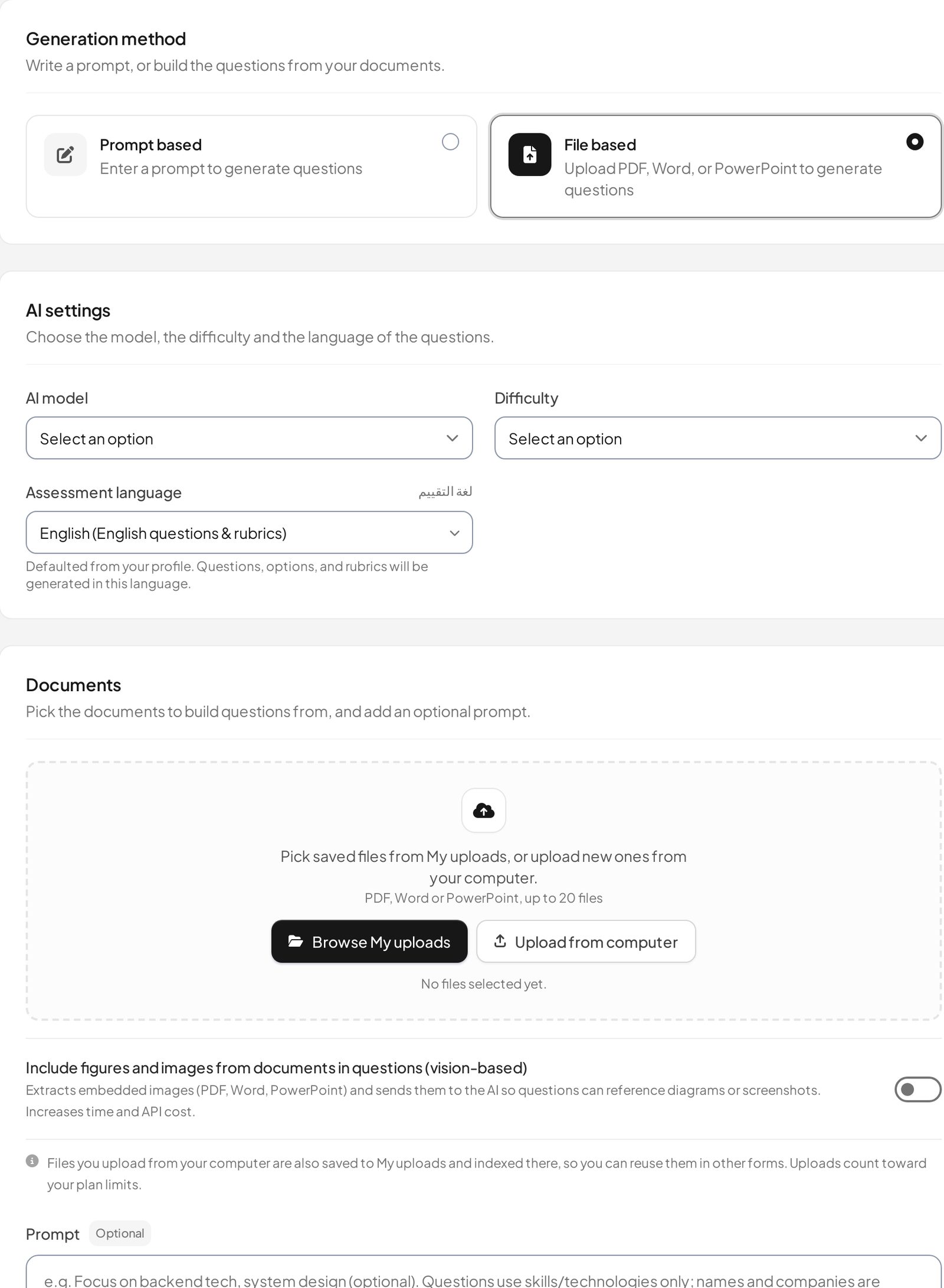
IntelliAssess writes tests from your lessons, delivers and marks them, and scores written answers against your rubric with AI grading. On Learning-purpose quizzes, its student feedback gives each student study notes on every question (a good answer, their answer compared, the idea behind it and improvement tips) and a study plan for each attempt with focus areas and checked resources, on Pro and up. Students can ask "Explain this to me" on a question (also Pro and up), practise what they missed, and ask the teacher for a re-mark. Exam results stay with the teacher until they choose to share them. It works in English and Arabic and publishes to Google Classroom.
Price (from our pricing page): Free for 25 students; Starter $39 a month for 200; Pro $99 for 500; yearly costs ten months. Where it falls short: no open AI chat or tutor, no lesson planning or materials, and no privacy certifications listed. See SchoolAI vs IntelliAssess.
5. Eduaide: a resource builder for teachers
Eduaide's pricing page lists 120+ resource templates, an Assessment Builder with nine question types, and exports to Google Docs, DOCX, Google Forms or PDF, with 1 million+ educators signed up. It has no student-facing AI. Price: Free with 24 credits a month; Pro $5.99 a month or $49.99 a year.
6. Khanmigo: a tutor on Khan Academy content
Khanmigo's pricing page is headed "Free for teachers", with lesson planning tied to Khan Academy's library, summaries of student work, and help creating rubrics and exit tickets. Learners pay $4 a month or $44 a year for "personalized tutoring on Khan Academy's world-class content" and guided writing; districts get teacher and student access with rostering and single sign-on through Clever or ClassLink. Best for: schools already using Khan Academy that want a tutor tied to its content.
7. Wayground: self-marking practice
Wayground (formerly Quizizz) is free for teachers, with quizzes that mark themselves, AI that generates and adapts content, and 20+ accommodations including Read Aloud. Its plans page lists AI grading with rubrics on school plans. The pages we read describe no student AI chat. See Wayground vs IntelliAssess.
Student AI: what each lets a teacher see
| Tool | What students do with AI | What the teacher sees, per its own pages |
|---|---|---|
| SchoolAI | Chat in teacher-designed Spaces; Sidekick tutor on Scale | All student conversations in full, real-time and after; safety alerts |
| MagicSchool | 50+ student tools in Student Rooms (Plus) | Stored interactions for authorised educators; moderation |
| Brisk | Boost activities such as Tutor, Debate and Writing Coach | All student chats; flags for profanity, insults and violence |
| Gemini for Education | Teacher-led Gemini Notebook and Gems; extra guardrails under 18 | Not described on the pages we read |
| Khanmigo | Tutoring and guided writing on Khan Academy content | Summaries of student work for teachers |
| IntelliAssess | Study notes, a study plan, "Explain this to me" and practice after a learning quiz | Marks, notes and re-mark requests; no open chat to review |
If supervised conversation is the goal, SchoolAI, MagicSchool and Brisk are the closest matches. If you are uneasy about open chat for younger students, AI that works only from a student's own marked answers is a narrower and easier thing to approve.
How far to trust AI with students
Whichever tool you choose, AI will sometimes be wrong. A tutor can give a confident but inaccurate explanation, and a marking model can score an answer too high or too low; a synthesis of 65 studies found agreement between AI and human raters on written answers "varied substantially". That is why teacher visibility matters so much in this category. SchoolAI, MagicSchool and Brisk let teachers read student conversations. IntelliAssess lets the teacher review and change every AI score before results are released, and remove any study note, and students can ask for a re-mark. Plan time each week to read a sample, especially in the first month.
Prices side by side
| Tool | Free option | Paid option for one teacher | Schools and districts |
|---|---|---|---|
| SchoolAI | Trial, 5 Space launches a year | None published | Pro and Scale on quote |
| MagicSchool | Free, 80+ teacher tools | Plus $8.33 a month billed annually | Enterprise on request |
| Brisk | Free for teachers | None published | Custom |
| Gemini for Education | Free with Education Fundamentals (institutions) | None for individuals | AI Pro add-on $15 to $24 per user a month |
| IntelliAssess | 25 students | Starter $39 a month for 200 students | Pro $99, Intensive $249, published |
| Eduaide | 24 credits a month | Pro $5.99 a month | On request |
| Khanmigo | Free for teachers | $4 a month for learners | On request |
Privacy claims compared
Student-facing AI raises the highest privacy bar in a school, so read these before features. SchoolAI states FERPA, COPPA and SOC 2 Type 2, 1EdTech certification and contractual no-training terms with its AI providers. MagicSchool states SOC 2 Type II, FERPA and COPPA programmes and a 95% Common Sense rating. Brisk states FERPA and COPPA compliance and a 95% Common Sense rating, and is working toward SOC 2 Type II. Google says Gemini for Education data is not human reviewed or used to train models. Khanmigo's pricing page refers to Khan Academy's student privacy standards. IntelliAssess stores identity and evidence photos encrypted, opens them through short-lived links, and lists no certifications, so ask before you buy. We did not audit any vendor.
What to check before giving students AI
- Can the teacher see every conversation? SchoolAI, MagicSchool and Brisk say so.
- Are conversations flagged? SchoolAI sends safety alerts; Brisk flags profanity, insults and violence.
- How do students get in, and at what age? Check consent for under-13s and whether accounts are needed.
- Can access be limited? Brisk lists admin-controlled access windows; SchoolAI limits Spaces to those a teacher launches.
- What happens to the data? Ask whether conversations are used to train models and how long they are kept.
Using SchoolAI alongside an assessment tool
SchoolAI and IntelliAssess do different jobs, so many schools could use both. SchoolAI Spaces suit exploration and practice during a unit: a student debates a historical figure, asks a tutor about a maths problem, or drafts a paragraph with a writing coach, while the teacher watches the conversations. IntelliAssess suits the end of the unit: a test written from the same lessons, marked at hand-in, with written answers scored against a rubric, and then study notes and practice built from each student's own mistakes. The overlap is small, and each covers a gap in the other: SchoolAI's pages do not describe marking a test, and IntelliAssess has no open chat.
Getting started with an alternative
- Pick one class and one purpose, such as supervised practice, or feedback after a unit quiz.
- Check approval first. Ask your district whether the tool is approved for student use, and confirm consent arrangements for younger students.
- Set it up from your own material, so the AI works from what you teach rather than a generic topic.
- Review a week of output: conversations for chat tools, or study notes and practice for IntelliAssess. Look for anything inaccurate or unhelpful.
- Ask students what helped, then decide whether to widen the trial.
Which alternative for which school
- A school that wants teacher tools and supervised student AI with a published price: MagicSchool.
- Teachers who want free AI inside Google Docs plus student activities: Brisk.
- A Google school: Gemini for Education.
- A school that wants AI for students only after assessment, with marks they can learn from: IntelliAssess.
- A school already using Khan Academy: Khanmigo.
- A teacher who mainly makes materials: Eduaide.
Where IntelliAssess is not the right choice
- You want students to chat with an AI tutor: SchoolAI, MagicSchool, Brisk Boost or Khanmigo.
- You want lesson planning and materials: MagicSchool, Brisk, Eduaide or Gemini.
- Your district requires SOC 2 or a privacy rating: SchoolAI, MagicSchool or Brisk state the most.
How to choose a SchoolAI alternative
- Decide who should talk to the AI: only teachers, students under supervision, or students after a test.
- Read the privacy page first, and check district approval.
- Check what you already license, including Google Workspace editions.
- Pilot with one class and review a week of student conversations or feedback before widening.
Browse every comparison or see IntelliAssess for schools.
Frequently asked questions
What is the best alternative to SchoolAI?
For teacher tools and supervised student AI with a published price, MagicSchool. For free AI inside your Google tools plus student activities, Brisk. For Google schools, Gemini for Education. For AI that helps students learn from a marked test, IntelliAssess.
How much does SchoolAI cost?
SchoolAI does not publish prices. Its free trial allows 5 Space launches a year; Pro and Scale are quoted.
Is SchoolAI safe for students?
SchoolAI says teachers can review all student AI conversations in full, sends alerts when conversations flag safety concerns, and states FERPA, COPPA and SOC 2 Type 2 compliance. Check your district's approval before rolling it out.
Khanmigo or SchoolAI?
Khanmigo ties its tutor to Khan Academy's content and is free for teachers, with learners paying $4 a month. SchoolAI lets teachers design their own Spaces on any topic, with full conversation review. Choose Khanmigo if your classes already use Khan Academy.
Does IntelliAssess have an AI tutor for students?
Not an open tutor. After a learning quiz, students get study notes on each question, a study plan, an "Explain this to me" option and practice on what they missed, built from their own marked answers.
Which alternative works in Arabic?
IntelliAssess writes, delivers and grades tests and feedback in Arabic, right to left. SchoolAI offers live translation in 60+ languages, and Brisk generates materials in 50+.
Does SchoolAI work with Google Classroom?
SchoolAI's pricing page mentions LMS integration, SIS-powered rostering and an embedded Sidekick in Canvas, but the pages we read do not name Google Classroom. Ask SchoolAI directly. IntelliAssess and Brisk work with Google Classroom.
Can I use SchoolAI and IntelliAssess together?
Yes. Use SchoolAI Spaces for supervised practice and exploration during a unit, and IntelliAssess for the unit test, its marking and the study notes and practice that follow.
Which SchoolAI alternative has a free plan for one teacher?
MagicSchool, Brisk, Eduaide, Khanmigo, Wayground and IntelliAssess all have free options for teachers. SchoolAI offers a free trial with 5 Space launches a year.
Is SchoolAI SOC 2 compliant?
SchoolAI's pricing page states "FERPA, COPPA, & SOC2 Type 2 compliant, 1EdTech certified". MagicSchool also states SOC 2 Type II; Brisk says it is working toward it; IntelliAssess lists no certifications, so ask us before you buy.
Keep reading
All articles
Read next
SchoolAI vs IntelliAssess: an AI tutor for students or feedback after a test?
SchoolAI puts students in supervised conversation with AI; IntelliAssess marks their tests and uses AI to help them learn from their own answers.

Jotform and ProProfs alternatives for quizzes and exams (2026)
Jotform and ProProfs side by side, then the alternatives by forms, certificates or real exams.
Motasem Aldiab 2 min read
ProProfs vs IntelliAssess: two AI quiz makers that grade essays
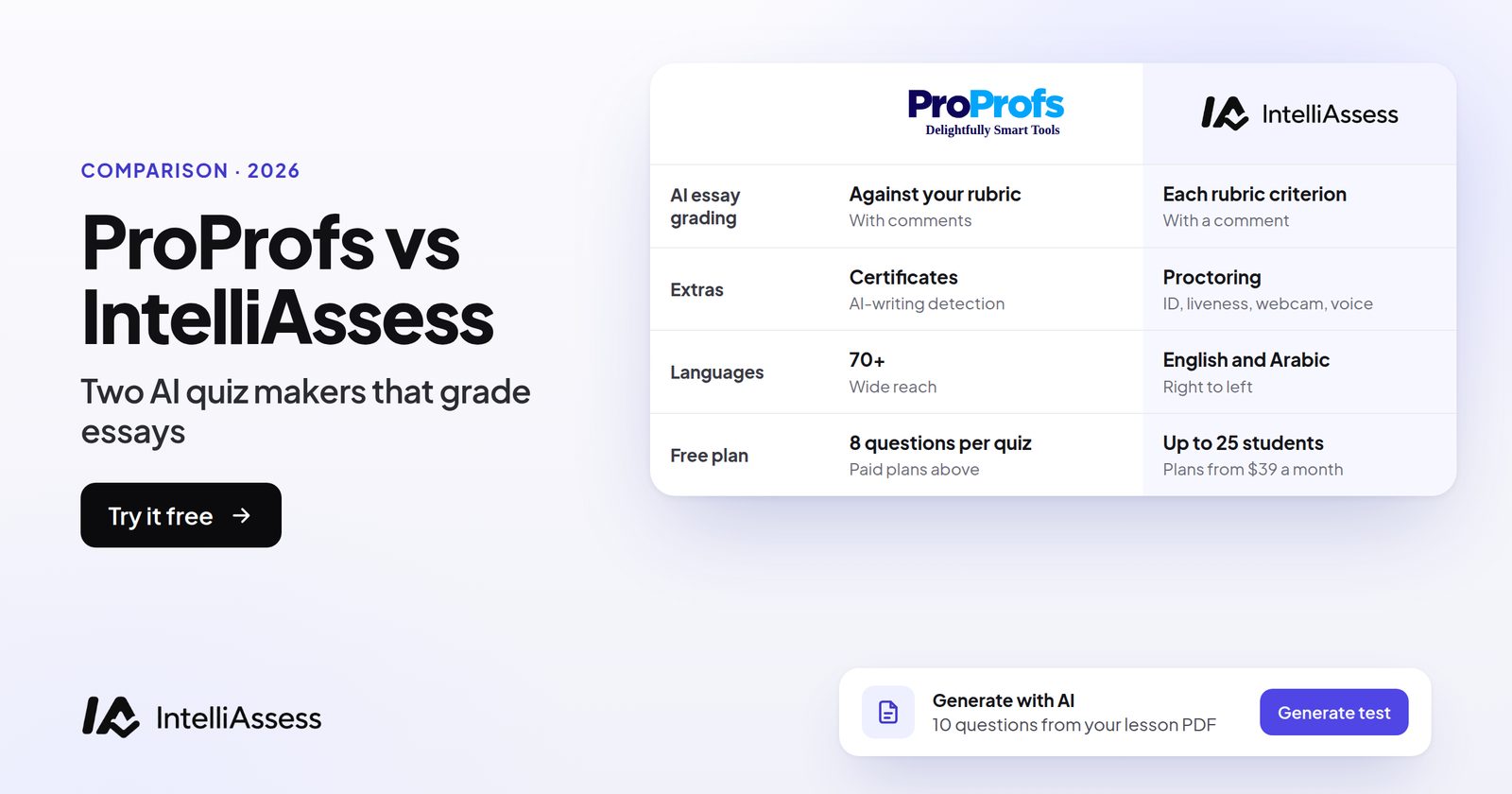
ProProfs and IntelliAssess both write quizzes and grade essays with AI; ProProfs leads on certificates and languages, IntelliAssess on sources, identity checks and Arabic.
Motasem Aldiab 2 min read