
Google Forms vs IntelliAssess: when a quiz becomes a real test

By Motasem Aldiab, Technology Consultant and Trainer - Cloud, DevOps, Java, Data Science
Contents25
- The short answer
- Google Forms vs IntelliAssess at a glance
- What Google Forms does well
- Google's AI for quizzes: what you get on each edition
- Where Google Forms stops
- One quiz, both tools: a 10-question history test
- What IntelliAssess adds
- Feature by feature
- Question types
- Writing the questions
- Delivering the test
- Security
- Marking
- Feedback to students
- Results and analytics
- Privacy
- The student's side
- Teachers working together
- Where Google Forms is better
- Where IntelliAssess is better
- Using both together
- Questions to ask before switching
- Pricing
- Choose Google Forms if
- Choose IntelliAssess if
Key takeaways
- 1Google Forms is free with Education Fundamentals and auto-marks six question types with an answer key.
- 2Gemini in Classroom drafts quizzes from a topic on every edition; Gemini in Forms builds from your files on Education Plus or an add-on.
- 3Locked mode works only on school-managed Chromebooks; Google describes no webcam or identity checks.
- 4IntelliAssess imports Forms quizzes, grades written answers by rubric and syncs grades to Classroom.
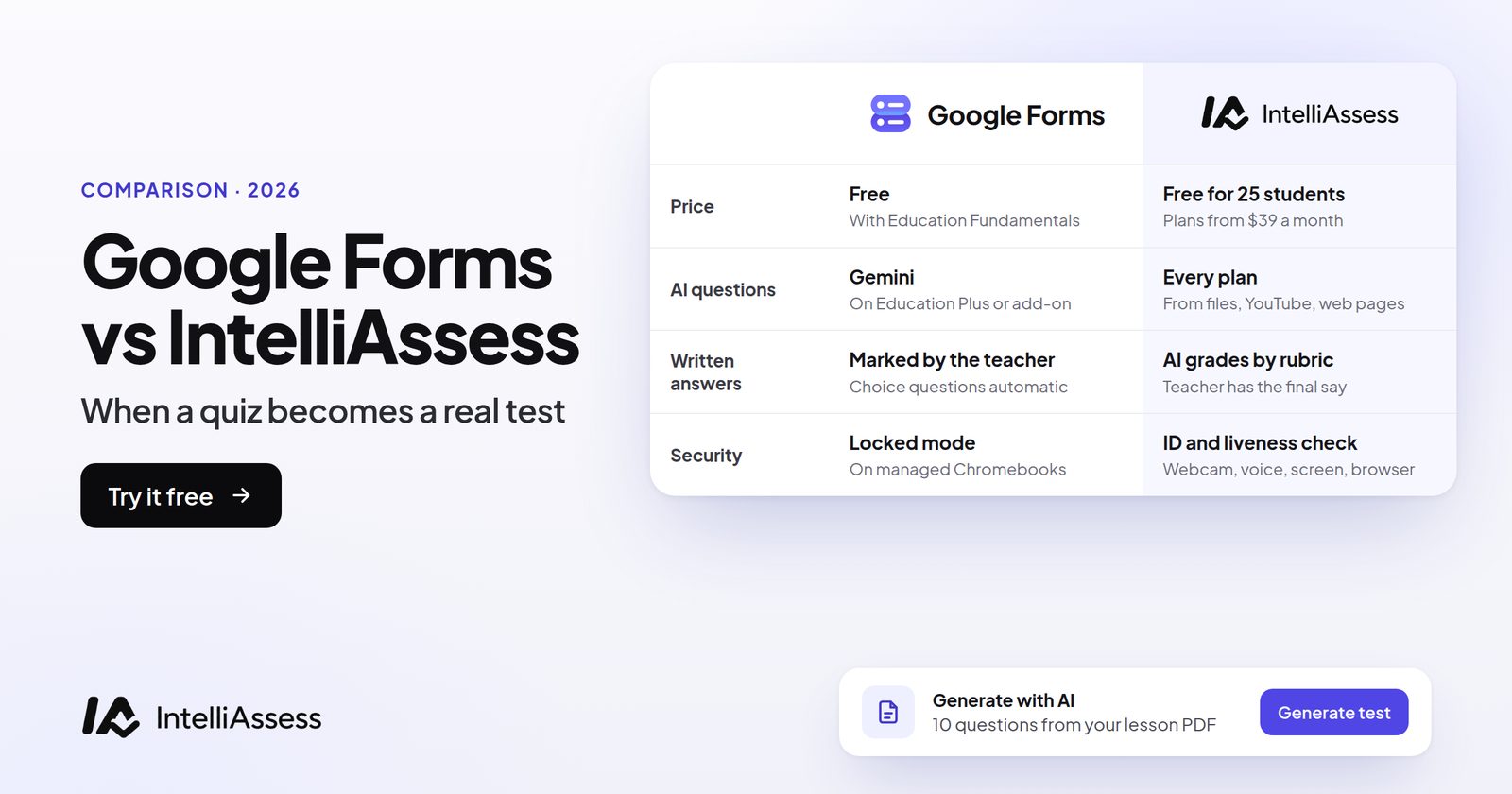
Google Forms vs IntelliAssess is the comparison most schools make first, because Google Forms is already there. Forms is free with Google Workspace for Education, marks answer-key questions on its own, sends grades to Google Classroom, and now drafts quizzes with Gemini. IntelliAssess is for when a quiz becomes a real test: it writes questions from your own files on every plan, grades written answers against a rubric with AI, and checks identity and webcam for exams at home, while still publishing to Google Classroom and importing your existing Forms quizzes. You do not have to choose one.
The short answer
Keep Google Forms for quick checks, exit tickets and quizzes an answer key can mark, especially if students test in class on school-managed Chromebooks. Add IntelliAssess when written answers take your evenings, when students sit tests at home on their own laptops and you need to know who took them, or when you want tests written from your own lesson files without a paid Google edition. IntelliAssess imports Forms quizzes and sends grades back to Classroom, so you can use both.
Google Forms vs IntelliAssess at a glance
| Google Forms | IntelliAssess | |
|---|---|---|
| Price | Free with Education Fundamentals | Free for 25 students; Starter $39 a month for 200 |
| AI quiz from a topic | Gemini in Classroom, all Education editions | Every plan |
| AI quiz from your files | Gemini in Forms, from Drive files, on Education Plus or an add-on | Every plan, from PDF, Word, PowerPoint, YouTube or a web page |
| Auto-marked question types | 6 with answer keys (short answer, multiple choice, checkboxes, dropdown, 2 grids) | Choice questions marked at hand-in; 8 types in all |
| Written answers | Graded by the teacher, with partial points | AI scores each rubric criterion with a comment; teacher has the final say (from Starter) |
| Exam security | Locked mode on school-managed Chromebooks | ID, selfie and liveness check, webcam, microphone, screen and browser checks on any laptop or desktop (from Starter) |
| Device lockdown | Yes, on managed Chromebooks | No; browser checks only |
| Phones and tablets | Yes (not in locked mode) | Proctored tests need a laptop or desktop |
| Google Classroom | Quiz assignments with grade import, under conditions | Graded assignments; rubric becomes a Classroom rubric; grades and criterion scores sync |
| Arabic | Not compared here | Questions, rubrics and feedback in Arabic, right to left |
What Google Forms does well
- Free and familiar. Forms is in every Google Workspace for Education edition, and Education Fundamentals is free for eligible schools.
- Automatic marking. Per Google's quiz help, answer keys work on short answer, multiple choice, checkboxes, dropdown and both grid types. You can add points and written or YouTube feedback to any question.
- Grading by hand. Grade response by response or question by question with full, partial or no points, and release grades immediately or after review.
- Quick insight. Summaries show frequently missed questions and the average, median and range of scores.
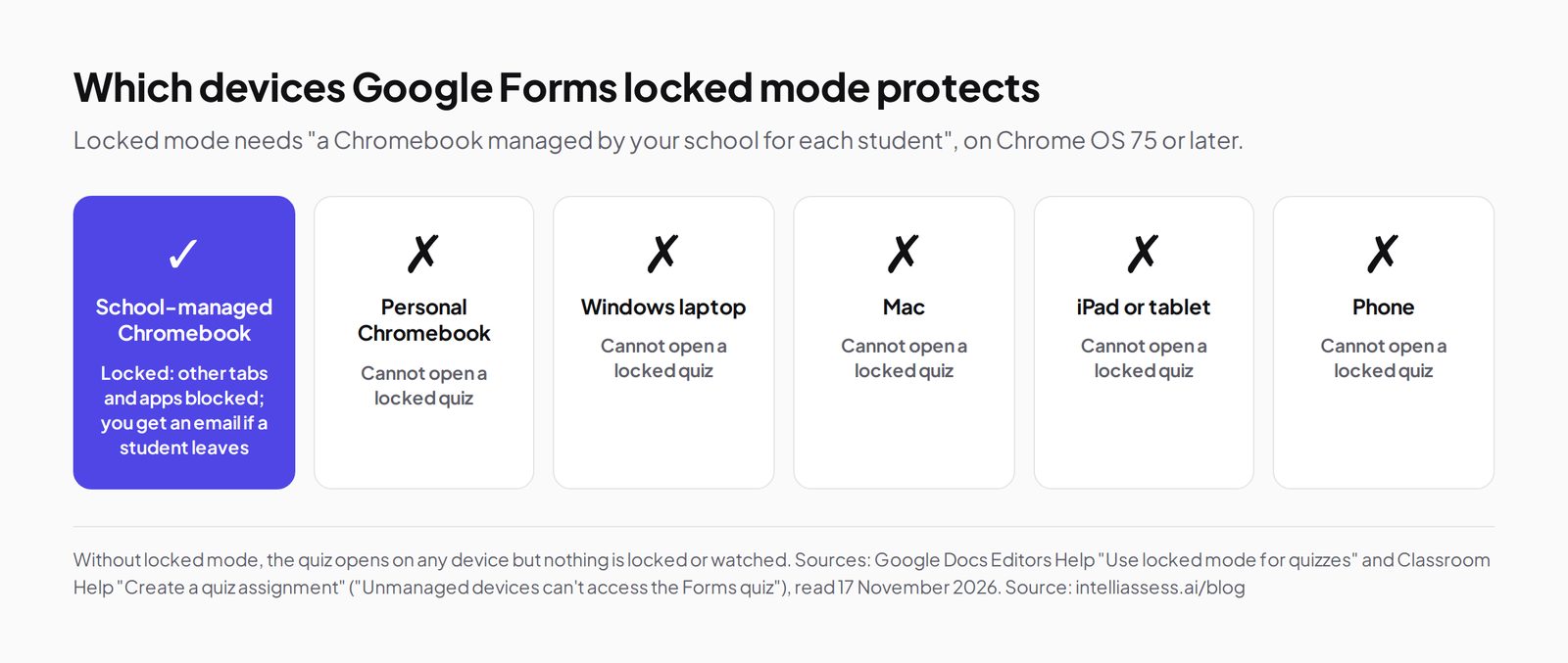
- Locked mode. On school-managed Chromebooks, a quiz can block other apps and tabs and email you if a student leaves (locked mode help).
Google's AI for quizzes: what you get on each edition
This is where most comparisons are out of date, so it is worth being exact. Google now has two ways to write a quiz with AI, on different editions:
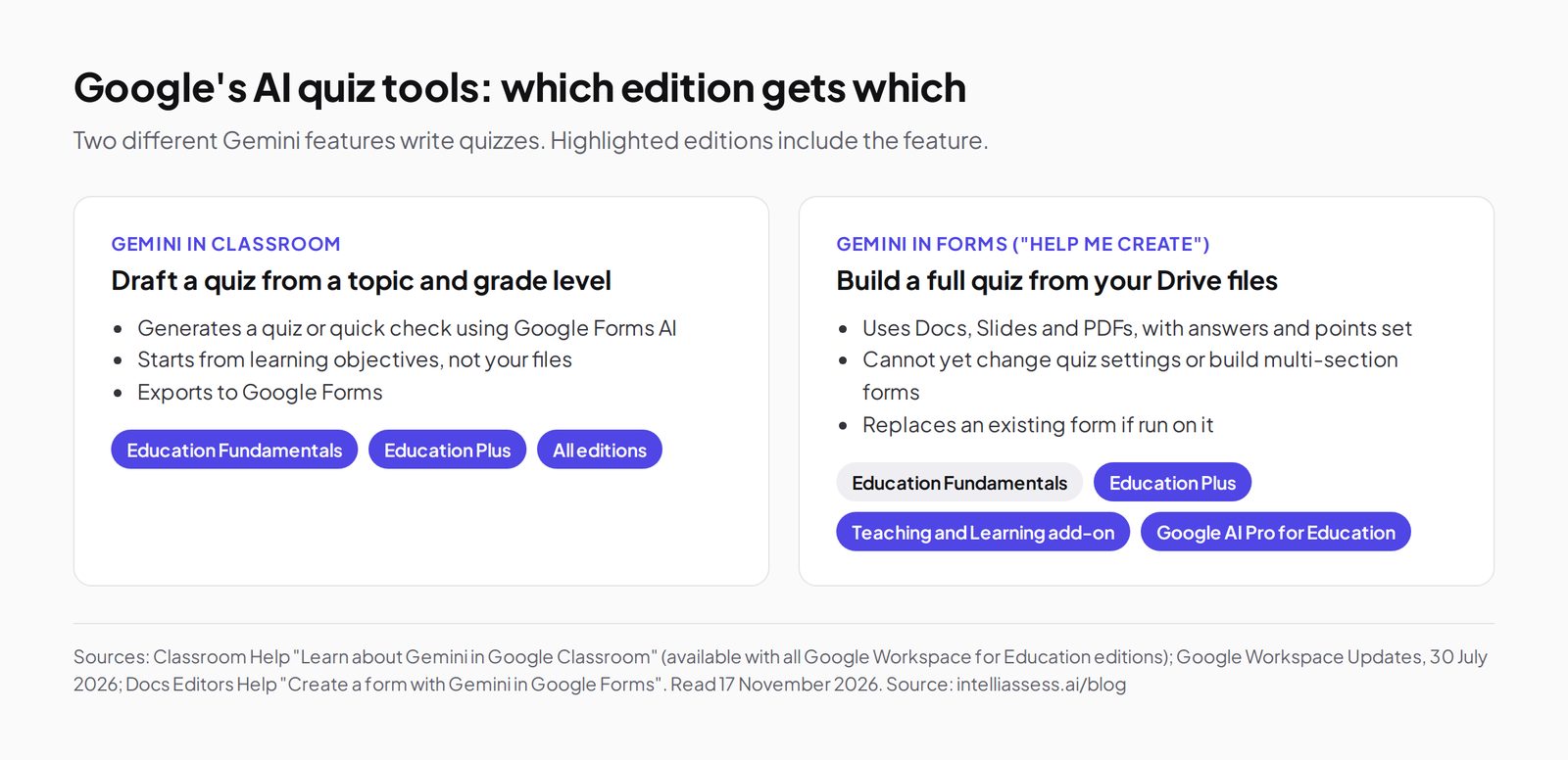
- Gemini in Classroom: available with all Google Workspace for Education editions. Teachers can "generate a quiz" or a "quick quiz using native Google Forms AI capabilities" from a grade level and topic, then export it to Forms.
- Gemini in Forms ("Help me create"): builds a whole quiz with correct answers and points from a prompt and your Drive files, mixing multiple-choice, checkbox, grid, short and long-answer questions. Google's announcement lists it for Education Plus, Teaching and Learning and Google AI Pro for Education. Its help page says it cannot yet change quiz settings or create forms with several sections, and running it on an existing form replaces that form.
So on the free edition you can get an AI draft from a topic, but building a quiz from your own lesson files inside Google needs a paid edition or add-on, priced on request. IntelliAssess generates from your files on every plan, including Free.
Where Google Forms stops
- Written answers. Paragraph answers are graded by hand. Google's Forms quiz help describes no grading against a rubric.
- Exams at home. Locked mode needs a Chromebook managed by your school for each student; unmanaged devices cannot open a locked quiz. There are no identity, webcam or microphone checks.
- Classroom grade import has rules. Google's quiz assignment help says the quiz must be the only attachment, students are limited to one response and must be in your domain, the form must collect email addresses, and changing the assignment after posting may block the import. Importing overwrites grades already entered.
One quiz, both tools: a 10-question history test
Picture a Year 9 history test with eight choice questions and two short essays, taken at home by a class of 28.
In Google Forms, the eight choice questions mark themselves. The two essays wait for you: 56 answers to read and score by hand, with partial points and feedback. Locked mode does not apply because students are on their own laptops, so the test runs on trust. Grades go to Classroom once the quiz meets the import conditions.
In IntelliAssess, you import the same Forms quiz by link, or generate it from your lesson slides, and add a rubric to each essay (for example: argument, evidence from sources, use of dates, clarity). At hand-in, choice questions are marked and each essay gets a score and a comment per criterion that you review and change where you disagree. Students first show an ID, take a selfie with a liveness check, then sit the test with webcam, microphone, screen and browser checks, and you get a report per student. Grades and rubric scores go to Classroom as drafts or straight to students.
The trade: IntelliAssess costs $39 a month from the point you need grading and proctoring, and you still review every AI score. Forms costs nothing and keeps everything in Google.
What IntelliAssess adds
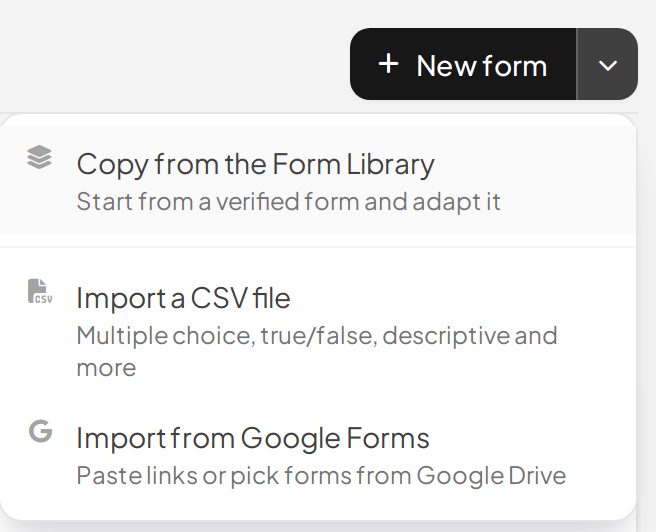
IntelliAssess's AI quiz generator writes a test from a topic, your PDF, Word or PowerPoint files, a YouTube video or a web page, across eight question types including written answers with a marking rubric, and checks every answer key in a second pass. Existing quizzes come in from Google Form links or IDs, one per line, or picked from Drive.
AI grading scores each written answer against every criterion of its rubric, with a comment per criterion; nothing reaches students until you allow it. Online proctoring checks identity, then watches webcam, microphone, screen and browser and gives you a report per student. In Google Classroom, a test publishes as a graded assignment or a stream announcement, its rubric becomes a Classroom rubric, and grades with criterion scores sync back, automatically after AI evaluation if you choose.
What it does not do: lock the whole device the way locked mode does on a managed Chromebook, or run proctored tests on phones and tablets.
Feature by feature
Question types
Google Forms has many question types, including short answer, paragraph, multiple choice, checkboxes, dropdown, grids, linear scales, dates, times and file upload. In a quiz, answer keys work on six of them: short answer, multiple choice, checkboxes, dropdown and both grids.
IntelliAssess covers multiple choice, multi-select with partial credit, true or false, fill in the blanks, short answer and written (descriptive) answers with a rubric, and can mix them in one test on paid plans. It has no grids, scales or file-upload answers.
Writing the questions
Google Forms leaves question writing to you, Gemini in Classroom (from a topic and grade level) or, on Education Plus and the add-ons, Gemini in Forms (from Drive files). IntelliAssess generates from a topic, up to 20 PDF, Word or PowerPoint files, a YouTube video or a web page on every plan, checks each answer key a second time, and drafts a rubric for written questions. You can also save any question to your own library, use a verified library of ready questions, or import CSV, a PDF exam or Google Forms quizzes.
Delivering the test
Google Forms shares by link or through a Classroom quiz assignment, can limit students to one response, and can lock school-managed Chromebooks. IntelliAssess publishes to Classroom as a graded assignment or stream announcement, and on paid plans adds an exam timer, a scheduled start, shuffled questions and options, PIN-protected tests and a choice of one attempt, a set number or unlimited attempts.
Security
Google Forms relies on locked mode on managed Chromebooks; on other devices nothing is locked or watched. IntelliAssess checks identity before the test (ID photo, selfie with head turns, liveness check, face match) and watches webcam, microphone, screen and browser during it, from Starter. You decide whether each event warns the student, ends the test or is only recorded, and you get a report per attempt with an integrity score and a timeline. A flag is evidence for you to review, not a verdict.
Marking
Google Forms marks answer-key questions instantly and leaves paragraph answers to you, with partial points and feedback. IntelliAssess marks choice questions at hand-in and scores each written answer against every rubric criterion, with a comment you can change. A written question with no rubric is left "not evaluated" rather than scored zero, and ungraded answers are kept out of averages until they are marked.
Feedback to students
Google Forms lets you add written or YouTube feedback to each answer, shown when you release grades. IntelliAssess shows students their marks and rubric comments when you release them, and on Learning-purpose quizzes (on the Pro plan and up) can give each student AI notes per question and a short study plan with links, built from the final marks. Exam results are never shown to other students.
Results and analytics
Google Forms summaries show frequently missed questions and the average, median and range, and responses export to Google Sheets. IntelliAssess analytics show completion, average and median score, pass rate, time taken, a question map sorted hardest first, results by topic, difficulty and question type, proctoring events, results by student group, and PDF reports per test, per student and per submission.
Privacy
Google Forms runs under your school's Google Workspace for Education agreement. IntelliAssess stores identity and evidence photos encrypted, opened only through short-lived links, and saves location only if you switch that check on. Our pages do not list certifications or data location; if your district needs them, ask us before you buy.
The student's side
Google Forms is familiar to most students, works on phones, tablets and laptops, and signs them in with their school Google account. IntelliAssess students open the test from Classroom or a link; schools can also add students by email, or by nickname and PIN for younger students without email. Students get a progress page with their scores over time, results by question type and rubric criterion, and a PDF of their own results, and they never see other students' scores. Proctored tests need a laptop or desktop with a webcam, which rules out phones for those tests.
Teachers working together
Google Forms lets you add collaborators to a form in Drive, so colleagues can edit questions and see responses. IntelliAssess has team workspaces on the Pro plan and up, with five roles (Viewer, TA or grader, Teacher, Admin and Owner), shared question-library categories and an activity feed showing who changed what. A TA can review AI scores and change grades without being able to delete the test.
Where Google Forms is better
- Free and already there, with nothing new for students or IT.
- Any device, including phones, and a locked mode on managed Chromebooks.
- More question formats, such as grids, scales, dates and file uploads.
- Surveys and forms as well as quizzes, with responses in Google Sheets.
- One sign-in through your school's Google accounts.
Where IntelliAssess is better
- Written answers scored for you against a rubric, with a reason per criterion.
- Tests written from your own files on every plan, without a paid Google edition.
- Identity and webcam checks for tests sat at home on personal laptops.
- Deeper analytics, from a question map to results by topic and student group.
- Arabic questions, rubrics and feedback, right to left.
Using both together
Many teachers do not replace Forms; they split the work. A common pattern:
- Forms for daily checks: exit tickets, homework quizzes and anything an answer key marks, in class on managed Chromebooks.
- IntelliAssess for the tests that matter: end-of-unit tests with written answers, exams sat at home, and tests written from your own lesson files.
- Classroom as the single gradebook: both send grades there, so students and parents see one place.
Because IntelliAssess imports Forms quizzes by link, moving one test across takes a few minutes, and you can move back if it does not suit.
Questions to ask before switching
- Which edition of Google Workspace for Education does our school have, and does it include Gemini in Forms?
- Are students on school-managed Chromebooks, or their own devices at home?
- How many hours a week go on marking written answers?
- Does our district need specific privacy terms or certifications from a new tool?
- Who reviews AI scores before students see them?
Pricing
Google Forms costs nothing extra: it comes with Education Fundamentals, free for eligible institutions. Gemini in Forms quiz creation needs Education Plus or the Teaching and Learning or Google AI Pro for Education add-on, which Google prices on request.
IntelliAssess publishes its prices: Free for 25 students, Starter $39 a month for 200, Pro $99 for 500 and Intensive $249 for 2,000, with yearly billing at ten months. AI question writing from files is on every plan; AI grading of written answers and webcam, voice and browser proctoring start on Starter.
Choose Google Forms if
- Your quizzes are mostly questions an answer key can mark.
- Students test in class on school-managed Chromebooks, so locked mode covers security.
- You need it free, today, with nothing new to learn, or students answer on phones.
- Your school has Education Plus and Gemini in Forms already writes the quizzes you need.
Choose IntelliAssess if
- Essays and short written answers take your evenings to mark.
- Students sit tests at home on their own laptops and you need to know who took them.
- You want tests from this week's lesson files without a paid Google edition.
- You teach in Arabic and want questions, rubrics and feedback in Arabic.
Comparing more tools? See Google Forms alternatives, scored on the same gaps, or every comparison. For whole departments, see IntelliAssess for schools.
Frequently asked questions
Is IntelliAssess a Google Forms alternative?
Yes, for tests rather than quick quizzes. It adds AI-written tests from your own files, AI grading of written answers against a rubric and identity and webcam proctoring, and it still works with Google Classroom and imports Google Forms quizzes.
Can Google Forms grade essays?
Google Forms marks questions that have an answer key automatically. Longer written answers are graded by the teacher, response by response or question by question, with partial points and feedback.
Does Google Forms have AI quiz generation for free?
Partly. Gemini in Classroom, available on all Workspace for Education editions, can draft a quiz from a topic and grade level. Gemini in Forms, which builds a quiz from your Drive files, is listed for Education Plus and the Teaching and Learning or Google AI Pro for Education add-ons.
Can Google Forms stop cheating?
Locked mode stops students opening other tabs and apps and emails you if they leave, but only on Chromebooks managed by your school. Google's pages describe no webcam or identity checks; IntelliAssess adds those for exams on any laptop or desktop.
Can I import my Google Forms quizzes into IntelliAssess?
Yes. Paste Google Form links or IDs, one per line, or pick forms from Google Drive; each becomes an editable test in Saved Forms.
Do IntelliAssess grades go back to Google Classroom?
Yes. Grades and rubric criterion scores sync to Classroom, as draft grades or returned straight to students, and can be pushed automatically once AI evaluation finishes.
Can IntelliAssess replace Google Forms entirely?
For tests, it can; for surveys, sign-up sheets and quick polls, Google Forms remains simpler, and it is free. Most teachers keep Forms for those and quick quizzes, and use IntelliAssess for graded tests.
Does IntelliAssess export results to Google Sheets?
Not directly. It syncs grades and rubric scores to Google Classroom and gives PDF reports per test, student and submission. Google Forms exports responses to Sheets.
Can students see their mistakes after an IntelliAssess test?
Yes, when you release results: marks, the right answers if you allow it, and rubric comments. On Learning-purpose quizzes, students on Pro plans and up can also get AI study notes and a plan.
Is IntelliAssess harder for students than Google Forms?
Not for an ordinary test: students open it from Classroom or a link and answer in the browser. Proctored tests add an identity check of about two to three minutes before the clock starts and need a laptop or desktop with a webcam, so tell students in advance.
Can several teachers share tests in IntelliAssess?
Yes, on the Pro plan and up, in a team workspace with roles. On Free and Starter, each teacher works in a personal workspace. In Google Forms, you share a form with colleagues through Drive.
What happens to my existing Google Forms quizzes?
Nothing, unless you import them. IntelliAssess copies a quiz from its link into an editable test; the original form stays in your Drive, unchanged, with all its responses, so you can keep using it alongside.
Keep reading
All articles
Read next
SchoolAI alternatives: 7 AI tools for teachers and students scored (2026)
Seven AI tools scored on the same nine facts, with SchoolAI as the reference, and what each lets teachers see when students use AI.

SchoolAI vs IntelliAssess: an AI tutor for students or feedback after a test?
SchoolAI puts students in supervised conversation with AI; IntelliAssess marks their tests and uses AI to help them learn from their own answers.
Motasem Aldiab 12 min read

Jotform and ProProfs alternatives for quizzes and exams (2026)
Jotform and ProProfs side by side, then the alternatives by forms, certificates or real exams.
Motasem Aldiab 2 min read