
Pear Assessment vs IntelliAssess (2026): item bank or your own lessons?

By Motasem Aldiab, Technology Consultant and Trainer - Cloud, DevOps, Java, Data Science
Contents24
- The short answer
- At a glance
- What Pear Assessment is
- What IntelliAssess is
- Item bank or your own material
- A unit, two ways
- Question types
- Marking and feedback
- Live view and data
- Test security
- How each uses AI
- Pricing compared
- Integrations
- Quality of the questions
- Accommodations and languages
- Setting up
- What students see
- A school's view
- Outside the US
- Using both
- Questions to ask before you decide
- Moving between them
- Who should choose which
- Where IntelliAssess falls short
Key takeaways
- 1Pear Assessment has 80,000+ standards-aligned questions and released state-test practice.
- 2IntelliAssess writes tests from your own files, videos or web pages and marks written answers by rubric.
- 3Pear Teacher Premium is $125 a year; IntelliAssess is free for 25 students and $39 a month for 200.
- 4Use Pear for state-test practice and IntelliAssess for unit tests from your own lessons.
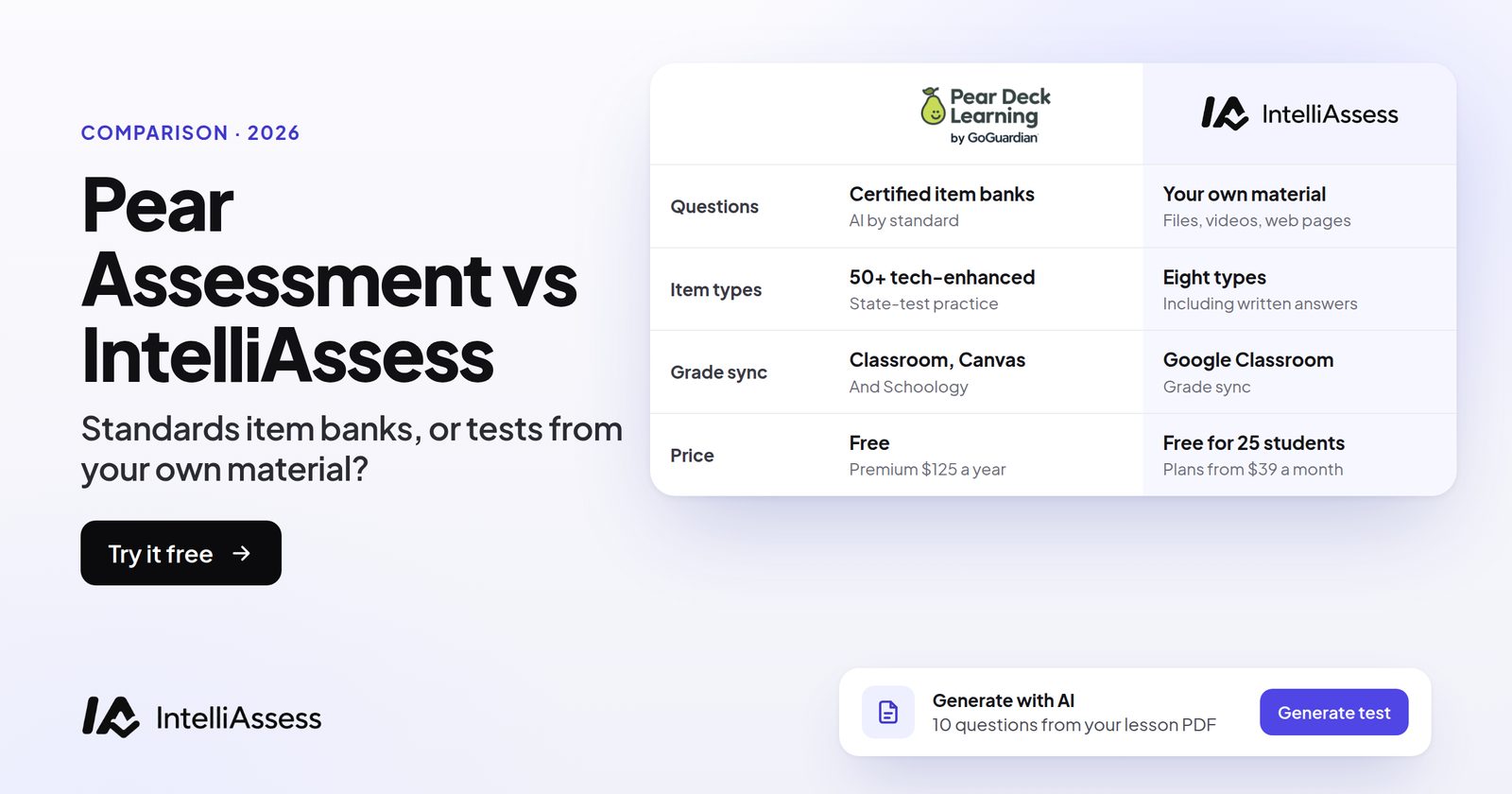
Pear Assessment vs IntelliAssess is a comparison between two sources of test questions. Pear Assessment, formerly Edulastic, starts from a bank: 80,000+ standards-aligned certified questions, a public library of 350,000 items, and released state-test practice, with standards reporting, a live view of answers and browser lockdown. IntelliAssess starts from your own material: it writes the test from the chapter, slides, video or web page you taught, marks written answers against a rubric with AI for you to review, and checks identity and the webcam when students take it at home. This page compares the two approaches, then features, AI, security and price.
The short answer
Choose Pear Assessment if you teach in a US school with state assessments and want standards-aligned items, released state-test practice, technology-enhanced questions, standards reporting and a live view of answers, for free or $125 a year. Choose IntelliAssess if you want unit tests written from your own lessons, written answers marked against a rubric by AI, Google Classroom grade sync, and identity checks for tests at home. Use both if you need state-test practice and tests from your own material.
At a glance
| Pear Assessment | IntelliAssess | |
|---|---|---|
| Where questions come from | Item banks: 80,000+ certified questions, 350K-item public library, 23K free assessments | Your files, a YouTube video, a web page, or a prompt |
| State-test practice | Yes, including released STAAR and LEAP practice | No |
| Question types | Technology-enhanced, standards-aligned | Multiple choice, multi-select, true/false, short answer, fill in the blanks, essay |
| Live view | Student responses in real time | No |
| Marking | Automatic grading | Automatic for objective questions; AI per rubric criterion for written answers, teacher reviews |
| Standards and data | Standards reporting, data studio, whole learner report | Results per test and class, skills view |
| Security | Browser lockdowns, dynamic passwords | ID, face match, webcam, microphone, screen and browser checks |
| Grade sync | Google Classroom, Schoology, Canvas | Google Classroom |
| Price | Teacher Free; Premium $125 a year; schools quoted | Free for 25 students; Starter $39 a month for 200 |
What Pear Assessment is
Pear Assessment is "Part of the Pear Deck Learning platform", alongside Pear Deck and Pear Practice, and the edulastic.com address now redirects to it (Pear Assessment). It describes itself as a testing solution that combines "the reporting capabilities and customization districts need with the simplified classroom assessments teachers love". Teachers can "administer district, common, and classroom assessments with high-quality item banks, or use curriculum-aligned assessments to create your own questions", and "Create technology-enhanced, standards-aligned assessments and get instant data to drive instruction, for free".
For districts, its data studio puts assessment results beside attendance and other data for MTSS planning, with a whole learner report for each student. Newer tools include "Instant lesson packages", which generate lessons, practice sets and tests on any topic, and a "Content converter" that turns existing materials into lessons, practice sets and assessments.
What IntelliAssess is
IntelliAssess writes, runs and marks tests. Its AI quiz generator builds questions from your PDF, Word or PowerPoint files, a YouTube video or a web page, checks each answer key in a second pass, and drafts a rubric for each written question; questions can be saved to a question bank. Tests go out by link or to Google Classroom. Objective answers mark themselves, and AI grading scores each written answer on every rubric criterion with a reason for the teacher to review. Proctoring is optional per test.
Item bank or your own material
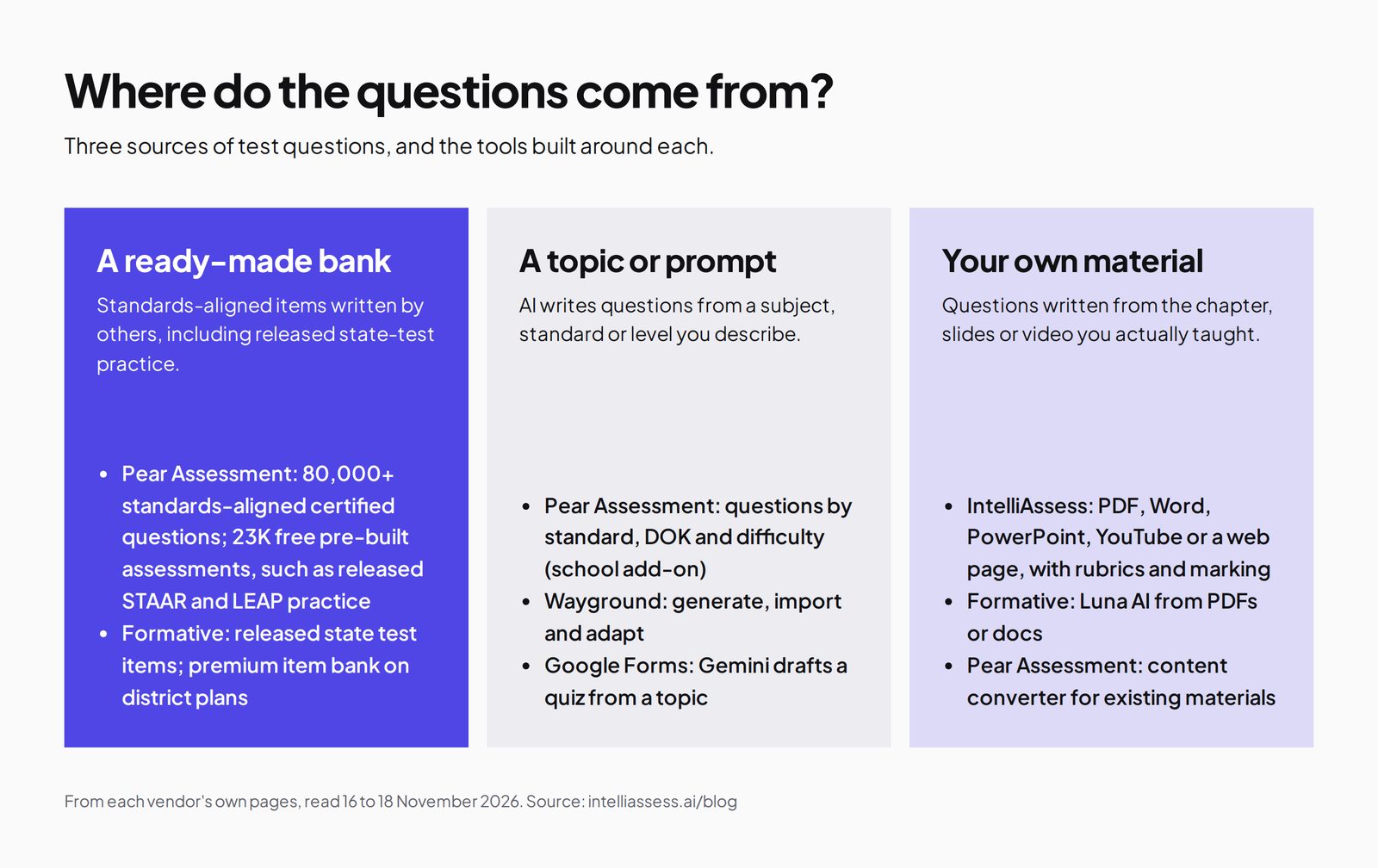
This is the real choice. Both have value, and they answer different needs.
A bank gives you questions that have been written, reviewed and aligned to standards by someone else. For state-test preparation, that is exactly what you want: items in the style and depth of the real test, released items from past state tests, and reporting by standard. Pear's bank is large, and its free library alone holds 23,000 pre-built assessments.
Your own material gives you questions that match your lessons: the examples you used, the order you taught them, the vocabulary your class knows. For a unit test on what you taught last week, or for teachers outside the US curriculum, that fit matters more than alignment to a state standard. IntelliAssess writes from whatever you upload, and you edit the draft.
Pear has started to cross over with its content converter, which turns your existing materials into assessments; it is marked new and offered through a demo, so check which plan includes it. IntelliAssess does not offer a standards-aligned bank.
A unit, two ways
Take a Grade 8 maths unit on linear equations in a Texas school.
With Pear Assessment, the teacher opens the free library and finds a slope-intercept practice set and released STAAR Grade 8 items. She assigns a practice set midway through the unit and watches answers arrive in real time. At the end, she builds a unit test from certified items tagged to the state standards, sets a browser lockdown, and gets a standards report showing which standards the class has mastered.
With IntelliAssess, the teacher uploads her own unit notes and worked examples, gets a draft test with multiple-choice questions and two short written explanations ("Explain what the slope tells you in this context"), edits it, and posts it to Google Classroom. Objective answers mark themselves; the explanations arrive with AI-drafted scores per rubric criterion, which she reviews before releasing results.
For STAAR preparation, Pear is the better fit. For a test that follows her own lessons and asks students to explain in words, IntelliAssess saves more time.
The same teacher could reasonably do both in one unit: Pear's practice sets and released items in the middle of the unit, when she needs to see which standards are shaky, and an IntelliAssess test at the end, when she wants the class to explain their reasoning in sentences and does not want to mark 150 explanations by hand over a weekend. The tools do not compete for the same lesson; they compete for the same budget, and both have free plans that make a trial cheap. If the free plans are enough for her class, the question of which to pay for may never arise.
Question types
Pear's assessments are "technology-enhanced, standards-aligned", the style used by many state tests. IntelliAssess's six types are aimed at classroom tests: multiple choice, multi-select, true/false, short answer, fill in the blanks and essay. If your students need practice with the interactive question formats of state tests, Pear is the right tool. If you want short answers and essays marked against a rubric, IntelliAssess is.
Marking and feedback
Pear lists automatic grading and instant data. Its pages do not describe AI marking of written answers. IntelliAssess marks objective questions automatically and drafts a score and reason for each rubric criterion on every written answer; the teacher reviews, changes any score, and releases results. Students see their marks and comments, can ask for a re-mark, and can practise what they missed.
Live view and data
Pear lets teachers "See student responses in real time as questions are answered", useful during practice in class, and its standards reporting and data studio serve schools and districts tracking mastery. IntelliAssess has no live view; it shows results once students submit, per test and per class, with written-answer scores per criterion and each student's strongest and weakest skills. For standards mastery reporting and MTSS, Pear does much more.
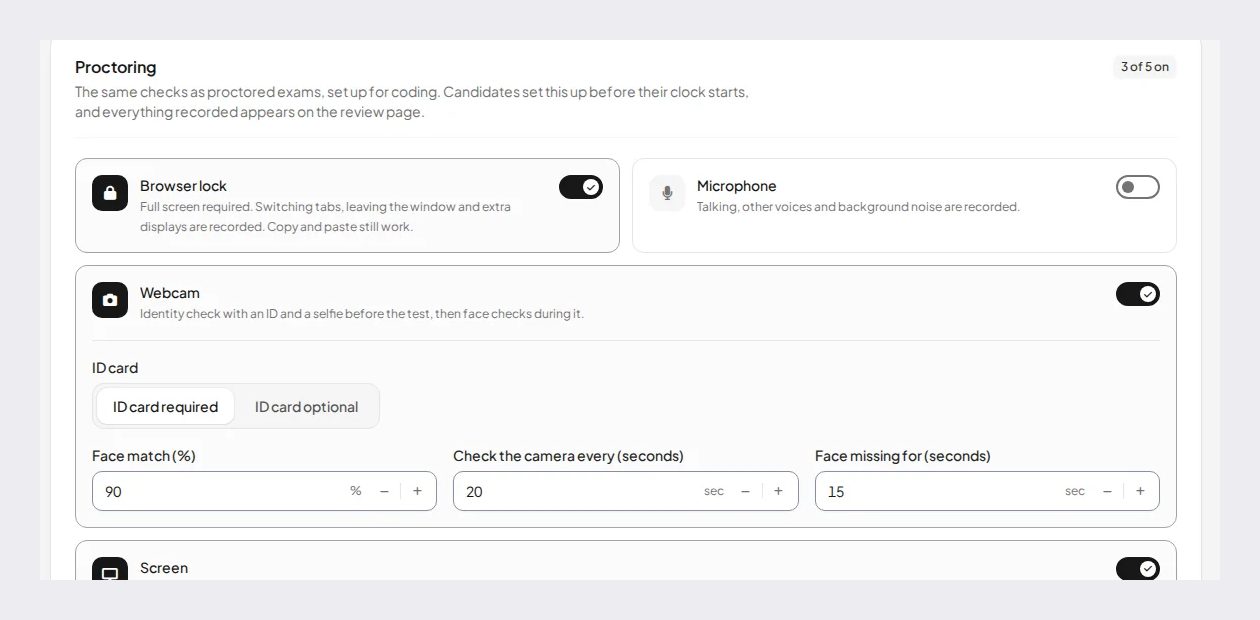
Test security
Pear offers "browser lockdowns to dynamic passwords, plus customizable settings", with advanced test security on Premium. That suits tests on school devices. IntelliAssess does not lock the device; it checks identity with an ID photo, selfie, liveness check and face match, and watches the webcam, microphone, whole screen and browser, with rules that warn and can submit the attempt. That suits tests taken at home on students' own laptops.
How each uses AI
Pear Assessment lists AI question generation "based on standards, DOK and difficulty level" as a school and district add-on, and its newer "Instant lesson packages" generate "a full package of customizable lessons, practice sets, and tests on any topic, differentiated for multiple student groups, in under a minute". The wider Pear family offers 40+ AI tools on Pear Start. These tools produce content around standards and topics.
IntelliAssess uses AI at both ends of a test: writing it from your own material, with answer keys checked and rubrics drafted, and marking written answers per rubric criterion with a reason, which the teacher reviews. Its AI does not produce lessons or differentiated practice packages.
If you want AI to help plan and differentiate, Pear's tools go further. If you want AI to take the marking load of written answers, IntelliAssess does that and Pear does not describe it.
Pricing compared
Pear Assessment (pricing): Teacher Free, $0; Teacher Premium, $125 a year, with advanced test security; Schools & Districts, quoted, with AI question generation as an add-on and SIS and LMS integration. Pear Deck, for interactive slides, is a separate Teacher Premium at $149 a year.
IntelliAssess (pricing): Free for 25 students; Starter $39 a month for 200; Pro $99 for 500; Intensive $249 for 2,000; yearly billing costs ten months. AI grading and proctoring start on Starter.
| Case | Pear Assessment | IntelliAssess |
|---|---|---|
| A US teacher preparing for state tests | Free or Premium $125 a year | No state-test items |
| A teacher, 150 students, unit tests with written answers | Premium $125 a year; written answers marked by hand | Starter $390 a year billed yearly, AI marking included |
| A district reporting standards mastery | Schools & Districts, quoted | Standards reporting not described |
| A school with graded tests at home needing identity checks | Identity checks not described | Starter or Pro, with a monthly face-check allowance |
For one teacher, Pear is cheaper. IntelliAssess costs more because it marks written answers and checks identity, which Pear does not describe. On the free plans, Pear gives a single teacher more for state-test practice, while IntelliAssess's free plan covers a class of up to 25 with AI-written tests, so a teacher can compare both on real work before paying for either.
Integrations
Pear Assessment's product page says teachers can "Sync class rosters and share assignments in Google Classroom or your LMS and push grades back to your gradebook", and its pricing names Google Classroom, Schoology and Canvas for grade sync, with SIS and LMS integration on school and district plans. IntelliAssess posts tests to Google Classroom and sends grades back; it does not integrate with Schoology or Canvas. For schools on Schoology or Canvas, Pear fits more easily.
Quality of the questions
A bank and an AI writer carry different risks. Certified bank items have been written and checked to a standard, so their main risk is fit: they may not match how you taught the topic. AI-written questions match your material, so their main risk is accuracy: a question or answer key can be wrong. IntelliAssess reduces that risk with a second pass that checks every answer key, and the teacher edits the draft before publishing; it does not remove the need to read the test. With Pear's AI add-on and instant lesson packages, the same advice applies to any question the AI writes.
Accommodations and languages
Pear's pages we read focus on content, data and security rather than listing accommodations, so ask Pear about per-student settings such as extended time and read-aloud before moving students with individual plans. IntelliAssess sets time limits per test, generates questions and rubrics in the language you choose, and works in English and Arabic, right to left included. Check per-student settings with IntelliAssess too before relying on them for individual plans.
Setting up
Pear Assessment: search the bank or library by grade, subject and standard, pick items or a pre-built assessment, adjust settings and security, and assign to a class synced from Google Classroom, Schoology or Canvas. Building from the bank is quick when the right items exist.
IntelliAssess: upload your notes or paste a link, choose question types, difficulty and number, review the draft and rubrics, set the time limit, attempts, schedule and any proctoring, and post to Google Classroom. Writing from your own material is quick when you already have good notes.
What students see
In Pear Assessment, students open an assignment from Google Classroom, Schoology or Canvas, answer standards-aligned and technology-enhanced questions, perhaps in a locked browser, and see their results. The teacher sees answers arrive in real time and reports by standard.
In IntelliAssess, students open a link or Google Classroom assignment and answer in the browser. On a proctored test, they take an ID photo and a selfie and allow the camera, microphone and screen first. After the teacher releases results, they see marks with a comment per rubric criterion on written answers, can ask for a re-mark, and can practise what they got wrong; on Pro and above, learning quizzes add study notes and an "Explain this to me" option.
A school's view
For a US school or district, Pear Assessment's appeal is system-wide: common assessments, item banks aligned to state standards, standards reporting across classes and schools, and a data studio that combines results with attendance and other data for MTSS. Those are district-level purchases, priced on request, and IntelliAssess does not compete with them.
IntelliAssess's appeal to a school is narrower: consistent rubric marking of written answers across a department, tests written from the department's own material, and the same identity checks for every student taking a test at home. A department can adopt it without a district decision, starting free with 25 students. Some schools will run Pear for benchmarks and state-test practice and IntelliAssess for the department's own graded tests.
Outside the US
Pear's bank and state-test practice are built around US standards. Teachers elsewhere can use the free library for general practice, but their tests must follow a national curriculum or exam board. IntelliAssess writes from your own material in the language you choose, and its interface works in English and Arabic, right to left included, so it does not depend on any one country's standards.
Using both
For a US teacher, the two fit together well. Use Pear Assessment, even on the free plan, for state-test practice, standards checks and live practice in class. Use IntelliAssess for unit tests written from your own lessons, especially those with short answers and essays, and for tests taken at home. Both sync grades to Google Classroom, so results meet in one gradebook. Trying the pairing costs nothing on both free plans.
Keep the roles clear for students: Pear for practice and state-test preparation, IntelliAssess for the graded unit tests. After a term, compare your marking time and how well each set of results reflects what students learned.
Questions to ask before you decide
- How much of your year goes on state-test practice?
- Do you need reports by standard for your school or district?
- Do your unit tests follow your own materials more than a standard bank?
- How many written answers do you mark each unit?
- Are graded tests taken at home?
- Do you teach outside the US, or in Arabic?
Yes to the first two points to Pear Assessment. Yes to the last four points to IntelliAssess. Yes to both groups points to using both.
Moving between them
If you move unit tests from Pear to IntelliAssess, keep Pear's free plan for state-test practice, export your results, and gather the notes and slides your tests should come from. Write a short rubric for each written question, and run one unit test in both tools before switching a whole course. If you move the other way, Pear's library and certified items will give you a head start on standards-aligned tests, and you can keep marking written answers by hand or with another tool.
Who should choose which
- Choose Pear Assessment for state-test practice, standards-aligned item banks, technology-enhanced questions, standards reporting, a live view, browser lockdowns, and a low price.
- Choose IntelliAssess for tests from your own lessons, written answers marked by rubric with AI, Google Classroom, identity checks at home, teaching outside the US, or Arabic.
Where IntelliAssess falls short
- No standards-aligned item bank or state-test items.
- No technology-enhanced question types.
- No standards reporting, data studio or MTSS reporting.
- No live view of answers.
- No Schoology or Canvas grade sync; Google Classroom only.
- It costs more than Pear Premium for one teacher.
For other tools, see Pear Assessment alternatives, Formative vs IntelliAssess and Wayground vs IntelliAssess, or browse every comparison.
Frequently asked questions
Is Pear Assessment better than IntelliAssess?
For state-test practice, standards-aligned items and standards reporting, yes. For tests written from your own lessons with written answers marked by AI, IntelliAssess does more. Many teachers could use both.
Is Pear Assessment the same as Edulastic?
Yes. Edulastic is now Pear Assessment, part of the Pear Deck Learning platform; edulastic.com redirects there.
How much does Pear Assessment cost?
Teacher Free is $0, Teacher Premium is $125 a year, and school and district plans are quoted. Its pricing page carries a 2024 copyright, so check current prices.
Can IntelliAssess use state-test questions?
No. IntelliAssess writes questions from your own material, such as notes, slides or videos. For released state-test items, use Pear Assessment or Formative.
Does Pear Assessment grade essays with AI?
Its pages describe automatic grading but not AI marking of written answers. IntelliAssess marks written answers against each rubric criterion with AI, for the teacher to review and release.
Which is better for tests at home?
IntelliAssess checks identity with an ID photo, selfie and face match, and watches the webcam, microphone, screen and browser. Pear offers browser lockdowns and dynamic passwords, which suit school devices.
Keep reading
All articles
Read next
SchoolAI alternatives: 7 AI tools for teachers and students scored (2026)
Seven AI tools scored on the same nine facts, with SchoolAI as the reference, and what each lets teachers see when students use AI.

SchoolAI vs IntelliAssess: an AI tutor for students or feedback after a test?
SchoolAI puts students in supervised conversation with AI; IntelliAssess marks their tests and uses AI to help them learn from their own answers.
Motasem Aldiab 12 min read

Jotform and ProProfs alternatives for quizzes and exams (2026)
Jotform and ProProfs side by side, then the alternatives by forms, certificates or real exams.
Motasem Aldiab 2 min read