
Proctorio vs IntelliAssess: an LMS extension or a whole-exam platform?

By Motasem Aldiab, Technology Consultant and Trainer - Cloud, DevOps, Java, Data Science
Contents21
- The short answer
- Proctorio vs IntelliAssess at a glance
- What Proctorio is
- What IntelliAssess is
- The student's journey, step by step
- What the reviewer sees afterwards
- Handling flags fairly
- Security, check by check
- Writing and marking: what Proctorio leaves to you
- Devices and access
- Privacy: what students are asked to install and show
- Pricing: a quote vs a public page
- One exam, two ways
- Where Proctorio is better
- Where IntelliAssess is better
- Choose Proctorio if
- Choose IntelliAssess if
- When to choose neither
- Using both together
- Questions to ask before switching
- Trying it without a migration
Key takeaways
- 1Proctorio needs its Secure Exam Proctor extension in a Chromium browser on laptops; it has a mobile app where enabled.
- 2IntelliAssess proctoring runs in the browser with nothing to install, on a laptop or desktop.
- 3Proctorio goes deeper on lockdown, live supervision and content protection; IntelliAssess also writes and grades the exam.
- 4Proctorio prices come from sales; IntelliAssess includes proctoring from $39 a month.
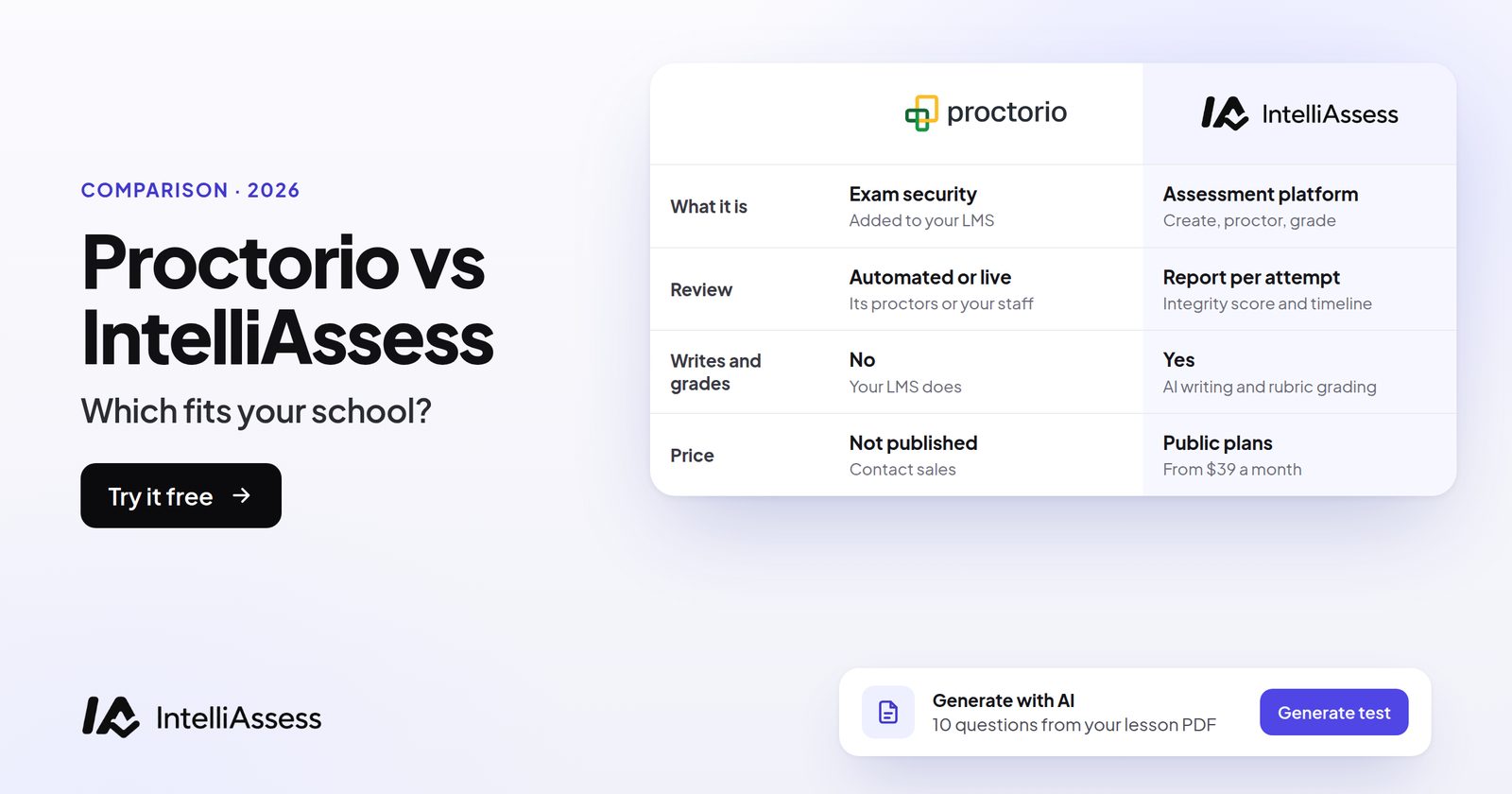
Proctorio vs IntelliAssess compares two different shapes of tool. Proctorio is exam security that plugs into the tests you already run in your LMS, through a browser extension, with live ID checks, lockdown controls, live proctoring options and content-leak protection, priced by quote. IntelliAssess is proctoring built into an assessment platform that also writes the questions and grades the answers, runs in the browser with nothing to install, and publishes its prices from $39 a month. Proctorio goes deeper on security; IntelliAssess covers the whole exam.
The short answer
Choose Proctorio if your exams live in Canvas, Moodle, Blackboard or another LMS and you only need to secure them, especially if you want live proctoring, lockdown controls, phone testing through its mobile app, or tools that track leaked content and AI-written work. Choose IntelliAssess if you want one tool to write, proctor and grade the test, students should not install anything, you want to see the price before talking to anyone, or you teach in Arabic.
Proctorio vs IntelliAssess at a glance
| Proctorio | IntelliAssess | |
|---|---|---|
| What it is | Exam security added to your LMS | Assessment platform: write, proctor, grade |
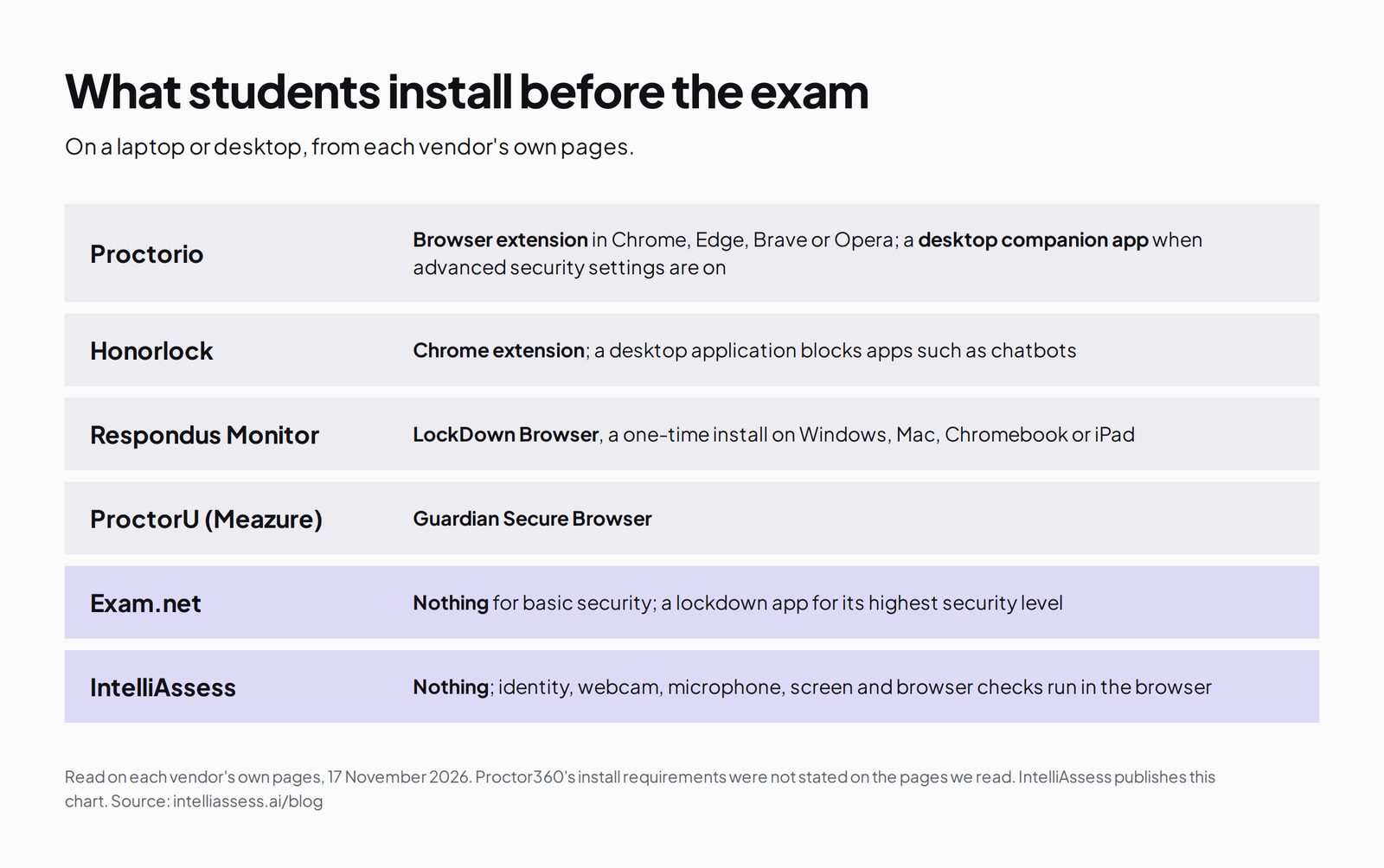
| What students install | Secure Exam Proctor extension (Chrome, Edge, Brave, Opera); a Windows or Mac companion app for advanced settings | Nothing; it runs in the browser |
| Phones and tablets | Mobile app for iOS and Android, where enabled | No; proctored tests need a laptop or desktop |
| Identity check | Live ID check with document validation and image matching | ID photo, live selfie with head turns, liveness check, face match |
| During the exam | Lockdown controls (tabs, extensions, clipboard, virtual machines), recording and flags | Webcam face checks, microphone, whole-screen and browser checks; you set each rule |
| Live supervision | Live proctoring, or your own staff via "Be Your Own Proctor" | No live proctors; reviewer report afterwards |
| Beyond proctoring | Origin (human-authorship checks), Vault (content-leak protection) | AI question writing from your files and AI grading by rubric |
| LMS | Runs inside the LMS | Google Classroom; no Canvas, Moodle or Blackboard integration |
| Price | Not published; "Talk to sales" | From $39 a month; proctoring included from Starter |
What Proctorio is
Proctorio says it has proctored "300M+ exams" since 2013. Its Integrity suite covers secure proctoring and interviews: a live ID check that "leverages document validation and image matching", lockdown settings you mix and match, recording and flagging, live proctoring, and "Be Your Own Proctor" for your own staff to watch in real time. Origin checks that work was done by a person rather than AI, and Vault guards exam content with tools such as WebSweep.
Its help centre says the Secure Exam Proctor extension "is required for all test-takers and exam administrators using a desktop or laptop device", in Chromium-based browsers only. A desktop companion app for Windows and Mac is required when advanced security settings are enabled, and a mobile app supports iOS and Android where mobile testing is allowed. Proctorio does not write or grade tests; it secures an exam your LMS delivers.
What IntelliAssess is
IntelliAssess is an assessment platform where the same exam is written, delivered, proctored and graded. Its AI quiz generator writes questions from your files, a YouTube video or a web page, and AI grading scores written answers against your rubric, with the teacher keeping the final say.
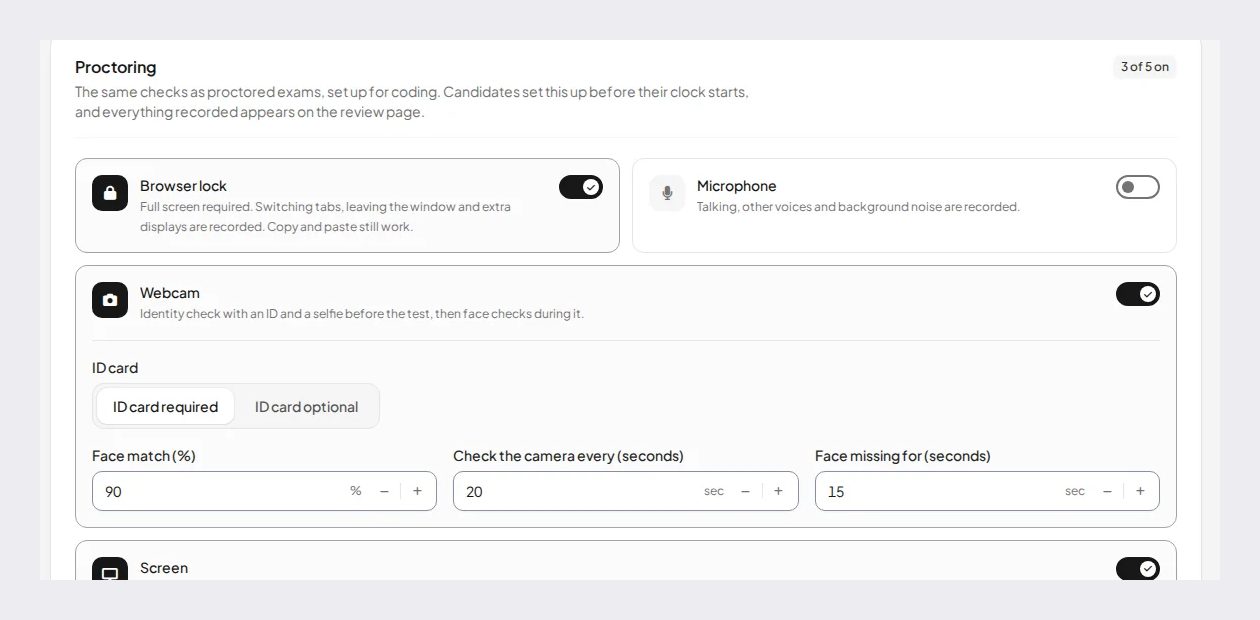
Its proctoring runs in the browser. Before the clock starts: an ID photo checked to look like a real document, a live selfie with head turns, a liveness check and a face match (90% by default). During the exam: webcam face checks, microphone, whole-screen sharing and browser checks. After it: a report per attempt with an integrity score and a timeline with photo evidence. For each rule you choose whether an event warns the student, ends the test or is only recorded. Its pages describe no room scan.
The student's journey, step by step
With Proctorio, a student on a laptop first installs the Secure Exam Proctor extension in Chrome, Edge, Brave or Opera, and, if the exam uses advanced security settings, the Windows or Mac companion app. They open the exam from the LMS as usual. Proctorio runs the settings the instructor chose: the live ID check with document validation and image matching, recording, and lockdown controls that can restrict tabs, extensions, the clipboard and virtual machines. If the exam allows mobile testing, they can use the mobile app instead. When they submit, the LMS records the answers and Proctorio keeps the recording and flags for review.
With IntelliAssess, the student opens the test from a link or from Google Classroom in their browser on a laptop or desktop. Before the clock starts, they photograph their ID, take a live selfie with head turns for the liveness check, and are matched against the ID (90% by default). They allow the webcam and microphone and share their whole screen. During the test, the webcam is checked at intervals (every 20 seconds in the settings shown above) and the browser is watched for leaving the page. When they hand in, choice questions are marked at once and written answers are scored against the rubric for the teacher to review.
The difference for students is mostly before the exam starts: an install for Proctorio, and a longer identity check for IntelliAssess. For both, a practice run with the same settings a few days before removes most problems on the day.
What the reviewer sees afterwards
Proctorio records the session and flags events according to the settings, for the instructor or your own staff to review; with live proctoring or "Be Your Own Proctor", someone can also watch in real time. Its Origin and Vault products add separate signals about AI-written work and leaked content.
IntelliAssess gives one report per attempt: an integrity score, a timeline of events with photo evidence from the webcam checks, and the result of the identity check, next to the student's answers and scores in the same place. Because the rules are set per exam, the report also shows which events only warned the student and which ended the test.
Handling flags fairly
Automated proctoring produces signals, not verdicts. A student who looks away to think, a sibling walking past, a slow connection or poor lighting can all trigger a flag. Whatever tool you use, agree three things before the first exam: who reviews flagged attempts, what evidence is needed before an academic-integrity case is opened, and how a student can see the evidence and respond. IntelliAssess helps here by letting you set events to "record only", so a borderline check does not end a student's exam, and by putting the photos behind each event in the report. Proctorio's range of settings lets you do something similar by choosing which behaviours to flag. Neither tool should be the only basis for a decision.
Security, check by check
| Check | Proctorio | IntelliAssess |
|---|---|---|
| Identity before the exam | Live ID check with document validation and image matching | ID photo checked to look like a real document, live selfie with head turns, liveness check, face match at 90% by default |
| Webcam during the exam | Recording, with flags | Face checks at set intervals, with photo evidence in the timeline |
| Microphone | Not detailed on the pages we read | Checked during the exam |
| Screen and browser | Lockdown controls for tabs, extensions, clipboard and virtual machines | Whole-screen sharing and browser checks; nothing is blocked |
| Device lockdown | Yes, with the desktop companion app for advanced settings | No |
| Live supervision | Live proctoring, or your own staff | No |
| AI-written work | Origin, a separate product | Not a separate check; written answers are scored against your rubric |
| Leaked questions | Vault, with tools such as WebSweep | No leak monitoring; AI makes writing a fresh version of the exam quicker |
On security alone, Proctorio does more: lockdown, live supervision and two products IntelliAssess has no equivalent for. IntelliAssess's case rests on the rest of the exam, and on asking students to install nothing.
Writing and marking: what Proctorio leaves to you
Proctorio secures an exam; it does not write or mark one. The questions come from you, your LMS question banks or a publisher, and written answers are marked by you or your teaching assistants. For many institutions that is the right split, because their LMS already handles both. For a department that spends more time writing exams and marking essays than worrying about lockdown, the larger saving may be in those two jobs. IntelliAssess writes questions from your own slides, documents, a YouTube video or a web page, checks each answer key, drafts rubrics for written questions, and scores each written answer against every criterion with a reason the teacher can change. That is the main reason to compare the two at all.
Devices and access
Proctorio supports Chromium-based browsers on laptops and desktops, adds a companion app for advanced settings, and supports phones through its mobile app where mobile testing is enabled. Students on Firefox or Safari need to switch browser. IntelliAssess needs a laptop or desktop with a webcam for proctored tests, and supports no phone or tablet proctoring. For both, plan for students without a suitable device or a quiet room: a loan laptop, a campus room or an in-person sitting.
Privacy: what students are asked to install and show
Students and IT teams increasingly ask two questions about proctoring: what runs on my device, and what does it see? Proctorio needs an extension (and sometimes a desktop app) with broad browser permissions; IntelliAssess needs nothing installed but does use the webcam, microphone and a shared screen. IntelliAssess's pages describe no room scan; we did not check Proctorio's room-scan settings. Room scans matter because in Ogletree v. Cleveland State University (N.D. Ohio, August 2022), a federal judge ruled that a public university's pre-exam room scan was an unreasonable search under the Fourth Amendment. In IntelliAssess, identity and evidence photos are stored encrypted and opened through short-lived links, and location is saved only if you turn that check on.
Pricing: a quote vs a public page
Proctorio does not publish prices; every route on its site ends at "Talk to sales". IntelliAssess publishes its plans, sized by the number of students:
| Plan | Price | Students | Proctoring |
|---|---|---|---|
| Free | $0 | 25 | Not included |
| Starter | $39 a month | 200 | Webcam, voice and browser; 200 face checks a month |
| Pro | $99 a month | 500 | As Starter; 400 face checks a month |
| Intensive | $249 a month | 2,000 | As Starter; 1,200 face checks a month |
Yearly billing costs ten months. There is no per-exam fee; webcam proctoring draws on the monthly allowance of face checks.
One exam, two ways
Take an end-of-term exam for 120 students: forty choice questions and two short essays, sat at home over a two-hour window.
A university on Canvas with Proctorio writes the exam in Canvas as usual, turns on Proctorio with an ID check, recording and a locked browser, and opens it to students. Choice questions are scored by Canvas; the 240 essays are marked by the instructor and teaching assistants. Flags are reviewed in Proctorio. Everything stays in the LMS, and the institution pays whatever its Proctorio contract says.
A department using IntelliAssess uploads the term's lecture slides, has the AI draft the forty questions and a rubric for each essay, edits them, and publishes the exam with proctoring on. Students complete the identity check in the browser and sit the exam. Choice questions are marked at hand-in and the 240 essays are scored against the rubric for the instructor to review and adjust. The integrity reports sit next to the answers. Grades go to Google Classroom, or are copied into another system by hand. The cost is the department's plan: Starter at $39 a month covers up to 200 students; check before exam week that the exam fits the plan's monthly face-check allowance (200 on Starter, 400 on Pro, 1,200 on Intensive).
The first route keeps the institution's systems and adds security. The second replaces three jobs (writing, proctoring and marking) with one tool, outside the LMS.
Where Proctorio is better
- Inside your LMS. Exams stay where they are.
- Live supervision by Proctorio or your own staff.
- Lockdown depth, including virtual-machine detection and a desktop app for advanced settings.
- Phones, through its mobile app.
- Content protection and AI-authorship checks (Vault and Origin).
Where IntelliAssess is better
- Nothing to install for students: it runs in the browser on a laptop or desktop.
- The whole exam: questions written from your material and written answers scored by rubric.
- A published price, with proctoring included from Starter.
- Arabic tests, right to left.
Choose Proctorio if
- Your exams live in an LMS and must stay there.
- You want live proctoring or your own staff watching in real time.
- You need lockdown controls, phone testing, or content-leak and AI-authorship tools.
- You buy through a sales process across many departments.
Choose IntelliAssess if
- You want the test written, proctored and graded in one place.
- Your students should not install a browser extension.
- You want a price you can see today.
- You teach in Arabic as well as English.
When to choose neither
Some exams do not need proctoring at all. The University of Chicago's "Alternatives to Proctorio" guidance suggests open-book questions that ask for analysis rather than recall, time-limited quizzes drawn from large question banks, papers, projects or presentations in place of a single high-stakes exam, and frequent low-stakes checks. Those designs make a webcam less necessary because the answer cannot simply be looked up.
That approach still needs good questions and consistent marking, which is the part IntelliAssess is built for even with proctoring switched off: it can write applied questions from your material and score written answers against a rubric. Its Free plan, for 25 students, includes AI question writing but no proctoring, so a course can try that route at no cost. Keep proctoring, from either tool, for the exams where identity and conditions genuinely matter.
Using both together
Institutions are rarely all one shape. A university might keep Proctorio for exams that must stay in Canvas or Moodle and need lockdown or live proctoring, while a department that teaches through Google Classroom, or teaches in Arabic, uses IntelliAssess for its own tests. The cost is two sets of student instructions and two places to review flags, so make sure each course tells students clearly which tool its exams use.
Questions to ask before switching
- Must our exams stay inside Canvas, Moodle, Blackboard or another LMS?
- Do we need live proctoring, device lockdown or mobile testing, or are recorded checks enough?
- What do we spend on Proctorio today, and what would a published plan cost for the same students?
- How much staff time goes on writing exams and marking written answers?
- What will students be asked to install and show, and has our privacy or legal team approved it?
- Who reviews flags, and how can a student respond?
Trying it without a migration
You can compare them on one real exam. IntelliAssess imports quizzes from CSV and Google Forms, so one class can sit a proctored test next to whatever you use today. Proctoring starts on Starter; see IntelliAssess for schools for how it grows to a department, or compare more tools in Proctorio alternatives and every comparison.
Frequently asked questions
Is IntelliAssess a Proctorio alternative?
For schools that want proctored online exams, yes, with a different shape: Proctorio secures tests in your LMS, while IntelliAssess is the whole assessment platform, from writing the questions to grading the answers.
Does Proctorio publish its prices?
No. On 17 November 2026 Proctorio's site offered "Talk to sales" and no pricing page. IntelliAssess publishes its prices, from $39 a month.
Do students install anything for Proctorio?
Yes. On laptops and desktops, the Secure Exam Proctor extension in a Chromium-based browser, plus a desktop companion app when advanced security settings are on. On phones, its mobile app where mobile testing is enabled.
Do students install anything for IntelliAssess?
No. The identity check and the webcam, microphone, screen and browser checks run in the browser on a laptop or desktop.
Can either tool decide that a student cheated?
Neither should. Both record events and evidence for a person to review. In IntelliAssess you choose per rule whether an event warns, ends the test or is only recorded, and the reviewer sees the timeline with photos.
Does IntelliAssess do a room scan?
Its pages describe no room scan: identity is checked with an ID photo, a selfie with head turns and a liveness check, then the webcam checks the face, and looks for phones and headphones, during the test.
Does IntelliAssess work with Canvas or Moodle?
No. IntelliAssess publishes to Google Classroom and shares tests by link; it has no Canvas, Moodle or Blackboard integration. If exams must stay in your LMS, Proctorio, Respondus or Honorlock fit better.
Can IntelliAssess block other apps during the exam?
No. It does not lock the device. It shares the whole screen and checks the browser, so leaving the test shows up in the report, and you decide whether that warns the student, ends the test or is only recorded.
Does IntelliAssess offer live proctoring?
No. Reviewers see the report after the exam. For a person watching or stepping in during the exam, Proctorio's live proctoring or "Be Your Own Proctor", Honorlock or ProctorU are the options.
Does Proctorio work in Firefox or Safari?
Not on laptops and desktops. Its help centre lists Chromium-based browsers only: Chrome, Edge, Brave and Opera.
How much does IntelliAssess cost for 500 students?
Pro is $99 a month for up to 500 students, or $990 a year billed yearly, with webcam, voice and browser proctoring included and a monthly allowance of 400 face checks. There is no per-exam fee. Proctorio quotes its price, so ask its sales team for the same number of students and compare.
Keep reading
All articles
Read next
SchoolAI alternatives: 7 AI tools for teachers and students scored (2026)
Seven AI tools scored on the same nine facts, with SchoolAI as the reference, and what each lets teachers see when students use AI.

SchoolAI vs IntelliAssess: an AI tutor for students or feedback after a test?
SchoolAI puts students in supervised conversation with AI; IntelliAssess marks their tests and uses AI to help them learn from their own answers.
Motasem Aldiab 12 min read

Jotform and ProProfs alternatives for quizzes and exams (2026)
Jotform and ProProfs side by side, then the alternatives by forms, certificates or real exams.
Motasem Aldiab 2 min read