
Proctorio alternatives for schools and universities (2026)

By Motasem Aldiab, Technology Consultant and Trainer - Cloud, DevOps, Java, Data Science
Contents18
- What you would replace
- Why schools look for a Proctorio alternative
- Four ways to replace Proctorio
- Beyond the webcam: AI tools and leaked questions
- The scorecard: 6 Proctorio alternatives on 7 published facts
- 1. Respondus Monitor: automated proctoring at a published price
- 2. Exam.net: locked exams across a whole school
- 3. IntelliAssess: proctoring with nothing to install, plus writing and grading
- 4. Honorlock: a live proctor when the AI spots something
- 5. ProctorU by Meazure Learning: fully supervised, high-stakes exams
- 6. Proctor360: live and multi-camera proctoring
- What the published prices mean for one institution
- What students need on exam day
- Privacy: what to tell students
- Which alternative for which institution
- Moving from Proctorio in five steps
- Where IntelliAssess is not the right choice
- How to choose a Proctorio alternative
Key takeaways
- 1Automated proctoring inside your LMS at a published price: Respondus Monitor.
- 2Proctoring with nothing to install, plus AI writing and grading: IntelliAssess.
- 3Live help during the exam: Honorlock; fully supervised exams: ProctorU or Proctor360.
- 4Sometimes the best alternative is an assessment that needs no proctoring.
The best Proctorio alternatives in 2026 are Respondus Monitor if you want automated proctoring inside your LMS at a published price, Exam.net for locked exams across a whole school, IntelliAssess if you want proctoring with nothing for students to install plus AI that writes and grades the exam, Honorlock if you want a live proctor to pop in when something looks wrong, and ProctorU (Meazure Learning) or Proctor360 for fully supervised high-stakes exams. There is also a fourth option most vendor lists leave out: redesigning the assessment so it does not need proctoring. Below, six tools are scored on the same seven published facts.
What you would replace
Proctorio says on its home page that it has proctored "300M+ exams" since 2013. Its product line has three parts: Integrity (secure proctoring and interviews, with a live ID check using document validation and image matching, live proctoring, and "Be Your Own Proctor" for your own staff), Origin (checking work was done by a person, not AI) and Vault (protecting exam content). Its help centre says the Secure Exam Proctor extension "is required for all test-takers and exam administrators using a desktop or laptop device" and supports Chromium-based browsers only (Chrome, Edge, Brave, Opera). A Windows and Mac companion app is needed when advanced security settings are on, and a mobile app covers iOS and Android where mobile testing is allowed. Proctorio publishes no prices; its site offers "Talk to sales".
Why schools look for a Proctorio alternative
- No public price. Budgeting starts with a sales call.
- Something to install. Students need a browser extension, and sometimes a desktop app; Firefox and Safari are not supported.
- Privacy concerns. Webcam recording in students' homes is contested. In August 2022 a federal judge ruled that a public university's pre-exam room scan violated the Fourth Amendment (Ogletree v. Cleveland State University, N.D. Ohio). The case concerned a room scan, not Proctorio, but it made many institutions review what they ask students to show.
- Security only. Proctorio secures an exam your LMS delivers; writing and grading still happen elsewhere.
Four ways to replace Proctorio
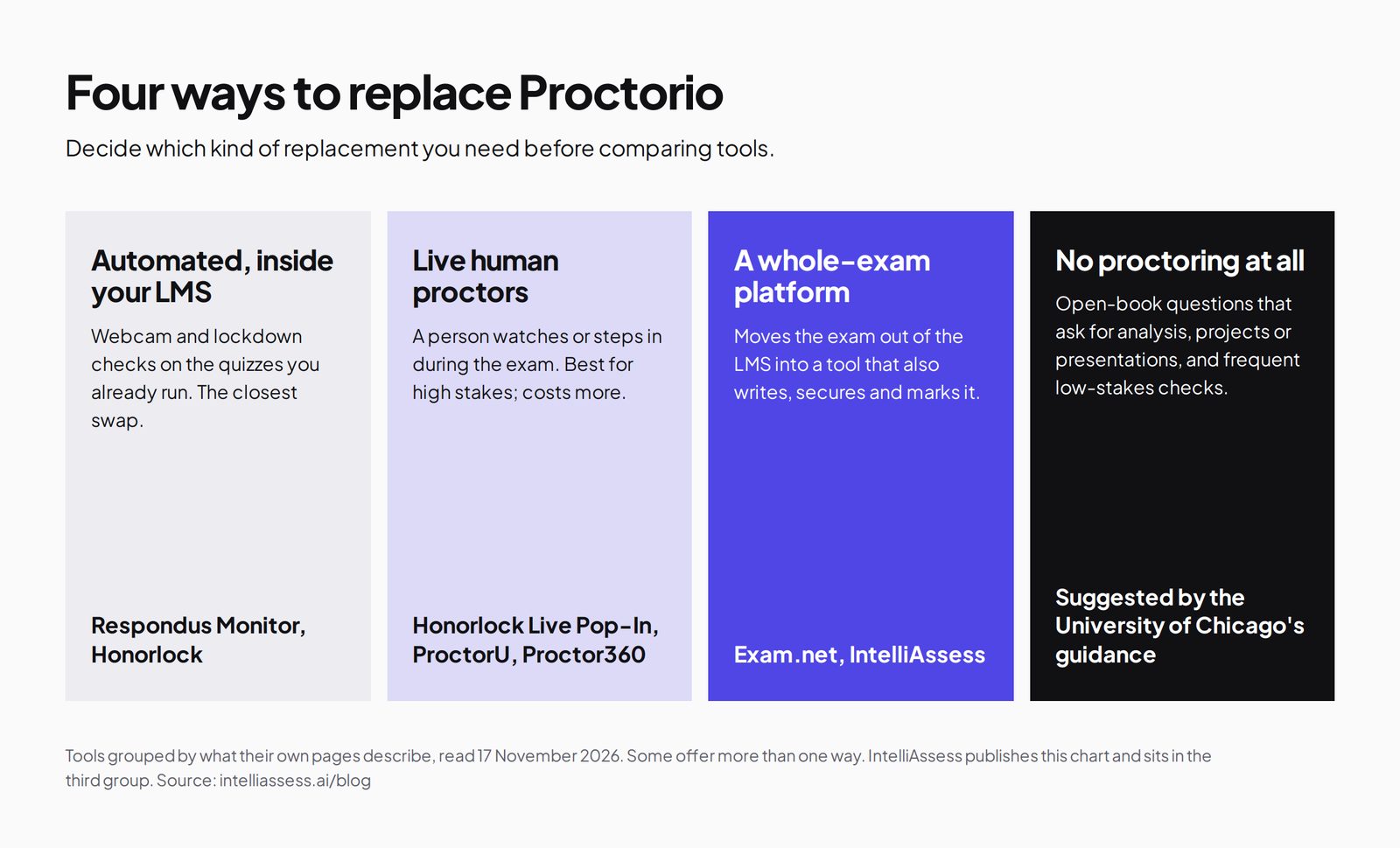
- Automated proctoring inside your LMS: the closest swap, keeping exams where they are.
- Live human proctors: for high-stakes exams where a person should step in.
- A whole-exam platform: moves the exam out of the LMS into a tool that also creates, secures and marks it.
- No proctoring: redesign the assessment. The University of Chicago's "Alternatives to Proctorio" page suggests open-book questions that ask for analysis rather than recall, time-limited quizzes with large question banks, papers, projects or presentations instead of high-stakes exams, and frequent low-stakes checks.
Beyond the webcam: AI tools and leaked questions
Since 2023 the main worry in many exams is no longer a friend in the room but an AI chatbot in another window, and questions shared online after the first sitting. The tools here tackle that in different ways. Proctorio sells two separate products for it: Origin, for checking that work was done by a person rather than AI, and Vault, for protecting exam content. Honorlock's desktop application blocks apps such as chatbots during the exam. Respondus LockDown Browser and Exam.net's lockdown app stop students leaving the exam. IntelliAssess shares the whole screen and runs browser checks, so other windows and tabs show up in the report, though it does not block them.
Leaked questions are a design problem as much as a security one. Large question banks with random selection, or a fresh exam written for each sitting, make a shared answer list far less useful. IntelliAssess and Exam.net both generate questions with AI, which makes a new version cheaper to produce; you still need to review each question before students see it.
The scorecard: 6 Proctorio alternatives on 7 published facts
A tick means the vendor's own page says so; a half means partly; a cross means its page does not say so. The list follows the total; ties go to the tool with a published price.
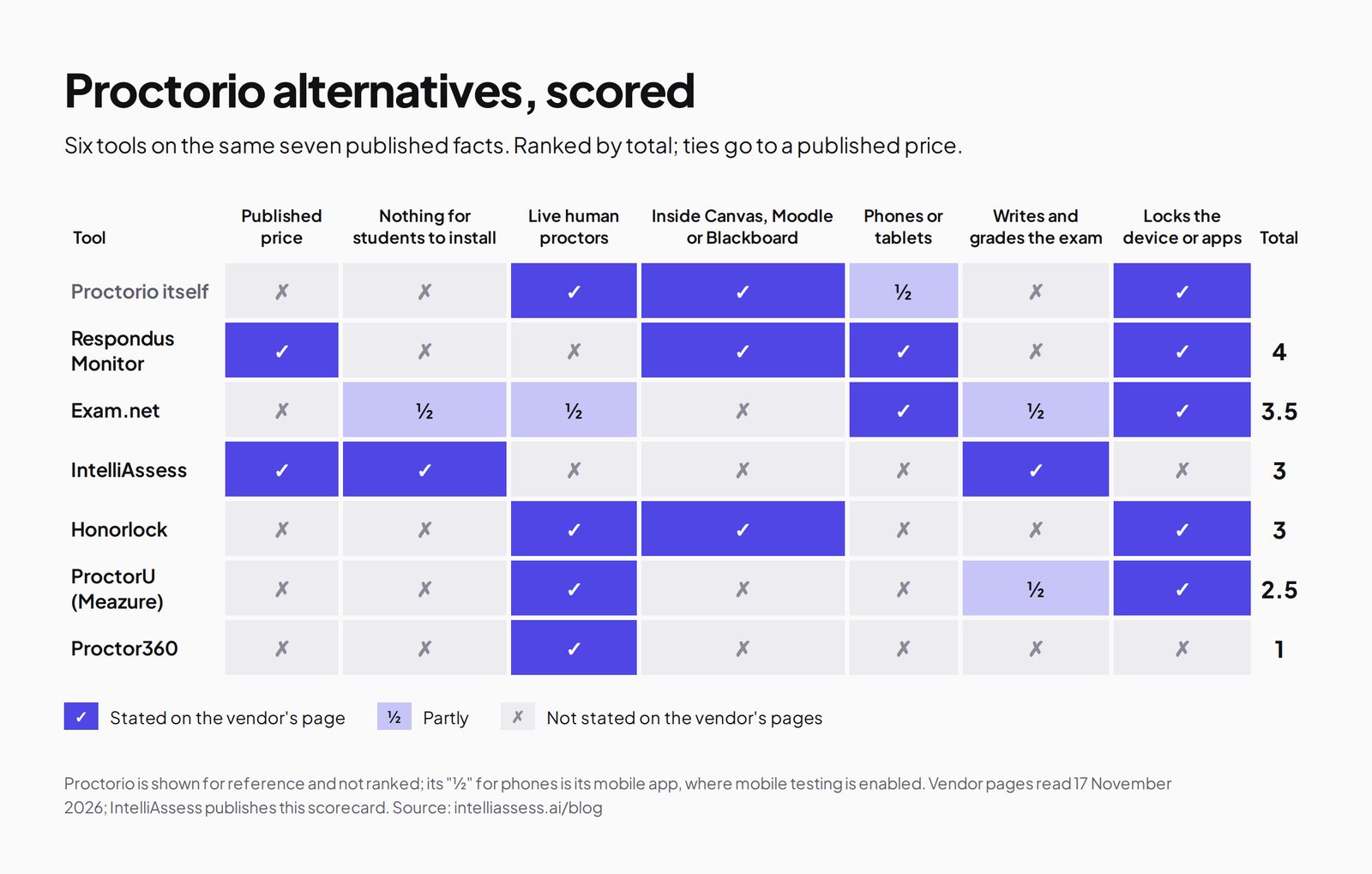
| Tool | Published price | Nothing for students to install | Live human proctors | Works inside Canvas, Moodle or Blackboard | Phones or tablets | Writes and grades the exam | Locks the device or apps | Total |
|---|---|---|---|---|---|---|---|---|
| Proctorio itself | ✗ | ✗ | ✓ | ✓ | ½ | ✗ | ✓ | |
| 1. Respondus Monitor | ✓ | ✗ | ✗ | ✓ | ✓ | ✗ | ✓ | 4 |
| 2. Exam.net | ✗ | ½ | ½ | ✗ | ✓ | ½ | ✓ | 3.5 |
| 3. IntelliAssess | ✓ | ✓ | ✗ | ✗ | ✗ | ✓ | ✗ | 3 |
| 4. Honorlock | ✗ | ✗ | ✓ | ✓ | ✗ | ✗ | ✓ | 3 |
| 5. ProctorU (Meazure Learning) | ✗ | ✗ | ✓ | ✗ | ✗ | ½ | ✓ | 2.5 |
| 6. Proctor360 | ✗ | ✗ | ✓ | ✗ | ✗ | ✗ | ✗ | 1 |
Exam.net's halves: the exam runs in the browser with an optional lockdown app; teachers monitor in real time; it auto-marks and has an AI question generator. Proctorio's half for phones: its mobile app, where mobile testing is enabled. A cross can mean "not stated on the pages we read", not "impossible".
1. Respondus Monitor: automated proctoring at a published price
Best for: institutions that want automated webcam proctoring inside their LMS and a price they can see.
Respondus Monitor is "fully automated proctoring" built on Respondus LockDown Browser, a custom browser that "cannot be used without" Monitor's companion licence. After "a quick one-time installation" it runs natively on Windows, Mac, Chromebook and iPad, and integrates with the major LMSs; instructors review flagged events afterwards (Respondus Monitor).
Price: its pricing page lists a $4,950 first-year licence regardless of institution size, then $5,950 for a 1,000-seat base tier plus $1,950 per extra 1,000 seats, quoted unlimited licences, or $15 per student for 12 months. No per-exam fees, and a free two-month pilot (North America).
Where it falls short: students install LockDown Browser, there are no live proctors, and it does not write or grade the exam. Respondus also published its response to the Ogletree ruling. See Respondus vs IntelliAssess.
2. Exam.net: locked exams across a whole school
Best for: schools that want secure exams without webcam recording, under one licence.
Exam.net's pricing page lists three security levels including a lockdown browser, real-time monitoring by the teacher, background cheat detection, an AI question generator, auto-marking by your rules and anonymised answers. Students join with an exam key and no account.
Price: a school licence on quote, after a 30-day trial per school. Where it falls short: no published price, no webcam proctoring described, and no LMS integration beyond Google Classroom and Microsoft Teams. See Exam.net vs IntelliAssess.
3. IntelliAssess: proctoring with nothing to install, plus writing and grading
Best for: schools and departments that want to create, proctor and grade an exam in one place, know the price up front, and not ask students to install anything.
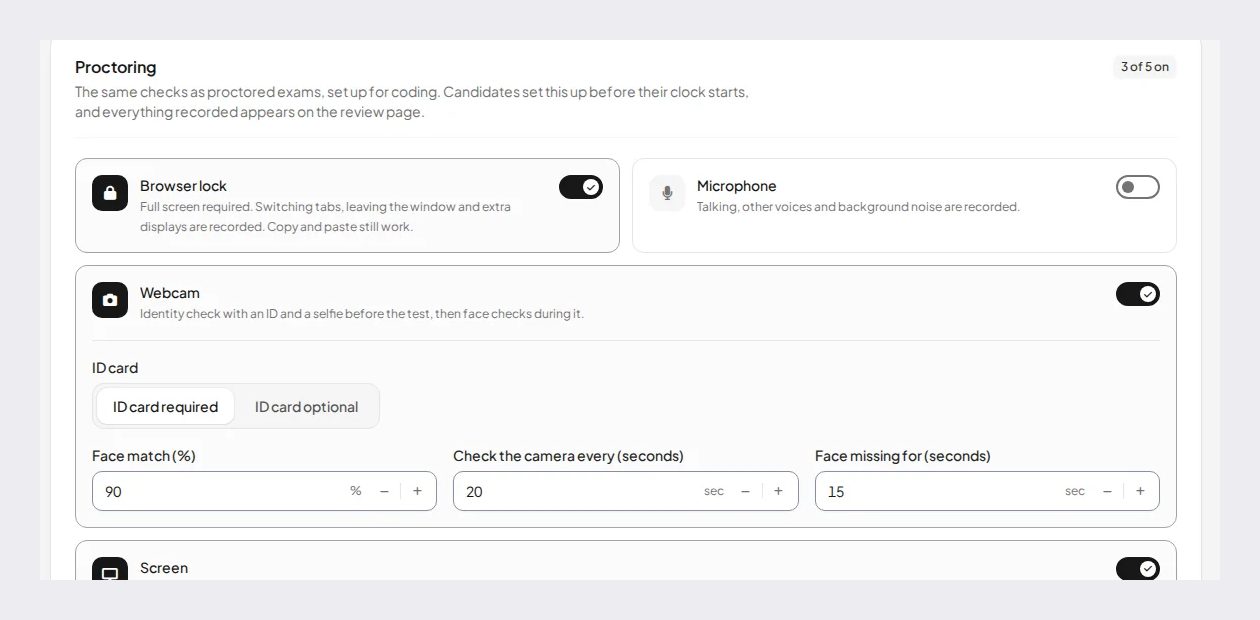
IntelliAssess's online proctoring runs in the browser. Before the test: an ID photo checked to look like a real document, a live selfie with head turns, a liveness check and a face match (90% by default). During it: webcam face checks, microphone, whole-screen sharing and browser checks, with a report per attempt showing an integrity score and a timeline with photo evidence. You choose per rule whether an event warns, ends the test or is only recorded. Identity and evidence photos are stored encrypted and opened through short-lived links, and location is saved only if you turn it on. Its pages describe no room scan.
The same tool writes the test from your files with its AI quiz generator and scores written answers against your rubric with AI grading, with the teacher keeping the final say. It works in English and Arabic.
Price (from our pricing page): webcam, voice and browser proctoring included from Starter at $39 a month (200 students), Pro $99 (500) and Intensive $249 (2,000), with a monthly allowance of webcam face checks (200, 400 or 1,200); yearly costs ten months. The Free plan (25 students) has no proctoring.
Where it falls short: no live proctors, no device lockdown, no Canvas, Moodle or Blackboard integration (it works with Google Classroom), and proctored tests need a laptop or desktop. See Proctorio vs IntelliAssess.
4. Honorlock: a live proctor when the AI spots something
Best for: universities that want a person to step in during the exam.
Honorlock's pricing page describes Live Pop-In: "human proctors review potential misconduct in real time and can intervene via live chat". It integrates with Canvas, Blackboard, Brightspace and Moodle, offers a desktop application that blocks apps such as chatbots, and is SOC 2 Type 2. Students install a Chrome extension, and a webcam and microphone are required.
Price: by quote: "flat-rate annual licensing or volume tiers based on FTE, or per students or exam". Where it falls short: no public price, an extension to install, and no writing or grading. See Honorlock vs IntelliAssess.
5. ProctorU by Meazure Learning: fully supervised, high-stakes exams
Best for: certification and high-stakes programmes that want a managed service.
Meazure Learning's remote proctoring page describes the ProctorU platform with its Guardian Secure Browser and says it was "the first remote proctoring vendor to guarantee a professional proctor will review every exam session". It also offers test-centre delivery and exam-development tools. Price: on request. Where it falls short: built for programmes, not weekly class tests.
6. Proctor360: live and multi-camera proctoring
Proctor360's site lists AI auto-proctoring, single-webcam live proctoring, multi-camera live proctoring using the candidate's phone, and a 360-degree camera headset it calls 360 Total View, with "affordable per-session pricing" but no published figure. Best for: exams that need the strongest live supervision.
What the published prices mean for one institution
Only two tools on this list publish prices, so a worked example helps. Take a department with 1,000 students who each sit a few proctored exams a year.
| Tool | How it is priced | 1,000 students, first year | Per exam fee |
|---|---|---|---|
| Respondus Monitor | Institution licence, or per student | $4,950 first-year licence (any size), then $5,950 a year for a 1,000-seat tier; or $15,000 at $15 per student | None |
| IntelliAssess | Plan by number of students | $2,490 a year on Intensive (up to 2,000 students), billed yearly | None; a monthly allowance of 1,200 webcam face checks |
| Proctorio | Not published | Talk to sales | Not published |
| Honorlock | Flat-rate annual, FTE tiers, or per student or exam | On quote | Depends on the model you choose |
| Exam.net | School licence | On quote after a 30-day trial | None stated |
| ProctorU and Proctor360 | Not published; Proctor360 mentions per-session pricing | On quote | Proctor360: per session |
The figures are not like for like. Respondus includes a locked browser and works inside your LMS; IntelliAssess includes the exam itself, from writing to grading, but no lockdown and no LMS beyond Google Classroom. Before relying on IntelliAssess at this size, check that your exam weeks fit the monthly face-check allowance, since several large exams in one month draw on the same allowance.
What students need on exam day
- Proctorio: the Secure Exam Proctor extension in Chrome, Edge, Brave or Opera on a laptop or desktop, a companion app on Windows or Mac when advanced security is on, or its mobile app where mobile testing is allowed.
- Respondus Monitor: a one-time install of LockDown Browser on Windows, Mac, Chromebook or iPad, plus a webcam.
- Honorlock: a Chrome extension, a webcam and a microphone, and its desktop application where app blocking is used.
- Exam.net: a browser and an exam key, with its lockdown app where the school requires it; no student account.
- IntelliAssess: a browser on a laptop or desktop with a webcam, an ID document for the identity check, and permission to share the whole screen; nothing to install.
- ProctorU: its Guardian Secure Browser. Proctor360: for its multi-camera option, the student's phone as a second camera.
Each requirement is a place where a student can get stuck: a Firefox user, a shared family laptop, a Chromebook without the right app, a missing ID. Whatever you choose, give students a short practice test with the same settings a week before the real exam, and a named person to contact if the checks fail.
Privacy: what to tell students
Proctoring collects personal data in a private space, which is why it draws objections. Whatever tool you use, tell students before the exam what is collected (webcam images, audio, screen, ID document, location), who reviews it, how long it is kept, and what happens when something is flagged. Offer an alternative for students who cannot meet the requirements, such as an in-person sitting.
Two points deserve care. First, room scans: the Ogletree ruling concerned a public university asking a student to show their bedroom, so many institutions now avoid them or make them optional. IntelliAssess's pages describe no room scan. Second, flags: every vendor here produces automated signals, and a flag is a reason for a person to look, not proof of misconduct. Decide who reviews flags and how a student can respond before the first exam, not after.
On data handling, IntelliAssess stores identity and evidence photos encrypted, opens them only through short-lived links, and records location only if you switch that check on. Its pages do not list certifications or data location; ask before you buy if you need them. Honorlock states SOC 2 Type 2 on its pricing page.
Which alternative for which institution
- A university that wants to keep exams in Canvas or Moodle with automated proctoring and a known price: Respondus Monitor.
- A university running high-stakes remote exams where a person should step in: Honorlock, or ProctorU for fully supervised sessions.
- A secondary school running exams on school devices: Exam.net, with its lockdown app and no webcam recording.
- A department or private school that wants one tool to write, proctor and grade exams, with nothing to install: IntelliAssess, on laptops and desktops.
- A certification body with exams that must be watched closely: Proctor360, ProctorU or Proctorio's live proctoring.
- A course where the exam could be a project instead: no proctoring at all, following guidance such as the University of Chicago's.
Moving from Proctorio in five steps
- List the exams that really need proctoring. Many weekly quizzes do not; redesigning them reduces cost and complaints.
- Decide where the remaining exams will live. If they stay in your LMS, look at Respondus or Honorlock; if they can move, a platform such as IntelliAssess or Exam.net also handles the questions and marking.
- Match the settings you used. Write down which Proctorio checks you turned on (ID, webcam, screen, browser lock) and set the closest equivalent, noting any you lose, such as device lockdown on IntelliAssess.
- Pilot one course. Run a practice exam and one real exam, and collect student problems and staff review time.
- Update your exam policy so it names the new tool, what it collects, who reviews flags and how students can appeal.
Where IntelliAssess is not the right choice
- Exams must stay inside Canvas, Moodle or Blackboard: Respondus Monitor or Honorlock.
- You want a person watching or stepping in live: Honorlock, ProctorU or Proctor360.
- You need the device locked: Respondus LockDown Browser or Exam.net.
- Students test on phones or tablets: Respondus (iPad) or Exam.net.
How to choose a Proctorio alternative
- First ask whether the exam needs proctoring. Open-book, applied questions or a project may remove the need.
- Decide where the exam lives. In the LMS: an add-on. Out of it: a platform that also writes and marks.
- Decide if a person must be involved. Live proctoring costs more and suits high-stakes exams.
- Read what students must install and show. Extensions, apps and room scans all affect access and privacy.
- Ask for the full price early, and run one real exam as a pilot.
Browse every comparison or see IntelliAssess for schools.
Frequently asked questions
What is the best alternative to Proctorio?
For automated proctoring inside your LMS at a published price, Respondus Monitor. For live help during the exam, Honorlock. For proctoring with nothing to install plus AI that writes and grades the exam, IntelliAssess. For whole-school locked exams, Exam.net.
Is there a Proctorio alternative that does not need a browser extension?
Yes. IntelliAssess runs its identity and monitoring checks in the browser with nothing to install. Exam.net runs in the browser, with an optional lockdown app.
Which proctoring tools publish their prices?
Of these, Respondus (a $4,950 first-year licence) and IntelliAssess (from $39 a month) publish prices. Proctorio, Honorlock, Meazure Learning, Proctor360 and Exam.net quote.
Are room scans legal?
In Ogletree v. Cleveland State University (August 2022), a federal court in Ohio ruled that a public university's pre-exam room scan was an unreasonable search under the Fourth Amendment. It is one district court ruling; ask your legal team how it applies to you.
Does Proctorio work on phones?
Proctorio has a mobile app for iOS and Android where mobile testing is enabled; on laptops and desktops it needs its extension in a Chromium-based browser.
Is Examity part of ProctorU now?
Yes. When we read Meazure Learning's site on 15 November 2026 it said it acquired Examity on 1 September 2023; Meazure Learning runs ProctorU.
Which Proctorio alternative is cheapest?
Among published prices, IntelliAssess starts at $39 a month for 200 students with proctoring included, and Respondus Monitor's first-year licence is $4,950 for any size of institution. Exam.net, Honorlock and the live proctoring services quote.
Which Proctorio alternative works on Chromebooks and iPads?
Respondus Monitor runs on Chromebooks and iPads after a one-time install, and Exam.net runs in the browser on most devices. IntelliAssess's proctored tests need a laptop or desktop.
Can I use proctoring without recording students' homes?
Partly. Exam.net secures exams with a lockdown app and teacher monitoring instead of webcam recording. Webcam-based tools, including IntelliAssess, record the student's face but not necessarily the room; IntelliAssess describes no room scan.
Keep reading
All articles
Read next
SchoolAI alternatives: 7 AI tools for teachers and students scored (2026)
Seven AI tools scored on the same nine facts, with SchoolAI as the reference, and what each lets teachers see when students use AI.

SchoolAI vs IntelliAssess: an AI tutor for students or feedback after a test?
SchoolAI puts students in supervised conversation with AI; IntelliAssess marks their tests and uses AI to help them learn from their own answers.
Motasem Aldiab 12 min read

Jotform and ProProfs alternatives for quizzes and exams (2026)
Jotform and ProProfs side by side, then the alternatives by forms, certificates or real exams.
Motasem Aldiab 2 min read