
Testportal vs IntelliAssess (2026): exam checks, marking and price

By Motasem Aldiab, Technology Consultant and Trainer - Cloud, DevOps, Java, Data Science
Contents25
- The short answer
- At a glance
- What Testportal is
- What IntelliAssess is
- Exam checks, one by one
- Leaving the test tab
- Time limits
- Webcam
- Who is sitting the test
- The screen
- Sound and other people
- Locking the device
- Writing questions with AI
- Marking
- Feedback and results
- Setting up a test
- A teacher's week with each
- Business and training use
- Integrations
- Pricing compared
- What students see
- Privacy and security
- Who should choose which
- Where IntelliAssess falls short
- Switching from Testportal
Key takeaways
- 1Testportal EDU is $39 a year for one teacher; IntelliAssess Starter is $39 a month for 200 students.
- 2Honest Respondent tracks the test tab; IntelliAssess adds ID, face match, webcam, microphone and screen checks.
- 3Testportal marks long answers by hand; IntelliAssess marks them against your rubric with AI for review.
- 4Testportal has certificates, an API and a Teams app; IntelliAssess has Google Classroom.
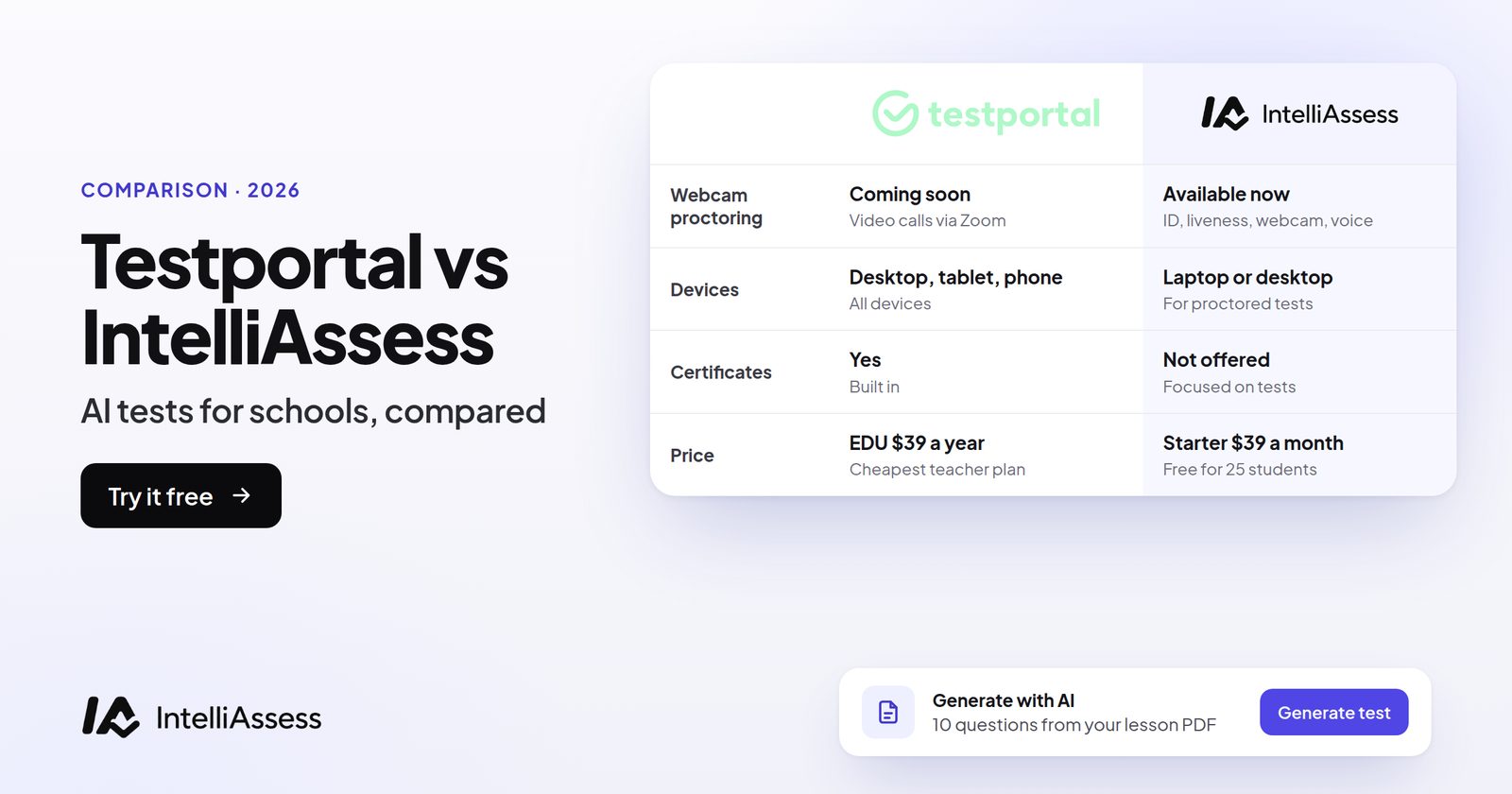
Testportal vs IntelliAssess compares two test platforms that both write questions with AI. Testportal is a mature test maker for businesses and teachers, strong on self-marking tests, feedback, certificates and Microsoft Teams, with Honest Respondent Technology to track the test tab. IntelliAssess is built for teachers and schools: it writes tests from your material, marks written answers against a rubric with AI, and checks identity, webcam, microphone and screen in the browser. This page compares them check by check, then on writing, marking, integrations and both published price lists.
The short answer
Choose Testportal if you are one teacher who mainly gives self-marking tests (its EDU plan is $39 a year), if your school runs on Microsoft Teams, or if you test employees and need certificates or an API. Choose IntelliAssess if marking written answers takes your evenings, if remote tests need to confirm who is sitting them, or if your school uses Google Classroom or teaches in Arabic.
At a glance
| Testportal | IntelliAssess | |
|---|---|---|
| Built for | Businesses and teachers | Teachers and schools |
| AI writes questions | Yes, on business plans, from files, text or a topic (beta) | Yes, on every plan, from files, a YouTube video or a web page |
| Long written answers | Reviewed manually by the test owner | Marked by AI against your rubric, teacher reviews |
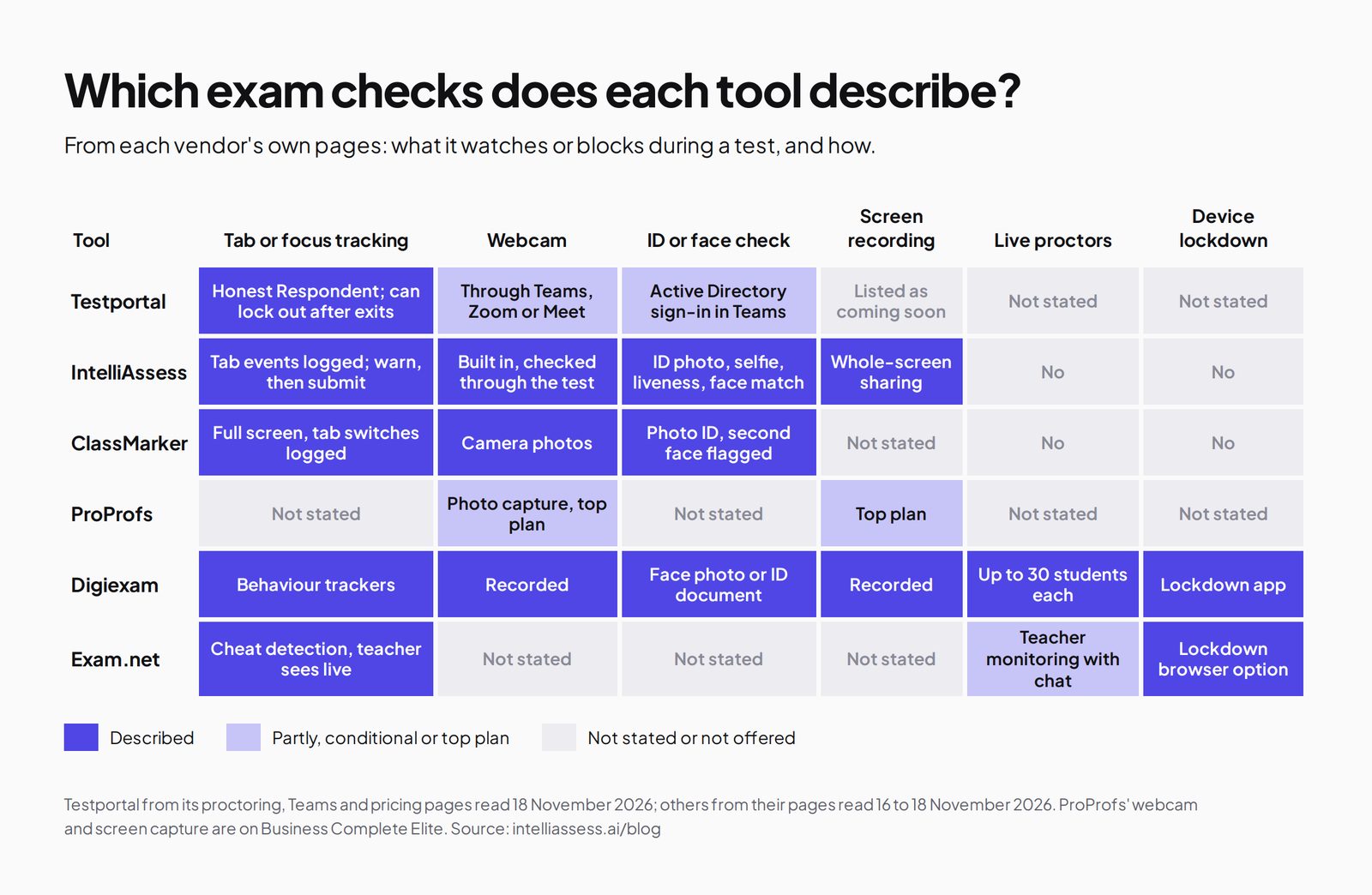
| Tab tracking | Honest Respondent; can lock out after too many exits | Full screen and tab events logged; warn, then submit if it keeps happening |
| Webcam | Through Teams, Zoom, Webex or Meet | Built in, checked through the test |
| Identity check | Azure Active Directory sign-in in Teams | ID photo, live selfie, liveness check, face match |
| Screen | Listed as coming soon | Whole-screen sharing during the test |
| Certificates and API | Yes, on business plans | No |
| Integrations | Microsoft Teams, API, embedding | Google Classroom |
| Languages | Assessments in all languages | English and Arabic, right to left included |
| Price | Business from $35 a month (30 results); EDU $39 a year | Free for 25 students; from $39 a month for 200 |
What Testportal is
Testportal calls itself "AI-powered skills and knowledge assessment software, serving 2.5M+ business and educational users worldwide" (homepage). It sells to two markets with separate price lists: businesses, for staff training, certification and recruitment tests, and teachers and lecturers, with a free plan.
- Question types: self-grading choice questions, self-grading short open answers checked against preset criteria, and descriptive open answers that "must be reviewed manually by the test owner"; partial, negative and bonus points (question types).
- AI question generator: generates questions and answers "based on your content", from uploaded files, pasted text with no character limit, or a topic, in all languages, included in business plans (AI question generator).
- Feedback: automatic overviews or question-by-question reviews, a second set of feedback released later, pass or fail and grade ranges, and certificates (feedback and grades).
- Microsoft Teams: a dedicated app, with Azure Active Directory sign-in and webcam supervision during the quiz (Teams).
- API and embedding on business plans (integrations).
What IntelliAssess is
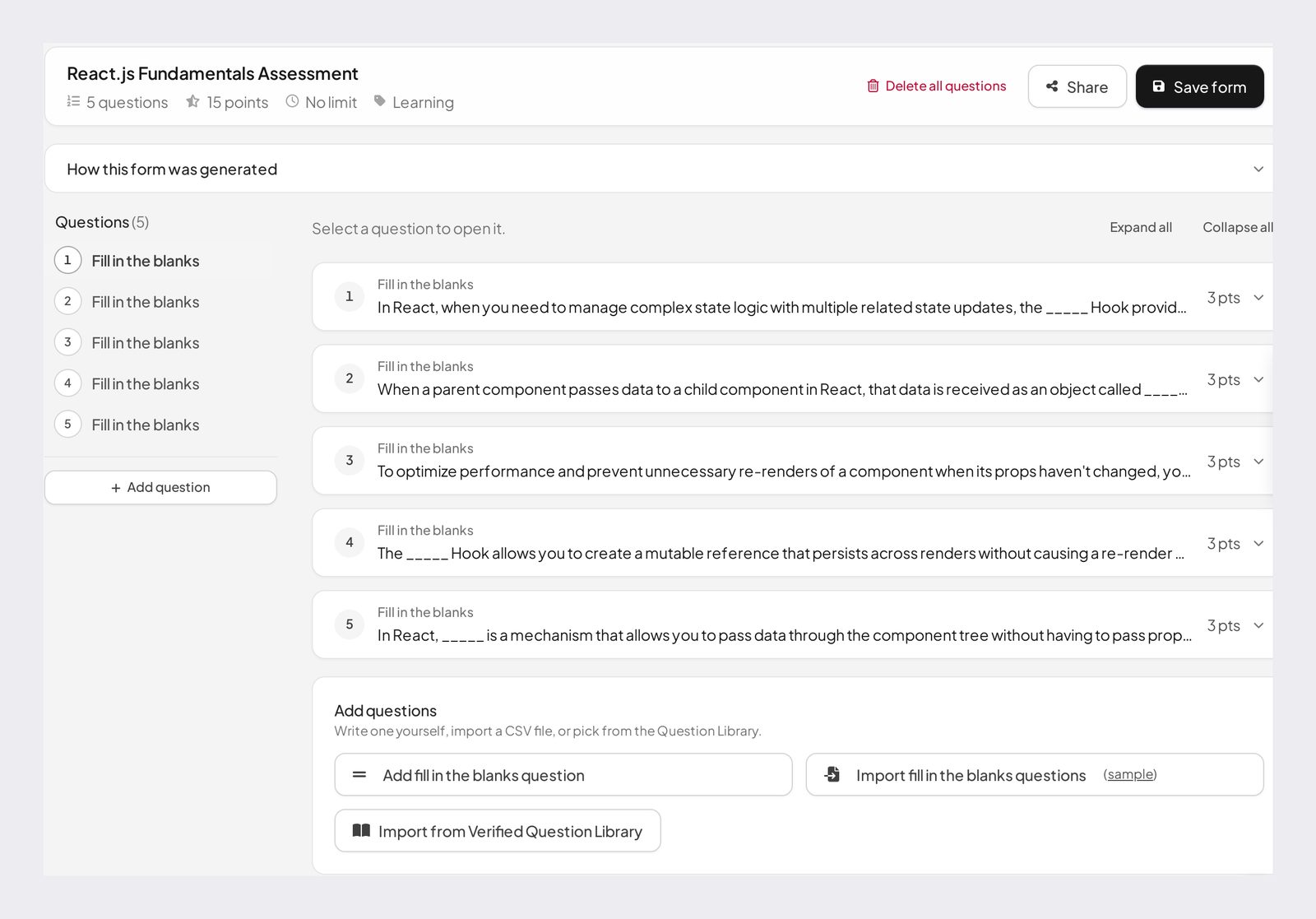
IntelliAssess writes, delivers, proctors and marks tests in one place. The AI quiz generator builds a draft test from your PDF, Word or PowerPoint files, a YouTube video or a web page, across eight question types, and checks every answer key in a second pass. AI grading marks written answers against each criterion of your rubric, with a comment per criterion that the teacher can change. Online proctoring runs in the browser with nothing to install. Tests are shared by link or published to Google Classroom, and the interface works in English and Arabic.
Exam checks, one by one
This is the comparison most Testportal users ask for. Below, each check is described from each vendor's own pages: Testportal's proctoring and security page and Teams page, and our online proctoring page.
Leaving the test tab
Testportal: Honest Respondent Technology monitors "test tab movements", shows which question prompted the attempt, and can disable access after a set number of exits. IntelliAssess: exam security keeps the test in full screen, blocks right-click, and logs every exit, tab switch and loss of focus on the attempt's timeline. The teacher picks how strict to be: Lenient gives warnings only and never submits; Balanced gives a warning first and submits the attempt if it keeps happening; Strict gives at most one warning, then submits. Both tools can end an attempt after repeated exits; Testportal disables access, IntelliAssess submits the work done so far and tells the reviewer why.
Time limits
Testportal: "Test time is measured on the server-side", with per-question limits, attempt limits and scheduled activation. IntelliAssess: a time limit, a maximum number of attempts and a schedule per test, and the attempt is submitted automatically when time runs out.
Webcam
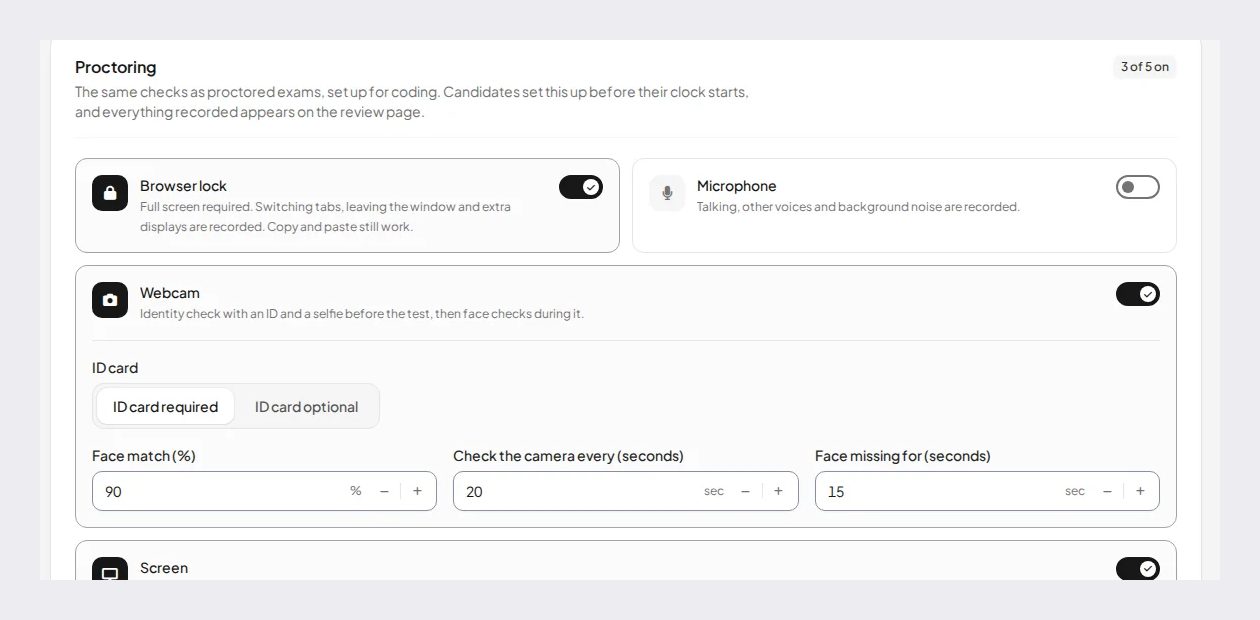
Testportal: its builder "is compatible with top conferencing platforms such as Zoom, Webex or Google Meet", and in Teams you can "oversee your respondents in real-time via webcam". The video runs through the meeting tool, not inside Testportal. IntelliAssess: the webcam is checked inside the test at an interval you set (for example every 20 seconds), with photos kept as evidence.
Who is sitting the test
Testportal: in Teams, access can require Azure Active Directory sign-in, and you can "use basic data to confirm identity". Outside Teams, access is by link, access code or group password. IntelliAssess: before the test, the student takes an ID photo and a live selfie, passes a liveness check, and is matched against the ID at a threshold you set, such as 90 percent. During the test, a missing face, more than one face or a face that does not match is recorded, and the webcam rules decide whether that warns the student or submits the attempt.
The screen
Testportal: screen-sharing detection is part of the "coming soon" advanced proctoring, with no date. IntelliAssess: students share their whole screen for the test, so a second application shows up in the evidence.
Sound and other people
Testportal: detecting "the presence of additional people" is also listed as coming soon. IntelliAssess: microphone checks record voices picked up during the test, and the microphone rules decide whether to warn or submit; camera checks flag more than one face.
Locking the device
Neither locks the device. Both can see when a student leaves the test, but neither stops another application opening. For that, see Digiexam, Exam.net or Respondus in our Testportal alternatives.
In short: Testportal is strong on tab discipline and works well with live supervision in Teams; IntelliAssess adds identity, webcam and screen checks inside the test itself, with a report per attempt.
Writing questions with AI
Both write questions from your material. Testportal takes files, pasted text of any length, or just a topic, in any language, and describes "an advanced multiple-choice question (MCQ) generator" alongside short answer and essay questions; its plan comparison labels AI generation beta, and the education comparison does not list it. IntelliAssess takes files, a YouTube video or a web page, writes eight question types on every plan including the free one, and checks each answer key in a second pass. The difference that matters most to teachers is the video and web page input, and that the free and education plans include it.
Marking
For choice questions and short answers with a fixed key, both mark automatically, and Testportal's partial, negative and bonus points give fine control. For longer written answers, they differ. Testportal sends them to the test owner to mark by hand. IntelliAssess marks each answer against every criterion of the rubric, writes a comment per criterion, and leaves the final mark to the teacher, who can change any score before releasing results.
If your tests are mostly choice questions, this difference is small. If you set short answers and essays every week, it is most of the time you will save.
Feedback and results
Testportal gives automatic feedback as an overview or a full review, a second round released later, pass or fail, grade ranges and certificates. IntelliAssess releases marks with the per-criterion comments when the teacher chooses; students can ask for a re-mark and practise the questions they missed, and on Pro and above, learning quizzes add study notes, study plans and an "Explain this to me" option. Testportal's certificates have no IntelliAssess equivalent.
Setting up a test
In Testportal, you build the test in its editor or have the AI draft questions from a file, text or a topic, set the time limit, attempts and activation dates, switch on Honest Respondent and choose how many tab exits are allowed, then share it by link, access code or group password, or open it in Teams. Respondents need no account. Certificates, branding and an embedded version are set up on business plans.
In IntelliAssess, you upload a document or paste a YouTube or web page link, choose question types and difficulty, and edit the draft the AI writes. You add a rubric to each written question, set the time limit, attempts and schedule, and pick an exam security level (Lenient, Balanced, Strict or custom) with the checks you want: webcam identity, face match, microphone and screen. Then you share the link or post the test to Google Classroom.
The setup time is similar for a choice-question quiz. For a test with written answers, IntelliAssess asks for a rubric up front, which is the step that later saves the marking.
A teacher's week with each
Take a teacher with five classes who gives one short quiz a week and one test with written answers each half term.
With Testportal, the weekly quizzes are quick: choice and short-answer questions self-mark, students get an automatic review of each question, and the teacher reads the results dashboard. On test weeks, every descriptive answer waits for the teacher to mark by hand. For remote tests, the teacher relies on Honest Respondent's tab tracking, or runs a Teams or Zoom call to watch students on camera.
With IntelliAssess, the weekly quizzes are similar. On test weeks, written answers arrive already marked against the rubric, with a comment per criterion, and the teacher reviews and changes marks rather than starting from scratch. For remote tests, each attempt has an identity check and a timeline of webcam, microphone, screen and browser events, so the teacher reviews flagged attempts instead of watching a call.
If that teacher never sets written answers or remote tests, Testportal EDU does the job for $39 a year. If they set both every half term, the marking time is where IntelliAssess earns its price.
Business and training use
Testportal sells as much to businesses as to schools. Its business plans include certificates with predefined and custom templates, branding with a logo, subdomain or white label, sub-accounts and admin accounts, an API that lets respondents "receive authorizations, start their tests and get results directly from your system", and tests framed inside your own website. For compliance training, product knowledge checks and certification, these features matter, and IntelliAssess does not offer certificates, white label or an API.
IntelliAssess is built around classes and students: its plans count students, its marking follows teachers' rubrics, and its integration is Google Classroom. A training team that issues certificates should stay with Testportal or look at ProProfs, FlexiQuiz or ClassMarker in our Testportal alternatives.
Integrations
Testportal is built around Microsoft: a Teams app, Microsoft 365, and Active Directory for access, plus an API and embedding on business plans. Canvas, Moodle, Blackboard and Google Classroom are not described on the pages we read. IntelliAssess publishes tests to Google Classroom and syncs grades back, and has no Teams app or API. Your school's platform may decide this on its own.
Pricing compared
Testportal's business plans are priced by results collected each month (business pricing): Standard $35 a month for 30 results, PRO $79 for 300, MAX $129 for 3,000, and MAX Customized from $159, quoted. Each has a 14-day free trial. Its education plans (education pricing) are Free EDU with 100 stored results, EDU at $39 a year with unlimited stored results and up to 3,000 results collected a month, and quoted school and university plans.
IntelliAssess (pricing): Free for 25 students; Starter $39 a month for 200; Pro $99 for 500; Intensive $249 for 2,000; yearly billing costs ten months. It counts students, not tests or results. AI grading and proctoring start on Starter, with a monthly allowance of face checks.
| Case | Testportal | IntelliAssess |
|---|---|---|
| A teacher, 120 students, self-marking quizzes weekly | EDU $39 a year | Starter $390 a year billed yearly |
| A teacher, 120 students, weekly short answers and essays | EDU $39 a year, essays marked by hand | Starter $390 a year, essays marked by AI for review |
| A school, 400 students, proctored tests at home | EDU School quote; webcam through Teams or video calls | Pro $990 a year, with the face-check allowance |
| A company, 250 staff tests a month with certificates | PRO $79 a month | No certificates |
Our arithmetic from both price lists, read 18 November 2026. Check the IntelliAssess face-check allowance against the number of proctored attempts you run.
On price alone, Testportal EDU wins for one teacher. IntelliAssess costs more and pays for itself only if AI marking or built-in identity checks save you real time.
What students see
In Testportal, a student opens the link or enters an access code, with no account needed, answers the questions, and sees whatever feedback the teacher set: a score, a full review of each question, or a pass or fail with a grade range. If the teacher holds back a second round of feedback, it arrives later. If the student leaves the tab too often, Honest Respondent can end their access to the test. In Teams, they may sign in with their school Microsoft account first.
In IntelliAssess, a student opens the link or the Google Classroom assignment. On a proctored test, they take an ID photo and a selfie, allow the camera, microphone and screen sharing, and see the rules for the test before starting, including when they will be warned. During the test, warnings appear if a rule is broken, and a Strict or Balanced test can be submitted for them. After the teacher releases results, they see their marks with a comment for each rubric criterion, can ask for a re-mark, and can practise the questions they got wrong.
Both are simple for students on unproctored tests. The proctored IntelliAssess flow has more steps at the start, so run a practice test first, as you would with any camera check. Tell students in advance what the camera, microphone and screen checks record, and who reviews them.
Privacy and security
Testportal says it runs on Microsoft Azure, offers a GDPR data processing agreement, and that your data is owned by you exclusively; its security page lists anti-DDoS protection, redundancy and encryption (security). IntelliAssess stores identity and evidence photos encrypted, opens them only through short-lived links, records location only if you switch that check on, and lists no certifications. Neither names an ISO 27001 or SOC 2 certificate on the pages we read. Because IntelliAssess collects webcam and ID photos, tell students what is recorded and who sees it.
Who should choose which
- Choose Testportal if you are a teacher on a tight budget giving self-marking tests, a school on Microsoft Teams, or a business that needs certificates, an API or embedded tests.
- Choose IntelliAssess if you set written answers, need to confirm identity in remote tests, use Google Classroom, want questions written from videos or web pages, or teach in Arabic.
Where IntelliAssess falls short
- No certificates, no selling tests, no API and no embedding.
- No Microsoft Teams app.
- Proctored tests need a laptop or desktop with a webcam.
- For one teacher with self-marking tests, it costs more than Testportal EDU.
Switching from Testportal
- Export your past results; Testportal says suspended accounts keep access to them, but keep a copy.
- Upload the documents your old tests came from, or the tests themselves, and let IntelliAssess draft new questions, then edit them.
- Write a short rubric for each written question; AI marking follows it.
- Choose which proctoring checks each test needs; low-stakes quizzes may need none.
- Run one test on the free plan with a small group before moving a whole course.
For other options see Testportal alternatives, ClassMarker vs IntelliAssess and Microsoft Forms vs IntelliAssess, or browse every comparison.
Frequently asked questions
Is IntelliAssess better than Testportal?
For written answers and identity checks in remote tests, IntelliAssess does more. For low-cost self-marking tests, certificates, Microsoft Teams and an API, Testportal does more. Choose by which of those you need.
What is Honest Respondent Technology?
Testportal's name for monitoring the test tab: it detects when a respondent leaves the test, shows which question prompted it, and can disable access after too many exits. It does not, on the pages we read, include webcam, identity or screen checks.
Does Testportal have AI grading?
Its pages describe self-grading choice and short open answers against preset criteria, and manual review of longer answers by the test owner. IntelliAssess marks written answers against your rubric with AI, for the teacher to review.
Which is cheaper, Testportal or IntelliAssess?
For a single teacher, Testportal EDU at $39 a year is cheaper than IntelliAssess Starter at $39 a month. For businesses, Testportal starts at $35 a month for 30 results. IntelliAssess is free for 25 students.
Does IntelliAssess work with Microsoft Teams?
No. IntelliAssess integrates with Google Classroom. Testportal has a Microsoft Teams app.
Do students install anything?
Neither asks students to install software on the pages we read. Testportal opens in the browser by link or code; IntelliAssess proctored tests run in the browser on a laptop or desktop with a webcam.
Keep reading
All articles
Read next
SchoolAI alternatives: 7 AI tools for teachers and students scored (2026)
Seven AI tools scored on the same nine facts, with SchoolAI as the reference, and what each lets teachers see when students use AI.

SchoolAI vs IntelliAssess: an AI tutor for students or feedback after a test?
SchoolAI puts students in supervised conversation with AI; IntelliAssess marks their tests and uses AI to help them learn from their own answers.
Motasem Aldiab 12 min read

Jotform and ProProfs alternatives for quizzes and exams (2026)
Jotform and ProProfs side by side, then the alternatives by forms, certificates or real exams.
Motasem Aldiab 2 min read