
Brisk vs IntelliAssess: an AI extension in your Docs or a test platform?

By Motasem Aldiab, Technology Consultant and Trainer - Cloud, DevOps, Java, Data Science
Contents24
- The short answer
- Brisk vs IntelliAssess at a glance
- What Brisk is
- What IntelliAssess is
- Feedback on a Google Doc, or a score on a test
- Feature by feature
- Making quizzes
- Delivering and marking
- Authorship and integrity
- Student-facing AI
- Languages
- One week, two ways
- What students see
- Rolling it out to a school
- How far to trust AI feedback and scores
- Pricing
- Privacy
- Where Brisk is better
- Where IntelliAssess is better
- When Brisk alone is enough
- Using Brisk and IntelliAssess together
- Questions to ask before choosing
- Choose Brisk if
- Choose IntelliAssess if
Key takeaways
- 1Brisk is free for teachers, with 30+ tools working inside Docs, Slides, PDFs and your LMS.
- 2Its feedback is drafted in the document, and Inspect Writing replays how a Doc was written.
- 3Brisk's quizzes are delivered in other tools; IntelliAssess delivers and marks the test.
- 4IntelliAssess scores written answers by rubric and proctors tests at home, from $39 a month.
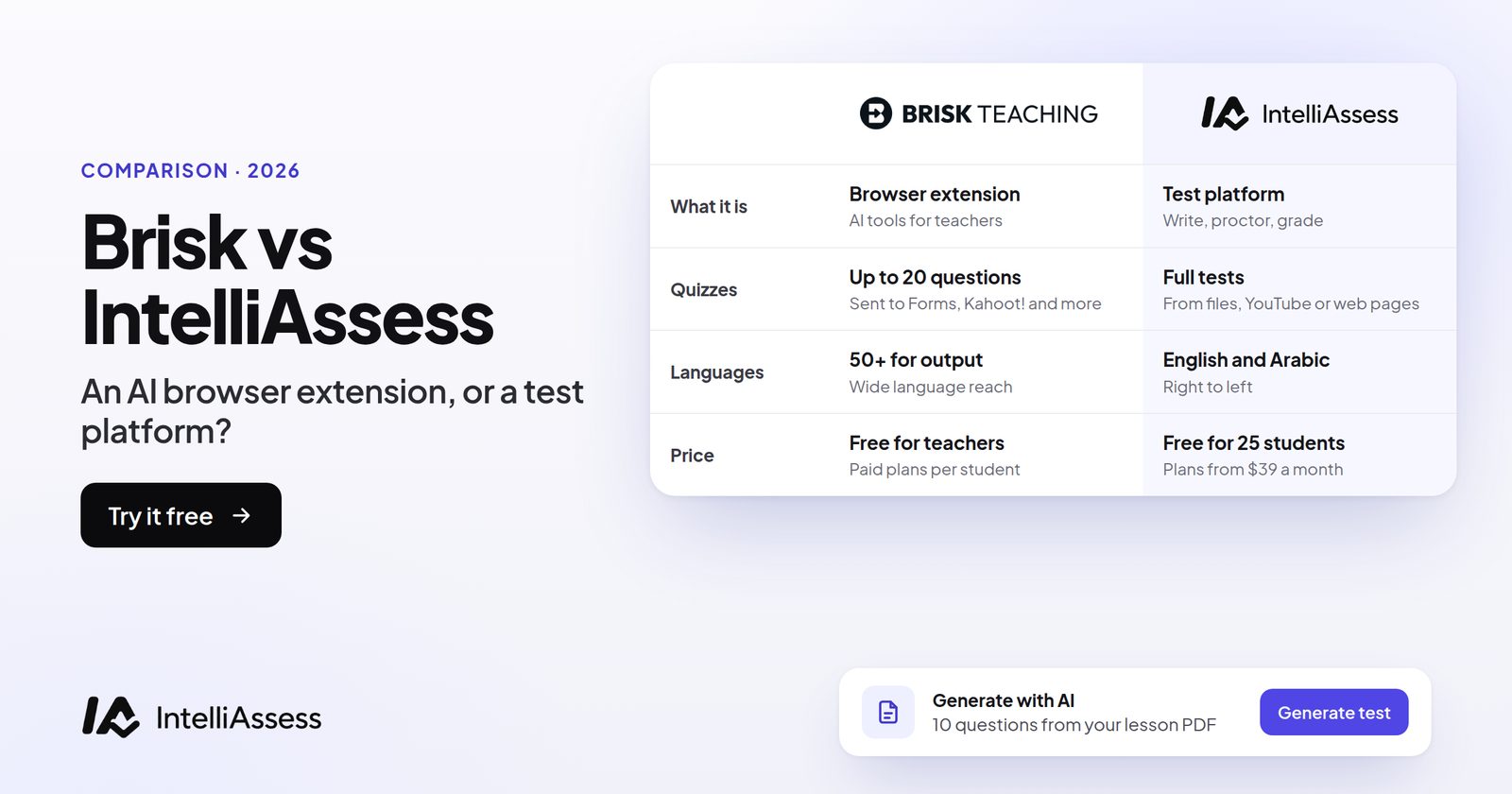
Brisk vs IntelliAssess compares a free Chrome extension that brings AI into the tools teachers already use with a test platform that writes, delivers, proctors and marks the test itself. Brisk works inside Google Docs, Slides, PDFs, YouTube and your LMS, with 30+ tools for lesson plans, quizzes and presentations, five kinds of feedback on student writing, a replay of how a document was written, and AI activities for students. IntelliAssess writes a full test from your lessons, runs it online with optional proctoring, and scores written answers against your rubric at hand-in, free for 25 students or from $39 a month. Brisk is the better everyday assistant; IntelliAssess is the better place to run and mark a test. Many teachers use both.
The short answer
Choose Brisk if you want free AI help across your day inside the tools you already use: feedback on essays in Google Docs, quizzes and slides made from any page or video, materials re-levelled or translated into 50+ languages, and a replay of how students wrote. Choose IntelliAssess if you want the test itself written, delivered and marked in one place: a full test from your lessons, taken online with a timer and optional proctoring, with written answers scored against your rubric before you release results. Use both if you want the assistant and a proper home for tests.
Brisk vs IntelliAssess at a glance
| Brisk | IntelliAssess | |
|---|---|---|
| What it is | A Chrome and Edge extension with 30+ AI tools for teachers | A test platform: write, deliver, proctor and mark |
| Where it works | Inside Google Docs and Slides, PDFs, YouTube, web pages, Canvas, Schoology and Google Classroom | Its own web app, publishing to Google Classroom |
| Making quizzes | Quiz generator; quizzes created as Microsoft Forms, exported to Canvas (school plans), Nearpod or Wayground | Full tests up to 100 questions across eight types, answer keys checked twice |
| Where students answer | In the tool the quiz goes to | In IntelliAssess, from a link or Google Classroom |
| Written work | Five kinds of feedback in the document; rubric scoring as an opt-in | A score and comment for each rubric criterion, teacher can change before release |
| Integrity | Inspect Writing: a replay of how a Google Doc was written | ID, selfie and liveness, webcam, microphone, screen and browser checks |
| Student AI | Brisk Boost activities, shared by link or code | AI study notes and plans after learning quizzes (Pro and up) |
| Languages | 50+ for generated materials | English and Arabic, right to left |
| Privacy | 95% Common Sense rating; FERPA and COPPA; working toward SOC 2 Type II | Encrypted identity photos; no certifications listed |
| Price | Free for teachers; school and district plans custom-priced | Free for 25 students; Starter $39 a month for 200 |
What Brisk is
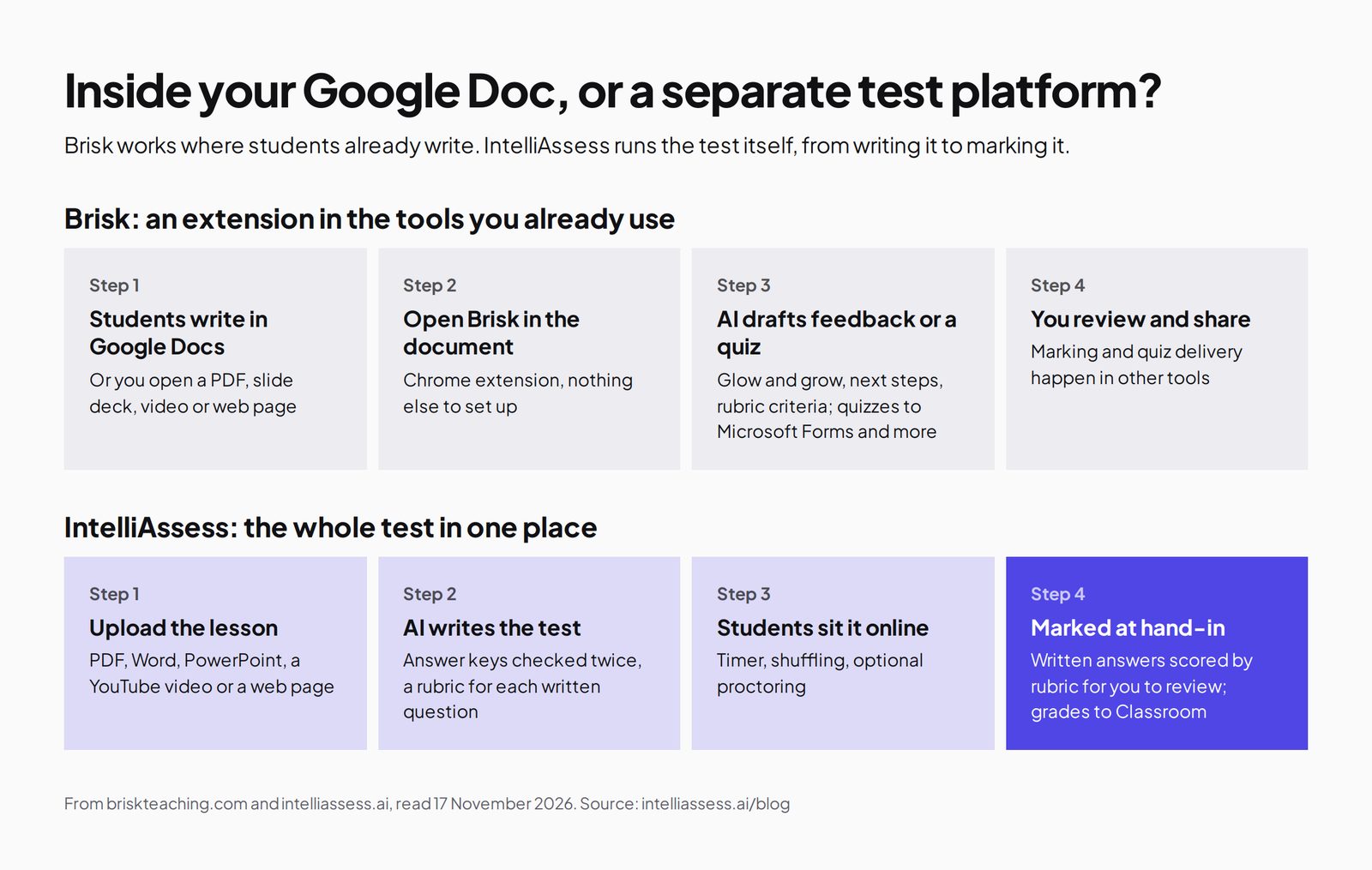
Brisk is a browser extension for Chrome and Edge. Its plans page lists a free plan for teachers with "30+ tools", including a lesson plan generator, quiz generator, rubric generator and presentation maker, tools to change reading levels and create instructional materials, and "5+ ways to give feedback": glow and grow, next steps, rubric criteria feedback, targeted feedback and batch feedback, with rubric scoring available as an opt-in and batch feedback insights that summarise class-wide strengths. It generates materials in 50+ languages.
Its integrations page describes creating Microsoft Forms quizzes with its quiz generator, exporting PowerPoint and Word files, exporting quizzes to Canvas as QTI files and LTI 1.3 for Canvas and Schoology on school and district plans, and sending activities to Nearpod and Wayground. When we read its quiz page on 16 November 2026, it described up to 20 questions at a time, delivered as a Google Doc, Word doc, Google Form, Microsoft Form, Kahoot!, Nearpod or Wayground activity.
Inspect Writing shows "a video-style replay of a student's writing process from first draft to final version", including what was typed, edited, added or deleted and "where text may have been pasted in". Brisk says it "doesn't produce an accuracy score"; it gives "a factual record of how the document was produced". Brisk Boost turns lessons into student activities such as Tutor, Debate, Exit Ticket and Writing Coach, shared by link, QR code or class code, with teachers able to see all student chats and set grade level, language and guardrails.
What IntelliAssess is
IntelliAssess's AI quiz generator writes a full test from a topic, up to 20 PDF, Word or PowerPoint files, a YouTube video or a web page, across multiple choice, multi-select with partial credit, true or false, fill in the blanks, short answer and written answers, and checks every answer key in a second pass. The rubric generator drafts criteria for each written question.
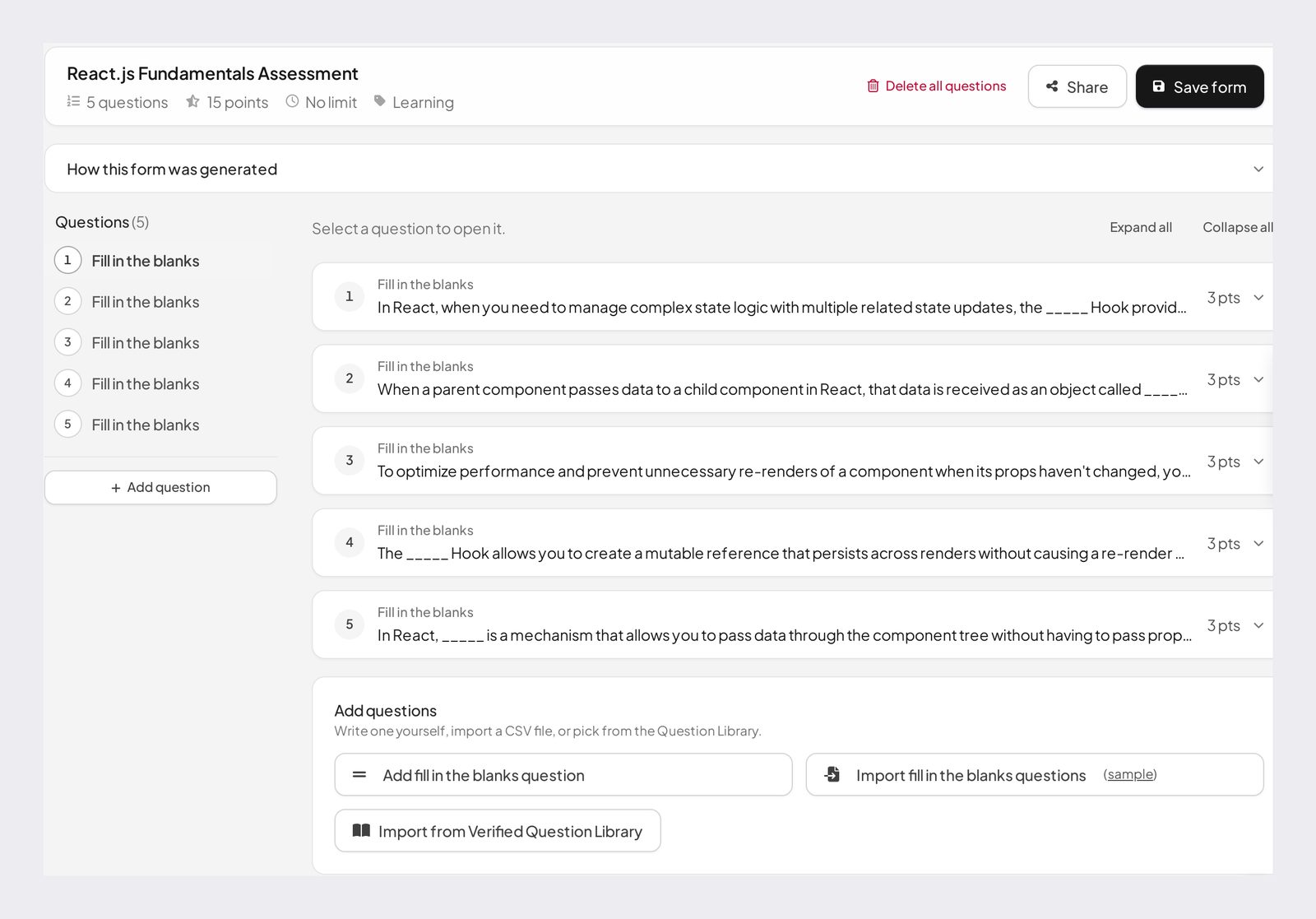
Students take the test online from a link or Google Classroom, with timers, scheduled starts, shuffled questions and attempt limits on paid plans. Choice questions are marked at hand-in, and AI grading scores every written answer against each rubric criterion with a comment; the teacher changes any score and releases results. For tests at home, proctoring checks identity with an ID photo, selfie and liveness check, then watches webcam, microphone, screen and browser. Analytics show results by question, topic and rubric criterion, and grades sync to Classroom. It works in English and Arabic.
What it does not do: work as an extension inside other tools, give feedback on documents written elsewhere, replay how a student wrote, or make lesson plans, slides or differentiated materials.
Feedback on a Google Doc, or a score on a test
This is the core difference. With Brisk, a student writes an essay in Google Docs over several days; you open Brisk on the document, pick a feedback style and your rubric, and Brisk drafts comments you review and share. It is feedback on work in progress, in the place the student wrote it, and it suits drafts, revision and coursework.
With IntelliAssess, the written answer is part of a test: a short response or a paragraph, written in a set time alongside choice questions. When the student hands in, the AI scores the answer against each criterion of the rubric with a reason, and you review the scores before releasing results. It is a mark on a finished answer, and it suits unit tests, quizzes with written questions and exams.
Neither replaces the other. A teacher who sets both essays and tests will find each tool better at its own half.
Feature by feature
Making quizzes
Brisk generates quizzes from whatever you have open, such as an article, a PDF or a YouTube video, and sends them to the tool your students use. It is quick, and it fits teachers who already deliver quizzes in Forms, Nearpod or Wayground. IntelliAssess generates longer tests, up to 100 questions, mixes eight question types including written answers with rubrics, checks each answer key a second time, and keeps the test in the platform that will deliver and mark it.
Delivering and marking
Brisk's pages do not describe delivering a quiz or marking it in Brisk itself; that happens in the tool you export to, where choice questions may mark themselves and written answers are marked by you. IntelliAssess delivers the test with a timer and optional proctoring, marks choice questions at hand-in, scores written answers against your rubric, and leaves a written answer with no rubric "not evaluated" rather than scoring it zero.
Authorship and integrity
Brisk's Inspect Writing replays how a Google Doc was written, which is useful evidence when a polished essay appears in one paste; Brisk says it gives no accuracy score. IntelliAssess does not inspect documents; it supervises the test instead, with an ID and selfie check before it starts and webcam, microphone, screen and browser checks during it, recorded in a report per attempt. One looks back at how a document was made; the other watches a test as it happens.
Student-facing AI
Brisk Boost gives students AI activities their teacher designs, from a tutor to a writing coach, with all chats visible to the teacher and flags for profanity, insults and violence. Students join by link, QR code or class code; the student Chrome extension is an add-on on the School and District plan. IntelliAssess has no open AI chat; on Learning-purpose quizzes, on Pro and up, it gives each student AI notes per question and a short study plan from their marks.
Languages
Brisk generates materials in 50+ languages. IntelliAssess writes, delivers and grades tests in English and Arabic, with right-to-left display for Arabic.
One week, two ways
Take a Year 9 history teacher with four classes. On Monday they turn a museum article into a reading guide and a short quiz; on Wednesday they give feedback on essay drafts; on Friday each class sits a unit test with fifteen choice questions and two short written answers, and two students are at home.
With Brisk alone, Monday is a few clicks inside the article, with the quiz sent to Wayground or Microsoft Forms. Wednesday is batch feedback on the drafts in Google Docs, with Inspect Writing on the one essay that looks pasted in. Friday's test is drafted by Brisk but delivered in another tool, the 240 written answers (120 students, two each) are marked by hand, and the students at home sit it on trust.
With IntelliAssess alone, Monday and Wednesday get no help. Friday's test is written from the unit slides, delivered with a time limit, marked at hand-in with the written answers scored against the rubric for review, and the two students at home sit it proctored.
With both, Brisk handles Monday and Wednesday and IntelliAssess handles Friday, for $0 plus $39 a month (or $390 a year) for IntelliAssess Starter.
What students see
With Brisk, students mostly see the results of the teacher's work: feedback comments in their Google Doc, a quiz in Forms, Nearpod or Wayground, or a Brisk Boost activity opened by link, QR code or class code with no account needed. Signed-in students can keep their progress in Boost conversations. With IntelliAssess, students open a test from Google Classroom or a link, sit it with any timer or proctoring the teacher set, and, when results are released, see their marks and a comment for each rubric criterion. They also get a progress page with their scores over time and a PDF of their own results, and never see other students' scores. Younger students without email can join with a nickname and PIN.
Rolling it out to a school
Brisk is designed for school-wide or district-wide adoption on its paid plans, which add rostering, curriculum setup, student learning insights, admin-controlled Boost hours and custom data privacy agreements; its FAQ mentions pilot periods and consortium pricing. Individual teachers can start on the free plan with the extension. IntelliAssess is usually adopted by a teacher or department first. Schools add students by email, CSV import or nickname and PIN, and organise them into groups; team workspaces on Pro and up add roles such as Viewer, TA or grader, Teacher and Admin, shared question-library categories and an activity feed, so a department can share tests and let a teaching assistant review AI scores without being able to delete a test.
How far to trust AI feedback and scores
Both tools keep the teacher in charge: Brisk's feedback is reviewed before you share it, and IntelliAssess's scores can be changed before results are released. That matters, because research on AI marking is mixed. A synthesis of 65 studies from 2022 to 2025 found agreement between large language models and human raters "varied substantially both across and within studies". The rubric does much of the work: criteria that describe what you would see in a good answer produce more consistent feedback and scores than vague ones. Check a handful of results against your own judgement in the first weeks with either tool.
Pricing
Brisk is free for teachers. Its Premium plan for schools and districts and its Intelligence plan for districts are custom-priced, with rostering, curriculum setup, student learning insights, custom data privacy agreements and, for some integrations such as Canvas QTI export and LTI 1.3, a school plan required. There is no individual paid plan.
IntelliAssess publishes its prices: Free for 25 students; Starter $39 a month for 200; Pro $99 for 500; Intensive $249 for 2,000. Yearly billing costs ten months, so Starter is $390 a year. AI question writing is on every plan; AI grading of written answers and proctoring start on Starter. For one teacher, Brisk is cheaper; IntelliAssess's price covers delivering, marking and proctoring tests.
Privacy
Brisk reports a 95% Common Sense privacy rating, says it is FERPA and COPPA compliant and GDPR aligned, offers custom data privacy agreements on school plans, and says it is "working toward SOC 2 Type II". IntelliAssess stores identity and evidence photos encrypted, opens them only through short-lived links, and saves location only if you switch that check on; its pages list no certifications or data location, so ask us if your district needs them.
Where Brisk is better
- Inside your tools: Google Docs, Slides, PDFs, YouTube, web pages and your LMS.
- Breadth: 30+ tools for planning, materials, differentiation and feedback.
- Feedback on drafts where students write, in five styles.
- Inspect Writing, a replay of how a document was written.
- Free for teachers, with 50+ languages and a strong privacy rating.
Where IntelliAssess is better
- Full tests up to 100 questions, with answer keys checked twice.
- Delivery and marking in one place, with written answers scored by rubric criterion.
- Proctoring for tests at home.
- Analytics by question, topic and rubric criterion.
- Arabic tests, right to left.
When Brisk alone is enough
Plenty of teachers will never need a separate test platform. If your assessments are exit tickets, short quizzes that mark themselves in Forms or Wayground, and essays you mark in Google Docs with Brisk's feedback, Brisk covers the week for free. A test platform earns its place when tests get longer, include written answers you would otherwise mark by hand, need a timer or a fixed start, or are sat at home where you need to know who is answering. If none of those apply, stay with Brisk and revisit the question at the next exam season, when longer tests and written answers tend to pile up.
Using Brisk and IntelliAssess together
The two overlap only at quiz writing and feedback, so they fit together easily. Use Brisk for everyday materials, quick quizzes and feedback on drafts in Google Docs, and IntelliAssess for unit tests and exams that need to be delivered, marked and, at home, supervised. Build the IntelliAssess test from the same slides or texts you used with Brisk, so it covers what you taught. Both work with Google Classroom, so students start in the same place and see one set of grades in one gradebook.
Questions to ask before choosing
- Do my students mostly write in Google Docs over days, or answer inside tests?
- Do I want feedback drafts on work in progress, or scores on finished answers?
- Do my quizzes need a timer, automatic marking or proctoring?
- Does my school already license Brisk Premium or another tool?
- Will students use AI themselves, and has my district approved it?
- Do I teach in Arabic, or in one of the 50+ languages Brisk generates?
Choose Brisk if
- You want AI help inside Google Docs, Slides, PDFs and your LMS, for free.
- Most written work is essays and drafts in Google Docs.
- You want a replay of how a student wrote a document.
- You deliver quizzes in Forms, Nearpod or Wayground already.
Choose IntelliAssess if
- You set unit tests and exams and want them written, delivered and marked in one place.
- You want written answers scored against each rubric criterion.
- Students sit tests at home and you need identity and webcam checks.
- You teach in Arabic.
Comparing more tools? See Brisk alternatives, scored on nine published facts, MagicSchool vs IntelliAssess, or every comparison.
Frequently asked questions
Is IntelliAssess an alternative to Brisk?
For tests, yes: it writes, delivers, proctors and marks them. For everyday help inside Google Docs, such as feedback on drafts, lesson plans and slides, Brisk does more, and many teachers use both.
Is Brisk free?
Yes, for teachers. Its Premium and Intelligence plans for schools and districts are custom-priced.
Can Brisk grade a test?
Brisk drafts feedback on written work, with rubric scoring as an opt-in, and creates quizzes that are delivered in other tools such as Microsoft Forms, Canvas, Nearpod or Wayground. Its pages do not describe delivering and marking a test in Brisk itself. IntelliAssess does both.
Does Brisk detect AI writing?
Brisk's Inspect Writing replays how a Google Doc was written, including where text may have been pasted in, and Brisk says it gives no accuracy score. IntelliAssess supervises tests with proctoring instead.
Does IntelliAssess work inside Google Docs?
No. IntelliAssess is a separate web app that publishes tests to Google Classroom. Brisk works inside Google Docs as an extension.
Which is better for essays?
For essays written in Google Docs over days, Brisk, or a dedicated grader such as EssayGrader or CoGrader. For short written answers inside a test, IntelliAssess.
Can I use Brisk and IntelliAssess together?
Yes. Use Brisk for materials and feedback, and IntelliAssess for tests that need marking and proctoring. Both work with Google Classroom.
Does Brisk need Chrome?
Brisk's teacher tools run as a Chrome and Edge extension. Brisk Boost activities open by link for students with no download. IntelliAssess runs in the browser; its proctored tests need a laptop or desktop with a webcam.
Which is cheaper for one teacher?
Brisk, which is free for teachers. IntelliAssess is free for 25 students, and Starter is $39 a month for 200 students with AI grading and proctoring.
Keep reading
All articles
Read next
SchoolAI alternatives: 7 AI tools for teachers and students scored (2026)
Seven AI tools scored on the same nine facts, with SchoolAI as the reference, and what each lets teachers see when students use AI.

SchoolAI vs IntelliAssess: an AI tutor for students or feedback after a test?
SchoolAI puts students in supervised conversation with AI; IntelliAssess marks their tests and uses AI to help them learn from their own answers.
Motasem Aldiab 12 min read

Jotform and ProProfs alternatives for quizzes and exams (2026)
Jotform and ProProfs side by side, then the alternatives by forms, certificates or real exams.
Motasem Aldiab 2 min read