
Brisk alternatives: 9 AI teacher tools scored (2026)

By Motasem Aldiab, Technology Consultant and Trainer - Cloud, DevOps, Java, Data Science
Contents21
- What Brisk does well
- Why teachers look for a Brisk alternative
- Inside your Google Doc, or a separate test platform?
- The scorecard: 9 Brisk alternatives on 9 published facts
- 1. MagicSchool: the broadest toolkit, with a paid plan you can buy
- 2. Gemini for Education: AI that comes with Google Workspace
- 3. IntelliAssess: when the quiz needs to become a marked test
- 4. Eduaide: a resource builder with a low price
- 5. SchoolAI: supervised AI for students
- 6. Khanmigo: free teacher tools and a tutor
- 7. Wayground: self-marking practice
- 8 and 9. EssayGrader and CoGrader: if essays are the main load
- Prices side by side
- Feedback on writing: drafts, scores and replays
- Privacy claims compared
- Student-facing AI: what to check
- Keeping Brisk and adding a test platform
- Getting started with an alternative
- Which alternative for which teacher
- Where IntelliAssess is not the right choice
- How to choose a Brisk alternative
Key takeaways
- 1MagicSchool is the broadest toolkit, with a Plus plan one teacher can buy.
- 2Gemini for Education comes at no cost with Google Workspace for Education Fundamentals.
- 3IntelliAssess comes third: it leads on delivering and marking tests, not planning.
- 4EssayGrader and CoGrader suit teachers whose main load is essays.
The best Brisk alternatives in 2026 are MagicSchool if you want the broadest free AI toolkit for teachers with a published paid plan, Gemini for Education if your school is on Google Workspace and wants AI inside Classroom at no extra cost, and IntelliAssess if the part of Brisk you lean on most is quizzes and feedback, and you want the test itself delivered and marked. Eduaide is a low-cost resource builder, SchoolAI and Khanmigo focus on AI for students, Wayground on self-marking practice, and EssayGrader and CoGrader on grading essays. Below, nine tools are scored on the same nine published facts, with Brisk as the reference.
What Brisk does well
Brisk's biggest strength is where it works. It is a Chrome extension that, in its own words, "works inside Canvas, Schoology, and Google Classroom, as well as Google Docs, Slides, YouTube, Microsoft tools, PDFs, and any webpage". A teacher does not open a separate site: they open Brisk on the document, video or page in front of them.
Its plans page (read 17 November 2026) lists a free plan for teachers with "30+ tools" including a lesson plan generator, a quiz generator, a rubric generator and a presentation maker, and "5+ ways to give feedback": glow and grow, next steps, rubric criteria feedback and batch feedback, with rubric scoring available as an opt-in. It generates materials in 50+ languages. Schools and districts can buy Premium and Intelligence plans at custom prices, with rostering, curriculum setup and student learning insights.
Two features are distinctive. Inspect Writing shows "a video-style replay of a student's writing process from first draft to final version", including "where text may have been pasted in"; Brisk says it "doesn't produce an accuracy score" and instead gives "a factual record of how the document was produced" (Inspect Writing). Brisk Boost turns lessons into student activities such as Tutor, Debate, Exit Ticket and Writing Coach, shared by link, QR code or class code with "no accounts, no downloads", with teachers able to see all student chats (Brisk Boost).
On privacy, Brisk reports a 95% Common Sense privacy rating, says it is FERPA and COPPA compliant and GDPR aligned, and says it is "working toward SOC 2 Type II". On its homepage it says 1 in 3 teachers in the USA use it.
Why teachers look for a Brisk alternative
- No individual paid plan. Brisk is free for teachers, and its paid plans are for schools and districts at custom prices. A teacher who wants more cannot simply upgrade.
- Some features need a school plan. Canvas QTI export and LTI 1.3 for Canvas and Schoology are listed for Schools and Districts, and the Brisk Boost student extension is an add-on on that plan.
- Quizzes leave Brisk to be delivered. Brisk's integrations page describes creating Microsoft Forms quizzes and exporting to Canvas, Nearpod and Wayground; it does not describe delivering a quiz and marking it in Brisk itself.
- Feedback, not a marked test. Brisk drafts feedback for you to share; timed tests, automatic marking and proctoring are not what it is built for.
- It needs Chrome or Edge. The teacher extension runs in Chromium browsers.
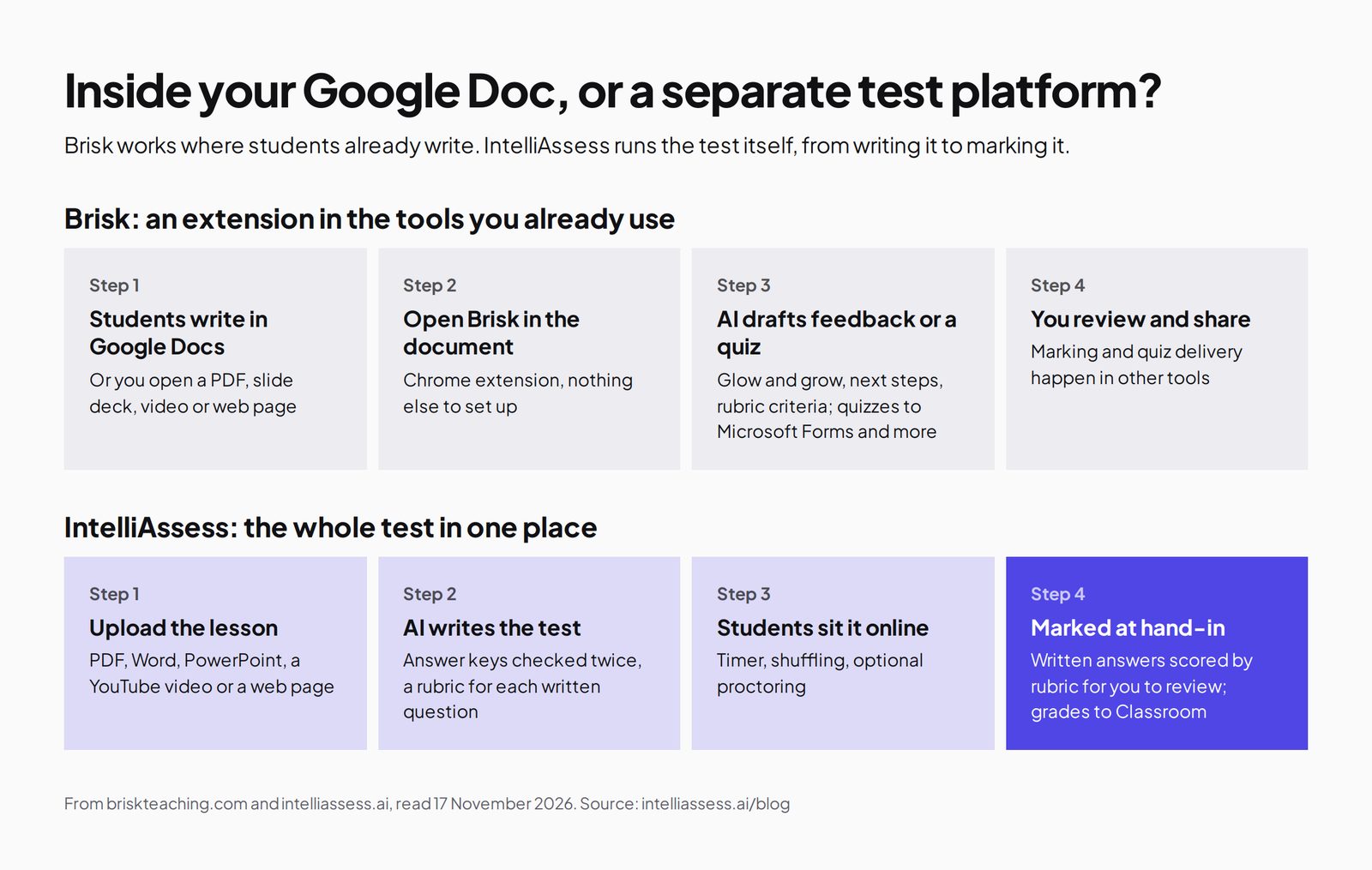
Inside your Google Doc, or a separate test platform?
The key question is whether you want AI where students already write, or a place to run the test itself. Brisk is the first; IntelliAssess is the second; many teachers will want both.
The scorecard: 9 Brisk alternatives on 9 published facts
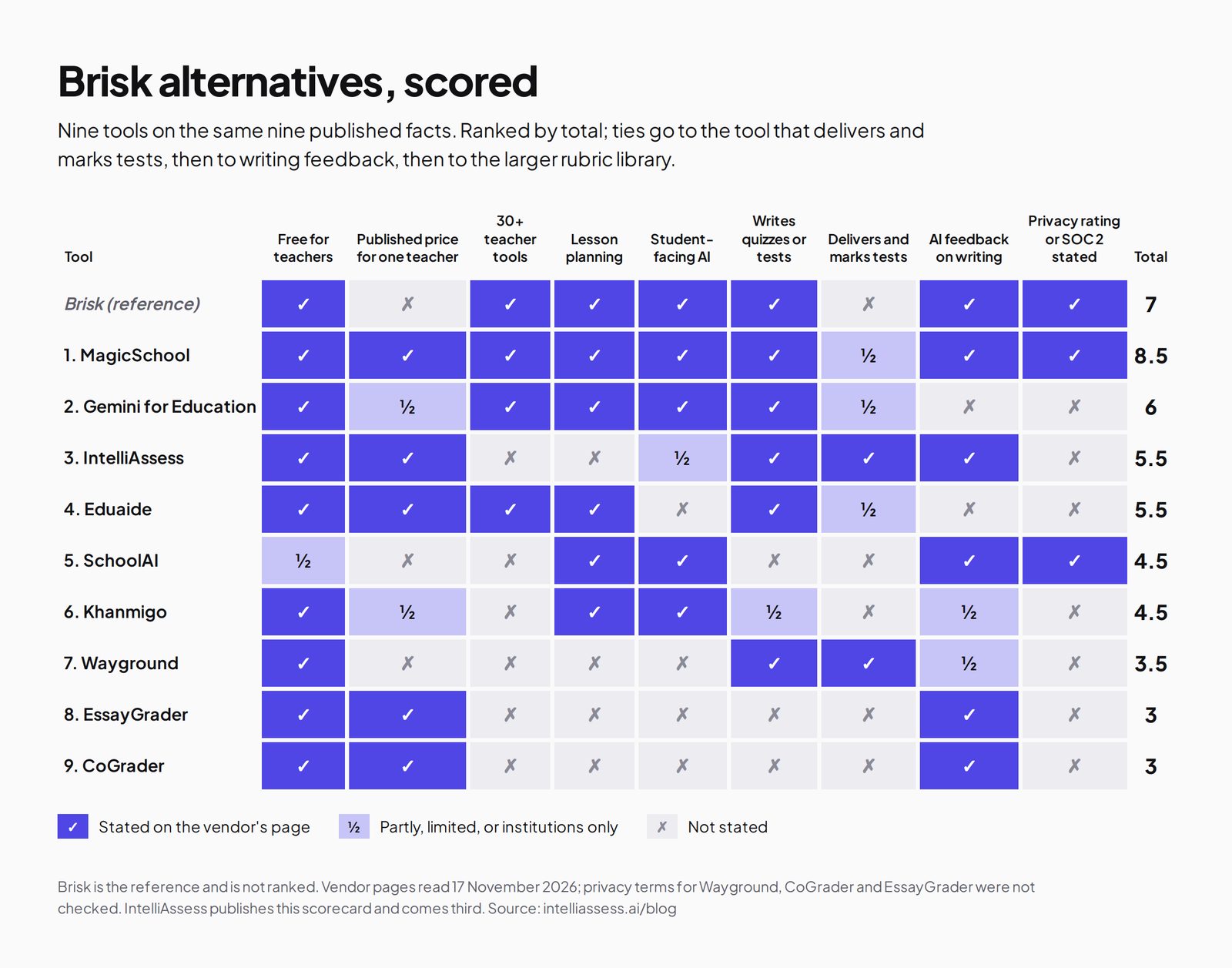
These are the same nine facts as our MagicSchool alternatives scorecard: free for teachers, a published price for one teacher, 30+ teacher tools, lesson planning, student-facing AI, writing quizzes or tests, delivering and marking tests, AI feedback on writing, and a stated privacy rating or SOC 2. A tick means the vendor's own page says so; a half means partly, limited, or only for institutions. Ties go to the tool that delivers and marks tests, then to writing feedback, then to the larger rubric library.
| Tool | Free for teachers | Published price for one teacher | 30+ teacher tools | Lesson planning | Student-facing AI | Writes quizzes or tests | Delivers and marks tests | AI feedback on writing | Privacy rating or SOC 2 stated | Total |
|---|---|---|---|---|---|---|---|---|---|---|
| Brisk itself | ✓ | ✗ | ✓ | ✓ | ✓ | ✓ | ✗ | ✓ | ✓ | 7 |
| 1. MagicSchool | ✓ | ✓ | ✓ | ✓ | ✓ | ✓ | ½ | ✓ | ✓ | 8.5 |
| 2. Gemini for Education | ✓ | ½ | ✓ | ✓ | ✓ | ✓ | ½ | ✗ | ✗ | 6 |
| 3. IntelliAssess | ✓ | ✓ | ✗ | ✗ | ½ | ✓ | ✓ | ✓ | ✗ | 5.5 |
| 4. Eduaide | ✓ | ✓ | ✓ | ✓ | ✗ | ✓ | ½ | ✗ | ✗ | 5.5 |
| 5. SchoolAI | ½ | ✗ | ✗ | ✓ | ✓ | ✗ | ✗ | ✓ | ✓ | 4.5 |
| 6. Khanmigo | ✓ | ½ | ✗ | ✓ | ✓ | ½ | ✗ | ½ | ✗ | 4.5 |
| 7. Wayground | ✓ | ✗ | ✗ | ✗ | ✗ | ✓ | ✓ | ½ | ✗ | 3.5 |
| 8. EssayGrader | ✓ | ✓ | ✗ | ✗ | ✗ | ✗ | ✗ | ✓ | ✗ | 3 |
| 9. CoGrader | ✓ | ✓ | ✗ | ✗ | ✗ | ✗ | ✗ | ✓ | ✗ | 3 |
Brisk scores a cross for a published price because its paid plans are custom-priced for schools, and a cross for delivering and marking tests because its pages describe exporting quizzes rather than running them. MagicSchool's half: quizzes are assigned to students with summaries, but automatic marking is not stated. Gemini: free through Education Fundamentals for institutions; suggested writing feedback is "coming soon", so it scores a cross. IntelliAssess's half for student AI: study notes and plans after learning quizzes, on Pro and up. Privacy terms for Wayground, EssayGrader and CoGrader were not checked for this page. MagicSchool ranks above Brisk itself on these facts, mainly for its published Plus price.
1. MagicSchool: the broadest toolkit, with a paid plan you can buy
Best for: teachers who want a Brisk-style toolkit with more tools and an individual paid plan.
MagicSchool's pricing page lists a free plan with 80+ teacher tools, the Raina chatbot, Quizzes and Class Writing Feedback, which lets you "review, personalize, and send AI-generated feedback on written assignments in batches, based in your rubric". Plus adds unlimited generations and 50+ student tools. It states SOC 2 Type II, FERPA and COPPA programmes and a 95% Common Sense privacy rating, and integrates with Google Docs, Classroom and Canvas.
Price: free; Plus $8.33 a month billed annually ($12.99 monthly); Enterprise on request. Where it falls short: a separate site rather than an extension in your documents, and no replay of how a document was written. See MagicSchool alternatives.
2. Gemini for Education: AI that comes with Google Workspace
Best for: Google schools that want AI inside Classroom without another vendor.
Google's Gemini for Education page says institutions can get it "at no cost" through Google Workspace for Education Fundamentals. Teachers can generate exams, quizzes and rubrics with answer keys and plan lessons, and Gemini in Classroom offers "30+ use cases" with teacher-led AI experiences for students. Suggested feedback on writing assignments is listed as "coming soon".
Price: free with Fundamentals for qualifying institutions; Google AI Pro for Education add-on $15 to $24 per user a month. Where it falls short: institution-led, and writing feedback not yet available. See Google Forms vs IntelliAssess.
3. IntelliAssess: when the quiz needs to become a marked test
Best for: teachers who use Brisk mainly for quizzes and feedback, and want the test delivered, marked and, when needed, proctored in one place.
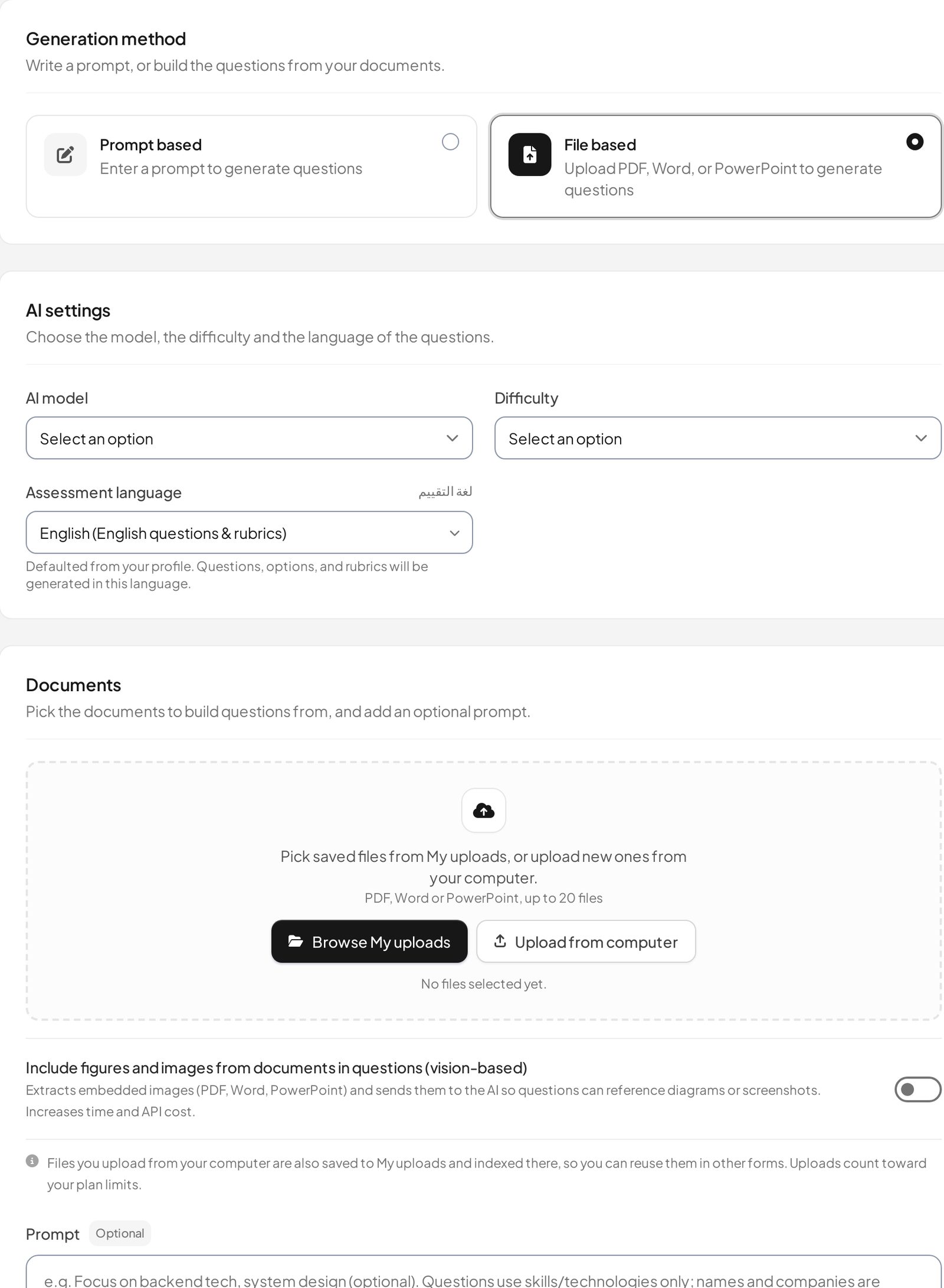
IntelliAssess's AI quiz generator writes a full test, up to 100 questions across eight types, from a topic, your files, a YouTube video or a web page, checks every answer key in a second pass, and drafts a rubric for each written question. Students sit the test online, from a link or Google Classroom, with timers and shuffling. Choice questions are marked at hand-in, and AI grading scores each written answer against every rubric criterion with a comment you can change before release. For tests at home, proctoring adds ID and webcam checks. It works in English and Arabic.
Price (from our pricing page): Free for 25 students; Starter $39 a month for 200; Pro $99 for 500; yearly costs ten months. AI grading and proctoring start on Starter. Where it falls short: no extension inside Docs, no feedback on documents written elsewhere, no replay of writing, no lesson planning or slides, and no privacy certifications listed. See Brisk vs IntelliAssess.
4. Eduaide: a resource builder with a low price
Eduaide's pricing page lists 120+ resource templates, an Assessment Builder with nine question types, and exports to Google Docs, DOCX, Google Forms or PDF. It reports 1 million+ educators signed up. Price: Free with 24 credits a month; Pro $5.99 a month or $49.99 a year. Best for: teachers who mostly make materials and want a cheap paid plan.
5. SchoolAI: supervised AI for students
SchoolAI's pricing page centres on Spaces, AI learning experiences teachers design and assign, with full review of student conversations and safety alerts, plus writing-analysis feedback and live translation in 60+ languages. It states FERPA, COPPA and SOC 2 Type 2. Price: a free trial with 5 Space launches a year; Pro and Scale on quote. Best for: schools focused on student-facing AI. See SchoolAI vs IntelliAssess.
6. Khanmigo: free teacher tools and a tutor
Khanmigo's pricing page is headed "Free for teachers", with lesson planning tied to Khan Academy content, summaries of student work, and help creating rubrics and exit tickets; learners pay $4 a month for tutoring. Best for: teachers already using Khan Academy.
7. Wayground: self-marking practice
Wayground (formerly Quizizz) is free for teachers, with quizzes that mark themselves, AI that generates and adapts content, and 20+ accommodations. Its plans page lists AI grading with custom and state rubrics on the School and District plan. Brisk can send quizzes to Wayground, so the two work together. See Wayground vs IntelliAssess.
8 and 9. EssayGrader and CoGrader: if essays are the main load
If you use Brisk mostly for feedback on essays, a dedicated grader may suit better. EssayGrader offers 800+ standards-aligned rubrics, reads handwriting, learns from essays you have graded, and checks for AI writing and plagiarism on paid plans: free for 100 essays a month, Pro $14.99 a month. CoGrader offers 500+ state-standard rubrics including STAAR and Regents, reads handwriting, and syncs with Google Classroom: free for 150 submissions a month, Individual $15 a month billed annually. Both score essays against a rubric rather than drafting feedback only. See CoGrader and EssayGrader alternatives.
Prices side by side
| Tool | Free option | Paid option for one teacher | Schools and districts |
|---|---|---|---|
| Brisk | Free for teachers, 30+ tools | None published | Premium and Intelligence, custom |
| MagicSchool | Free, 80+ tools | Plus $8.33 a month billed annually | Enterprise on request |
| Gemini for Education | Free with Education Fundamentals (institutions) | None for individuals | AI Pro add-on $15 to $24 per user a month |
| IntelliAssess | 25 students | Starter $39 a month for 200 students | Pro $99, Intensive $249, published |
| Eduaide | 24 credits a month | Pro $5.99 a month or $49.99 a year | On request |
| EssayGrader | 100 essays a month | Pro $14.99 a month | Quoted |
| CoGrader | 150 submissions a month | Individual $15 a month billed annually | Quoted |
Feedback on writing: drafts, scores and replays
Brisk's feedback is drafted in the document for you to review, in several styles, with rubric scoring as an opt-in. MagicSchool drafts batch feedback based on your rubric for you to send. EssayGrader and CoGrader score essays against a rubric, with standards-aligned libraries and handwriting support. IntelliAssess scores written answers inside its own tests against every rubric criterion, with a reason a teacher can change. On authorship, Brisk's Inspect Writing replays how a Google Doc was written; EssayGrader and CoGrader check submitted text for AI writing and plagiarism on paid plans; IntelliAssess supervises a test with proctoring instead. Each answers a different question, so pick by where your students write.
Privacy claims compared
| Tool | What its own pages state |
|---|---|
| Brisk | 95% Common Sense privacy rating, FERPA and COPPA compliant, GDPR aligned, working toward SOC 2 Type II |
| MagicSchool | SOC 2 Type II, FERPA and COPPA programmes, 95% Common Sense rating |
| SchoolAI | FERPA, COPPA and SOC 2 Type 2 |
| Gemini for Education | Google Workspace for Education terms; data not used to train AI models |
| IntelliAssess | Encrypted identity photos with short-lived links; no certifications listed |
Student-facing AI: what to check
Brisk Boost, MagicSchool's student tools, SchoolAI Spaces, Khanmigo's tutor and Gemini for students all put AI in front of children. Before turning any of them on, check four things. Can the teacher see every conversation? Brisk says "teachers have visibility into all student chats with Brisk Boost", and SchoolAI and MagicSchool make similar statements. Are conversations flagged for safety? Brisk says it flags chats with "profanity, insults, and violence". How do students get in? Brisk Boost activities open by link, QR code or class code with no accounts, while its student Chrome extension is an add-on on the School and District plan. And can access be limited to school hours? Brisk lists admin-controlled access windows. IntelliAssess's student-facing AI is much narrower: after a Learning-purpose quiz, on Pro and up, a student can get AI notes per question and a short study plan built from their marks, with no open chat.
Keeping Brisk and adding a test platform
Many teachers do not need to replace Brisk at all. It is free, it works where students already write, and its feedback and Inspect Writing are hard to match inside Google Docs. What it does not do is run a timed test, mark it and, for tests at home, check who is sitting it. A common setup is to keep Brisk for lesson materials, quick quizzes and feedback on drafts, and use a test platform for unit tests and exams: IntelliAssess for tests with written answers and proctoring, or Wayground for self-marking practice. Both IntelliAssess and Brisk work with Google Classroom, so students still start from the class they know.
Getting started with an alternative
- Pick one job to move first, such as unit tests or essay grading, rather than replacing Brisk across the board.
- Use the same material. Upload the lesson or text you would have opened Brisk on, so the new tool works from what you actually taught.
- Write or check the rubric before grading a full class, and run five pieces you have already marked through it.
- Tell students where to find it, through Google Classroom or a link in your usual channel.
- Compare after one cycle: marking time, how many students had trouble starting, and whether the scores matched your judgement.
Which alternative for which teacher
- A teacher who wants more tools and an individual paid plan: MagicSchool.
- A Google school that wants AI inside Classroom: Gemini for Education.
- A teacher whose quizzes need to become marked, timed or proctored tests: IntelliAssess, alongside Brisk for feedback.
- A teacher marking many essays against state rubrics: EssayGrader or CoGrader.
- A school focused on safe AI for students: SchoolAI, or Brisk Boost on a school plan.
- A teacher who wants a cheap paid resource builder: Eduaide.
Where IntelliAssess is not the right choice
- You want AI inside your Google Docs, Slides and LMS: keep Brisk.
- You give feedback on essays written over days: Brisk, EssayGrader or CoGrader.
- You want lesson plans, slides and differentiated materials: Brisk, MagicSchool or Eduaide.
- Your district requires SOC 2 or a privacy rating: MagicSchool or SchoolAI state the most.
How to choose a Brisk alternative
- Name the job you want done differently: planning, feedback, student AI or tests.
- Decide whether you need AI inside your documents or a separate place to run tests.
- Check what your school already licenses, including Google Workspace editions.
- Try two free plans on a real week of work.
Browse every comparison or see IntelliAssess for schools.
Frequently asked questions
What is the best alternative to Brisk?
For the broadest toolkit with a paid plan you can buy yourself, MagicSchool. For Google schools, Gemini for Education. For quizzes that become marked tests, IntelliAssess. For grading essays against state rubrics, EssayGrader or CoGrader.
Is Brisk free?
Yes, for teachers. Its paid Premium and Intelligence plans for schools and districts are custom-priced.
Is Brisk better than MagicSchool?
They are close. Brisk works inside your documents and LMS as an extension and replays how students wrote; MagicSchool has more tools, a published Plus plan and SOC 2 Type II. Many teachers try both.
Does Brisk detect AI writing?
Brisk's Inspect Writing replays how a Google Doc was written, including pasted text, and Brisk says it "doesn't produce an accuracy score". EssayGrader and CoGrader check submitted text for AI writing on paid plans.
Can Brisk grade a quiz?
Brisk's pages describe creating quizzes and sending them to Microsoft Forms, Canvas (on school plans), Nearpod or Wayground, where they are delivered. IntelliAssess delivers and marks the test itself.
Which Brisk alternative works in Arabic?
IntelliAssess writes, delivers and grades tests in Arabic, right to left. Brisk generates materials in 50+ languages.
Does Brisk work with Canvas and Schoology?
Yes. Brisk says it works inside Canvas, Schoology and Google Classroom as a Chrome extension; Canvas QTI export and LTI 1.3 for Canvas and Schoology are listed for its Schools and Districts plans. IntelliAssess works with Google Classroom only.
Can I use Brisk and IntelliAssess together?
Yes. Use Brisk for lesson materials, quick quizzes and feedback in Google Docs, and IntelliAssess for unit tests and exams that need marking and, at home, proctoring. Both work with Google Classroom.
Does Brisk have a paid plan for one teacher?
Not on its plans page, which lists a free plan for teachers and custom-priced plans for schools and districts. MagicSchool Plus, Eduaide Pro, EssayGrader Pro, CoGrader Individual and IntelliAssess Starter can all be bought by one teacher.
Keep reading
All articles
Read next
SchoolAI alternatives: 7 AI tools for teachers and students scored (2026)
Seven AI tools scored on the same nine facts, with SchoolAI as the reference, and what each lets teachers see when students use AI.

SchoolAI vs IntelliAssess: an AI tutor for students or feedback after a test?
SchoolAI puts students in supervised conversation with AI; IntelliAssess marks their tests and uses AI to help them learn from their own answers.
Motasem Aldiab 12 min read

Jotform and ProProfs alternatives for quizzes and exams (2026)
Jotform and ProProfs side by side, then the alternatives by forms, certificates or real exams.
Motasem Aldiab 2 min read