
MagicSchool vs IntelliAssess: an AI teacher toolkit or a test platform?

By Motasem Aldiab, Technology Consultant and Trainer - Cloud, DevOps, Java, Data Science
Contents24
- The short answer
- MagicSchool vs IntelliAssess at a glance
- What MagicSchool is
- What IntelliAssess is
- Ask each for a unit test: what you get
- Feature by feature
- Planning and materials
- Student-facing AI
- Writing feedback and scores
- Delivering and supervising tests
- Results
- Integrations and languages
- Privacy
- How far to trust AI feedback and scores
- One week, two ways
- Where MagicSchool is better
- Where IntelliAssess is better
- What students see
- Rolling it out to a school
- Using MagicSchool and IntelliAssess together
- Pricing
- Questions to ask before choosing
- Choose MagicSchool if
- Choose IntelliAssess if
Key takeaways
- 1MagicSchool is free for teachers with 80+ tools; Plus is $8.33 a month billed annually.
- 2Its quizzes are low-stakes checks and its writing feedback is drafted for you to send.
- 3IntelliAssess writes full tests, scores written answers by rubric and proctors exams.
- 4Plan in MagicSchool and test in IntelliAssess: both work with Google Classroom.
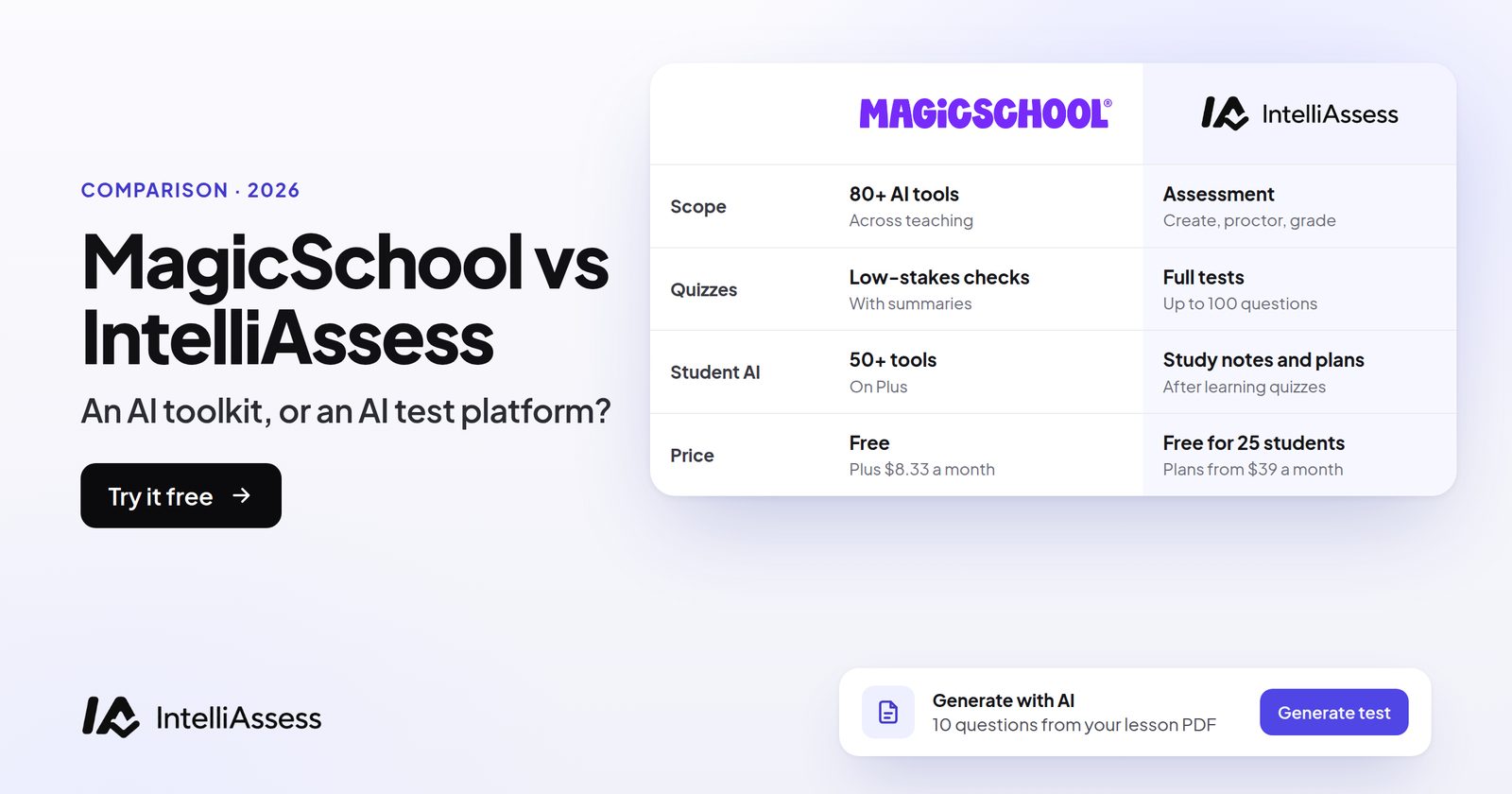
MagicSchool vs IntelliAssess compares an AI toolkit for the whole teaching week with an AI platform for one part of it: tests. MagicSchool gives teachers 80+ AI tools for lesson plans, materials, differentiation and feedback, low-stakes quizzes and 50+ student tools, free or $8.33 a month billed annually. IntelliAssess writes full tests from your material, delivers and marks them, scores written answers against each rubric criterion, and proctors exams at home, free for 25 students or from $39 a month. MagicSchool does far more jobs; IntelliAssess does the testing job more completely. Many teachers will use both.
The short answer
Choose MagicSchool if you want one AI assistant across planning, worksheets, IEPs, presentations and feedback, with AI tools for students and strong, stated privacy credentials, at a very low price. Choose IntelliAssess if your time goes on setting, running and marking tests: you want a full test written from your material, written answers scored rather than only commented on, and exams at home supervised. Use both if you want help across the week and a proper home for tests.
MagicSchool vs IntelliAssess at a glance
| MagicSchool | IntelliAssess | |
|---|---|---|
| Scope | 80+ teacher tools across planning, materials, differentiation and feedback | Assessment: write, deliver, mark, proctor and analyse tests |
| Quizzes | Low-stakes formative checks such as exit tickets, assigned with real-time summaries; a multiple-choice quiz maker | Full tests up to 100 questions across eight types, answer keys checked in a second pass |
| Written work | Class Writing Feedback: AI feedback based on your rubric, reviewed and sent in batches | AI scores each rubric criterion with a comment; the teacher changes any score before release |
| Delivering exams | Not described | Timers, scheduled starts, shuffling, PINs and attempt limits on paid plans |
| Proctoring | Not described | ID, selfie and liveness check, then webcam, microphone, screen and browser checks |
| Student AI | 50+ student tools (Plus), with teacher visibility and moderation | AI study notes and study plans after Learning-purpose quizzes, Pro and up |
| Integrations | Google Docs, Classroom, Canvas and more; Enterprise adds Clever, ClassLink, Canvas, Schoology and SSO | Google Classroom |
| Privacy | SOC 2 Type II, FERPA and COPPA programmes, 95% Common Sense rating, EU Data Privacy Framework | Encrypted identity photos with short-lived links; no certifications listed |
| Languages | Not stated on the pages we read | English and Arabic, right to left |
| Price | Free; Plus $8.33 a month billed annually ($12.99 monthly); Enterprise on request | Free for 25 students; Starter $39 a month for 200; Pro $99; Intensive $249 |
What MagicSchool is
MagicSchool's Free plan, "Forever Free" for individual teachers, includes 80+ teacher tools, the Raina chatbot, Quizzes and Class Writing Feedback. Plus adds unlimited generations, unlimited output history and editing, 50+ student tools, student learning insights and advanced tool features. Enterprise adds a custom data privacy agreement, SIS and LMS integrations, single sign-on, district alignment (tools that follow the district's own curriculum and handbooks), customisation, guardrails, moderation and data dashboards.
For students, MagicStudent offers "50+ AI study tools designed to support learning, guided by educators every step of the way", in Student Rooms where teachers "choose and configure AI tools, set learning goals, and share them with students". Interactions are stored so authorised educators can see them. On its homepage, MagicSchool reports that teachers save "7-10" hours a week on average, and outputs export to Google Docs, Slides and Microsoft files.
On privacy, its trust page lists SOC 2 Type II, participation in iKeepSafe's FERPA and COPPA programmes, 1EdTech TrustEd Apps certification and the EU Data Privacy Framework, and it reports a 95% Common Sense privacy rating. Its homepage says, "We don't use student or teacher data to train AI."
What IntelliAssess is
IntelliAssess is built around the test. Its AI quiz generator writes questions from a topic, up to 20 PDF, Word or PowerPoint files, a YouTube video or a web page, across multiple choice, multi-select with partial credit, true or false, fill in the blanks, short answer and written answers, and checks each answer key a second time. The rubric generator drafts criteria for each written question. You review and edit everything before students see it.
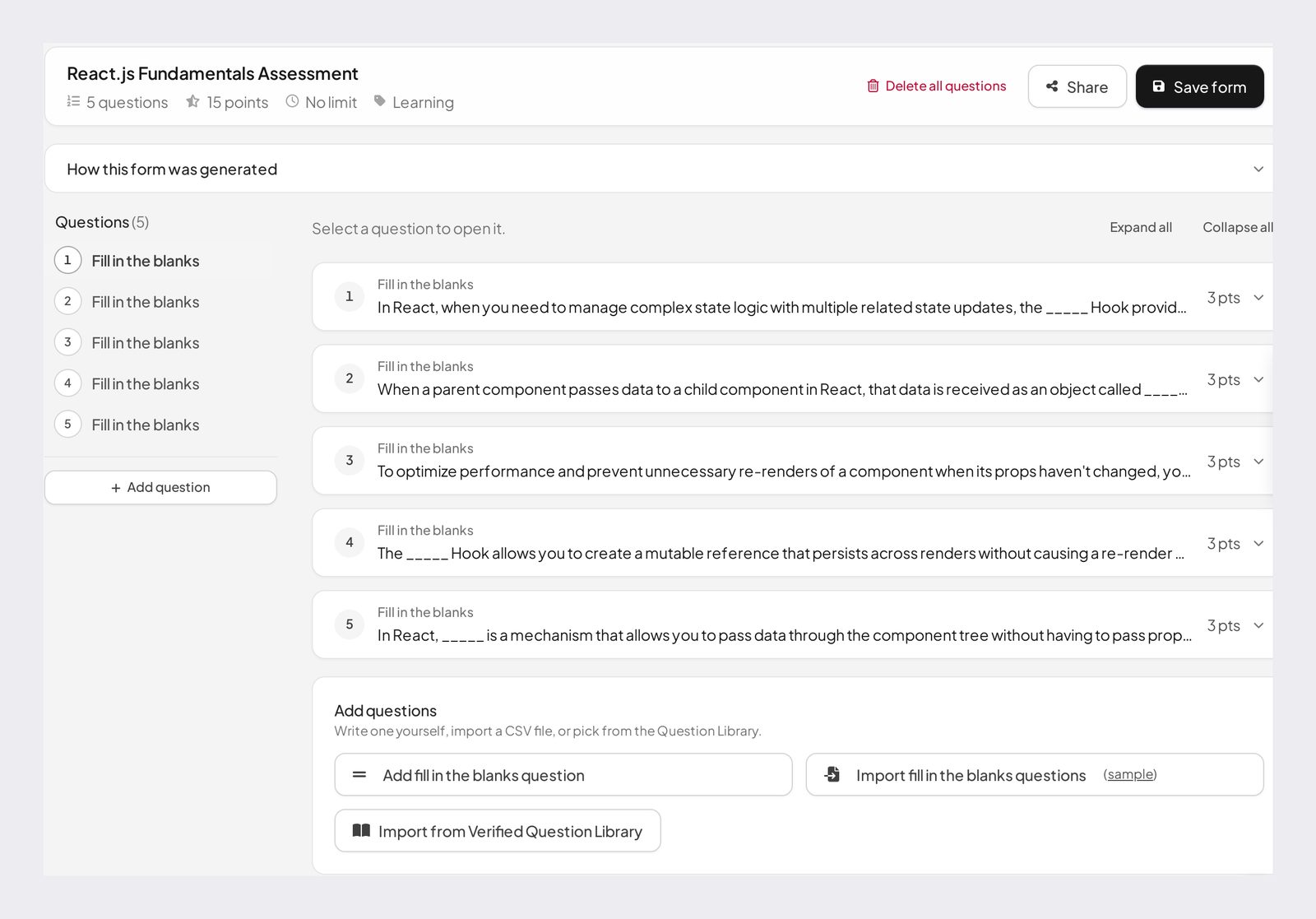
Students sit the test online, from a link or Google Classroom. Choice questions are marked at hand-in, and AI grading scores each written answer against every criterion of its rubric with a comment you can change. For exams at home, online proctoring checks identity with an ID photo, a selfie and a liveness check, then watches webcam, microphone, screen and browser, with a report per attempt. Analytics show results by question, topic, question type and rubric criterion, and grades sync to Google Classroom.
What it does not have: lesson-planning, IEP, worksheet or presentation tools; open AI chat for students; LMS integrations beyond Google Classroom; and privacy certifications on its pages.
Ask each for a unit test: what you get
The clearest way to see the difference is to give both the same request: "a unit test on photosynthesis for Year 9, with two short written answers".
In MagicSchool, you would use its Multiple Choice Quiz Maker ("Generate a custom multiple choice quiz for any assignment") or another generator, and get questions you can edit and export to Google Docs or Slides, or assign as a low-stakes Quiz in a Student Room with a real-time summary of how students did. For the written answers, its Rubric Generator can draft a rubric, and Class Writing Feedback can draft comments on students' responses for you to review and send. Turning that into a timed, marked unit test means moving it into another tool, such as Google Forms.
In IntelliAssess, you upload the unit's slides or describe the topic, choose the mix (say, fifteen multiple choice and two written answers), and get a test with answer keys checked and a rubric drafted for each written question. You set a time limit and publish it to Google Classroom. When students hand in, the choice questions are marked, the written answers are scored against the rubric for you to review, and the results appear by question and criterion. If some students sit it at home, you switch on proctoring first.
MagicSchool gets you to good questions quickly; IntelliAssess carries the same questions through to marks.
Feature by feature
Planning and materials
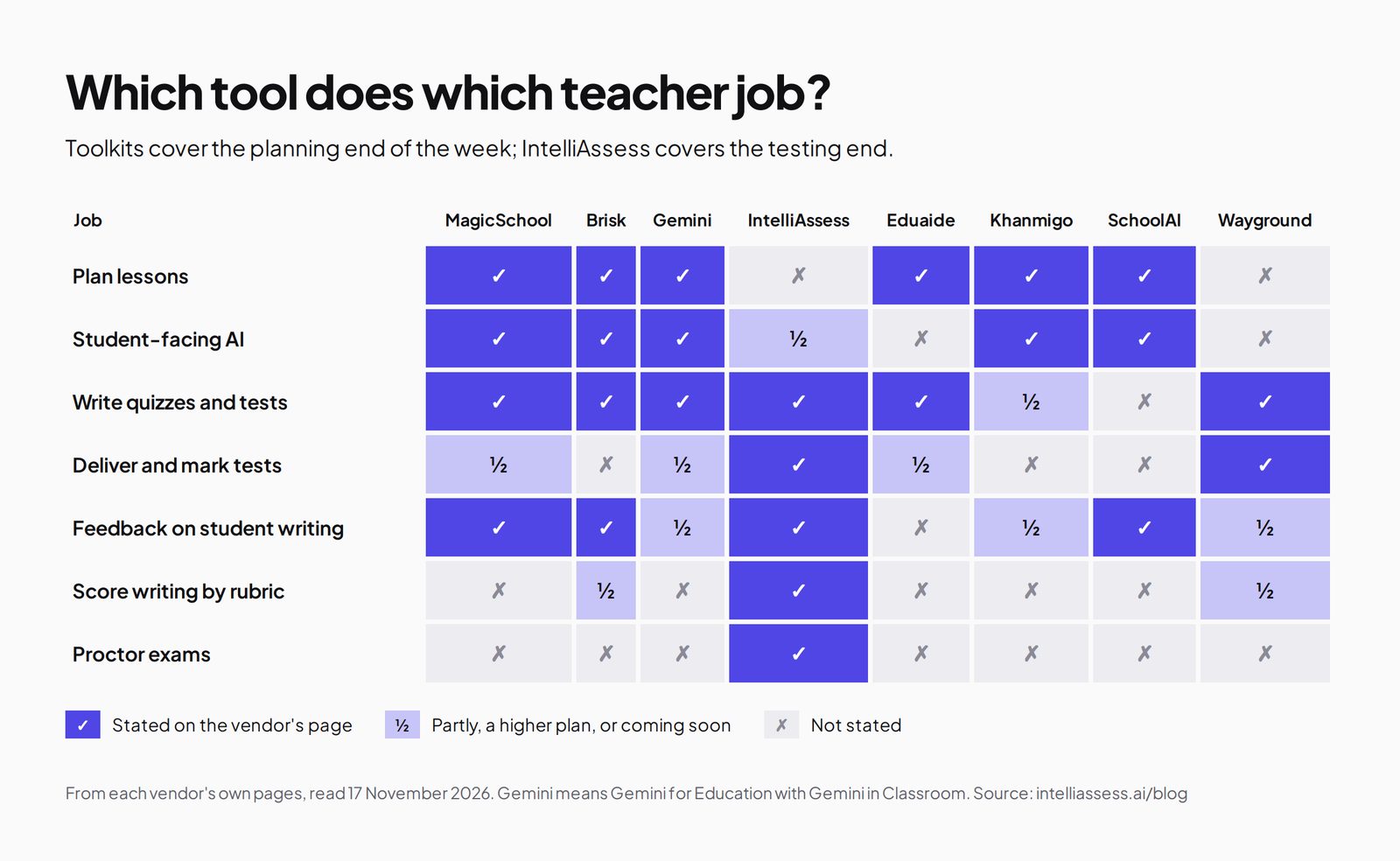
MagicSchool is the clear choice: 80+ tools for lesson plans, worksheets, IEPs, presentations, differentiation and more, with district alignment on Enterprise. IntelliAssess has none of these outside assessment.
Student-facing AI
MagicSchool offers 50+ student tools on Plus, in Student Rooms that teachers configure, with moderation and stored conversations for teacher visibility. IntelliAssess offers no open chat. On Learning-purpose quizzes, on Pro and up, it gives each student AI notes per question and a short study plan with links, built from their final marks.
Writing feedback and scores
MagicSchool's Class Writing Feedback drafts feedback "based in your rubric" in batches, which you personalise and send. Its pages do not say it gives a score per criterion. IntelliAssess scores each written answer against every criterion with a comment, and leaves a written question with no rubric "not evaluated" rather than scoring it zero. You can change any score before results are released.
Delivering and supervising tests
MagicSchool assigns low-stakes Quizzes to students with real-time summaries; its pages do not describe timers, scheduled starts, auto-marking or proctoring. IntelliAssess adds timers, scheduled starts, shuffled questions and options, PIN-protected tests and attempt limits on paid plans, and identity, webcam, microphone, screen and browser checks from Starter, with a report per attempt.
Results
MagicSchool gives real-time summaries on Quizzes, student learning insights on Plus and data dashboards on Enterprise. IntelliAssess analytics show completion, average and median score, pass rate, time taken, a question map sorted hardest first, results by topic, difficulty, question type and rubric criterion, and PDF reports per test, per student and per submission.
Integrations and languages
MagicSchool integrates with Google Docs, Classroom, Canvas and more, with Clever, ClassLink, Canvas and Schoology on Enterprise. IntelliAssess works with Google Classroom only, but writes, delivers and grades in Arabic as well as English. MagicSchool's pages we read do not state its languages.
Privacy
MagicSchool states considerably more: SOC 2 Type II, FERPA and COPPA programmes, a 95% Common Sense rating and a custom data privacy agreement on Enterprise. IntelliAssess stores identity and evidence photos encrypted, opens them only through short-lived links, and saves location only if you switch that check on, but lists no certifications. If your district requires SOC 2, ask us before you buy.
How far to trust AI feedback and scores
Both tools keep the teacher in charge: MagicSchool's feedback is reviewed before you send it, and IntelliAssess's scores can be changed before results are released. That matters, because research on AI marking is mixed. A synthesis of 65 studies from 2022 to 2025 found agreement between large language models and human raters "varied substantially both across and within studies". In practice, the rubric does much of the work: criteria that describe what you would see in a good answer produce more consistent scores and comments than vague ones. Whichever tool you use, check a handful of results against your own marking in the first weeks, and reword any criterion where the AI and you keep disagreeing.
One week, two ways
Take a secondary science teacher with four classes. On Monday they plan the week's lessons; on Wednesday they differentiate a reading for two students with IEPs; on Friday each class sits a unit test with written answers, and one student is off sick and sits it at home.
With MagicSchool alone, Monday and Wednesday are quick: lesson plans, a re-levelled reading and IEP-aligned materials in minutes. Friday's test can be drafted in MagicSchool, but it has to be delivered and marked somewhere else, the written answers are marked by hand with AI feedback drafts to help, and the student at home sits it on trust.
With IntelliAssess alone, Monday and Wednesday get no help. Friday's test is written from the unit slides, delivered with a time limit, marked at hand-in with written answers scored against the rubric, and the student at home completes an identity check and sits it proctored.
With both, MagicSchool handles Monday and Wednesday, and IntelliAssess handles Friday. For one teacher paying out of pocket, that is $99.96 a year for MagicSchool Plus (or nothing on Free) plus $390 a year for IntelliAssess Starter.
Where MagicSchool is better
- Breadth. 80+ teacher tools against IntelliAssess's assessment tools only.
- Price for one teacher. Free, or $99.96 a year for Plus.
- Student AI. 50+ student tools with teacher visibility and moderation.
- Privacy credentials. SOC 2 Type II, FERPA and COPPA programmes, a 95% Common Sense rating and a custom data privacy agreement on Enterprise.
- Integrations. Canvas, Schoology, Clever and ClassLink on Enterprise, as well as Google.
Where IntelliAssess is better
- Full tests. Up to 100 questions across eight types, with answer keys checked a second time.
- Marking. Choice questions marked at hand-in, written answers scored per rubric criterion.
- Exams at home. Identity, webcam, microphone, screen and browser checks, with a report per attempt.
- Results by criterion. Analytics by question, topic, question type and rubric criterion.
- Arabic. Tests written, delivered and graded right to left.
What students see
In MagicSchool, students work in Student Rooms their teacher has set up, using the AI tools and goals the teacher chose, and take low-stakes Quizzes there. Written work comes back with the feedback the teacher reviewed and sent. In IntelliAssess, students open a test from Google Classroom or a link, sit it with any time limit or proctoring the teacher set, and see their marks and a comment for each rubric criterion when results are released. They also get a progress page with their scores over time and a PDF of their own results, and on Learning-purpose quizzes, a short study plan. They never see other students' scores.
Rolling it out to a school
MagicSchool is built for district roll-out: Enterprise adds single sign-on, SIS and LMS integrations through Clever, ClassLink, Canvas and Schoology, tool controls and guardrails, district alignment to local curriculum, dashboards and a dedicated customer service manager. IntelliAssess is usually adopted by a teacher or a department first. Schools add students by email, CSV import or, for younger students without email, a nickname and PIN, and organise them into groups. Team workspaces on Pro and up add five roles (Viewer, TA or grader, Teacher, Admin and Owner), shared question-library categories and an activity feed, so a department can share tests and let a teaching assistant review AI scores without being able to delete a test.
Using MagicSchool and IntelliAssess together
The two overlap only at quiz writing and writing feedback, so they fit together easily. Plan, differentiate and create materials in MagicSchool. When it is time for a unit test or exam, build it in IntelliAssess from the same lesson files, so it covers what you actually taught, and let it mark and, if needed, supervise the test. Keep MagicSchool's low-stakes Quizzes for exit tickets during the week, where a real-time summary is all you need. Both work with Google Classroom, so students see one place for their work. If your district already licenses MagicSchool Enterprise, nothing about that changes; IntelliAssess sits alongside it for the tests that need marking and supervision, and can be tried on its Free plan with one class of up to 25 students before anyone pays; AI grading of written answers and proctoring start on Starter.
Pricing
MagicSchool is free for teachers. Plus is $8.33 per user a month billed annually ($99.96 a year) or $12.99 billed monthly, and Enterprise for districts is priced on request, with volume discounts mentioned in its FAQ.
IntelliAssess publishes its prices: Free for 25 students; Starter $39 a month for 200 students; Pro $99 for 500; Intensive $249 for 2,000. Yearly billing costs ten months, so Starter is $390 a year. AI question writing is on every plan; AI grading of written answers and proctoring start on Starter. For one teacher, MagicSchool is much cheaper. IntelliAssess's price covers delivering, marking and supervising tests for up to 200 students, which MagicSchool's pages do not describe.
Questions to ask before choosing
- Where does most of my AI time go: planning and materials, or tests and marking?
- Do my quizzes need to be timed, marked automatically and supervised, or are exit tickets enough?
- Do I want feedback drafts on student writing, or a score per rubric criterion?
- Will students use AI themselves, and has my district approved a student-facing tool?
- Does my district require SOC 2 or a signed data privacy agreement?
- Do I teach in a language other than English, such as Arabic?
Choose MagicSchool if
- You want AI help across planning, differentiation, IEPs and worksheets.
- Your assessments are mostly exit tickets and quick formative checks.
- You want feedback drafts on student writing at very low cost.
- You want supervised AI tools for students, or your district needs SOC 2 and a data privacy agreement.
Choose IntelliAssess if
- You set unit tests and exams and want them written, delivered and marked in one place.
- You want written answers scored against each criterion, not only commented on.
- Students sit tests at home and you need identity and webcam checks.
- You teach in Arabic.
Comparing more tools? See MagicSchool alternatives, scored on nine published facts, Brisk vs IntelliAssess, or every comparison.
Frequently asked questions
Is IntelliAssess a MagicSchool alternative?
For tests and marking, yes. For everything else MagicSchool does, such as lesson plans, IEPs, worksheets and student AI tools, it is not; many teachers use both.
Can MagicSchool grade essays?
MagicSchool's Class Writing Feedback drafts feedback on written assignments in batches, based on your rubric, for you to review and send. Its pages do not say it assigns scores per criterion. IntelliAssess scores each written answer against every criterion with a comment you can change.
Is MagicSchool free?
Yes, for individual teachers, with 80+ tools, Quizzes and Class Writing Feedback. Plus is $8.33 a month billed annually or $12.99 monthly; Enterprise is priced on request.
Does MagicSchool have proctoring?
Its pages, read on 17 November 2026, describe low-stakes quizzes and no proctoring. IntelliAssess includes identity, webcam, microphone, screen and browser checks from its Starter plan.
Can MagicSchool quizzes be marked automatically?
MagicSchool says its Quizzes come with real-time summaries; its pages do not describe automatic marking or timed exams. IntelliAssess marks choice questions at hand-in and scores written answers against a rubric.
Is MagicSchool safe for students?
MagicSchool states SOC 2 Type II, FERPA and COPPA programmes and a 95% Common Sense privacy rating, and says student interactions are moderated and visible to authorised educators. Check your district's approval before turning on student tools.
Can I use MagicSchool and IntelliAssess together?
Yes. Plan and create materials in MagicSchool, and build, deliver and mark unit tests in IntelliAssess. Both work with Google Classroom.
Does IntelliAssess have AI tools for students like MagicStudent?
Not in the same way. IntelliAssess has no open AI chat or student toolkit. On Learning-purpose quizzes, on Pro and up, it gives each student AI notes per question and a short study plan built from their marks.
Which is better for a district?
For an AI platform for every teacher and student, with SSO, rostering and a data privacy agreement, MagicSchool Enterprise. For a published-price assessment platform that departments can adopt for tests, marking and proctoring, IntelliAssess, after checking it meets your privacy requirements.
Which is cheaper for one teacher?
MagicSchool: free, or $99.96 a year for Plus. IntelliAssess Starter is $390 a year, and covers delivering, marking and proctoring tests for up to 200 students.
Does MagicSchool work with Google Classroom?
MagicSchool's homepage says it integrates with Google Docs, Classroom, Canvas and more, and exports outputs to Google and Microsoft files. IntelliAssess publishes tests to Google Classroom and syncs grades and criterion scores there.
Keep reading
All articles
Read next
SchoolAI alternatives: 7 AI tools for teachers and students scored (2026)
Seven AI tools scored on the same nine facts, with SchoolAI as the reference, and what each lets teachers see when students use AI.

SchoolAI vs IntelliAssess: an AI tutor for students or feedback after a test?
SchoolAI puts students in supervised conversation with AI; IntelliAssess marks their tests and uses AI to help them learn from their own answers.
Motasem Aldiab 12 min read

Jotform and ProProfs alternatives for quizzes and exams (2026)
Jotform and ProProfs side by side, then the alternatives by forms, certificates or real exams.
Motasem Aldiab 2 min read