
Gradescope vs IntelliAssess (2026): paper, typed or code?

By Motasem Aldiab, Technology Consultant and Trainer - Cloud, DevOps, Java, Data Science
Contents24
- The short answer
- At a glance
- What Gradescope is
- What IntelliAssess is
- Three lanes: paper, typed and code
- Paper
- Typed online
- Code
- Setting up an assignment
- Where each fits by subject
- What the AI does
- Rubrics and regrades
- Statistics and feedback
- Academic integrity
- What students do
- Integrations
- Pricing compared
- A week with each
- Schools, languages and support
- Privacy and security
- Using both
- Questions to ask before you decide
- Who should choose which
- Where IntelliAssess falls short
Key takeaways
- 1IntelliAssess does not grade scanned or handwritten work; Gradescope is built for it.
- 2Gradescope AI groups similar answers; IntelliAssess AI drafts a score per rubric criterion.
- 3Gradescope Basic is free; AI grouping, bubble sheets, code and LMS sync are on quoted Institutional.
- 4IntelliAssess is free for 25 students and from $39 a month, with proctoring for tests at home.
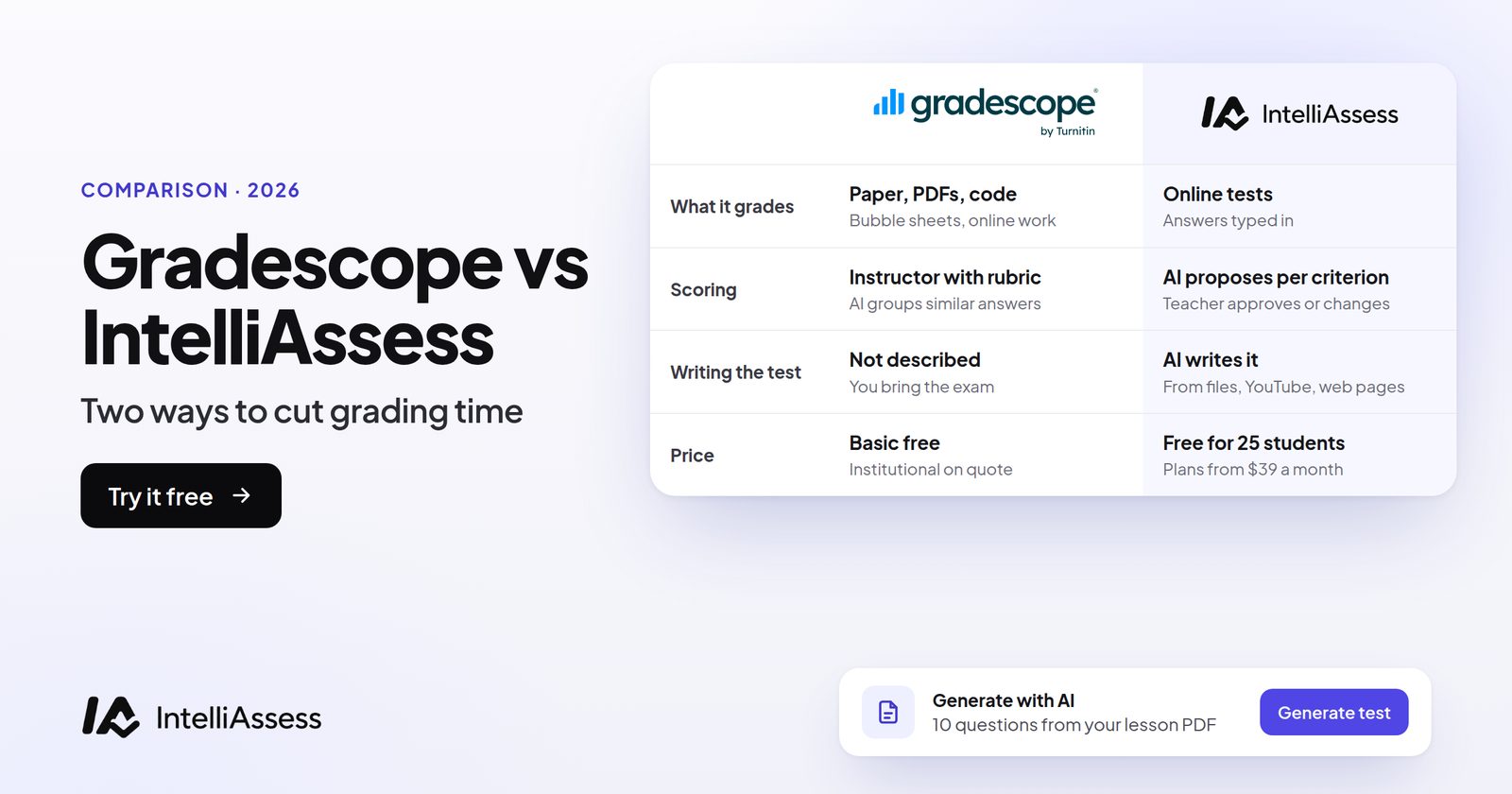
Gradescope vs IntelliAssess comes down to how your students hand in their work. Gradescope, from Turnitin, is built for paper: scanned handwritten exams, photographed homework, bubble sheets and code, graded question by question with dynamic rubrics and AI that groups similar answers. IntelliAssess does not grade scanned or handwritten work at all. It is built for tests taken online: it writes the test from your material, marks each typed written answer against your rubric with AI for you to review, and can proctor the test in the browser. This page compares them lane by lane, on AI, rubrics, integrity, integrations and price.
The short answer
Choose Gradescope if students write exams or homework on paper, if you teach STEM subjects with fixed-template answers, if you give bubble-sheet exams, or if you grade programming assignments. Choose IntelliAssess if your tests are taken online with typed short answers and essays, if you want the questions written for you, or if you want AI to draft a mark for every written answer rather than group them. Use both if your department has paper exams and online tests.
At a glance
| Gradescope | IntelliAssess | |
|---|---|---|
| Built for | Paper, uploads and code, mostly in universities | Online tests in schools and universities |
| Scanned handwritten exams | Yes: batch scanning, page splitting, roster matching | No |
| Bubble sheets | Yes, up to five key versions (Institutional) | No |
| Programming assignments | Autograder in any language, code similarity (Institutional) | Not for classes |
| Typed online tests | Online assignments (Institutional) | Yes, the core of the product |
| Writes the questions | No | Yes, from files, YouTube videos or web pages |
| What the AI does | Groups similar answers for some question types | Drafts a score and reason for each rubric criterion |
| Rubrics | Dynamic: changes apply to graded work | Per-criterion rubrics, AI-drafted, teacher edits any score |
| Regrades | Regrade requests | Re-mark requests |
| Proctoring | Not described | ID, face match, webcam, microphone, screen and browser checks |
| Integrations | LMS integration and SSO (Institutional) | Google Classroom with grade sync |
| Price | Basic free; Institutional quoted | Free for 25 students; from $39 a month |
What Gradescope is
Gradescope says it has graded "700M+" questions for "140k+" instructors at "2,600+" universities and "3.2M+" students (Gradescope). It started with paper and is still best at it.
- Exams on paper: scanned in batches, split into submissions automatically, and matched to the roster, with leftovers matched by hand (getting started).
- Homework: students upload PDFs or photos, including from a mobile app that "allows students to upload work without the use of a scanner".
- Question-by-question grading with a dynamic rubric, so each grader sees one question across all students.
- Answer groups: group similar answers and grade each group once; on Institutional, AI forms the groups for some question types.
- Bubble sheets: answer keys in up to five versions, separated by version when scanned.
- Programming: any language, graded manually, by autograder or both, with submissions from GitHub or Bitbucket and code similarity reports.
- Regrades and statistics: regrade requests after release; statistics per assignment, question and rubric item, with questions tagged by concept.
What IntelliAssess is
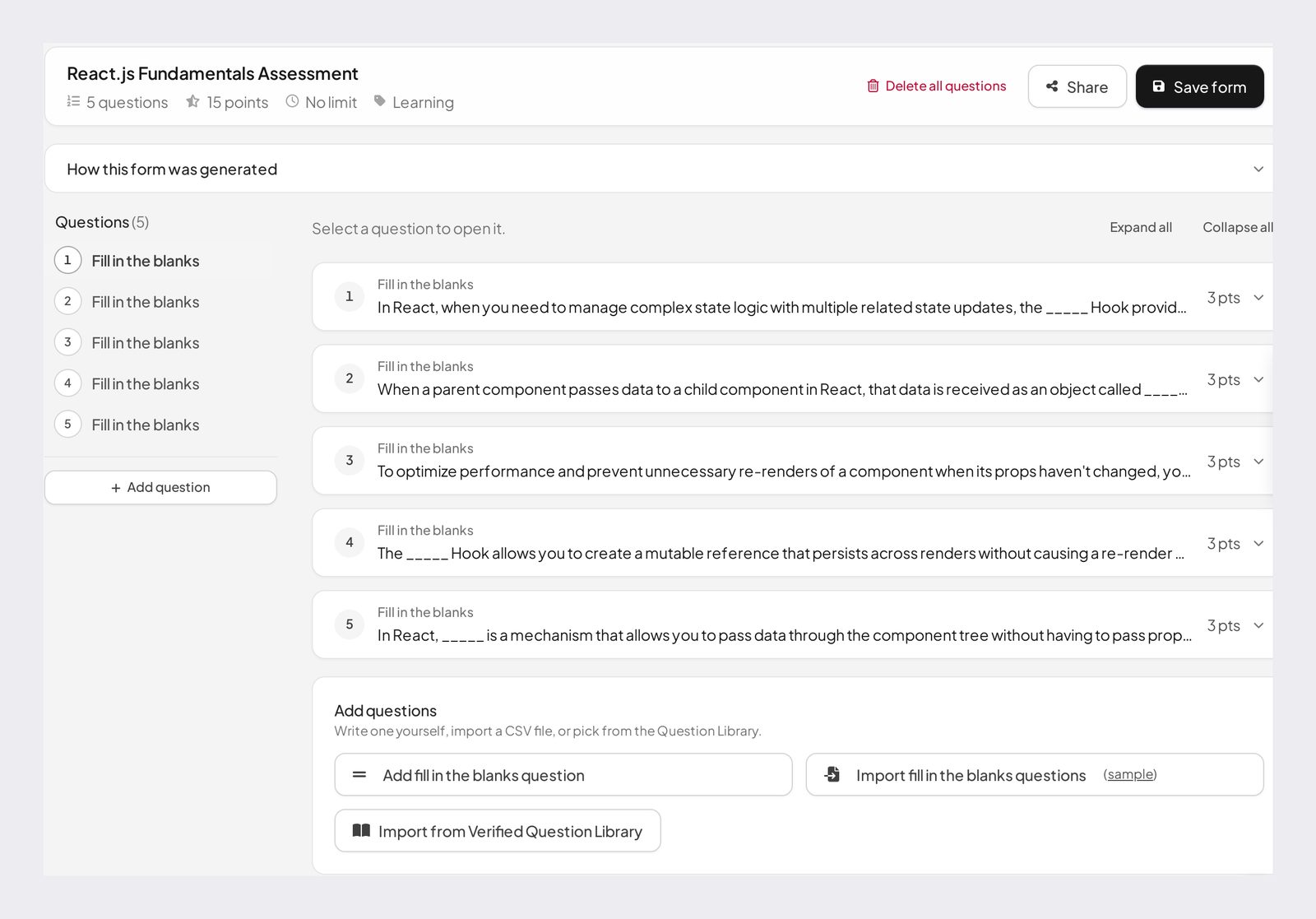
IntelliAssess builds, runs and marks online tests. The AI quiz generator writes questions from your PDF, Word or PowerPoint files, a YouTube video or a web page, across eight question types, and checks each answer key in a second pass. The rubric generator drafts a rubric for every written question. AI grading scores each typed answer on every criterion with a reason, and the teacher reviews, changes and releases. Tests can be proctored in the browser, shared by link or posted to Google Classroom, and the interface works in English and Arabic.
Three lanes: paper, typed and code
Paper
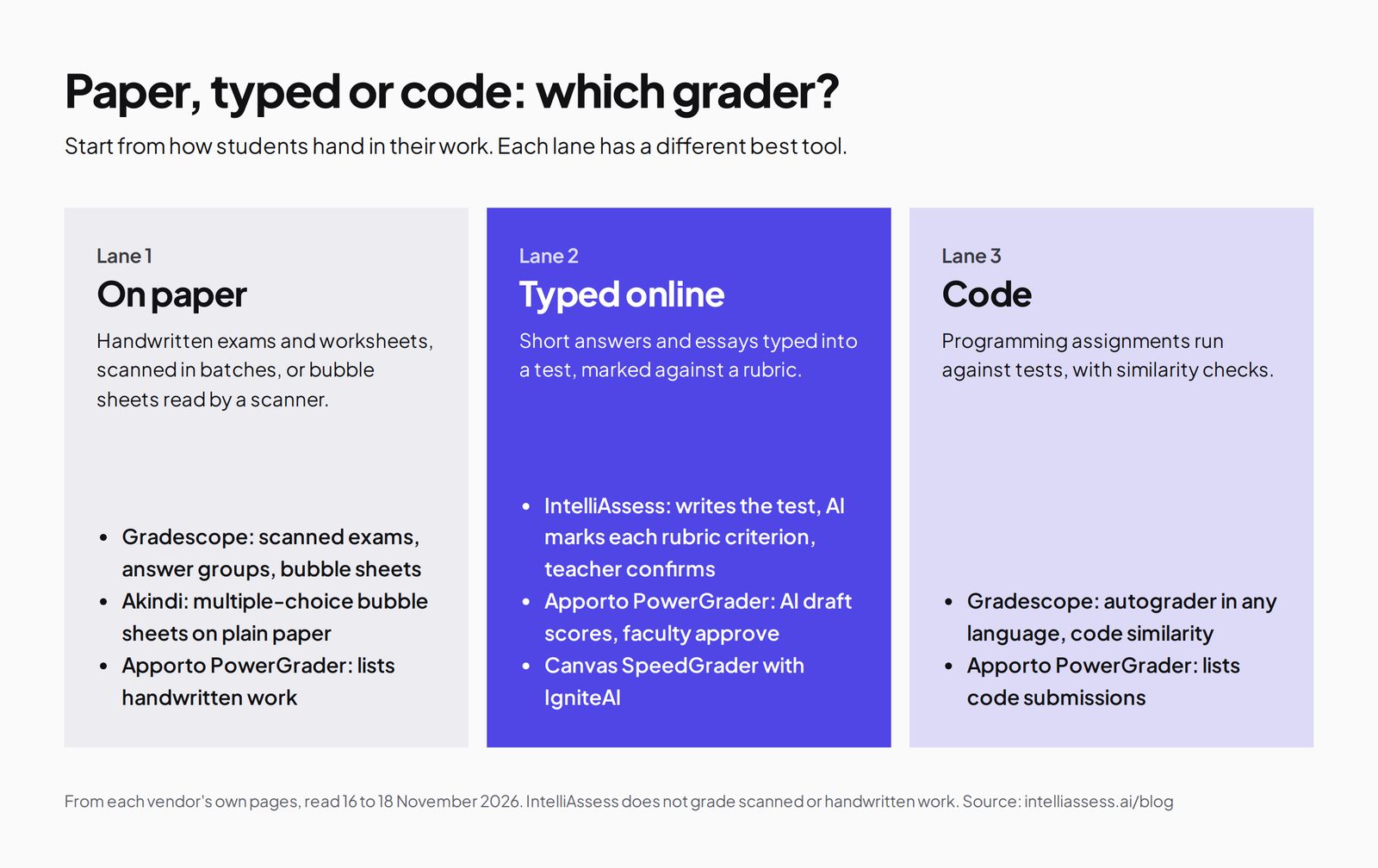
Gradescope's lane, and IntelliAssess has nothing to offer here. If your students write on paper, keep Gradescope, or see Gradescope alternatives for bubble-sheet tools such as Akindi.
Typed online
Both can handle this lane, in different ways. Gradescope's online assignments, on Institutional, offer multiple choice, short answer, check boxes and file uploads, graded with its rubric and grouping tools. IntelliAssess is built around it: the test is written for you, typed answers are marked against the rubric by AI, and the test can be proctored. This is the lane where IntelliAssess leads.
Code
Gradescope's autograder runs in any language with similarity checks. IntelliAssess's coding tasks are part of its hiring product, not its class plans, so for programming courses, Gradescope is the choice.
Setting up an assignment
In Gradescope, an exam starts as your own paper exam; for fixed-template assignments, the questions sit in the same place on every copy, and you add a rubric for each question, before or while grading. After the exam, you scan the papers and upload them in batches; Gradescope splits the scan into submissions and matches names to your roster. For homework, students upload their own PDFs or photos, of variable length. Programming assignments need an autograder you write or adapt, with tests that run against each submission.
In IntelliAssess, a test starts from your material. You upload a chapter, slides or a link, pick question types and difficulty, and edit the draft. Each written question gets a rubric, drafted by the rubric generator and edited by you. You set the time limit, attempts and schedule, choose proctoring if the test is taken at home, and share the link or post it to Google Classroom. Students type their answers; nothing is scanned.
Gradescope's setup is about turning paper into gradable data. IntelliAssess's setup is about writing the test and the rubric, after which marking is drafted for you.
Where each fits by subject
Gradescope's homepage shows examples from computer science, physics, mathematics, chemistry, biology, engineering and economics. These are subjects where students work problems by hand, show steps on paper, and often reach the same answer, which is where scanning, question-by-question grading and answer groups save the most time.
IntelliAssess fits subjects where answers are written in sentences and differ from student to student: humanities, languages, social sciences, business and the explanatory parts of science courses. Its rubric marking works on short answers and essays rather than worked calculations on paper. A science teacher who sets typed explanation questions can use it; one who sets pages of handwritten derivations should use Gradescope.
What the AI does
Both use AI to save marking time, at a different step. Gradescope's AI sorts; IntelliAssess's AI scores.
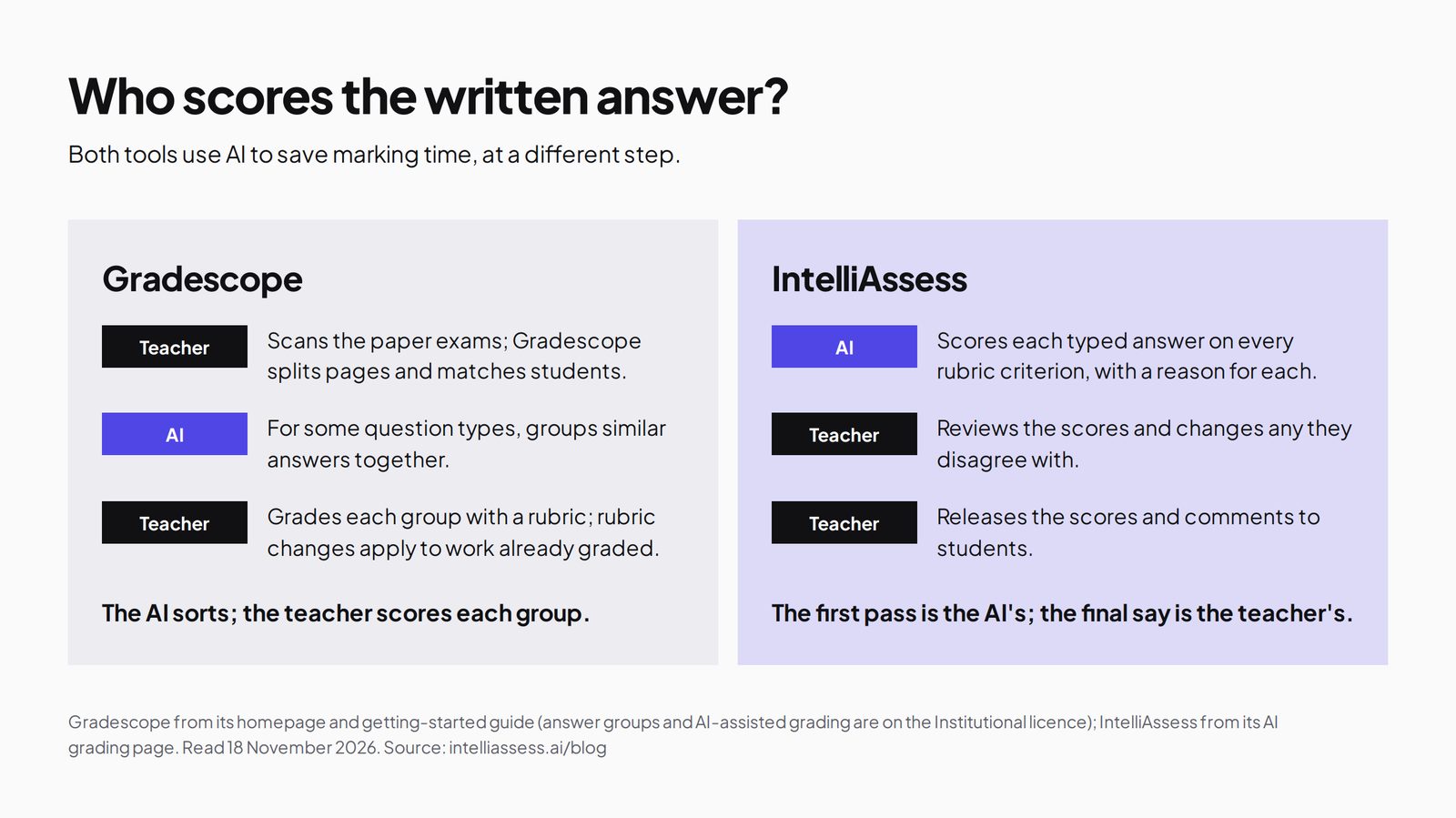
Gradescope: "AI-Assisted Answer Groups" use AI "to automatically group similar student answers that instructors can review and grade (available only for some question types)", for fixed-template assignments, on the Institutional licence. The instructor gives one grade to each group. One instructor quoted on Gradescope's site graded "10 multiple choice questions for approximately 250 students in 15 minutes". Grouping works best when many students give the same answer: a numerical result, a formula, a labelled diagram. The pages we read do not say Gradescope's AI assigns scores itself or marks essays.
IntelliAssess: every typed answer gets a draft score on each rubric criterion, with a written reason, before the teacher sees it. The teacher reads, accepts or changes each score, and releases results when ready. This works for answers that differ from student to student, such as explanations, short essays and case answers, where grouping helps less.
So the better AI depends on the answers. Identical numerical answers across 300 students: grouping wins. Thirty different paragraphs explaining a concept: a drafted score per criterion wins.
Rubrics and regrades
Gradescope's dynamic rubric is one of its best features: you can "make rubric changes that apply to previously graded work", so if you decide halfway through that a mistake deserves fewer points off, every paper already graded updates. IntelliAssess's rubrics are per criterion with levels; the AI drafts a score for each, and the teacher can change any score and comment before release. It does not describe re-scoring graded work automatically when a rubric changes, so decide your rubric before marking, or re-run AI grading.
Both let students push back. Gradescope has regrade requests after grades are released, which instructors can switch off per assignment. IntelliAssess has re-mark requests, which notify the teacher, and students can also practise the questions they missed.
Statistics and feedback
Gradescope gives statistics per assignment, per question and per rubric item, and lets you tag questions with concepts or learning objectives, which suits large courses tracking which topics students miss. IntelliAssess shows results per test, and students see their strongest and weakest skills from graded tests and practice. On Pro and above, learning quizzes add study notes, study plans and an "Explain this to me" option for students.
Academic integrity
Gradescope's integrity features fit its lanes: anonymous grading to reduce bias, and code similarity for programming, both on Institutional. Paper exams are usually supervised in a room, so the grading tool does not need to watch students.
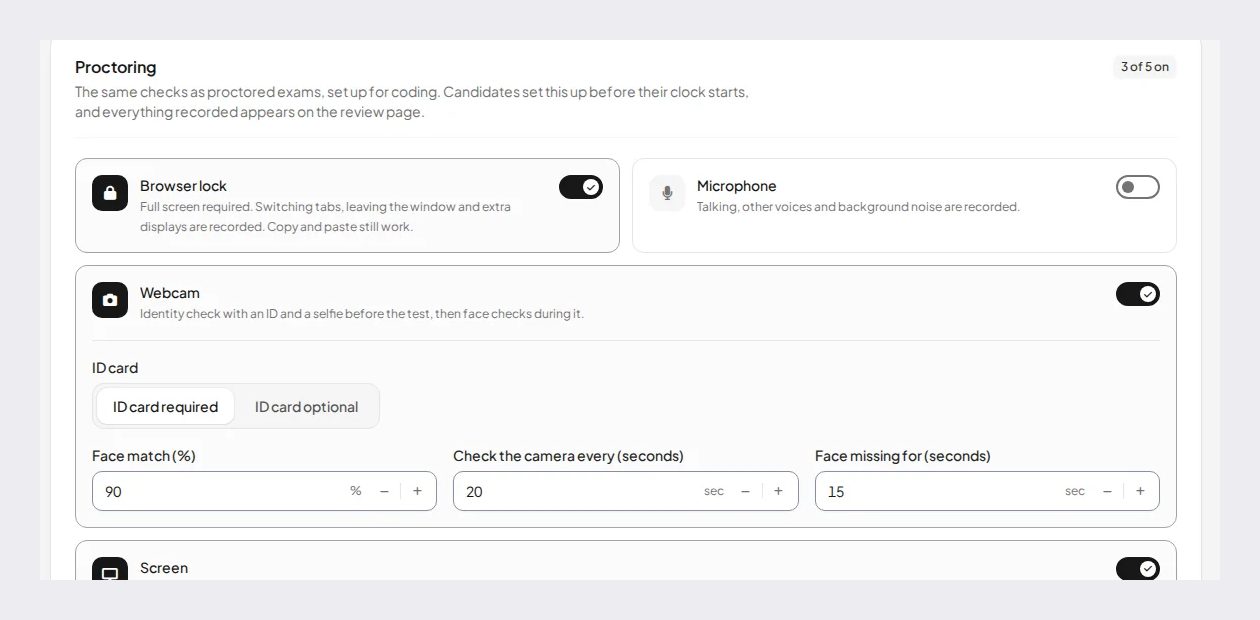
IntelliAssess's tests are often taken at home, so it adds checks during the test: an ID photo, live selfie, liveness check and face match before; webcam, microphone, whole-screen and browser checks during. Teachers choose how strict to be: Lenient gives warnings only, Balanced warns first and submits the attempt if problems keep happening, and Strict allows at most one warning. Each attempt gets a report.
What students do
With Gradescope, students sit a paper exam in the room and never touch Gradescope until results come out, or they upload homework as PDFs or photos, using the mobile app if they have no scanner. After release, they see each question with the rubric items applied and the instructor's comments, and can send a regrade request if they think something was missed. For programming work, they submit code, sometimes straight from GitHub, and see the autograder's results.
With IntelliAssess, students open a test link or a Google Classroom assignment and type their answers. On a proctored test, they take an ID photo and a selfie and allow the camera, microphone and screen first. When the teacher releases results, they see a mark and a comment for each rubric criterion, can ask for a re-mark with a reason, and can practise the questions they got wrong.
The student experience follows the lane: paper and uploads for Gradescope, typed tests for IntelliAssess.
Integrations
Gradescope's LMS integration, single sign-on and administrator dashboard are on Institutional, and are not part of the one-term trial. The pages we read do not list which LMSs. IntelliAssess publishes tests to Google Classroom and sends grades back; it does not integrate with Canvas, Moodle, Blackboard or Brightspace. For a university on Canvas that needs grades to flow automatically, Gradescope Institutional fits and IntelliAssess does not.
Pricing compared
Gradescope has two plans (pricing). Basic is free and includes dynamic rubrics, question-by-question grading, student and instructor PDF uploads, statistics, regrade requests, data export and the student app. Institutional is priced on request, with a one-term trial, and adds AI-powered grading and roster matching, collaborative and anonymous grading, programming, online and bubble-sheet assignments, code similarity, LMS integration, SSO and an administrator dashboard. Individual instructors can use Basic; Institutional is bought by the institution. The pricing page carries a 2023 copyright, so check it with Gradescope.
IntelliAssess (pricing): Free for 25 students; Starter $39 a month for 200; Pro $99 for 500; Intensive $249 for 2,000; yearly billing costs ten months. AI grading and proctoring start on Starter.
| Case | Gradescope | IntelliAssess |
|---|---|---|
| One instructor, 150 students, scanned paper exams | Basic, free | Not supported |
| One instructor, 150 students, typed short answers weekly | Basic has no online assignments; Institutional, quoted | Starter, $390 a year billed yearly |
| A department, 400 students, programming assignments | Institutional, quoted | Not for classes |
| A school, 400 students, typed tests at home with proctoring | No proctoring described | Pro, $990 a year, with a monthly face-check allowance |
Gradescope Basic is unbeatable for one instructor grading scans for free. IntelliAssess is the only one of the two with a published paid price for AI features that one instructor can buy.
A week with each
A chemistry instructor with Gradescope: Monday's quiz is on paper. After class, a teaching assistant scans the stack; Gradescope splits it and matches names. The instructor grades question 1 across all 200 students, using answer groups so every "0.25 mol" is graded at once, then moves to question 2. A rubric item is adjusted halfway, and the papers already graded update. Grades are released, and three students submit regrade requests.
A history teacher with IntelliAssess: on Monday, the teacher uploads the chapter, gets a draft quiz with three short-answer questions and a rubric for each, edits two questions, and posts it to Google Classroom. Students take it at home with webcam checks. On Wednesday, every answer has a draft score per criterion with a reason; the teacher reads them, changes a few, and releases results, which flow back to Classroom. One student asks for a re-mark.
The two weeks hardly overlap. That is the point: they are tools for different kinds of work, and the right one is the one that matches how your students hand theirs in.
Schools, languages and support
Gradescope is used mostly in universities, but its sign-up form also lists high schools, middle schools and elementary schools, and its pricing form has a secondary education option, so schools can use it. Its pricing page is available in English, German, Mexican Spanish, French, Brazilian Portuguese and Turkish, and the Institutional licence includes dedicated onboarding and training, which is not part of the trial.
IntelliAssess is built for teachers in schools as well as universities: plans count students, one teacher can sign up and pay, and tests can be posted straight to Google Classroom. Its interface and generated tests work in English and Arabic, right to left included, which matters for schools teaching in Arabic. Questions and rubrics are generated in the language you choose for the test.
If you are a school teacher with typed tests, IntelliAssess is the more natural fit. If you are a school with paper exams in mathematics or science, Gradescope Basic is free to try.
Privacy and security
Gradescope lists SSO on Institutional and links a privacy policy from every page; its mobile app keeps students' work in Gradescope rather than a third-party scanner app. IntelliAssess stores identity and evidence photos encrypted, opens them only through short-lived links, records location only if the teacher switches that check on, and lists no certifications. Proctoring collects personal data, so tell students what is recorded and who sees it.
Using both
A department with both paper and online assessment can run each in its own tool: midterms and finals on paper through Gradescope, weekly typed quizzes and written tests through IntelliAssess. Because IntelliAssess can be bought by one teacher or department, and Gradescope Basic is free, a trial of the split costs little. Keep grades in one place by exporting from each, or through Google Classroom where IntelliAssess is used.
If you try a split, decide the rule in advance and tell students: for example, anything sat in the exam hall goes through Gradescope, and anything taken online goes through IntelliAssess. Compare the hours spent marking each kind of work after one term. If the typed work took less time with drafted marks and the scores held up when you checked them, keep the split; if not, you have lost little, because Gradescope Basic stays free and IntelliAssess can be cancelled monthly.
Questions to ask before you decide
- How much of your assessment is on paper, how much typed online, and how much code?
- Are your answers mostly the same across students (numbers, formulas) or mostly different (explanations, essays)?
- Does your institution already license Gradescope Institutional?
- Do tests happen in a supervised room, or at home?
- Must grades sync to Canvas, Moodle, Blackboard or Brightspace, or is Google Classroom enough?
- Do you want the questions written for you?
Paper, same answers, an existing licence and LMS sync point to Gradescope. Typed tests, varied answers, home testing and AI-written questions point to IntelliAssess.
Who should choose which
- Choose Gradescope for paper exams, photographed homework, bubble sheets, programming assignments, fixed-template STEM answers, and Canvas or other LMS sync on Institutional.
- Choose IntelliAssess for typed online tests with written answers, AI-written questions, AI-drafted marks per rubric criterion, proctoring at home, Google Classroom, or Arabic.
Where IntelliAssess falls short
- It does not grade scanned, photographed or handwritten work.
- No bubble sheets.
- No code autograder for classes.
- No Canvas, Moodle, Blackboard or Brightspace integration.
- No retroactive rubric that re-scores graded work when the rubric changes.
For more options, see Gradescope alternatives, CoGrader vs IntelliAssess and Digiexam vs IntelliAssess, or browse every comparison.
Frequently asked questions
Can IntelliAssess grade handwritten or scanned exams like Gradescope?
No. IntelliAssess marks answers typed into its online tests. For scanned or photographed handwritten work, use Gradescope.
Is Gradescope's AI grading the same as IntelliAssess's?
No. Gradescope's AI groups similar answers for some question types so the instructor grades each group once. IntelliAssess's AI drafts a score and reason for each rubric criterion on every typed answer, for the teacher to review.
Is Gradescope free?
Gradescope Basic is free for instructors. AI-powered grading, answer groups, bubble sheets, programming and online assignments and LMS integration are on the Institutional licence, priced on request.
Which is better for essays?
For essays typed into an online test, IntelliAssess drafts a mark per rubric criterion. For handwritten essays on paper, Gradescope lets you grade scans with a rubric, without AI scoring.
Does IntelliAssess work with Canvas?
No. IntelliAssess integrates with Google Classroom. Gradescope lists LMS integration on its Institutional licence.
Can I use Gradescope and IntelliAssess together?
Yes. Many departments could grade paper exams in Gradescope and run typed online tests in IntelliAssess.
Keep reading
All articles
Read next
SchoolAI alternatives: 7 AI tools for teachers and students scored (2026)
Seven AI tools scored on the same nine facts, with SchoolAI as the reference, and what each lets teachers see when students use AI.

SchoolAI vs IntelliAssess: an AI tutor for students or feedback after a test?
SchoolAI puts students in supervised conversation with AI; IntelliAssess marks their tests and uses AI to help them learn from their own answers.
Motasem Aldiab 12 min read

Jotform and ProProfs alternatives for quizzes and exams (2026)
Jotform and ProProfs side by side, then the alternatives by forms, certificates or real exams.
Motasem Aldiab 2 min read