
Honorlock vs IntelliAssess: live proctors or one platform?

By Motasem Aldiab, Technology Consultant and Trainer - Cloud, DevOps, Java, Data Science
Contents28
- The short answer
- Honorlock vs IntelliAssess at a glance
- What Honorlock is
- What IntelliAssess is
- Supervision: where Honorlock leads
- Writing and marking: where IntelliAssess leads
- Feature by feature
- During the exam
- AI tools and leaks
- Integrations
- Students
- Accessibility
- Results and reports
- Languages
- The student's side
- Handling flags fairly
- How far to trust AI marking
- One course, two ways
- Pricing: "no surprise fees" vs a public price
- Privacy
- Where Honorlock is better
- Where IntelliAssess is better
- Running both side by side
- When an exam may not need proctoring
- Getting started
- Questions to ask before choosing
- Choose Honorlock if
- Choose IntelliAssess if
Key takeaways
- 1Honorlock's live proctors review AI flags in real time and can join by chat.
- 2It blocks AI chatbots, detects phones and searches for leaked questions.
- 3IntelliAssess writes exams from your lessons and marks written answers by rubric.
- 4Honorlock is priced by quote; IntelliAssess starts free, then $39 a month.
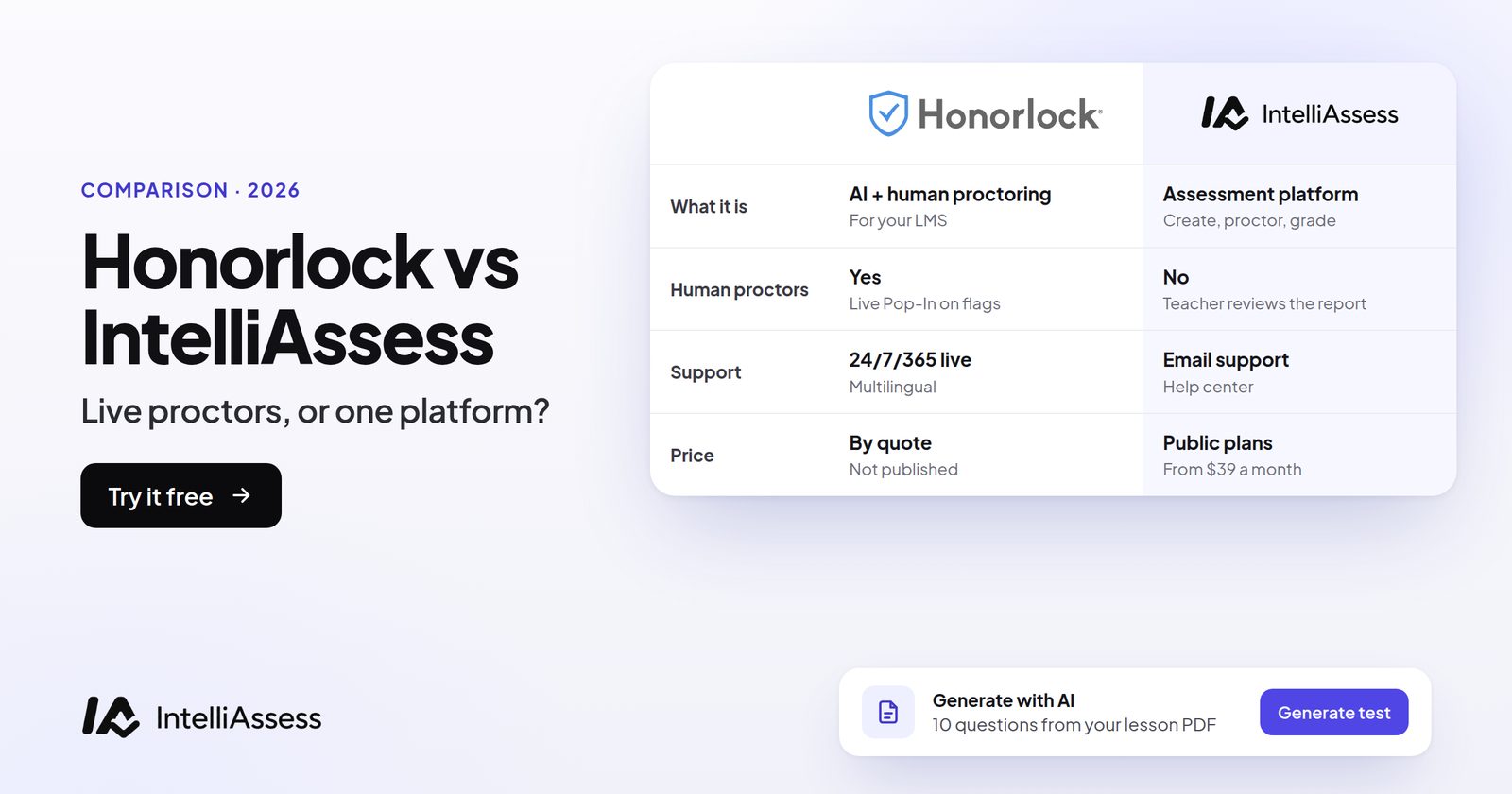
Honorlock vs IntelliAssess compares online proctoring that combines AI flags with live human proctors inside your LMS with a platform that writes, proctors and marks the exam itself. Honorlock reviews AI flags with a live proctor who can join by chat, blocks apps such as AI chatbots, detects phones and voice assistants, searches the web for leaked questions, and integrates with Canvas, Blackboard, Moodle and Brightspace, priced by quote. IntelliAssess writes exams from your lessons, proctors them in the browser with ID and webcam checks and nothing to install, and scores written answers against your rubric with AI, free for 25 students or from $39 a month. Honorlock is far stronger on supervision; IntelliAssess covers writing and marking, which Honorlock leaves to your LMS.
The short answer
Choose Honorlock if your exams live in Canvas, Blackboard, Moodle or Brightspace and you want AI flags reviewed by a live proctor in real time, app blocking for AI chatbots, phone and voice-assistant detection, a search for leaked questions, and stated SOC 2 Type 2 and accessibility credentials. Choose IntelliAssess if you want one tool to write the exam from your lessons, proctor it with nothing for students to install, and give teachers an AI first pass at marking written answers, with a published price and a free start. Run both if you want Honorlock for high-stakes LMS exams and IntelliAssess for frequent tests with written answers.
Honorlock vs IntelliAssess at a glance
| Honorlock | IntelliAssess | |
|---|---|---|
| What it is | Online proctoring for exams in your LMS | Assessment platform: write, deliver, proctor, mark |
| Supervision | AI monitors video, audio and desktop; a live proctor reviews flags and can join by chat, 24/7, no scheduling | Automated: webcam face checks, microphone, whole-screen and browser checks; report reviewed afterwards |
| Identity | Part of its proctoring flow | ID photo, live selfie with head turns, liveness check, face match |
| Blocking | Desktop application blocks apps, including AI chatbots; browser protection | No blocking; events recorded |
| Phones and voice | Handheld device detection; voice-assistant detection | Not described |
| Leaked questions | Search and Destroy finds and takes down shared questions | Not described; new exam versions can be generated |
| Writing and marking | Not part of the product; done in your LMS | AI writes exams from your files; AI scores written answers by rubric |
| Integrations | Canvas, Blackboard, Moodle, Brightspace, Open LMS and more; publisher platforms | Google Classroom |
| What students install | Chrome extension; desktop app if used | Nothing |
| Security | SOC 2 Type 2; U.S.-based data; 365-day default retention | Encrypted identity photos; no certifications listed |
| Price | Quote; models named, no figures | Free for 25 students; Starter $39 a month for 200 |
What Honorlock is
Honorlock "combines AI-powered monitoring with live human proctors". In its Live Pop-In model, AI watches "video, audio, and desktop activity", a proctor reviews each flag in real time "instead of instantly interrupting the session", and for high-stakes violations "the proctor enters the session via 1:1 chat", available "24/7/365" with "no scheduling required". Its desktop application blocks all applications by default, including "AI chatbots like ChatGPT and Claude", while letting admins allow specific ones such as Excel when an exam needs them. It detects visible phones and handheld devices, claims Apple Handoff detection, and listens for voice-assistant commands such as "Hey Siri". Its Search and Destroy feature searches the web for shared exam questions and sends one-click takedown requests.
Honorlock integrates with Canvas, Blackboard, Moodle, D2L Brightspace, Open LMS, Intellum, Docebo and Cornerstone through LTI 1.3, and with publisher platforms such as Pearson MyMathLab, Cengage WebAssign and McGraw-Hill Connect. Students install its Chrome extension and need a webcam and microphone. It says it is "SOC 2 Type 2 Certified", stores data in U.S.-based infrastructure, keeps recordings for a 365-day default that institutions can change, and aims to meet WCAG 2.1 AA.
What IntelliAssess is
IntelliAssess's AI quiz generator writes exams from your PDF, Word or PowerPoint files, a YouTube video or a web page, up to 100 questions across eight types, checks each answer key a second time, and drafts a rubric for each written question. You can also import questions from CSV, Google Forms or a PDF exam.
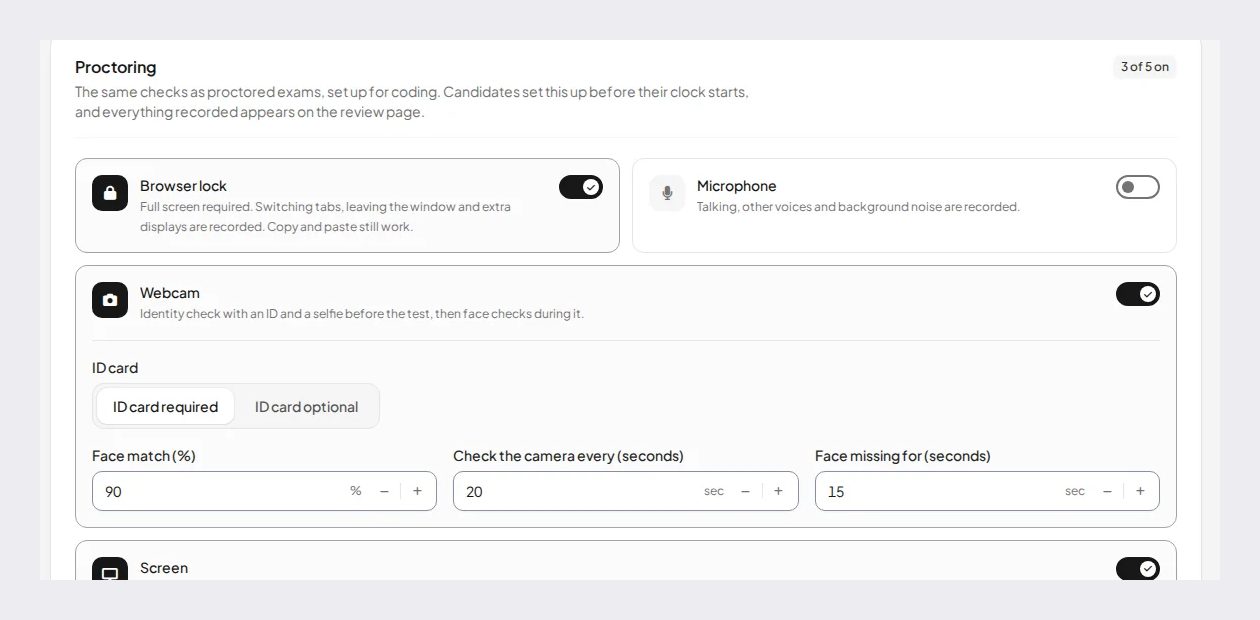
Its online proctoring runs in the browser with nothing to install: an ID photo checked to look like a real document, a live selfie with head turns, a liveness check and a face match (90% by default), then webcam face checks, microphone, whole-screen sharing and browser checks. For each rule you choose whether an event warns, ends the exam or is only recorded, and each attempt has a report with an integrity score and a timeline with photo evidence. AI grading scores each written answer against every rubric criterion with a reason the teacher can change before release. It publishes to Google Classroom and works in English and Arabic.
What it does not have: live proctors, app blocking, phone or voice-assistant detection, a search for leaked questions, Canvas, Blackboard, Moodle or Brightspace integration, tablets or phones for proctored exams, or security certifications on its pages.
Supervision: where Honorlock leads
Honorlock's main advantage is a person in the loop during the exam. Its AI raises flags, but a proctor reviews them in real time and only interrupts when needed, which reduces false accusations from AI flags alone and lets problems be handled while the student is still in the exam. Its app blocking, phone detection and voice-assistant detection target the ways students most often get outside help today. For high-stakes exams, that is a level of supervision IntelliAssess does not offer.
IntelliAssess's proctoring is automated and reviewed afterwards. It records what happened, with photos and a timeline, and lets the teacher decide. That suits frequent tests and exams where after-the-fact review is enough, and it asks students to install nothing. The trade-off is that problems are found after the exam rather than during it, so a student who was flagged learns about it later, and the teacher has to decide what the evidence shows without having been able to ask in the moment.
Writing and marking: where IntelliAssess leads
Honorlock secures an exam your LMS delivers; the questions come from you or a publisher, and written answers are marked in the LMS. IntelliAssess writes exams from your lesson files and gives teachers an AI first pass at marking written answers, with a reason for every criterion. A written answer with no rubric is left "not evaluated" rather than scored zero. For a course with frequent tests and many short written answers, the time saved on writing and marking can matter more than the level of supervision.
Feature by feature
During the exam
Honorlock monitors video, audio and desktop activity with AI, has a proctor review flags in real time, and can block apps. IntelliAssess checks the webcam at intervals, listens through the microphone, records the shared screen and checks the browser, without blocking anything.
AI tools and leaks
Honorlock blocks AI chatbots through its desktop app, listens for voice assistants, and searches the web for leaked questions. IntelliAssess shows other windows and tabs in the screen recording, and can write a new version of an exam from the same material, which makes shared answers less useful.
Integrations
Honorlock works inside the major LMSs and publisher platforms through LTI 1.3. IntelliAssess works with Google Classroom and by link.
Students
Honorlock students install a Chrome extension and sometimes a desktop app, and need a webcam and microphone. IntelliAssess students install nothing but need a laptop or desktop with a webcam for proctored exams, an ID document, and to share their screen.
Accessibility
Honorlock states Section 508 compliance and aims for WCAG 2.1 AA, with VPATs available, and its proctors account for approved accommodations. IntelliAssess lets teachers set timers and attempt limits per test and choose which events are only recorded, and works in English and Arabic.
Results and reports
Honorlock keeps session recordings and flags for reviewers, for 365 days by default, while grades stay in your LMS. IntelliAssess keeps an integrity report per attempt next to the student's answers and scores, with analytics by question, topic and rubric criterion and PDF reports per exam, student and submission.
Languages
Honorlock's pages we read do not list the languages of its interface or proctor chat. IntelliAssess writes, delivers and marks exams in English and Arabic, with right-to-left display for Arabic.
The student's side
With Honorlock, a student installs the Chrome extension once, opens the exam from their LMS as usual, and goes through Honorlock's checks with webcam and microphone on. If their institution uses app blocking, they install the desktop application too. During the exam, if the AI flags something, a proctor reviews it and may open a chat with them. Honorlock says recordings are kept for 365 days by default.
With IntelliAssess, a student opens the exam from Google Classroom or a link on a laptop or desktop, photographs their ID, takes a live selfie with head turns, allows the webcam and microphone and shares their screen. Nothing is installed and nobody joins the session. After results are released, they see their marks and a comment for each rubric criterion, and never see other students' results.
With either, give students a practice test with the same settings before the real one, and a named contact if a check fails on the day.
Handling flags fairly
Automated proctoring produces signals, not verdicts. A student who looks away to think, a sibling walking past or a slow connection can all trigger a flag. Honorlock's answer is a live proctor who reviews each flag before acting, which it says filters out "low-value noise" and accounts for approved accommodations. IntelliAssess's answer is control and evidence: you choose which events only get recorded, so a borderline check does not end an exam, and every event in the report has a time and, for webcam events, a photo. With either tool, agree who reviews flags after the exam, what evidence is needed before an integrity case is opened, and how a student can see the evidence and respond.
How far to trust AI marking
Honorlock does not mark exams, so this applies only to IntelliAssess. Research on AI scoring of written answers is mixed: a synthesis of 65 studies from 2022 to 2025 found agreement between large language models and human raters "varied substantially both across and within studies". IntelliAssess therefore shows a reason for every criterion score and lets the teacher change any score before release. Before relying on it, run five answers you have already marked through the rubric and reword any criterion where the AI and you disagree.
One course, two ways
Take a university course with 250 students, weekly online quizzes, two mid-terms and a final, all with some written answers.
With Honorlock, every quiz and exam is built in Canvas, with Honorlock enabled. AI flags are reviewed by live proctors, chatbots are blocked, and Search and Destroy watches for leaked questions. Teaching assistants mark the written answers in Canvas. Students install the extension once.
With IntelliAssess, the instructor drafts each quiz and mid-term from the week's slides, students sit them in the browser with ID and webcam checks, and AI scores written answers against the rubric for teaching assistants to review. There are no live proctors, no app blocking and no Canvas integration, which may not meet the department's rules for the final.
With both, the final stays in Canvas with Honorlock, and the weekly quizzes and mid-terms move to IntelliAssess, where writing and marking take the most time.
Pricing: "no surprise fees" vs a public price
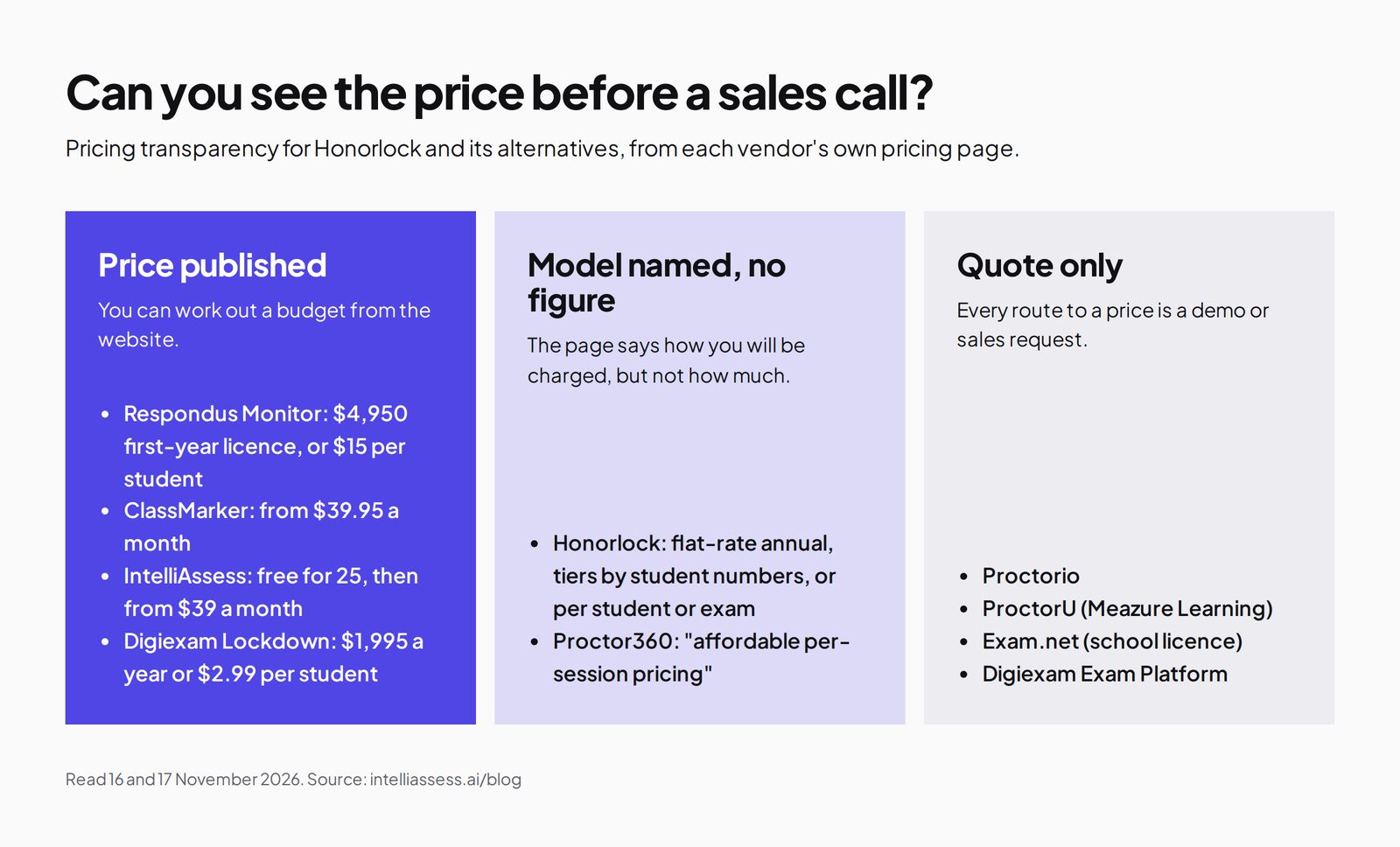
Honorlock's pricing page names its models, "flat-rate annual licensing or volume tiers based on FTE, or per students or exam" for higher education and per-candidate or per-exam for credentialing, and promises "no variable charges or surprise add-on fees", but publishes no figures.
IntelliAssess publishes its prices: Free for 25 students; Starter $39 a month for 200; Pro $99 for 500; Intensive $249 for 2,000; yearly billing costs ten months. Proctoring and AI grading start on Starter, and webcam proctoring has a monthly allowance of face checks (200, 400 or 1,200), so check that your exam weeks fit.
Privacy
Honorlock is specific: SOC 2 Type 2, encryption in transit and at rest in U.S.-based infrastructure, a 365-day default retention that institutions can change, no sale of test-taker data, and a FERPA statement that it acts as a contractor; its FAQ also refers to recordings kept for 12 months, so confirm retention in your contract. IntelliAssess stores identity and evidence photos encrypted, opens them only through short-lived links, records location only if you switch that check on, and lists no certifications or data location; ask us if your institution needs them.
Where Honorlock is better
- Live proctors who review AI flags and can step in by chat.
- App blocking for AI chatbots, and phone and voice-assistant detection.
- Search and Destroy for leaked questions.
- LMS and publisher integrations.
- Stated credentials: SOC 2 Type 2, Section 508, WCAG 2.1 AA.
Where IntelliAssess is better
- Writing exams from your lesson files.
- AI marking of written answers against your rubric.
- Nothing to install for students.
- A published price and a free plan.
- Arabic exams, right to left.
Running both side by side
You can test IntelliAssess on one exam without moving anything. Import an existing quiz from CSV, Google Forms or a PDF, or generate one from the chapter you are teaching, and run it as a proctored test for one class, while Honorlock carries on securing your LMS exams. A common split is Honorlock for finals and other high-stakes exams that need live proctors, and IntelliAssess for weekly quizzes and mid-terms with written answers. See online exam software for schools for how departments share one workspace. Students then see two kinds of exam in a term, so tell each class clearly which tool a given quiz or exam uses, and run a short practice test on each before the first graded one.
When an exam may not need proctoring
Not every assessment needs a camera. The University of Chicago's guidance on alternatives to proctoring suggests open-book questions that ask for analysis rather than recall, time-limited quizzes from large question banks, and frequent low-stakes checks. Those still need good questions and consistent marking, which IntelliAssess helps with even with proctoring switched off. Keep Honorlock's live supervision for the exams where identity and conditions genuinely matter.
Getting started
- Sort your exams by stakes, and keep Honorlock where live proctors matter.
- Pick one course to try IntelliAssess for weekly quizzes or a mid-term with written answers.
- Write or check the rubric for each written question against answers you have marked.
- Run a practice test with the same proctoring settings so students know what to expect.
- Compare marking time and student problems after a few weeks.
Questions to ask before choosing
- Which exams need a live proctor, and which can be reviewed afterwards?
- Must exams stay in Canvas, Blackboard, Moodle or Brightspace?
- Do we rely on app blocking, phone detection or leaked-question searches?
- How much staff time goes on writing exams and marking written answers?
- Can every student install a browser extension, and do they have a laptop with a webcam?
- What will Honorlock cost at our size, and what does procurement need on security?
Choose Honorlock if
- Your exams live in an LMS and must stay there.
- You want a live proctor to review flags and step in.
- You need app blocking, phone detection or leaked-question searches.
- Procurement requires SOC 2 Type 2 and documented accessibility.
Choose IntelliAssess if
- You want exams written, proctored and marked in one place.
- Your students should not install software.
- Marking written answers takes most of your time.
- You want a published price, or teach in Arabic.
Comparing more tools? See Honorlock alternatives, in three groups, Proctorio vs IntelliAssess, or every comparison.
Frequently asked questions
Is IntelliAssess an alternative to Honorlock?
For schools that want to write, proctor and mark exams in one place with nothing to install, yes. Honorlock is stronger on live supervision, app blocking, phone detection and LMS integration.
How much does Honorlock cost?
Honorlock does not publish prices. Its pricing page names flat-rate annual, FTE-tier and per-student or per-exam models and asks you to request a quote. IntelliAssess is free for 25 students, then from $39 a month.
Does IntelliAssess have live proctors?
No. IntelliAssess records events with photos and an integrity score for review after the exam. Honorlock's proctors review flags in real time and can join by chat.
Does IntelliAssess block ChatGPT?
It does not block apps. It shares the whole screen and checks the browser, so other windows show up in the report. Honorlock's desktop application blocks AI chatbots.
Do students install anything for Honorlock?
Yes, the Honorlock Chrome extension, and the desktop application if their institution uses app blocking. IntelliAssess needs nothing installed.
Which works with Canvas?
Honorlock integrates with Canvas and other LMSs through LTI 1.3. IntelliAssess works with Google Classroom and by link.
Does IntelliAssess detect phones?
Its pages do not describe phone detection. Honorlock flags visible phones and handheld devices and has a proctor review them.
Can I use Honorlock and IntelliAssess together?
Yes. Keep Honorlock for high-stakes LMS exams with live proctors, and use IntelliAssess for frequent tests you want written and marked with AI, with nothing for students to install.
Is Honorlock SOC 2 certified?
Honorlock's security page says it is "SOC 2 Type 2 Certified", with data encrypted in transit and at rest in U.S.-based infrastructure. IntelliAssess lists no certifications, so ask us if you need them.
Which is better for a single department?
For a department that wants to write, proctor and mark its own tests without an institution-wide contract, IntelliAssess, starting on the free plan. For institution-wide exams in an LMS with live proctors, Honorlock.
Keep reading
All articles
Read next
SchoolAI alternatives: 7 AI tools for teachers and students scored (2026)
Seven AI tools scored on the same nine facts, with SchoolAI as the reference, and what each lets teachers see when students use AI.

SchoolAI vs IntelliAssess: an AI tutor for students or feedback after a test?
SchoolAI puts students in supervised conversation with AI; IntelliAssess marks their tests and uses AI to help them learn from their own answers.
Motasem Aldiab 12 min read

Jotform and ProProfs alternatives for quizzes and exams (2026)
Jotform and ProProfs side by side, then the alternatives by forms, certificates or real exams.
Motasem Aldiab 2 min read