
Honorlock alternatives: pick by what you want to keep (2026)

By Motasem Aldiab, Technology Consultant and Trainer - Cloud, DevOps, Java, Data Science
Contents25
- What Honorlock does, so you know what you are replacing
- Why institutions look for a Honorlock alternative
- The scorecard: 8 Honorlock alternatives in three groups
- Group 1: If you want live human proctors
- Digiexam
- Proctorio
- ProctorU by Meazure Learning
- Proctor360
- Group 2: If you want automated proctoring in your LMS
- Respondus Monitor
- Group 3: If you want one tool for the whole exam
- ClassMarker
- Exam.net
- IntelliAssess
- What students need on exam day
- AI tools and leaked questions
- Can you see the price before a sales call?
- Accessibility and accommodations
- Live proctors or AI flags?
- Privacy compared
- When an exam may not need proctoring
- Moving from Honorlock in five steps
- Questions to ask before you switch
- Which alternative for which institution
- Where IntelliAssess is not the right choice
Key takeaways
- 1For live proctors: Digiexam, Proctorio, ProctorU or Proctor360.
- 2For automated proctoring in your LMS: Respondus Monitor, at a published price.
- 3For the whole exam in one tool: ClassMarker, Exam.net or IntelliAssess.
- 4Honorlock names its pricing models but publishes no figures.
Honorlock alternatives fall into three groups, depending on which part of Honorlock you want to keep. If you want live human proctors, look at Digiexam, Proctorio, ProctorU by Meazure Learning or Proctor360. If you want automated proctoring and lockdown inside your LMS at a published price, look at Respondus Monitor. If you want to stop buying proctoring separately and run the whole exam in one tool, look at ClassMarker, Exam.net or IntelliAssess. Below, eight tools are scored on the same seven published facts, with Honorlock as the reference; ClassMarker and Respondus Monitor lead overall, and IntelliAssess comes sixth.
What Honorlock does, so you know what you are replacing
Honorlock's homepage (read 17 November 2026) describes proctoring that "combines AI-powered monitoring with live human proctors". Its Live Pop-In page explains how: AI monitors "video, audio, and desktop activity", a live proctor reviews each flag in real time "instead of instantly interrupting the session", and for high-stakes violations "the proctor enters the session via 1:1 chat", with "24/7/365 access with no scheduling".
Around that, Honorlock offers:
- App blocking: the Honorlock Application blocks all applications by default, including "AI chatbots like ChatGPT and Claude", and lets admins allow specific ones such as Excel.
- Phone and voice detection: it flags visible phones and other handheld devices, claims Apple Handoff detection, and listens for voice commands such as "Hey Siri" or "OK Google", with suspected phone use "reviewed and verified by a human proctor".
- Search and Destroy: it searches the web for shared exam questions, categorises them, and sends one-click takedown requests.
- Integrations: it "integrates directly with Canvas, Blackboard, Moodle, D2L Brightspace, Open LMS, Intellum, Docebo, and Cornerstone" via LTI 1.3, and with publisher platforms such as Pearson MyMathLab and McGraw-Hill Connect.
- Security and privacy: its security page says it is "SOC 2 Type 2 Certified", stores data in U.S.-based cloud infrastructure, keeps data for a 365-day default that institutions can change, and "never sells or monetizes test-taker data".
Students need a webcam and microphone and must install the Honorlock Chrome extension, plus the desktop application if the institution uses it. Price: Honorlock's pricing page names its models, "flat-rate annual licensing or volume tiers based on FTE, or per students or exam" for higher education, and promises "no variable charges or surprise add-on fees", but publishes no figures; you request a quote.
Why institutions look for a Honorlock alternative
- No published price. Budgeting starts with a quote, even though the pricing models are named.
- Something to install. Students install a Chrome extension, and sometimes a desktop app, despite the homepage's "No Annoying Software" line.
- Proctoring only. Honorlock secures exams your LMS delivers; writing and marking happen elsewhere.
- Privacy concerns. Webcam, audio and desktop monitoring at home are contested by some students and faculty, and some institutions want less of it.
The scorecard: 8 Honorlock alternatives in three groups
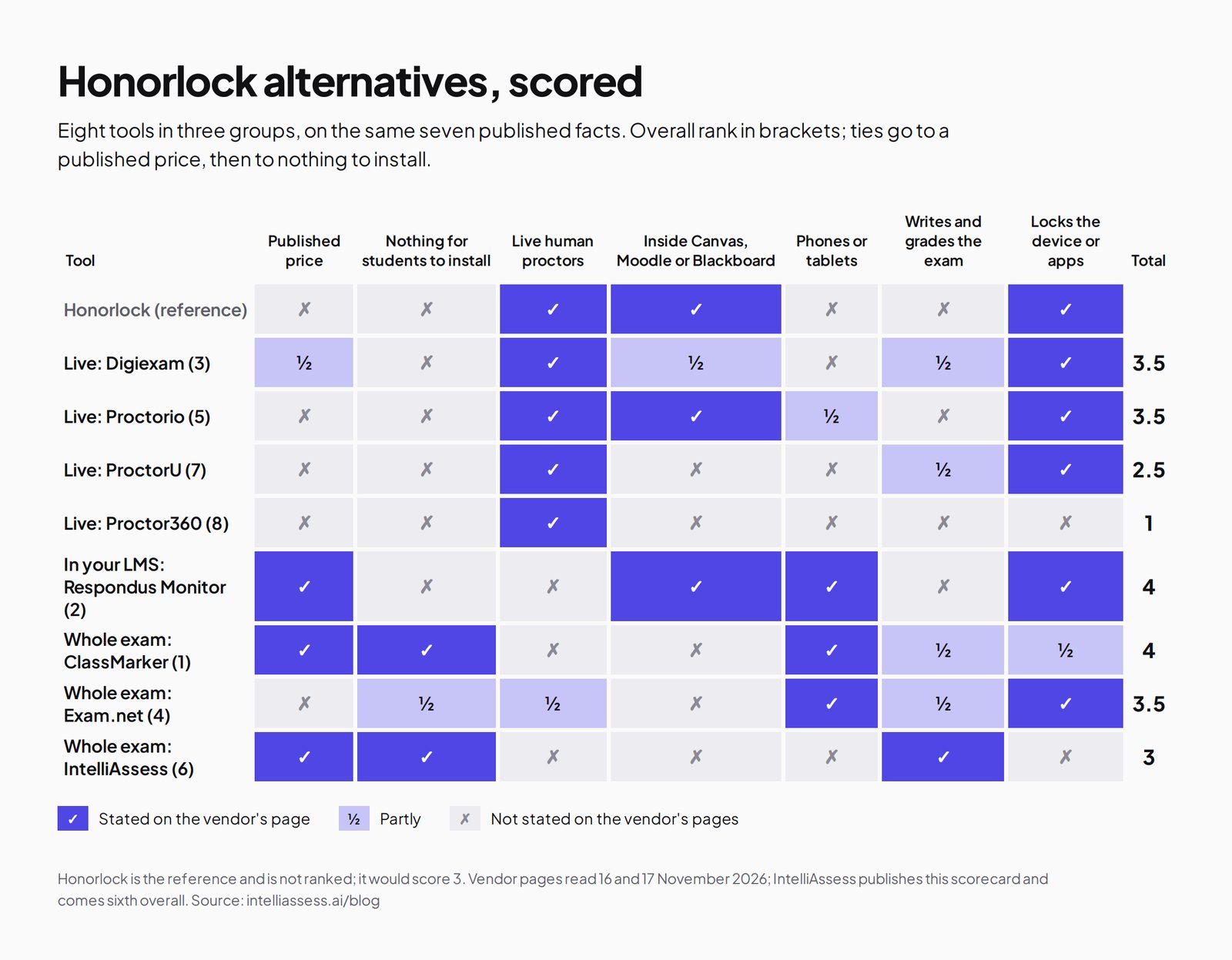
A tick means the vendor's own page says so; a half means partly; a cross means its page does not say so. The facts are a published price, nothing for students to install, live human proctors, working inside Canvas, Moodle or Blackboard, phones or tablets, writing and grading the exam, and locking the device or apps. Overall, ties go to a published price, then to nothing for students to install.
| Tool (overall rank) | Published price | Nothing for students to install | Live human proctors | Inside Canvas, Moodle or Blackboard | Phones or tablets | Writes and grades the exam | Locks the device or apps | Total |
|---|---|---|---|---|---|---|---|---|
| Honorlock itself | ✗ | ✗ | ✓ | ✓ | ✗ | ✗ | ✓ | 3 |
| Live human proctors | ||||||||
| Digiexam (3) | ½ | ✗ | ✓ | ½ | ✗ | ½ | ✓ | 3.5 |
| Proctorio (5) | ✗ | ✗ | ✓ | ✓ | ½ | ✗ | ✓ | 3.5 |
| ProctorU (7) | ✗ | ✗ | ✓ | ✗ | ✗ | ½ | ✓ | 2.5 |
| Proctor360 (8) | ✗ | ✗ | ✓ | ✗ | ✗ | ✗ | ✗ | 1 |
| Automated proctoring in your LMS | ||||||||
| Respondus Monitor (2) | ✓ | ✗ | ✗ | ✓ | ✓ | ✗ | ✓ | 4 |
| One tool for the whole exam | ||||||||
| ClassMarker (1) | ✓ | ✓ | ✗ | ✗ | ✓ | ½ | ½ | 4 |
| Exam.net (4) | ✗ | ½ | ½ | ✗ | ✓ | ½ | ✓ | 3.5 |
| IntelliAssess (6) | ✓ | ✓ | ✗ | ✗ | ✗ | ✓ | ✗ | 3 |
Honorlock's phones cross: its pages we read describe detecting phones, not using them as the exam device. Digiexam's halves: a published Lockdown price but not its Exam Platform, Canvas-only Lockdown in early access, and automatic grading without AI writing. Exam.net's halves: real-time teacher monitoring rather than proctors, and an optional high-security install. ProctorU's half for grading: it also offers exam development and test-centre delivery. A cross can mean "not stated on the pages we read".
Group 1: If you want live human proctors
Digiexam
Digiexam's proctoring page describes ID checks by face photo or ID document, recorded screen and webcam with behavioural trackers, a phone as a second camera, and in-person proctoring where "up to 30 students can be viewed simultaneously by one exam proctor", with automatic and anonymous grading. Its Lockdown product for Canvas costs $1,995 a year or $2.99 per student; its Exam Platform is quoted. See Digiexam alternatives.
Proctorio
Proctorio says it has proctored "300M+ exams", with a live ID check, lockdown settings, live proctoring or "Be Your Own Proctor" for your own staff, Origin for checking human authorship and Vault for content protection, through a browser extension in Chromium browsers and a mobile app where enabled (Proctorio). Prices are on request. Its Vault is the closest match to Honorlock's Search and Destroy. See Proctorio alternatives.
ProctorU by Meazure Learning
Meazure Learning's remote proctoring page describes the ProctorU platform with its Guardian Browser, and says that "in 2021, we became the first remote proctoring vendor to guarantee a professional proctor will review every exam session", reviewing footage "within 24 to 72 hours". It also offers test-centre delivery and exam development. Prices are on request. Best for: certification and high-stakes programmes that want a managed service.
Proctor360
Proctor360's site lists 360 Total View, multi-camera live proctoring with a "cell phone as 2nd camera", single-webcam live proctoring and AI auto-proctoring with automated ID verification, with "affordable per-session pricing" but no figure. Best for: exams that need the strongest live view of the room.
Group 2: If you want automated proctoring in your LMS
Respondus Monitor
Respondus Monitor is "fully automated proctoring" built on Respondus LockDown Browser, installed once on Windows, Mac, Chromebook or iPad and integrated with the major LMSs; instructors review flagged events afterwards (Respondus Monitor). Price: a $4,950 first-year licence regardless of institution size, then tiers by seats, or $15 per student for 12 months (pricing). Where it falls short: no live proctors. It is the closest like-for-like replacement if you value Honorlock's LMS integration more than its live pop-in. See Respondus vs IntelliAssess.
Group 3: If you want one tool for the whole exam
ClassMarker
ClassMarker Monitor needs nothing installed and works on desktops, tablets and phones, enforcing full screen, logging tab switches, taking camera photos and asking for a photo ID. Objective questions are graded instantly; essays are marked by hand. Price: from $39.95 a month for 400 credits, with ten credits per camera-monitored attempt (pricing). See ClassMarker alternatives.
Exam.net
Exam.net offers three security levels including a lockdown browser, real-time teacher monitoring with chat, an AI question generator, auto-marking by your rules, anonymised answers and accommodations, with Google Classroom and Teams integrations, under a school licence on quote (pricing). It describes no webcam proctoring. See Exam.net alternatives.
IntelliAssess
IntelliAssess writes exams from your files, a YouTube video or a web page with its AI quiz generator, scores written answers against your rubric with AI grading for the teacher to review, and proctors in the browser with nothing to install: an ID photo, selfie, liveness check and face match, then webcam, microphone, whole-screen and browser checks, with a report per attempt.
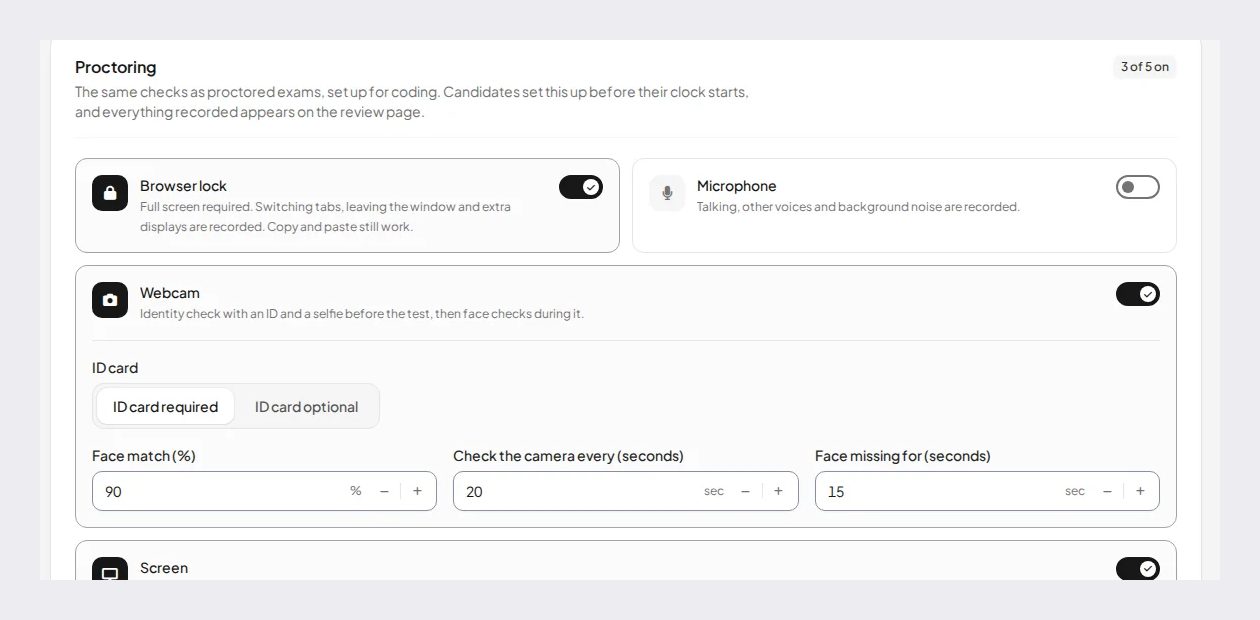
Price (from our pricing page): Free for 25 students; Starter $39 a month for 200; Pro $99 for 500; Intensive $249 for 2,000, with a monthly allowance of face checks. Where it falls short: no live proctors, no device lockdown, no Canvas, Moodle or Blackboard integration, no phone detection or leaked-question search, and proctored exams need a laptop or desktop. See Honorlock vs IntelliAssess.
What students need on exam day
- Honorlock: the Chrome extension, a webcam and microphone, and the desktop application if the institution uses app blocking.
- Proctorio: its extension in Chrome, Edge, Brave or Opera, a companion app for advanced settings, or its mobile app where enabled.
- Respondus Monitor: a one-time install of LockDown Browser on Windows, Mac, Chromebook or iPad, and a webcam.
- Digiexam: an ID document or face photo, recorded webcam and screen, and its desktop application for Lockdown.
- ProctorU: its Guardian Browser.
- Proctor360: a webcam, and a phone as a second camera for multi-camera sessions.
- ClassMarker: a browser on any device, with a camera if Monitor is on.
- Exam.net: an exam key, and its high-security mode where required.
- IntelliAssess: a browser on a laptop or desktop with a webcam, an ID document and permission to share the screen; nothing to install.
Every requirement is a place where a student can get stuck. Run a practice exam with the same settings a week before, and give students a named contact for problems on the day.
AI tools and leaked questions
Two of Honorlock's newer features target problems that grew with generative AI. Its desktop application blocks chatbots such as ChatGPT and Claude, and its Smart Speech Detection listens for voice assistants. Its Search and Destroy looks for exam questions shared online and helps you take them down. Among the alternatives, Proctorio's Vault protects exam content and its Origin checks whether work was written by a person; Respondus LockDown Browser and Exam.net's high-security mode stop students leaving the exam; IntelliAssess shares the whole screen and checks the browser, so another window or tab shows up in the report, though it does not block it. IntelliAssess's other answer to leaked questions is design: it can write a fresh version of an exam from the same material, which makes a shared answer list less useful.
Can you see the price before a sales call?
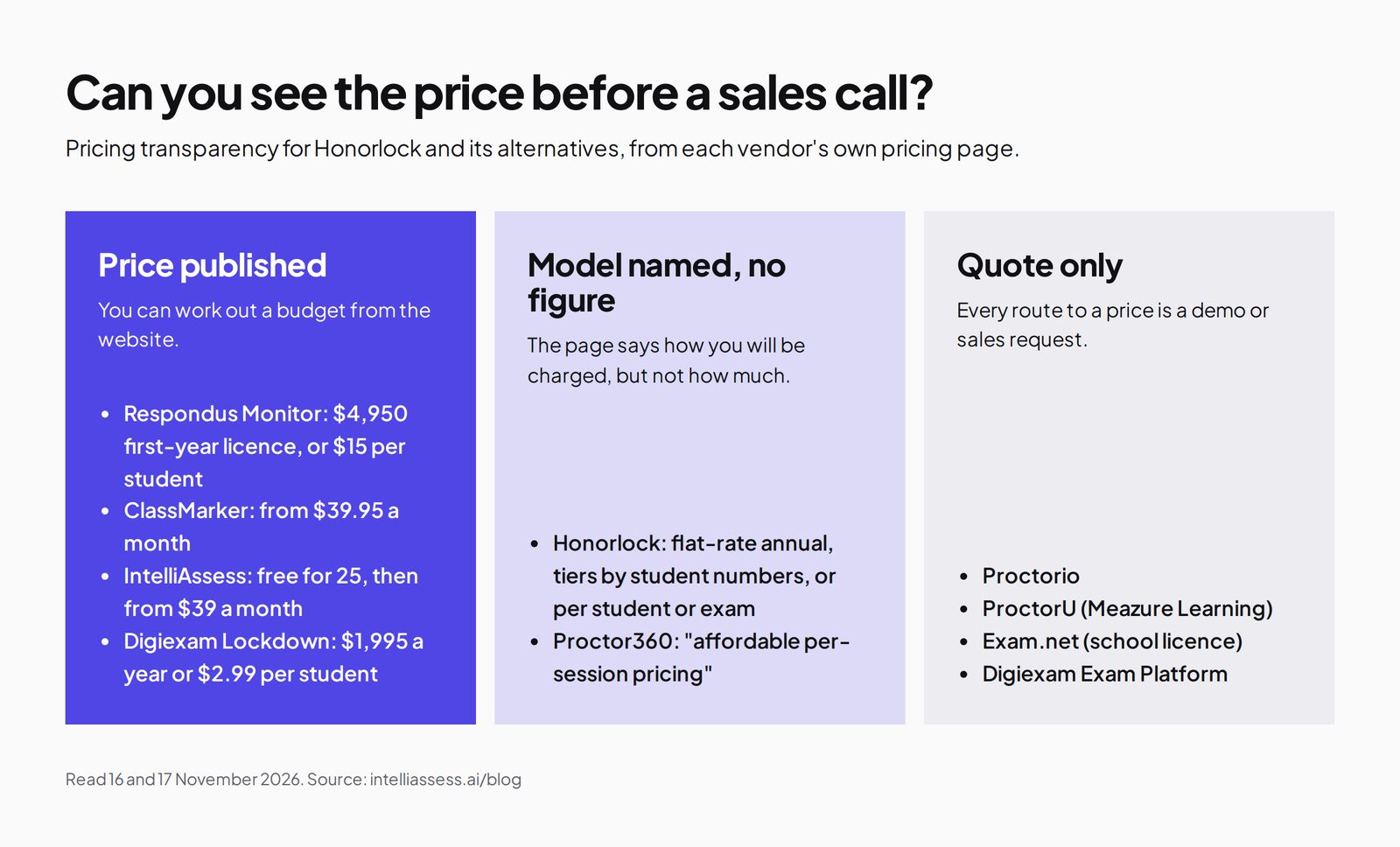
Pricing transparency varies widely in proctoring. Some vendors publish prices, some name a model without figures, and some quote only.
| Tool | What the pricing page shows |
|---|---|
| Honorlock | Models named: flat-rate annual, tiers by student numbers, or per student or exam; no figures |
| Respondus Monitor | $4,950 first-year licence, then tiers by seats; or $15 per student |
| ClassMarker | $39.95 a month for 400 credits; packs from $25 |
| IntelliAssess | Free for 25; Starter $39 a month for 200 students |
| Digiexam | Lockdown $1,995 a year or $2.99 per student; Exam Platform on quote |
| Proctor360 | "Affordable per-session pricing", no figure |
| Proctorio, ProctorU, Exam.net | Quote only |
Accessibility and accommodations
Honorlock's accessibility statement says it is "fully ADA accessible and compliant with Section 508" and aims to "conform to WCAG 2.1 level AA", with student, instructor and mobile VPATs linked, and its Live Pop-In page says proctors account for "approved accommodations" when reviewing flags. Exam.net lists text-to-speech, a dyslexia font and extra time. For exams run inside an LMS with Respondus or Proctorio, accommodations such as extra time are usually set in the LMS. IntelliAssess lets teachers set timers and attempt limits per test, and lets you choose which proctoring events only get recorded rather than ending a test, which helps when a student's accommodation might otherwise trigger a flag. Ask each vendor for its VPAT before switching, and test the student flow with a screen reader if your students use one.
Live proctors or AI flags?
Honorlock's hybrid model, where AI flags and a person decides in real time, sits between two approaches. Fully live services such as ProctorU and Proctor360 put a person on every session, which is the most supervised but costs the most and needs more scheduling. Fully automated tools such as Respondus Monitor, ClassMarker and IntelliAssess record events for review afterwards, which is cheaper and easier to run but means problems are dealt with after the exam rather than during it. Digiexam and Proctorio offer both. A common pattern is live proctoring for finals and certification exams, and automated proctoring for everything else.
Privacy compared
Honorlock is unusually specific about privacy: SOC 2 Type 2, U.S.-based storage, a 365-day default retention that institutions can change, no sale of test-taker data, a FERPA statement that it acts as a contractor, and an accessibility statement citing WCAG 2.1 AA. Its pages are not fully consistent (its FAQ refers to WCAG 2.0 and to recordings kept for 12 months), so confirm the details in your contract. Proctor360 shows a SOC 2 logo without naming a type. IntelliAssess stores identity and evidence photos encrypted, opens them only through short-lived links, records location only if you switch that check on, and lists no certifications. Whatever you choose, tell students what is recorded, who reviews it and how long it is kept.
When an exam may not need proctoring
Some institutions moving away from Honorlock are also reducing how much they proctor. The University of Chicago's guidance on alternatives to proctoring suggests open-book questions that ask for analysis rather than recall, time-limited quizzes drawn from large question banks, projects or presentations in place of a single high-stakes exam, and frequent low-stakes checks. Those designs still need good questions and consistent marking, which IntelliAssess helps with even with proctoring switched off. Keep live proctoring for the exams where identity and conditions genuinely matter.
Moving from Honorlock in five steps
- Check your contract and data retention. Honorlock keeps recordings for 365 days by default, so plan how long you need access to past exams.
- Sort exams by stakes. Decide which need live proctors, which need automated review, and which may need neither.
- List the features you use, such as app blocking, phone detection or Search and Destroy, and check which alternatives replace them.
- Pilot one course with a practice exam and one real exam, collecting student problems and staff review time.
- Update your exam policy to name the new tool, what it records and how students can respond to a flag.
Questions to ask before you switch
- Which exams truly need a live proctor, and which could use automated review?
- Must exams stay in Canvas, Moodle, Blackboard or Brightspace?
- Do we rely on app blocking, phone detection or leaked-question searches?
- What will students need to install, and on which devices?
- How much staff time goes on writing exams and marking written answers?
- What do we pay Honorlock now, and what would each alternative cost at our size?
Which alternative for which institution
- A university that wants live proctors for high-stakes exams: ProctorU, Proctorio or Digiexam.
- A university that wants automated proctoring in its LMS at a published price: Respondus Monitor.
- A school or trainer that wants proctoring on any device with nothing to install: ClassMarker.
- A school running locked exams on school devices: Exam.net.
- A department that wants exams written, marked and proctored in one place: IntelliAssess.
Where IntelliAssess is not the right choice
- You need a live proctor to step in during the exam.
- Exams must stay in your LMS, or you rely on publisher platforms such as MyMathLab.
- You need app blocking, phone detection or a search for leaked questions.
- Students sit proctored exams on tablets or phones.
Frequently asked questions
What is the best alternative to Honorlock?
For live proctors, Proctorio, ProctorU or Digiexam. For automated proctoring in your LMS at a published price, Respondus Monitor. For proctoring on any device with nothing to install, ClassMarker. For writing, marking and proctoring exams in one place, IntelliAssess.
How much does Honorlock cost?
Honorlock does not publish prices. Its pricing page names flat-rate annual licensing, tiers by student numbers, or per-student or per-exam models for higher education, and asks you to request a quote.
Does Honorlock need software?
Yes. Students install the Honorlock Chrome extension, and the desktop application if their institution uses app blocking. A webcam and microphone are required.
Which Honorlock alternative has live proctors?
Digiexam, Proctorio, ProctorU and Proctor360. Respondus Monitor, ClassMarker and IntelliAssess are automated, with events reviewed afterwards.
Which alternative needs nothing installed?
ClassMarker and IntelliAssess run their proctoring in the browser with nothing installed. Exam.net's basic level runs in the browser, with an optional high-security install.
Is Honorlock SOC 2 certified?
Its security page says it is "SOC 2 Type 2 Certified", with data encrypted in transit and at rest in U.S.-based infrastructure. IntelliAssess lists no certifications.
Does Honorlock work with Moodle?
Yes. Honorlock says it integrates directly with Canvas, Blackboard, Moodle, D2L Brightspace, Open LMS, Intellum, Docebo and Cornerstone through LTI 1.3. Respondus and Proctorio also work with major LMSs; IntelliAssess works with Google Classroom.
Can I use Honorlock and IntelliAssess together?
Yes. Keep Honorlock for LMS exams that need live pop-in proctors, and use IntelliAssess for tests you want written and marked with AI, proctored in the browser with nothing to install.
Does Honorlock detect phones?
Yes. Honorlock says it flags visible phones and other handheld devices, claims Apple Handoff detection, and has a human proctor review suspected phone use. Proctor360 and Digiexam can use a phone as a second camera instead. IntelliAssess does not describe phone detection.
Which Honorlock alternative publishes its price?
Respondus Monitor ($4,950 first-year licence, or $15 per student), ClassMarker (from $39.95 a month), Digiexam Lockdown ($1,995 a year or $2.99 per student) and IntelliAssess (free for 25, then from $39 a month). Proctorio, ProctorU, Proctor360 and Exam.net quote, so request their prices in the same week to compare.
Keep reading
All articles
Read next
SchoolAI alternatives: 7 AI tools for teachers and students scored (2026)
Seven AI tools scored on the same nine facts, with SchoolAI as the reference, and what each lets teachers see when students use AI.

SchoolAI vs IntelliAssess: an AI tutor for students or feedback after a test?
SchoolAI puts students in supervised conversation with AI; IntelliAssess marks their tests and uses AI to help them learn from their own answers.
Motasem Aldiab 12 min read

Jotform and ProProfs alternatives for quizzes and exams (2026)
Jotform and ProProfs side by side, then the alternatives by forms, certificates or real exams.
Motasem Aldiab 2 min read