
Kahoot! vs IntelliAssess (2026): a game or a graded test?

By Motasem Aldiab, Technology Consultant and Trainer - Cloud, DevOps, Java, Data Science
Contents25
- The short answer
- At a glance
- What Kahoot! is
- What IntelliAssess is
- Game or graded test
- Why games work, and where they stop
- A unit with both
- Written answers
- AI
- Integrity
- Setting up
- Accessibility
- Free plans compared
- Pricing compared
- What students see
- Ages and settings
- Reports
- If you want a different game tool
- Privacy
- Questions to ask before you decide
- Using both
- A department's view
- Tips for using both
- Who should choose which
- Where IntelliAssess falls short
Key takeaways
- 1Kahoot! is built for live games: energy, recall and a quick read of the room.
- 2IntelliAssess is built for graded tests: AI marks written answers against a rubric for review.
- 3Kahoot! Go is free for 10 players per game; Bronze is $36 a year for 50.
- 4Use Kahoot! for review during the unit and IntelliAssess for the test at the end.
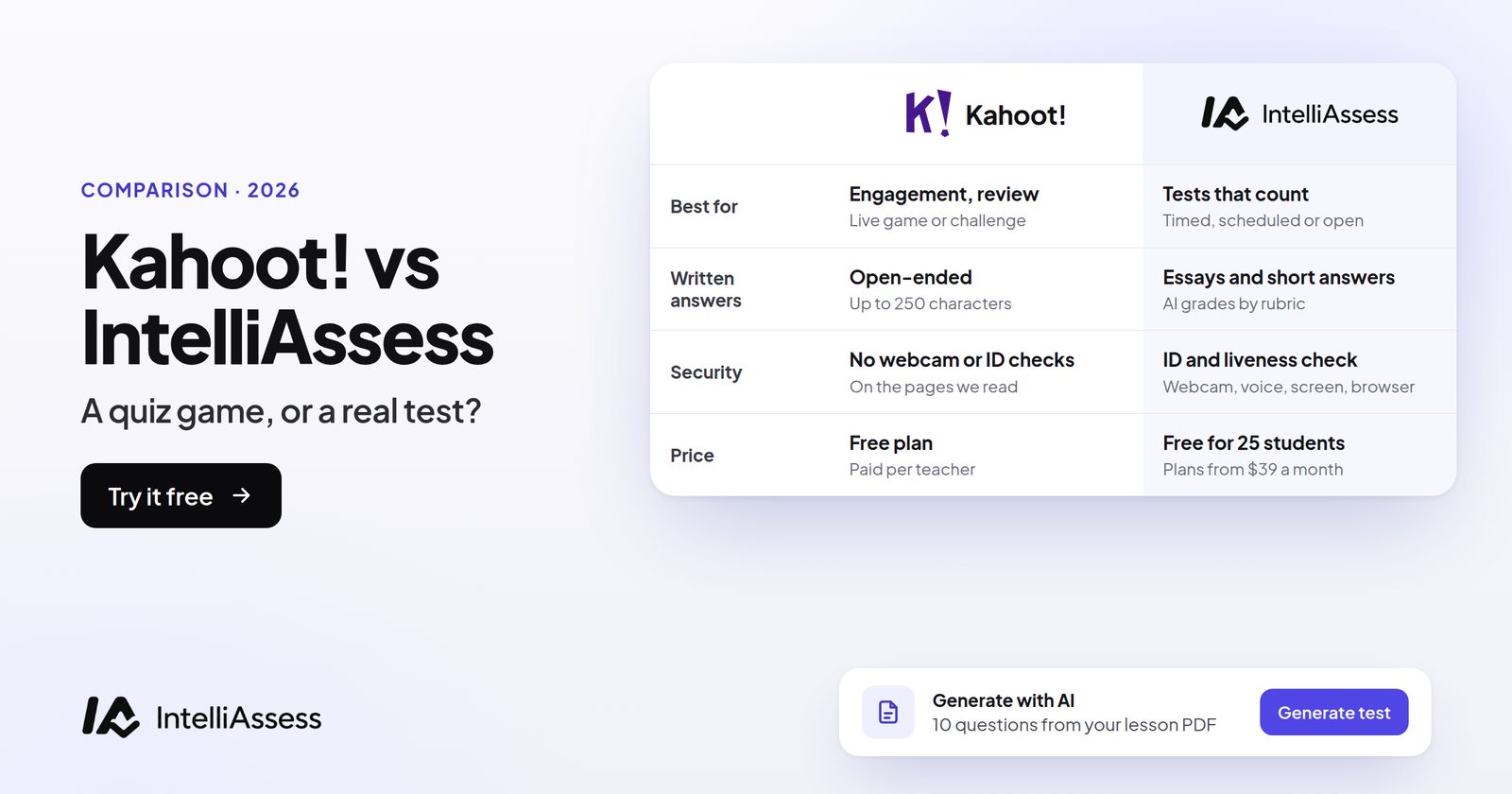
Kahoot! vs IntelliAssess compares a classroom game show with a platform for tests that count. Kahoot! turns a lesson into a live game: questions on a shared screen, students answering on their devices, points, music and a podium, plus self-paced challenges and AI that builds a kahoot from your material. IntelliAssess writes tests from your own lessons, marks written answers against a rubric with AI for you to review, and can check identity and the webcam when students take a test at home. They are built for different jobs, and this page shows where each one fits, then compares features, AI, free plans and price.
The short answer
Use Kahoot! to energise a lesson, review before a test and check recall quickly, especially with younger students; Kahoot! Go is free for up to 10 players per game, and Bronze is $36 a year for 50. Use IntelliAssess for the test itself: written from your lessons, sat in class or at home, with written answers marked by rubric, identity checks if needed, and grades in Google Classroom. Use both: Kahoot! for the review game, IntelliAssess for the test that follows.
At a glance
| Kahoot! | IntelliAssess | |
|---|---|---|
| Built for | Live games and review | Graded tests |
| Live game with leaderboard | Yes, the core of the product | No |
| Self-paced play | Self-study experiences, assigned kahoots | Learning quizzes and practice of missed questions |
| AI | Creates kahoots from topics, files and trusted sources | Writes tests from files, YouTube or web pages; drafts rubrics; marks written answers |
| Written answers | Open-ended responses, not graded | Marked per rubric criterion by AI, teacher reviews |
| Identity and integrity | Not described | ID, face match, webcam, microphone, screen and browser checks |
| Reports | Results by participant and question | Results per test and class, scores per rubric criterion |
| Free plan | Kahoot! Go, up to 10 players per game | Up to 25 students |
| Paid from | Bronze $36 a year, 50 players | Starter $39 a month for 200 students |
What Kahoot! is
Kahoot! was founded in Oslo in 2012, and when we read its site on 16 November it said more than 10 million teachers had hosted a kahoot in the past 12 months. Its core is the live game: "Host a live kahoot with questions displayed on a shared screen", with real-time class reporting that shows where "every student stands" (Kahoot! for schools).
- Live and self-paced play: host games on a shared screen, run team modes, or assign kahoots for students to complete in their own time.
- AI creation: on paid plans, create from topics and trusted sources; Kahoot! Go can create from PDFs up to 3 pages; schools can switch generative AI off.
- Question types (16 November read): quiz, true or false, type answer, puzzle, slider, poll, pin on an image, word cloud, brainstorm and open-ended answers, which let students "type a long free-form response".
- Reports: results by participant and question, with basic reports on Go and fuller reports on paid plans.
Kahoot!'s pages describe open-ended questions as a way to gather responses, not as marked answers, and describe no webcam or identity checks.
What IntelliAssess is
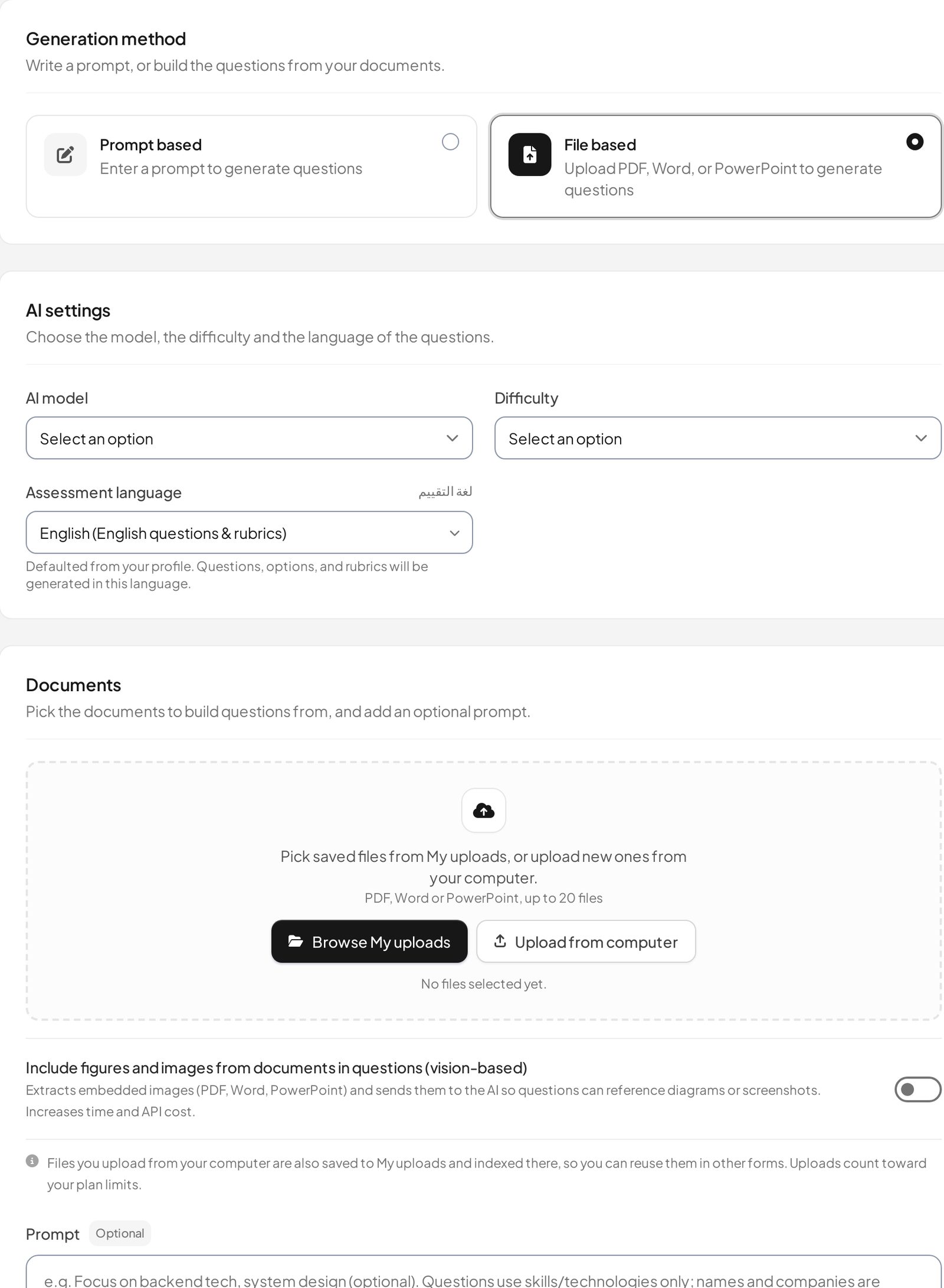
IntelliAssess's AI quiz generator writes a test from your PDF, Word or PowerPoint files, a YouTube video or a web page, checks each answer key in a second pass, and drafts a rubric for each written question. Tests go out by link or to Google Classroom. Objective answers mark themselves; AI grading scores each written answer on every rubric criterion with a reason for the teacher to review. Proctoring is optional per test. Students see their marks and feedback when released, can ask for a re-mark, and can practise what they missed.
Game or graded test
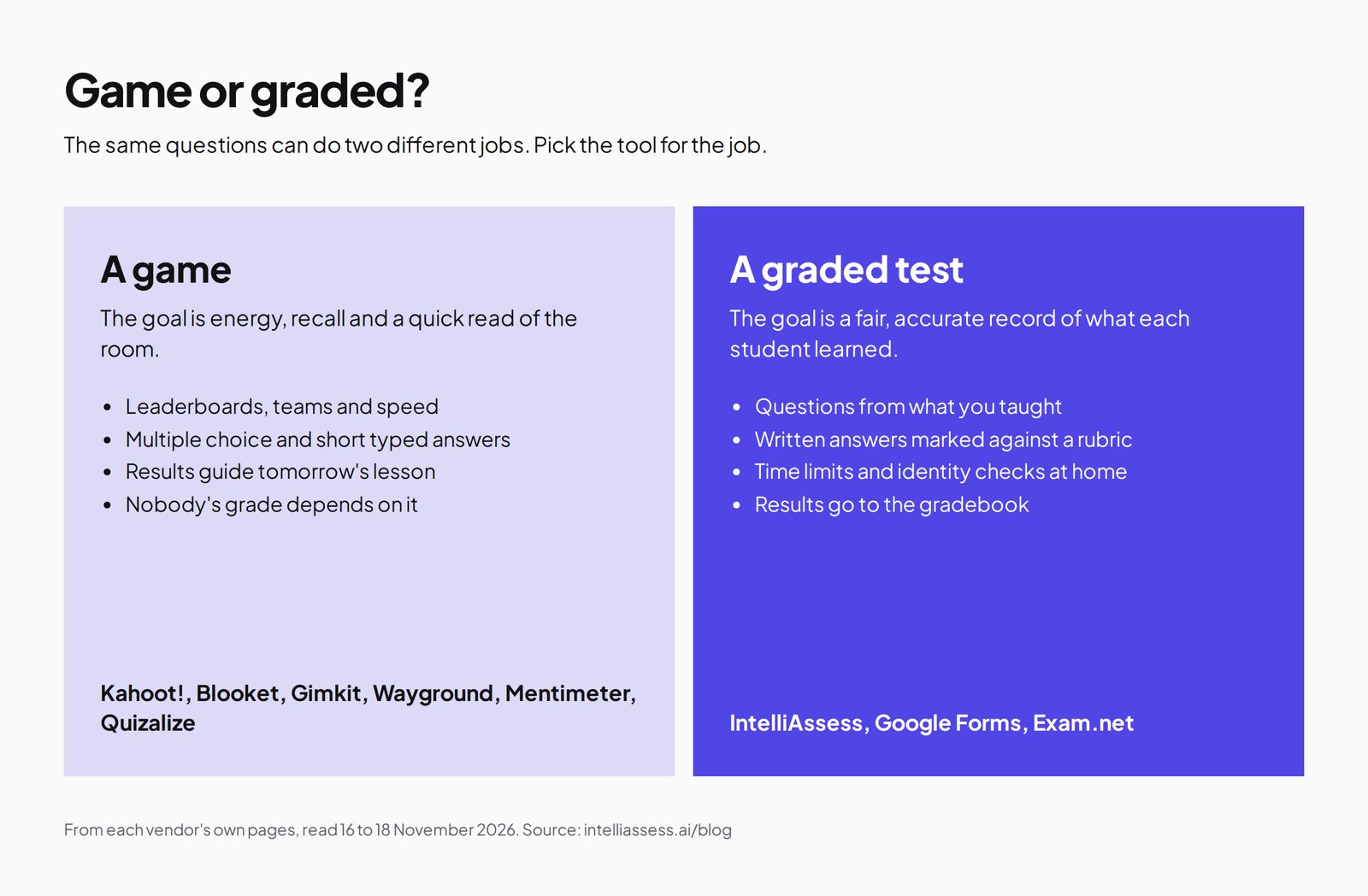
A game and a test can share the same questions and still do different jobs. A game is built for energy and recall: speed matters, scores reward quick thinking, and the result tells the teacher what to revisit. Nobody's grade depends on it. A test is built for a fair record: questions match what was taught, every student has the same time and conditions, written answers are marked consistently, and the result goes in the gradebook.
Kahoot! is very good at the first job. IntelliAssess is built for the second. Neither tries to be the other.
Why games work, and where they stop
Quiz games work because retrieval practice works: asking students to recall what they learned, again and again, strengthens memory, and a game makes that recall something students want to do. The leaderboard adds urgency, and the teacher gets a quick picture of what the class remembers. That is why Kahoot! has stayed in classrooms for over a decade.
The same features limit games as assessments. Speed rewards the fastest readers, not only the most knowledgeable students. Multiple choice under time pressure tests recognition more than explanation. Scores mix luck with knowledge, and nobody checks who is holding the device. None of that matters for review, and all of it matters for a grade. A graded test slows down: every student gets the same time, questions ask for explanation as well as recognition, and marking is consistent.
A unit with both
Take a Year 7 science unit on the solar system.
Week 1, Friday: a Kahoot! on planet order and sizes, ten questions, five minutes. The class is loud, the leaderboard changes every question, and the teacher sees that half the class mixes up Uranus and Neptune. Kahoot! is the right tool.
Week 2, Wednesday: a self-paced kahoot for homework, so students who missed the game can catch up. Still Kahoot!.
Week 3, Monday: a review game before the test. Kahoot! again, or a different game for variety.
Week 3, Thursday: the unit test, which counts. Ten objective questions and two written answers, such as "Explain why the planets nearer the Sun are rocky". Three students are absent and will take it at home. The teacher uploads her unit slides to IntelliAssess, edits the draft test and rubrics, and posts it to Google Classroom with identity checks for the students at home. The written answers arrive with AI-drafted scores per criterion, which she reviews before releasing results.
Three of the four moments belong to Kahoot!. The one that goes on the report belongs to IntelliAssess. The Kahoot! results from weeks one to three also tell the teacher what to stress in the test's written questions, so the two tools help each other rather than compete.
Written answers
Kahoot!'s open-ended questions let students "type a long free-form response", and its type-answer questions accept short exact answers. Its pages describe these as ways to collect responses, not as marked answers. IntelliAssess marks each written answer on every criterion of the rubric, with a reason, and the teacher can change any score before results are released. If written answers are part of your assessment, this is the main difference between the two.
Written answers are also where tests and games part most clearly. A game needs answers that can be checked instantly so the leaderboard can update; a sentence explaining why something happens cannot be checked that way without reading it. That is why game tools lean on multiple choice and short exact answers, and why a test platform needs a way to mark longer answers fairly. IntelliAssess's way is a rubric written before the test and an AI that applies it to every answer, with the teacher checking the result. Kahoot! does not try to do this, and does not need to for the job it is built for.
AI
Both use AI to write questions. Kahoot!'s paid plans create kahoots from topics and trusted sources, and Kahoot! Go can create from PDFs up to 3 pages; schools on EDU plans can switch generative AI features off. IntelliAssess writes tests from files, YouTube videos and web pages within a token allowance per billing period, checks answer keys in a second pass, drafts rubrics, and marks written answers from its Starter plan. Kahoot!'s AI makes games quickly; IntelliAssess's makes and marks tests.
Integrity
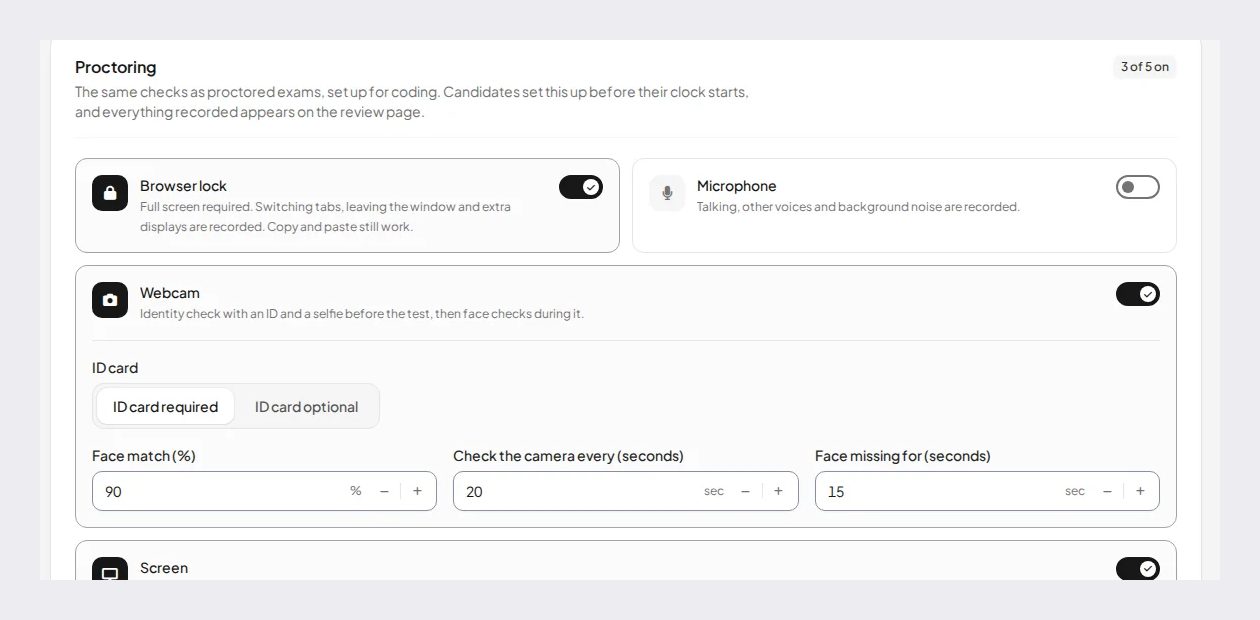
A game does not need proctoring, and Kahoot! does not describe any. For a test taken at home, IntelliAssess checks identity with an ID photo, live selfie, liveness check and face match, then watches the webcam, microphone, whole screen and browser, with rules that warn the student and can submit the attempt if problems continue.
Setting up
Kahoot!: pick a kahoot from the library or create one, by hand or with AI from a topic or file, then press play and share the game PIN on the shared screen. A ten-question kahoot can be ready in minutes, which suits the end of a lesson or a quick review.
IntelliAssess: upload your notes, slides or a link, choose question types, difficulty, number of questions and points, review the draft and rubrics, set time limits, attempts, schedule and any proctoring, and post to Google Classroom. Setup takes longer because the test has to be fair and marked; the time comes back when written answers arrive with drafted scores.
Accessibility
When we read its site on 16 November, Kahoot! offered read-aloud text and a read-aloud host mode for students who cannot yet read, which makes it usable with very young classes. IntelliAssess sets time limits per test, generates questions and rubrics in the language you choose, and works in English and Arabic, right to left included. Check per-student accommodations, such as extra time for individual students, with each vendor before relying on them for students with individual plans.
Free plans compared
| Kahoot! Go | IntelliAssess Free | |
|---|---|---|
| Players or students | Up to 10 per game | Up to 25 students |
| AI | Create from PDFs up to 3 pages | AI token allowance each billing period |
| Reports | Basic reports | Results per test |
| Written answers | Collected, not marked | Collected; AI marking from Starter |
Kahoot! Go's 10-player limit means most teachers pay for whole-class games. IntelliAssess Free covers a class of up to 25 for tests, without AI marking.
Pricing compared
Kahoot! (plans, read 18 November 2026; prices exclude tax):
| Kahoot! plan | Billed annually | Players per game |
|---|---|---|
| Go | Free | Up to 10 |
| Kahoot!+ Bronze | $36 a year | Up to 50 |
| Kahoot!+ Silver | $84 a year | Up to 100 |
| Kahoot!+ Gold | $120 a year | Up to 200 |
| EDU Standard | $179.88 per host a year | School plan |
| EDU Pro | $299 per host a year | School plan, with LMS integration and SSO |
A Black Friday offer, "Get Kahoot!+ from $3/mo", was running when we read the page.
IntelliAssess (pricing): Free for 25 students; Starter $39 a month for 200; Pro $99 for 500; Intensive $249 for 2,000; yearly billing costs ten months. AI grading and proctoring start on Starter.
| Case | Kahoot! | IntelliAssess |
|---|---|---|
| Weekly review games for a class of 30 | Bronze $36 a year | Not a game tool |
| Unit tests with written answers for 150 students | Not built for graded tests | Starter $390 a year billed yearly |
| Graded tests at home needing identity checks | Not described | Starter or Pro, with a monthly face-check allowance |
For games, Kahoot! is far cheaper. IntelliAssess costs more because it marks and supervises tests, which Kahoot! does not attempt. A teacher who only runs games should not pay for IntelliAssess, and a teacher who needs marked tests will not get them from a Kahoot! plan at any price.
What students see
In Kahoot!, students join with a game PIN, answer on their devices while the questions show on the shared screen, and watch the leaderboard move. In self-paced kahoots, they play alone at home.
In IntelliAssess, students open a test link or Google Classroom assignment and answer in the browser, with a time limit and any rules shown first. On a proctored test, they take an ID photo and a selfie and allow the camera, microphone and screen. After results are released, they see marks with a comment per rubric criterion, can ask for a re-mark, and can practise what they missed.
Ages and settings
Kahoot! works from early primary to university, and its music, colour and read-aloud options suit younger students. IntelliAssess suits secondary school and university courses where students write answers in sentences and tests count towards grades. For a class of seven-year-olds, Kahoot! is the better choice by far.
Reports
Kahoot! reports results by participant and question, which tells a teacher who struggled and on what, and its paid plans add fuller reports. IntelliAssess reports each student's answers and scores for each test, with written-answer scores per rubric criterion and the reason, and sends grades to Google Classroom. Kahoot!'s reports guide the next lesson; IntelliAssess's become the grade.
If you want a different game tool
Kahoot! is not the only game in town, and its free plan is the smallest. Blooket Starter is free for up to 60 players, with Plus at $59.88 a year for up to 300. Gimkit Basic lets you play featured modes "with as many students as you want", with Pro at $59.88 a year adding all modes and homework assignments. Wayground Basic is free for up to 100 students with live and self-paced play and AI. Any of these can take Kahoot!'s place in the unit above; none of them replaces the graded test. Our Kahoot! alternatives page compares them on six facts.
Privacy
Schools should check each game vendor's privacy terms before students sign in, especially for younger students. IntelliAssess collects more on proctored tests: ID and selfie photos and webcam evidence, which it stores encrypted and opens only through short-lived links, and it records location only if the teacher switches that check on. It lists no certifications. Tell students what a proctored test records and who sees it before they start.
Questions to ask before you decide
- Is the quiz for energy and recall, or for a grade?
- Do students write answers in sentences that need marking?
- Will some students take it at home, and does it matter who takes it?
- How many players do you need in a free game?
- Do grades need to reach Google Classroom?
Energy, recall and a live game point to Kahoot!. A grade, written answers and tests at home point to IntelliAssess. Most teachers will answer yes to both groups, which is why many use both.
Using both
Kahoot! and IntelliAssess fit together without overlap. Run games and review in Kahoot! during the unit, and the graded test in IntelliAssess at the end. Kahoot! Bronze at $36 a year covers games for a class of up to 50, and IntelliAssess Free covers tests for up to 25 students; Starter adds AI marking and proctoring for larger groups. Students will understand the difference: Kahoot! is for practice and fun, IntelliAssess for the test.
A department's view
A department buying for several teachers is buying for two jobs. Kahoot!'s school plans, from EDU Standard at $179.88 per host a year to EDU Pro at $299 with LMS integration and SSO, cover games and review across classes. IntelliAssess covers the department's graded tests, with consistent rubric marking across teachers, tests written from the department's own material, and identity checks for every student testing at home. Few departments need to choose one; most will budget for games and tests separately, or use free plans for one of them.
Tips for using both
- Use Kahoot! results to decide what to revisit before the test, not as part of the grade.
- Build the IntelliAssess test from the same slides you used for the kahoots, so the questions follow what you taught.
- Add at least one written question to each test; that is where AI marking saves time and where games cannot help.
- Tell students which activities count, so the leaderboard stays fun and the test stays serious.
Who should choose which
- Choose Kahoot! for live games, review, quick recall checks, younger students and a low price.
- Choose IntelliAssess for graded tests from your own lessons, written answers marked by rubric, identity checks at home, and grades in Google Classroom.
Where IntelliAssess falls short
- No live game, leaderboard, music or podium.
- Not built for quick review or energising a lesson.
- Fewer question types: no puzzle, slider, pin, poll or word cloud.
- Not designed for young children who cannot yet read.
- It costs more than Kahoot! Bronze.
For other tools, see Kahoot! alternatives, Socrative vs IntelliAssess and Wayground vs IntelliAssess, or browse every comparison.
Frequently asked questions
Is IntelliAssess a Kahoot! alternative?
Not for games. IntelliAssess has no live game or leaderboard. It is an alternative for the graded test that follows a unit, with written answers marked by AI and identity checks for tests at home.
How much does Kahoot! cost for teachers?
Kahoot! Go is free for up to 10 players per game. Kahoot!+ Bronze is $36 a year for 50 players, Silver $84 for 100 and Gold $120 for 200, billed annually. School plans start at $179.88 per host a year.
Can Kahoot! grade written answers?
Kahoot!'s open-ended questions collect free-form responses but are not described as marked. IntelliAssess marks written answers against a rubric with AI, for the teacher to review.
Can I use Kahoot! for tests?
You can run a kahoot as a quiz, but it is built for speed and fun, with no identity checks or rubric marking. For tests that count, a test platform fits better.
Which is better for younger students?
Kahoot!, with its colour, music and read-aloud options. IntelliAssess is built for older students writing answers in tests.
Can I use Kahoot! and IntelliAssess together?
Yes. Use Kahoot! for games and review during the unit, and IntelliAssess for the graded test at the end, with grades in Google Classroom. The two do not need to be connected, and students quickly learn which one counts.
Keep reading
All articles
Read next
SchoolAI alternatives: 7 AI tools for teachers and students scored (2026)
Seven AI tools scored on the same nine facts, with SchoolAI as the reference, and what each lets teachers see when students use AI.

SchoolAI vs IntelliAssess: an AI tutor for students or feedback after a test?
SchoolAI puts students in supervised conversation with AI; IntelliAssess marks their tests and uses AI to help them learn from their own answers.
Motasem Aldiab 12 min read

Jotform and ProProfs alternatives for quizzes and exams (2026)
Jotform and ProProfs side by side, then the alternatives by forms, certificates or real exams.
Motasem Aldiab 2 min read