
Kahoot! alternatives in 2026: free class games, and tests that count

By Motasem Aldiab, Technology Consultant and Trainer - Cloud, DevOps, Java, Data Science
Contents24
- What Kahoot! does well
- Why teachers look for a Kahoot! alternative
- How many players does each free plan allow?
- The scorecard: 5 game tools on 6 published facts
- 1. Blooket: the most game modes for free
- 2. Gimkit: unlimited players on the free plan
- 3. Wayground: games, practice and AI in one free plan
- 4. Mentimeter: quiz competitions inside presentations
- 5. Quizalize: games with mastery tracking
- Game styles compared
- Homework and self-paced play
- Reports and AI
- Using games and graded tests together
- Game or graded?
- When the quiz has to count: graded-test tools
- 1. IntelliAssess: tests from your lessons, marked
- 2. Google Forms: free self-marking quizzes
- 3. Exam.net: locked exams for a whole school
- Prices compared
- School and department plans
- Ages and settings
- Which alternative for which teacher
- Where IntelliAssess is not the right choice
- How to choose a Kahoot! alternative
Key takeaways
- 1Blooket, Gimkit and Wayground have free plans that fit a whole class; Kahoot! Go allows 10 players.
- 2Blooket Plus and Gimkit Pro both cost $59.88 a year.
- 3Mentimeter suits quiz competitions in slides; Quizalize adds mastery tracking.
- 4For tests that count, IntelliAssess leads the separate graded-test section.
The best Kahoot! alternatives for classroom games are Blooket, free for up to 60 players with many game modes and Plus at $59.88 a year; Gimkit, free for as many students as you want with three rotating modes and Pro at $59.88 a year; and Wayground, free for up to 100 students with live and self-paced play and AI. Mentimeter suits quiz competitions inside presentations, and Quizalize adds mastery tracking. If your quiz has to count towards a grade, a game tool is the wrong choice; for that, see the separate section on graded-test tools, where IntelliAssess comes first. Below, five game tools are scored on six published facts, with Kahoot! as the reference, and every free plan's player limit is compared.
What Kahoot! does well
Kahoot! made the live classroom quiz a habit. Teachers "Host a live kahoot with questions displayed on a shared screen", students answer on their own devices, and the leaderboard does the rest (Kahoot! for schools). It says teachers can "Know exactly where every student stands, in real time, with class reporting". Paid plans add self-study experiences, AI creation from topics and trusted sources, more question types and larger games, and schools can switch generative AI off.
Price (plans, read 18 November 2026):
| Plan | Billed annually | Players per game |
|---|---|---|
| Kahoot! Go | Free | Up to 10 |
| Kahoot!+ Bronze | $36 a year | Up to 50 |
| Kahoot!+ Silver | $84 a year | Up to 100 |
| Kahoot!+ Gold | $120 a year | Up to 200 |
| EDU Standard (schools) | $179.88 per host a year | School plan |
Player limits from Kahoot!'s plans FAQ. A Black Friday offer, "Get Kahoot!+ from $3/mo", was running when we read the page, so check current prices. The page says prices exclude tax.
Kahoot! is excellent at what it does. The most common reason teachers look elsewhere is the free plan: Kahoot! Go allows only 10 players per game, which rules out most whole-class games without paying.
Why teachers look for a Kahoot! alternative
- The free plan is small. Ten players per game on Kahoot! Go.
- Students want new games. Tools such as Blooket and Gimkit offer many different game modes beyond the classic quiz race.
- Homework. Some teachers want students to play at home at their own pace.
- Graded work. A game is not a test; when the result has to count, a different kind of tool fits better.
How many players does each free plan allow?
Most teachers searching for free Kahoot! alternatives want one thing: a whole class in one game without paying. Here is each free plan's limit.
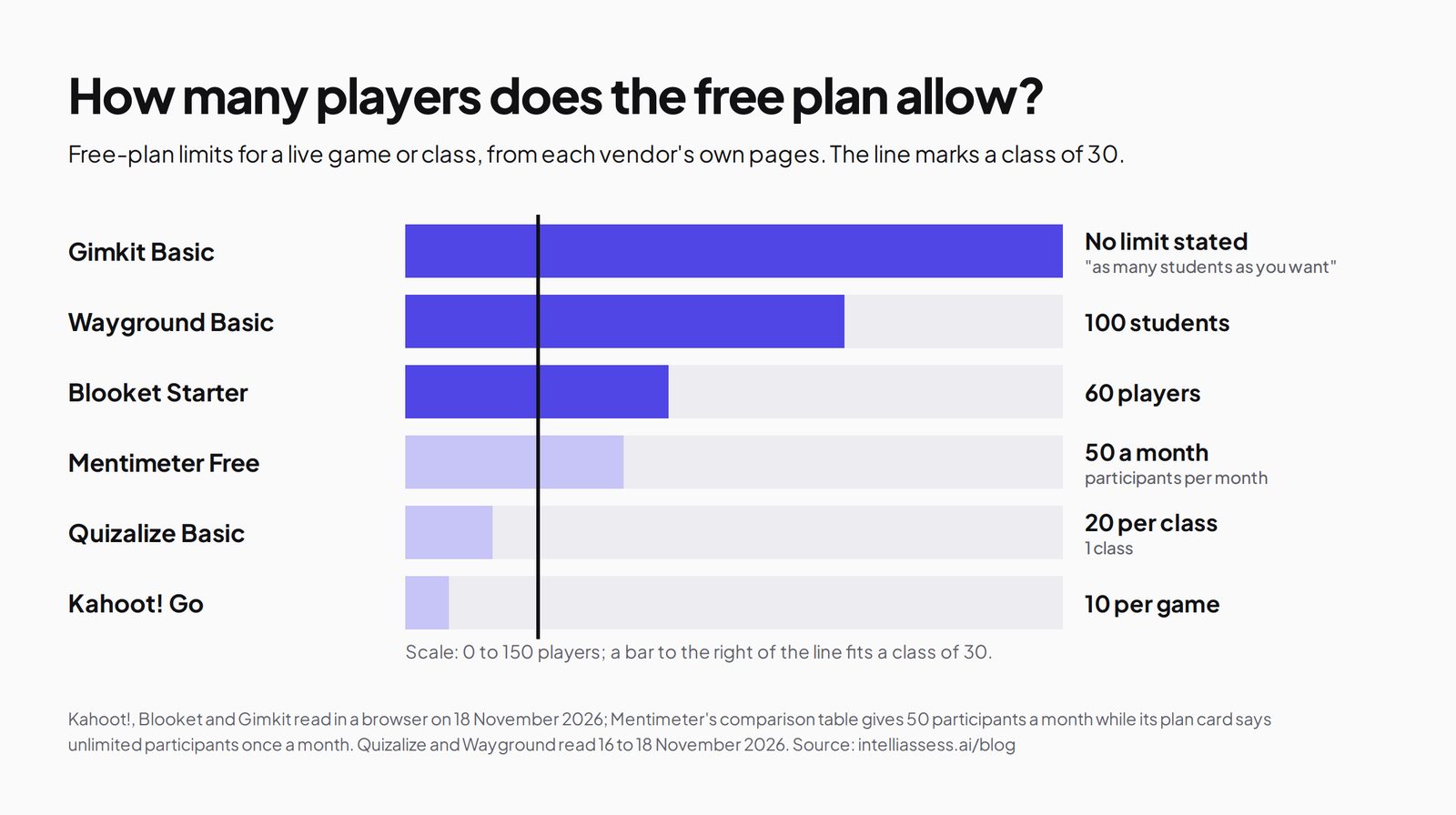
| Free plan | Players | What else is limited |
|---|---|---|
| Gimkit Basic | "as many students as you want" | About three free game modes at a time, rotated |
| Wayground Basic | Up to 100 students | Limited question types and storage |
| Blooket Starter | Up to 60 players | Plus game modes, enhanced reports and folders are paid |
| Mentimeter Free | 50 participants a month | No import or export |
| Quizalize Basic | 20 students per class, 1 class | 5 saved quizzes, multiple choice only, 3 AI quizzes a month |
| Kahoot! Go | Up to 10 per game | Basic reports; AI from PDFs up to 3 pages |
Mentimeter's comparison table gives 50 participants a month for Free, while its plan card says "Unlimited participants once per month"; we use the table's figure.
The scorecard: 5 game tools on 6 published facts
We scored each game tool on what Kahoot! users weigh: a free plan for a whole class, a published price for one teacher, several game modes, homework or self-paced play, AI question writing and reports per student. A tick means the vendor's own page says so; a half means partly, limited or on paid plans only; a cross means its page does not say so. Ties go to a published price for one teacher.
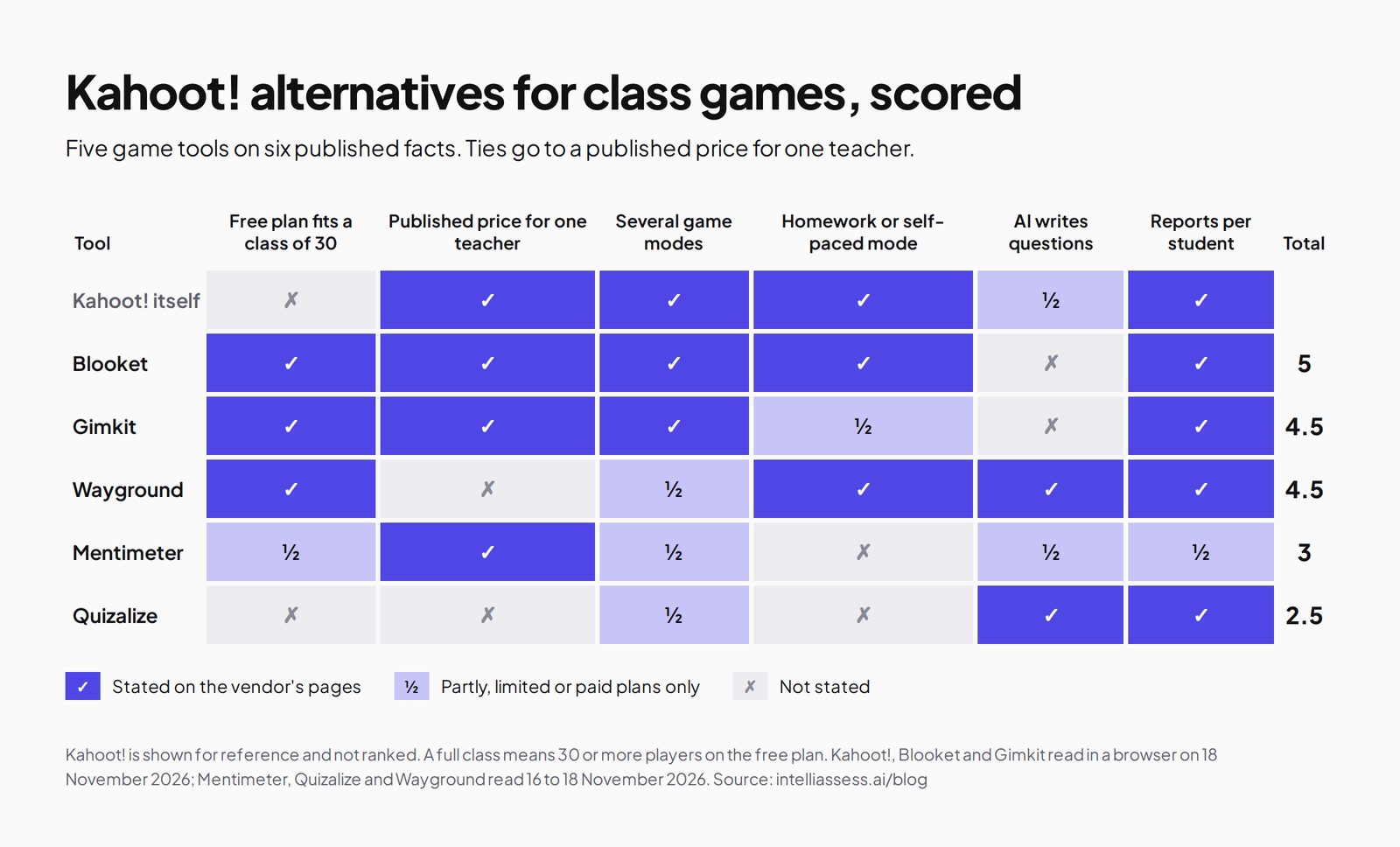
| Tool | Free plan fits a class of 30 | Published price for one teacher | Several game modes | Homework or self-paced mode | AI writes questions | Reports per student | Total |
|---|---|---|---|---|---|---|---|
| Kahoot! itself | ✗ | ✓ | ✓ | ✓ | ½ | ✓ | 4.5 |
| 1. Blooket | ✓ | ✓ | ✓ | ✓ | ✗ | ✓ | 5 |
| 2. Gimkit | ✓ | ✓ | ✓ | ½ | ✗ | ✓ | 4.5 |
| 3. Wayground | ✓ | ✗ | ½ | ✓ | ✓ | ✓ | 4.5 |
| 4. Mentimeter | ½ | ✓ | ½ | ✗ | ½ | ½ | 3 |
| 5. Quizalize | ✗ | ✗ | ½ | ✗ | ✓ | ✓ | 2.5 |
Kahoot!'s AI half: full AI creation on paid plans, limited on Go. Gimkit's homework half: Assignments are on Pro. Wayground: no paid price for one teacher published; its plans describe live and student-paced delivery rather than a list of game modes. Mentimeter: quiz competitions inside presentations; "Menti AI" is listed without detail; exports from Basic. Quizalize: Standard's price is not shown on its page; team games on Standard. Blooket's and Gimkit's pages we read do not describe AI question writing.
1. Blooket: the most game modes for free
Best for: teachers who want lots of game variety and a free plan that fits a class.
Blooket offers "Fun, free, educational games for everyone": teachers find a question set in its library or create their own, pick a game mode, and run "a live or asynchronous game in just a few clicks", with "detailed reports at the end of each game" (Blooket). It says its gameplay suits "students from early elementary to high school and beyond".
Price (upgrade page): Starter is free "forever" with up to 60 players, question set search and unique game modes; Plus is $4.99 a month charged yearly ($59.88), adding exclusive game modes, enhanced reports with question-by-question data and individual student breakdowns, folders, audio questions and up to 300 players; Plus Flex is $9.99 billed monthly. Group pricing is available. Where it falls short: its pages do not describe AI question writing or grade sync.
2. Gimkit: unlimited players on the free plan
Best for: teachers who want strategy-style games where students earn and spend in-game cash, for any class size.
In Gimkit, students "earn in-game cash by answering questions correctly" and reinvest it in upgrades and power-ups, with "10+ unique game modes and more in development" (Gimkit). Its Pro FAQ says the free Gimkit Basic lets you "play Gimkit featured modes with as many students as you want, set up classes (rostering), and collect reports", with "generally three free game modes at any given time". Pro unlocks all modes, Assignments for homework, and images and audio in questions.
Price: Pro annual $59.88; Pro monthly $14.99; a department plan is $650 a year for 20 teachers and a school plan $1,000 a year for every teacher (group pricing). Where it falls short: only rotating modes on the free plan, homework on Pro, and no AI question writing described.
3. Wayground: games, practice and AI in one free plan
Best for: teachers who want live and self-paced play with AI and accommodations, free for up to 100 students.
Wayground, formerly Quizizz, offers on its free Basic plan "Live and student-paced delivery", "Live instruction data with Classroom Pulse", AI to "generate, import, adapt, and explain", and "20+ accommodations, including Read Aloud" (plans). Its homepage lists auto-graded homework and "Lockdown mode, tab-switching alerts, and academic integrity reports". School & District plans add AI grading with rubrics and LMS integrations. Where it falls short: no published paid plan for one teacher; limited question types on the free plan. See Wayground alternatives.
4. Mentimeter: quiz competitions inside presentations
Best for: teachers and lecturers who present slides and want quick polls and a quiz competition inside them.
Mentimeter's quiz is "a competition" in which results from all quiz questions "add up to determine one final winner" (education plans). The free plan includes Menti AI and multiple question types, with 50 participants a month according to its comparison table. Price: Basic $8.99 per presenter a month and Pro $14.99, billed yearly, excluding tax; LMS integration with Canvas, Blackboard, Moodle and Brightspace is on Enterprise. Where it falls short: no homework mode described, and a monthly participant cap on the free plan.
5. Quizalize: games with mastery tracking
Best for: teachers who want quiz games that feed standards mastery and differentiated follow-up.
Quizalize's free Basic plan includes 20 students per class, one class, 5 saved quizzes, multiple choice, a leaderboard game mode and 3 AI-generated quizzes a month (Quizalize). Standard adds 200 students per class, unlimited classes and AI quiz creation, 8 question types, team games, "Mastery by Standard", mastery dashboards, report cards and "Auto-Differentiation". It says results sync with Google Classroom, Microsoft Teams or your LMS. Where it falls short: a small free plan, and the Standard price is not shown on its page.
Game styles compared
The tools differ less in price than in how a game feels in the room.
- Kahoot!: the classic race. Questions on a shared screen, answers on devices, a leaderboard after each question.
- Blooket: a library of game modes that change how points are won, with exclusive modes on Plus. Games run live or asynchronously.
- Gimkit: students answer at their own pace, earn in-game cash, and spend it on upgrades and power-ups, across 10+ modes; Basic rotates about three of them.
- Wayground: live and student-paced quizzes with game elements, plus practice, accommodations and AI on the free plan.
- Mentimeter: a quiz competition inside a presentation, with scores adding up across questions to one winner.
- Quizalize: a leaderboard mode on the free plan, and team games such as Goalzz, Hoozz and Blockerzz on Standard.
Rotating between two tools, for example Kahoot! for a quick race and Blooket or Gimkit for a longer game, keeps review fresh without paying for either.
Homework and self-paced play
Live games need everyone in the room at once. For homework, you need a mode students can play alone. Blooket runs asynchronous games, Gimkit offers Assignments on Pro, Wayground has student-paced delivery and auto-graded homework on its free plan, and Kahoot! lists self-study experiences on paid plans. Mentimeter and Quizalize's pages we read do not describe a homework mode. If homework practice matters most, Wayground's free plan and Blooket's asynchronous games are the easiest starting points.
Reports and AI
Every tool reports results, with different depth. Blooket Plus adds question-by-question data and individual student breakdowns; Gimkit Basic collects reports; Wayground shows live instruction data; Quizalize Standard adds mastery dashboards and report cards; Mentimeter exports results from Basic; Kahoot! Go has basic reports, with fuller reports on paid plans.
For AI question writing, Wayground's free plan includes AI to generate, import, adapt and explain; Quizalize's free plan includes 3 AI quizzes a month and Standard unlimited; Kahoot! paid plans create from topics and trusted sources; Mentimeter lists Menti AI without detail. Blooket's and Gimkit's pages we read do not describe AI question writing. Whatever writes the questions, read them before a game: a wrong answer key in a fast race teaches the wrong thing quickly.
Using games and graded tests together
Games and tests work best side by side. Use a game tool during the unit for recall and energy, and a graded-test tool at the end for the record. For example, a teacher might run Blooket or Gimkit reviews each week, and then an IntelliAssess unit test with written answers marked against a rubric, posted to Google Classroom. Free plans make the pairing cheap to try: Gimkit Basic, Blooket Starter or Wayground Basic for games, and IntelliAssess Free for a class of up to 25.
Game or graded?
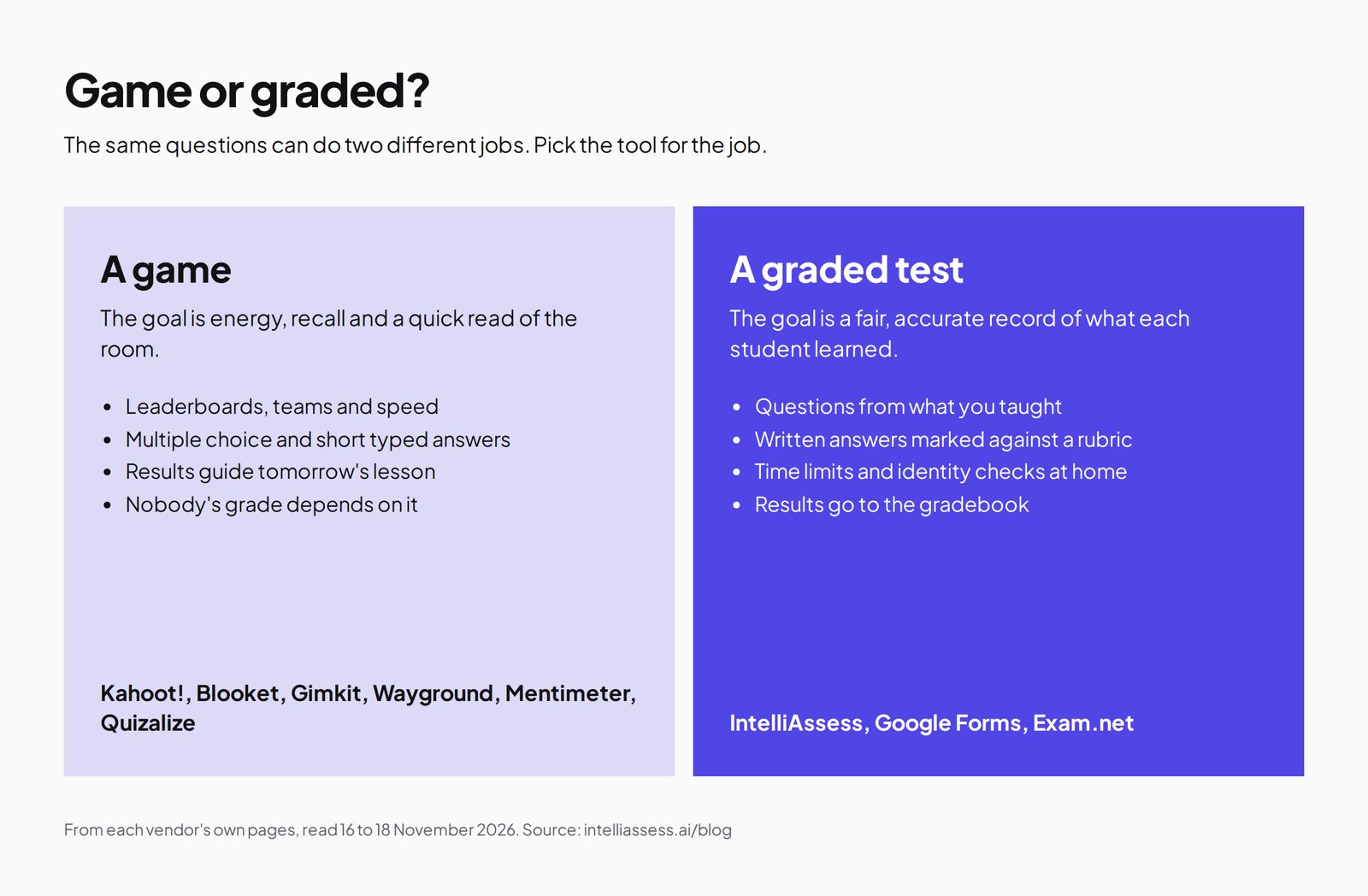
Every tool above is built for play: speed, energy and a quick read of the room. That is valuable, and nobody's grade depends on it. When a quiz has to count, the job changes: questions must match what you taught, written answers need marking, and for tests at home you may need to know who is taking them.
When the quiz has to count: graded-test tools
These tools are not Kahoot! alternatives in the game sense. They are what teachers reach for when the end-of-unit quiz becomes a test that counts. IntelliAssess comes first here because it is the only one that marks written answers with AI.
1. IntelliAssess: tests from your lessons, marked
IntelliAssess's AI quiz generator writes tests from your PDF, Word or PowerPoint files, a YouTube video or a web page. Objective questions mark themselves, and AI grading scores each written answer on every rubric criterion with a reason for the teacher to review. Online proctoring adds ID, face match, webcam, microphone, screen and browser checks for tests at home, and tests post to Google Classroom with grades sent back. Price (pricing): Free for 25 students; Starter $39 a month for 200, with AI grading and proctoring. Not a game: no leaderboard, no live game mode. See Kahoot! vs IntelliAssess.
2. Google Forms: free self-marking quizzes
Google Forms comes free with Google Workspace for Education Fundamentals. Quizzes have answer keys on six question types; written answers are marked by hand; locked mode works on school-managed Chromebooks; grades go to Classroom. See Google Forms alternatives.
3. Exam.net: locked exams for a whole school
Exam.net offers three security levels including a lockdown browser, an AI question generator and rule-based auto-marking, under a school licence on quote, with Google Classroom and Microsoft Teams integrations. See Exam.net alternatives.
Prices compared
| Tool | Free | Cheapest paid plan for one teacher |
|---|---|---|
| Kahoot! | Go, 10 players | Bronze $36 a year, 50 players |
| Blooket | Starter, 60 players | Plus $59.88 a year, 300 players |
| Gimkit | Basic, no player limit stated | Pro $59.88 a year |
| Wayground | Basic, 100 students | Not published |
| Mentimeter | 50 participants a month | Basic $8.99 a month billed yearly |
| Quizalize | 20 students, 1 class | Standard, price not shown |
| IntelliAssess (graded tests) | 25 students | Starter $390 a year billed yearly |
For games, Kahoot! Bronze is the cheapest paid plan, and Gimkit, Wayground and Blooket have the most useful free plans for a full class. Blooket Plus and Gimkit Pro cost the same, $59.88 a year, so the choice between them comes down to which games your students prefer. IntelliAssess sits in a different price bracket because it marks and supervises tests rather than running games.
School and department plans
If several teachers want the same tool, group pricing changes the sums. Gimkit is the most transparent: $650 a year gives Pro to 20 teachers in a department, and $1,000 a year gives Pro to every teacher in a school, paid by card or purchase order without a sales call. Kahoot!'s school plans start with EDU Standard at $179.88 per host a year and EDU Pro at $299, with Premium on custom pricing. Blooket offers group pricing for multiple teachers. Mentimeter asks schools wanting 10 or more licences to contact it, and Quizalize and Wayground quote school prices. For a department of 20, Gimkit's group plan costs about the same as two Kahoot! EDU Pro hosts.
Ages and settings
Blooket says its gameplay is designed for students "from early elementary to high school and beyond", and its bright, varied modes suit younger classes especially. Gimkit's earn-and-spend strategy appeals to older primary and secondary students, and it began as a high school project. Mentimeter fits lectures and presentations, including at university. Kahoot! and Wayground work across ages. For tests in secondary school and university, where written answers matter, the graded-test tools above fit better than any game.
Which alternative for which teacher
- Lots of game modes, free for a class of up to 60: Blooket.
- Strategy games for any class size, free: Gimkit.
- Games plus self-paced practice, AI and accommodations: Wayground.
- Quiz competitions inside slides: Mentimeter.
- Games that feed standards mastery: Quizalize.
- Tests that count, with written answers: IntelliAssess, in the graded-test section.
Where IntelliAssess is not the right choice
- You want a live game with a leaderboard.
- You want students to play for fun and recall.
- You need a free plan for more than 25 students.
- You want any of the game modes that make Blooket and Gimkit popular.
How to choose a Kahoot! alternative
- Check your class size against each free plan's player limit.
- Ask your students which games they enjoy; variety keeps review fresh.
- Decide whether you want homework play as well as live games.
- Keep graded tests separate in a tool built for them.
- Try two free plans for a week each before paying.
Browse every comparison, or see Socrative alternatives and Wayground alternatives.
Frequently asked questions
What is the best free alternative to Kahoot!?
For a whole class, Gimkit Basic, which allows as many students as you want with about three free modes, Blooket Starter, with up to 60 players, and Wayground Basic, with up to 100 students. Kahoot! Go allows 10 players per game.
Is Blooket better than Kahoot!?
For free whole-class games and game variety, Blooket's free plan does more: up to 60 players against Kahoot! Go's 10. Kahoot! has AI creation on paid plans and a cheaper first paid tier, Bronze at $36 a year.
How much does Gimkit cost?
Gimkit Basic is free. Pro is $59.88 a year or $14.99 a month. Departments pay $650 a year for 20 teachers and schools $1,000 a year for every teacher.
How many players can join a free Kahoot!?
Kahoot! Go allows up to 10 participants per game. Bronze allows 50, Silver 100 and Gold 200.
Can I use a game tool for graded tests?
You can, but game tools are built for speed and fun rather than fair, accurate grading. For tests that count, IntelliAssess, Google Forms or Exam.net fit better.
Is Quizizz the same as Wayground?
Yes. Quizizz is now Wayground; its homepage says "Quizizz is now Wayground". Its free Basic plan covers up to 100 students with live and self-paced play.
Keep reading
All articles
Read next
SchoolAI alternatives: 7 AI tools for teachers and students scored (2026)
Seven AI tools scored on the same nine facts, with SchoolAI as the reference, and what each lets teachers see when students use AI.

SchoolAI vs IntelliAssess: an AI tutor for students or feedback after a test?
SchoolAI puts students in supervised conversation with AI; IntelliAssess marks their tests and uses AI to help them learn from their own answers.
Motasem Aldiab 12 min read

Jotform and ProProfs alternatives for quizzes and exams (2026)
Jotform and ProProfs side by side, then the alternatives by forms, certificates or real exams.
Motasem Aldiab 2 min read