
MagicSchool alternatives: 7 AI teacher tools compared (2026)

By Motasem Aldiab, Technology Consultant and Trainer - Cloud, DevOps, Java, Data Science
Contents17
- What MagicSchool does well
- Why teachers look for a MagicSchool alternative
- Which tool does which job?
- The scorecard: 7 MagicSchool alternatives on 9 published facts
- 1. Brisk: a toolkit inside the tools you already use
- 2. Gemini for Education: AI that comes with Google Workspace
- 3. IntelliAssess: the testing end of the week
- 4. Eduaide: a resource builder with a low published price
- 5. SchoolAI: student AI Spaces with full teacher visibility
- 6. Khanmigo: free teacher tools and a tutor on Khan Academy content
- 7. Wayground: self-marking practice, free for teachers
- Prices side by side
- Privacy claims compared
- Student-facing AI: what to check
- Which alternative for which teacher
- Using a toolkit and a specialist together
- How to choose a MagicSchool alternative
Key takeaways
- 1Brisk is the closest free toolkit and works inside Google Docs and your LMS.
- 2Gemini for Education comes at no cost with Google Workspace for Education Fundamentals.
- 3IntelliAssess comes third: it leads on tests, marking and proctoring, not planning.
- 4Eduaide has the cheapest published paid plan; SchoolAI centres on student AI Spaces.
The best MagicSchool alternatives in 2026 are Brisk if you want a free AI toolkit that works inside Google Docs, Canvas and Schoology, Gemini for Education if your school is on Google Workspace and wants AI at no extra cost, and IntelliAssess if the part of MagicSchool you lean on most is quizzes, tests and marking. Eduaide is a low-cost resource builder with a published price, SchoolAI is built around student AI Spaces, Khanmigo pairs free teacher tools with Khan Academy's tutor, and Wayground suits self-marking practice. Below, seven tools are scored on the same nine published facts, with MagicSchool shown as the reference.
What MagicSchool does well
Before looking elsewhere, it is worth being clear about what you would give up. On its pricing page, MagicSchool's Free plan, "Forever Free" for individual teachers, includes 80+ teacher tools, the Raina chatbot, Quizzes and Class Writing Feedback. Plus, at $8.33 per user a month billed annually or $12.99 billed monthly, adds unlimited generations, output history and editing, 50+ student tools and student learning insights. Enterprise, priced on request, adds a custom data privacy agreement, SIS and LMS integrations (Clever, ClassLink, Canvas, Schoology), single sign-on, district alignment, guardrails and dashboards.
Its MagicStudent tools let teachers give students 50+ AI study tools, with interactions stored for teacher visibility and "built-in moderation guided by district expectations". On privacy, its homepage says it is SOC 2 certified and "FERPA/COPPA-compliant", its trust page lists SOC 2 Type II and the EU Data Privacy Framework, and it reports a 95% Common Sense privacy rating. It integrates with Google Docs, Classroom, Canvas and more, and exports outputs to Google and Microsoft files.
That is a lot for free or $100 a year. Most teachers who look for an alternative are not unhappy with MagicSchool overall; they want one job done differently.
Why teachers look for a MagicSchool alternative
- They want AI where they already work. MagicSchool is a separate site. Brisk works as a Chrome extension inside Docs, Slides and the LMS; Gemini sits inside Google Classroom.
- The free plan has limits that are not spelled out. "Unlimited generations" is listed for Plus, which implies a cap on Free, but the cap is not stated.
- Student tools sit on Plus. The 50+ student tools are listed in the Plus block on the pricing page.
- Quizzes are low-stakes. MagicSchool describes its Quizzes as "low-stakes, formative assessments like exit tickets", with real-time summaries. Its pages do not describe auto-marking, timed exams or proctoring.
- Writing feedback is feedback. Class Writing Feedback lets you "review, personalize, and send AI-generated feedback on written assignments in batches, based in your rubric". Its pages do not say it assigns a score per criterion.
- Languages are not stated on the pages we read, which matters for schools teaching outside English.
Which tool does which job?
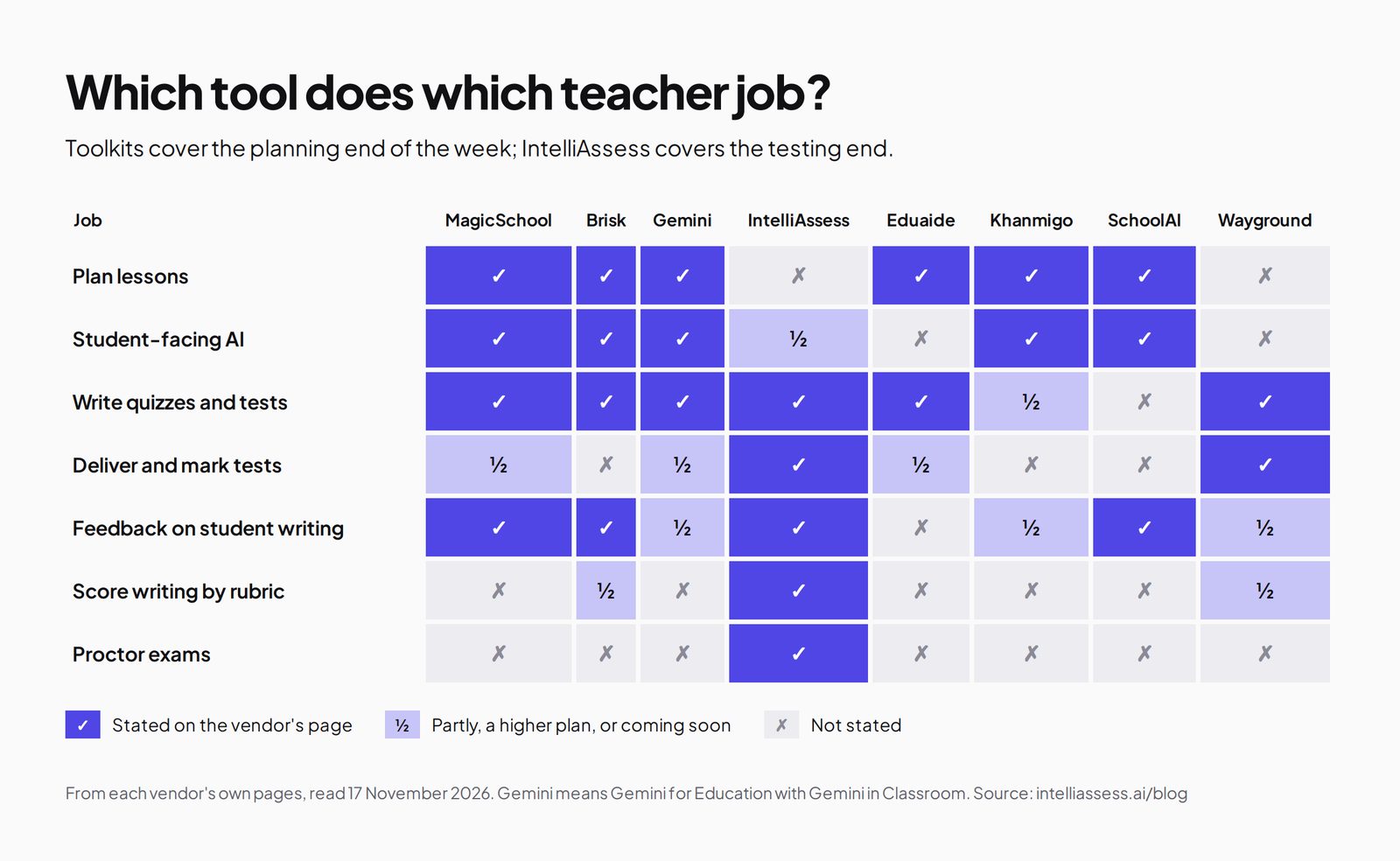
The clearest way to compare AI teacher tools is by the jobs in a teacher's week. Toolkits such as MagicSchool, Brisk and Gemini cover the planning end: lesson plans, materials, differentiation and feedback. Assessment platforms cover the testing end: writing a test, delivering it, marking it and, for exams, supervising it.
The scorecard: 7 MagicSchool alternatives on 9 published facts
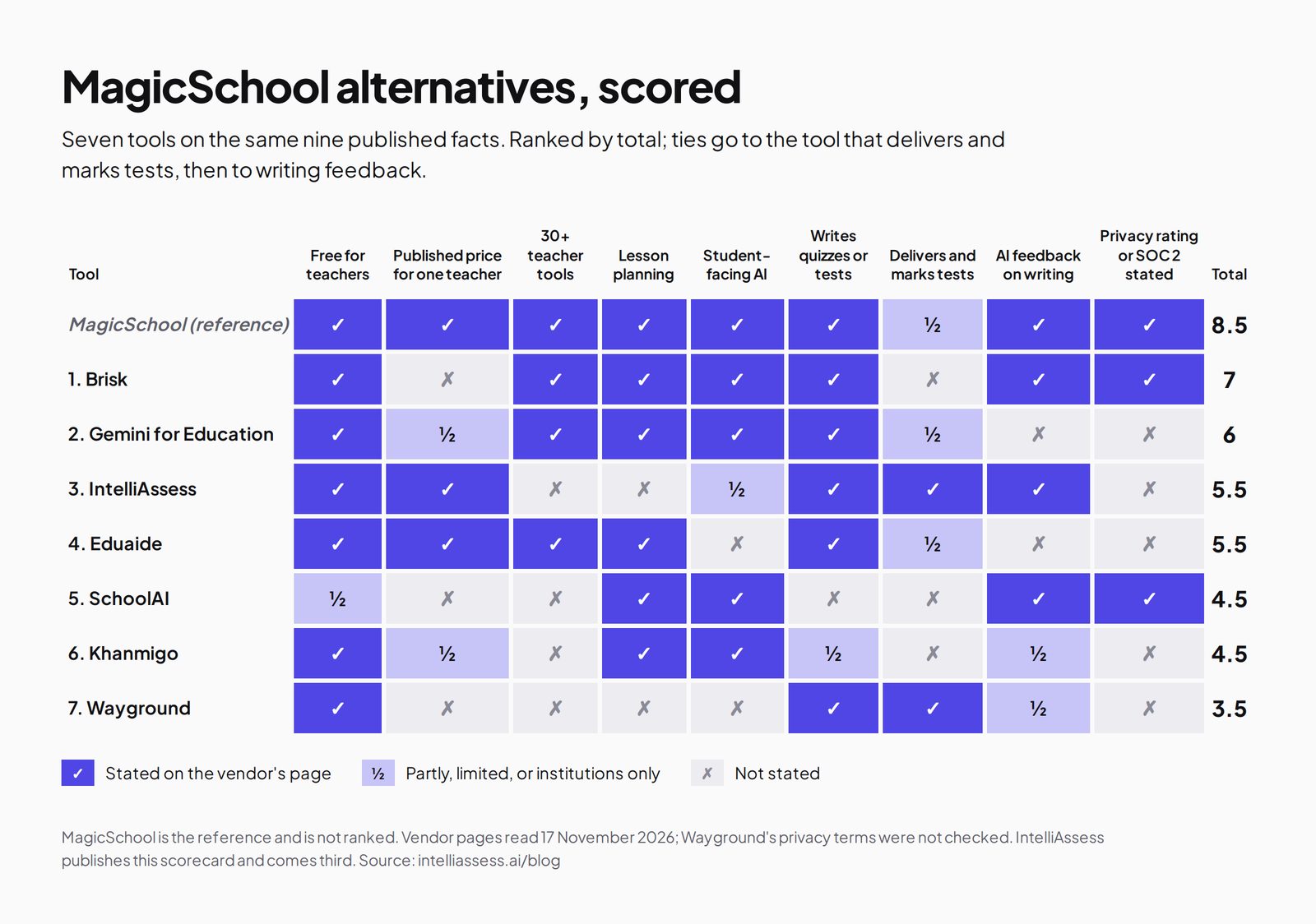
We scored each tool on what MagicSchool users compare: the price, breadth of tools, lesson planning, student-facing AI, quiz writing, delivering and marking tests, feedback on writing, and stated privacy credentials. A tick means the vendor's own page says so; a half means partly, limited, or only for institutions; a cross means the page does not say so. Ties go to the tool that delivers and marks tests, then to writing feedback.
| Tool | Free for teachers | Published price for one teacher | 30+ teacher tools | Lesson planning | Student-facing AI | Writes quizzes or tests | Delivers and marks tests | AI feedback on writing | Privacy rating or SOC 2 stated | Total |
|---|---|---|---|---|---|---|---|---|---|---|
| MagicSchool itself | ✓ | ✓ | ✓ | ✓ | ✓ | ✓ | ½ | ✓ | ✓ | 8.5 |
| 1. Brisk | ✓ | ✗ | ✓ | ✓ | ✓ | ✓ | ✗ | ✓ | ✓ | 7 |
| 2. Gemini for Education | ✓ | ½ | ✓ | ✓ | ✓ | ✓ | ½ | ✗ | ✗ | 6 |
| 3. IntelliAssess | ✓ | ✓ | ✗ | ✗ | ½ | ✓ | ✓ | ✓ | ✗ | 5.5 |
| 4. Eduaide | ✓ | ✓ | ✓ | ✓ | ✗ | ✓ | ½ | ✗ | ✗ | 5.5 |
| 5. SchoolAI | ½ | ✗ | ✗ | ✓ | ✓ | ✗ | ✗ | ✓ | ✓ | 4.5 |
| 6. Khanmigo | ✓ | ½ | ✗ | ✓ | ✓ | ½ | ✗ | ½ | ✗ | 4.5 |
| 7. Wayground | ✓ | ✗ | ✗ | ✗ | ✗ | ✓ | ✓ | ½ | ✗ | 3.5 |
Notes on halves and crosses. MagicSchool: quizzes are assigned to students with summaries, but auto-marking is not stated. Gemini: free through Google Workspace for Education Fundamentals for qualifying institutions; the AI Pro add-on is priced per user for institutions; suggested feedback on writing is listed as "coming soon", so it scores a cross here; Google Forms, not Gemini itself, marks answer-key quizzes. IntelliAssess: student-facing AI is limited to study notes and study plans after Learning-purpose quizzes, on Pro and up; our pages list no privacy certifications. Eduaide: exports quizzes to Google Forms, which can mark them. SchoolAI: a free trial with 5 Space launches a year rather than a free plan. Khanmigo: free for teachers; the published $4 a month is for learners and parents; teacher tools include exit tickets and summaries of student work. A cross can mean "not stated on the pages we read", not "impossible".
1. Brisk: a toolkit inside the tools you already use
Best for: teachers who want MagicSchool-style help without leaving Google Docs, Slides or their LMS.
Brisk's plans page lists a free plan for teachers with 30+ tools, including a lesson plan generator, quiz generator, rubric generator and presentation maker, and "5+ ways to give feedback": glow and grow, next steps, rubric criteria feedback and batch feedback with no limit, with rubric scoring available as an opt-in. Brisk Boost gives students "safe, teacher-guided AI activities", and Inspect Writing analyses how a submission was written. Its FAQ says Brisk "works inside Canvas, Schoology, and Google Classroom", as well as Docs, Slides, YouTube and Microsoft tools, and it generates materials in 50+ languages. On privacy it reports a 95% Common Sense privacy rating and FERPA and COPPA compliance, and says it is "working toward SOC 2 Type II".
Price: free for teachers; Premium for schools and Intelligence for districts are custom-priced. Where it falls short: no published paid price, no individual paid plan, and its pages do not describe delivering quizzes to students and marking them. See Brisk vs IntelliAssess.
2. Gemini for Education: AI that comes with Google Workspace
Best for: schools already on Google Workspace for Education that want AI for every teacher without another vendor.
Google's Gemini for Education page says an institution "can get Gemini for Education at no cost by signing up for Google for Education Fundamentals". Teachers can "generate exams, quizzes, assignments and rubrics from scratch or based on previous examples, along with corresponding answer keys", create lesson plans aligned to standards and re-level texts. Its editions page lists Gemini in Classroom on Fundamentals, with "30+ use cases" and teacher-led AI experiences for students through Gemini Notebook and Gems, while suggested feedback on writing assignments is marked "coming soon" on the Google AI Pro for Education add-on. Google says data "is not human reviewed or used to train AI models", and the Gemini app runs in more than 40 languages.
Price: free with Education Fundamentals for qualifying institutions; Education Plus is $6 per user a year; the Google AI Pro for Education add-on is $15 to $24 per user a month depending on edition and billing. Where it falls short: institution-led rather than a teacher sign-up, AI feedback on writing not yet available, and quiz marking happens in Google Forms. See Google Forms vs IntelliAssess.
3. IntelliAssess: the testing end of the week
Best for: teachers who use MagicSchool mainly for quizzes and feedback, and want tests written, delivered, marked and, when needed, proctored in one place.
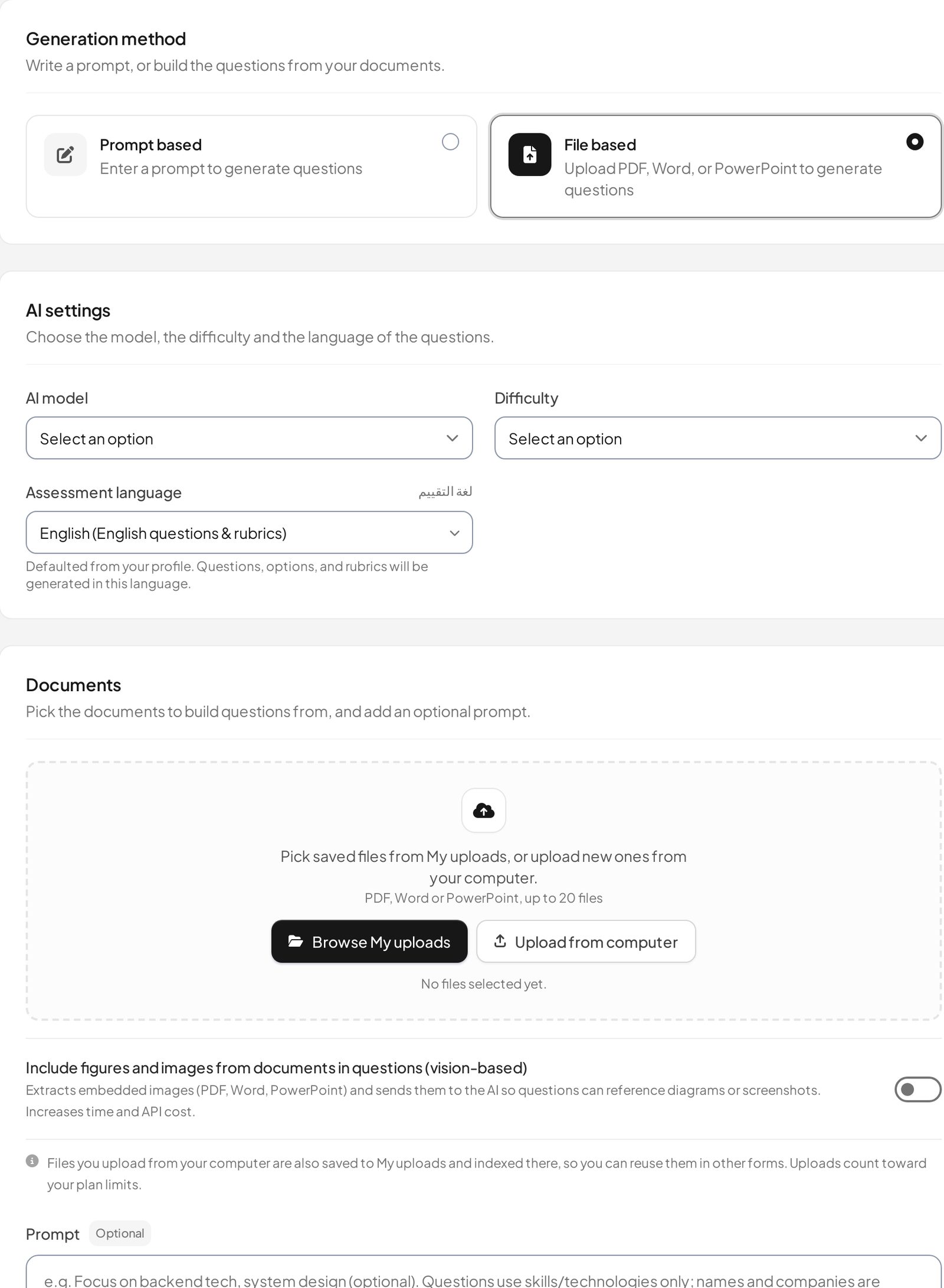
IntelliAssess's AI quiz generator writes a full test, up to 100 questions across eight types, from a topic, your PDF, Word or PowerPoint files, a YouTube video or a web page, and checks every answer key in a second pass. Its rubric generator drafts criteria for each written question. Students sit the test online with timers, scheduled starts, shuffled questions and attempt limits on paid plans. Choice questions are marked at hand-in and AI grading scores each written answer against every rubric criterion, with a comment per criterion that you can change before results are released. For exams at home, online proctoring adds an ID photo, selfie and liveness check, then webcam, microphone, screen and browser checks. Grades go to Google Classroom, and it works in English and Arabic.
Price (from our pricing page): Free for 25 students; Starter $39 a month for 200, Pro $99 for 500, Intensive $249 for 2,000; yearly billing costs ten months. AI grading and proctoring start on Starter. Where it falls short: no lesson planning, IEP, worksheet or presentation tools, a narrow set of student-facing AI, no privacy certifications listed on our pages, and Google Classroom is its only class platform. See MagicSchool vs IntelliAssess.
4. Eduaide: a resource builder with a low published price
Best for: teachers who mostly create materials and want a clear, cheap paid plan.
Eduaide's pricing page says teachers use it "to create lesson materials, graphic organizers, instructional games, assessments, rubrics, and 120+ different classroom resource templates", with an Assessment Builder offering "nine question types, difficulty controls" and standards from 50+ jurisdictions. Finished work exports to Google Docs, DOCX, Google Forms, plain text or PDF. It reports 1 million+ educators signed up as of October 2026, and says it "does not sell user data".
Price: Free with 24 credits a month (up to 8 resources); Pro $5.99 a month or $49.99 a year with unlimited generations; schools on request. Where it falls short: no student-facing AI, no feedback on student writing, and no privacy certifications stated on the pages we read.
5. SchoolAI: student AI Spaces with full teacher visibility
Best for: schools whose main goal is safe, supervised AI for students.
SchoolAI's pricing page centres on Spaces, "AI-powered learning experiences you design and assign to students", with Mission Control for "real-time and post-session visibility into student learning", full review of student AI conversations, and alerts when a conversation flags a safety concern. Teachers get Dot for lesson planning, tools for rubrics, and writing-analysis feedback; Scale adds a personal AI tutor, student portals and an embedded student Sidekick in Canvas. It states FERPA, COPPA and SOC 2 Type 2 compliance, and offers live translation in 60+ languages.
Price: a free trial with 5 Space launches a year; Pro and Scale on quote. Where it falls short: no published price, and its pages do not describe quiz generation or marking. See SchoolAI vs IntelliAssess.
6. Khanmigo: free teacher tools and a tutor on Khan Academy content
Best for: teachers who already use Khan Academy and want a free assistant and a tutor for students.
Khanmigo's pricing page is headed "Free for teachers". Teacher features include standards-aligned, differentiated lesson planning tied to Khan Academy's library, "an on-demand summary of student work", and help to "create learning objectives, rubrics, and even exit tickets". Learners and families pay $4 a month or $44 a year for tutoring and guided writing; districts get teacher and student access, rostering and single sign-on through Clever or ClassLink.
Price: free for teachers; $4 a month for learners; districts on request. Where it falls short: a short list of teacher tools, no test delivery, and its pricing page does not name FERPA, COPPA or SOC 2.
7. Wayground: self-marking practice, free for teachers
Best for: engaging quizzes and practice that mark themselves.
Wayground (formerly Quizizz) is free for teachers, with assessments, presentations, flashcards and videos, AI that generates and adapts content, and 20+ accommodations such as Read Aloud. Its plans page lists 40 million+ standards-aligned resources and "full AI grading with custom and state rubrics" on the School and District plan.
Price: Basic is free; School and District on quote. Where it falls short: not a planning toolkit, no student-facing AI described, and rubric grading needs a school plan. See Wayground vs IntelliAssess.
Prices side by side
| Tool | Free option | Paid option for one teacher | Schools and districts |
|---|---|---|---|
| MagicSchool | Free, 80+ teacher tools | Plus $8.33 a month billed annually, $12.99 monthly | Enterprise on request |
| Brisk | Free for teachers, 30+ tools | None published | Premium and Intelligence, custom |
| Gemini for Education | Free with Education Fundamentals (institutions) | None for individuals | Education Plus $6 per user a year; AI Pro add-on $15 to $24 per user a month |
| IntelliAssess | 25 students | Starter $39 a month for 200 students; $390 a year | Pro $99, Intensive $249 a month, published |
| Eduaide | 24 credits a month | Pro $5.99 a month or $49.99 a year | On request |
| SchoolAI | Free trial, 5 Space launches a year | None published | Pro and Scale on quote |
| Khanmigo | Free for teachers | $4 a month for learners and parents | On request |
| Wayground | Basic, free for teachers | None published | School and District on quote |
For one teacher paying out of pocket, the cheapest paid plans are Eduaide Pro ($49.99 a year) and MagicSchool Plus ($99.96 a year). IntelliAssess costs more because it covers delivering, marking and proctoring tests for up to 200 students, not only generating content. Brisk, SchoolAI and Wayground's paid tiers are sold to schools.
Privacy claims compared
For student-facing AI in particular, district approval often depends on privacy credentials. Here is what each vendor states on the pages we read; we did not audit any of them.
| Tool | What its own pages state |
|---|---|
| MagicSchool | SOC 2 Type II, FERPA and COPPA (iKeepSafe programmes), 1EdTech TrustEd Apps, EU Data Privacy Framework, 95% Common Sense privacy rating; says it does not use student or teacher data to train AI |
| Brisk | FERPA and COPPA compliant, 95% Common Sense privacy rating, GDPR aligned, "working toward SOC 2 Type II"; "does not sell student data" |
| Gemini for Education | Covered by Google Workspace for Education terms; data "not human reviewed or used to train AI models" |
| SchoolAI | FERPA, COPPA and SOC 2 Type 2, 1EdTech certified; AI providers contractually bound never to train on student data |
| Eduaide | Does not sell user data or share it with third parties for their own use |
| Khanmigo | Upholds Khan Academy's student privacy standards; no certifications named on its pricing page |
| IntelliAssess | Identity and evidence photos encrypted and opened through short-lived links; location saved only if switched on; no certifications listed |
If your district requires SOC 2 or a signed data-privacy agreement, MagicSchool, SchoolAI and Brisk (for its Premium and Intelligence plans) state the most. Ask IntelliAssess, Eduaide and Khanmigo directly before rolling them out.
Student-facing AI: what to check
MagicStudent, Brisk Boost, SchoolAI Spaces, Khanmigo's tutor and Gemini for students all put AI in front of children, which raises different questions from teacher tools. Before turning any of them on, check four things: whether the teacher can see every conversation (MagicSchool and SchoolAI say so explicitly), whether conversations are moderated and flagged for safety concerns, whether students under 13 can use it and how consent works, and whether access can be limited to school hours (Brisk lists "Boost school hours" as an option). IntelliAssess's student-facing AI is much narrower: after a Learning-purpose quiz, on Pro and up, a student can get AI notes on each question and a short study plan built from their marks. There is no open chat.
Which alternative for which teacher
- A teacher who lives in Google Docs and Canvas or Schoology: Brisk, free.
- A school already on Google Workspace for Education: Gemini for Education and Gemini in Classroom, at no extra cost.
- A teacher whose heaviest load is tests and marking: IntelliAssess, alongside a toolkit for planning.
- A teacher who wants a cheap, clear paid plan for making materials: Eduaide Pro.
- A district rolling out supervised AI for students: SchoolAI or MagicSchool Enterprise.
- A teacher already using Khan Academy: Khanmigo.
- A teacher who wants self-marking practice games: Wayground, or see Kahoot! alternatives.
Using a toolkit and a specialist together
The tools on this list overlap less than their marketing suggests. A common setup is one toolkit for the planning end of the week (MagicSchool, Brisk or Gemini) and one specialist for the testing end (IntelliAssess for tests with written answers and proctoring, Wayground for practice, or Gradescope for scanned paper). For essays written over days, a dedicated grader may fit better; see CoGrader and EssayGrader alternatives. The cost is a second login; the benefit is that each job is done by the tool built for it.
How to choose a MagicSchool alternative
- Name the job you want done differently. Planning in your own documents, student AI, or tests and marking each point to a different tool.
- Check what your school already pays for. Gemini comes with Google Workspace for Education Fundamentals; a district may already license MagicSchool, Brisk or SchoolAI.
- Read the privacy page before the feature list, especially for student-facing tools.
- Try the free plan on one real week of work and count the minutes saved, not the number of tools.
Browse every comparison or see IntelliAssess for schools.
Frequently asked questions
What is the best alternative to MagicSchool?
For a free toolkit that works inside Google Docs and your LMS, Brisk. For schools on Google Workspace, Gemini for Education. For quizzes, tests and marking, IntelliAssess. For a cheap paid resource builder, Eduaide. For supervised student AI, SchoolAI.
Is MagicSchool free?
Yes, for individual teachers, with 80+ tools, Quizzes and Class Writing Feedback. Plus is $8.33 a month billed annually or $12.99 monthly, and Enterprise for districts is priced on request.
Is Brisk better than MagicSchool?
They are close. Brisk works inside Google Docs, Slides, Canvas, Schoology and Google Classroom as an extension, and offers 50+ languages; MagicSchool has more tools (80+), a published Plus price and SOC 2 Type II. Try both on the same week of planning.
Which MagicSchool alternative is best for tests and grading?
IntelliAssess writes full tests, delivers and marks them, scores written answers against each rubric criterion, and can proctor exams at home. Wayground's school plans also list AI grading with rubrics.
Which alternatives have AI for students?
MagicSchool (MagicStudent, on Plus), Brisk (Brisk Boost), SchoolAI (Spaces), Khanmigo (its tutor, $4 a month for learners or through a district) and Gemini for Education. IntelliAssess offers AI study notes and study plans after learning quizzes, on Pro and up, but no open chat.
Is Gemini for Education really free?
Google says institutions can get Gemini for Education at no cost through Google Workspace for Education Fundamentals, which is free for qualifying institutions. Extra features, including some in Gemini in Classroom, need the paid Google AI Pro for Education add-on.
Which MagicSchool alternative works in Arabic?
IntelliAssess writes, delivers and grades tests in Arabic, right to left. Brisk generates materials in 50+ languages, SchoolAI translates in 60+ and the Gemini app runs in 40+; check whether the specific tools you need support your language.
Keep reading
All articles
Read next
SchoolAI alternatives: 7 AI tools for teachers and students scored (2026)
Seven AI tools scored on the same nine facts, with SchoolAI as the reference, and what each lets teachers see when students use AI.

SchoolAI vs IntelliAssess: an AI tutor for students or feedback after a test?
SchoolAI puts students in supervised conversation with AI; IntelliAssess marks their tests and uses AI to help them learn from their own answers.
Motasem Aldiab 12 min read

Jotform and ProProfs alternatives for quizzes and exams (2026)
Jotform and ProProfs side by side, then the alternatives by forms, certificates or real exams.
Motasem Aldiab 2 min read