
Formative alternatives in 2026: live checks and graded tests

By Motasem Aldiab, Technology Consultant and Trainer - Cloud, DevOps, Java, Data Science
Contents18
- What Formative does well
- Why teachers look for a Formative alternative
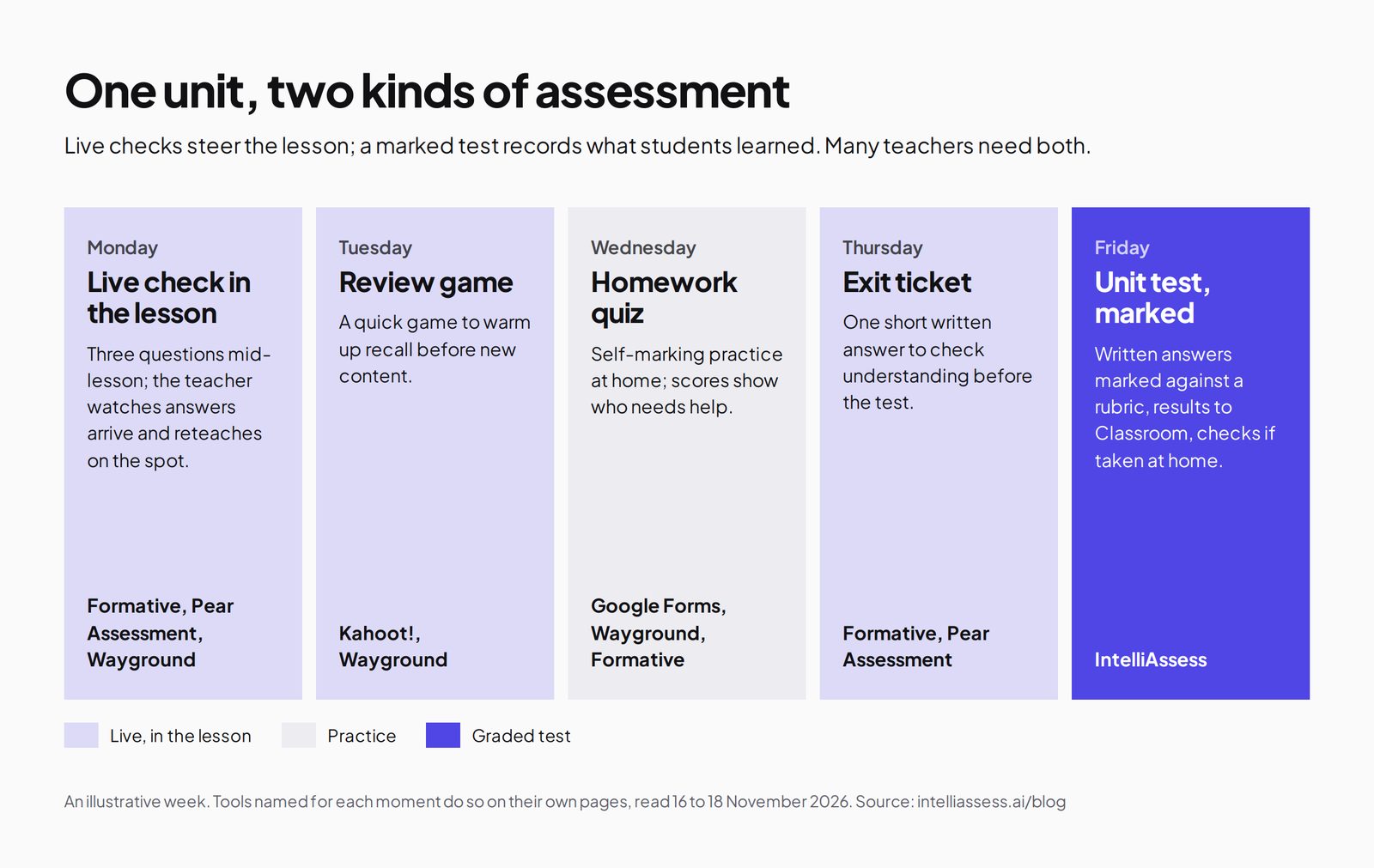
- Live checks and graded tests are different jobs
- The scorecard: 5 Formative alternatives on 9 published facts
- 1. Pear Assessment: the closest swap for live checks and tests
- 2. Wayground: free live and self-paced activities
- 3. IntelliAssess: the graded test after the live checks
- 4. Kahoot!: live review games
- 5. Google Forms: free quizzes in Classroom
- How each tool uses AI
- Data, standards and reports
- Accommodations and languages
- Moving from Formative
- Prices compared
- Which alternative for which teacher
- Where IntelliAssess is not the right choice
- Using a live-check tool and a test tool together
- How to choose a Formative alternative
Key takeaways
- 1Pear Assessment and Wayground keep Formative's real-time view of answers, with free teacher plans.
- 2IntelliAssess comes third: no live view, but it marks written answers by rubric and secures tests at home.
- 3Formative's Classroom Plan is $249 a year; Pear Assessment Premium is $125 a year.
- 4Kahoot! suits live review games; Google Forms suits free quizzes in Classroom.
The best Formative alternatives depend on which part of Formative you use. For live checks during a lesson, with answers appearing as students type, look at Pear Assessment or Wayground, both with free teacher plans. For review games, Kahoot!. For free self-marking quizzes inside Google Classroom, Google Forms. For end-of-unit tests with written answers marked against a rubric and checks for tests taken at home, look at IntelliAssess, which comes third: it has no live response view, so it complements in-lesson checks rather than replacing them. Below, five tools are scored on the same nine facts, with Formative as the reference.
What Formative does well
Formative is "One tool for assessment, data, and collaboration" (Formative for teachers, read 18 November 2026). Its core is the live view: teachers "See student responses in real time, not tomorrow", tracking student thinking as answers arrive, so they can stop and reteach in the same lesson. That is what most teachers mean when they say they use Formative.
- Question types: "20+ tech-enhanced questions and multimedia content types to support any subject or grade", with audio, visual and written feedback.
- Lessons, not just quizzes: lesson blocks, multimedia, practice sets and a drag-and-drop builder with Google Slides, delivered with teacher pacing, student pacing or as a game.
- Luna AI: builds activities "from prompts, PDFs, or docs", converts paper worksheets to digital, and adds "AI-powered hints and answer choice explanations".
- Standards: tag any question with standards and track progress.
- Grading: "Auto-grading, customizable rubrics, & direct student feedback".
- Security: "built-in anti-cheating features and released state test items"; district plans add Respondus LockDown Browser.
- Collaboration: shared libraries, common assessments and dashboards for schools and districts.
Price (plans): the Classroom Plan is $249 a year per teacher ($20.75 a month billed annually); the Small School Plan, for up to 250 students, is $3,125 a year; district plans are quoted and include the premium item bank, Respondus LockDown Browser and translations in over 50 languages. Sign-up is free, but the plans page lists no free plan.
Why teachers look for a Formative alternative
- No free plan listed. The Classroom Plan is $249 a year; Pear Assessment, Wayground, Kahoot! and Google Forms all have free options.
- Written answers are marked by the teacher. Formative lists rubrics and auto-grading, but not AI marking of written answers.
- Tests at home. Anti-cheating features and a lockdown browser on district plans help in class; identity checks for tests at home are not described.
- A different mix. Some teachers want more games, more AI, or a tool already paid for by their school.
Live checks and graded tests are different jobs
Formative assessment in the original sense means using evidence of learning to adjust teaching while it is still happening. Paul Black and Dylan Wiliam's 1998 paper "Inside the Black Box" made the case that this kind of assessment raises standards, and it is why live response views matter. A graded end-of-unit test is a different job: it records what students learned and usually counts towards a grade. Most teachers need both, and few tools do both equally well.
The scorecard: 5 Formative alternatives on 9 published facts
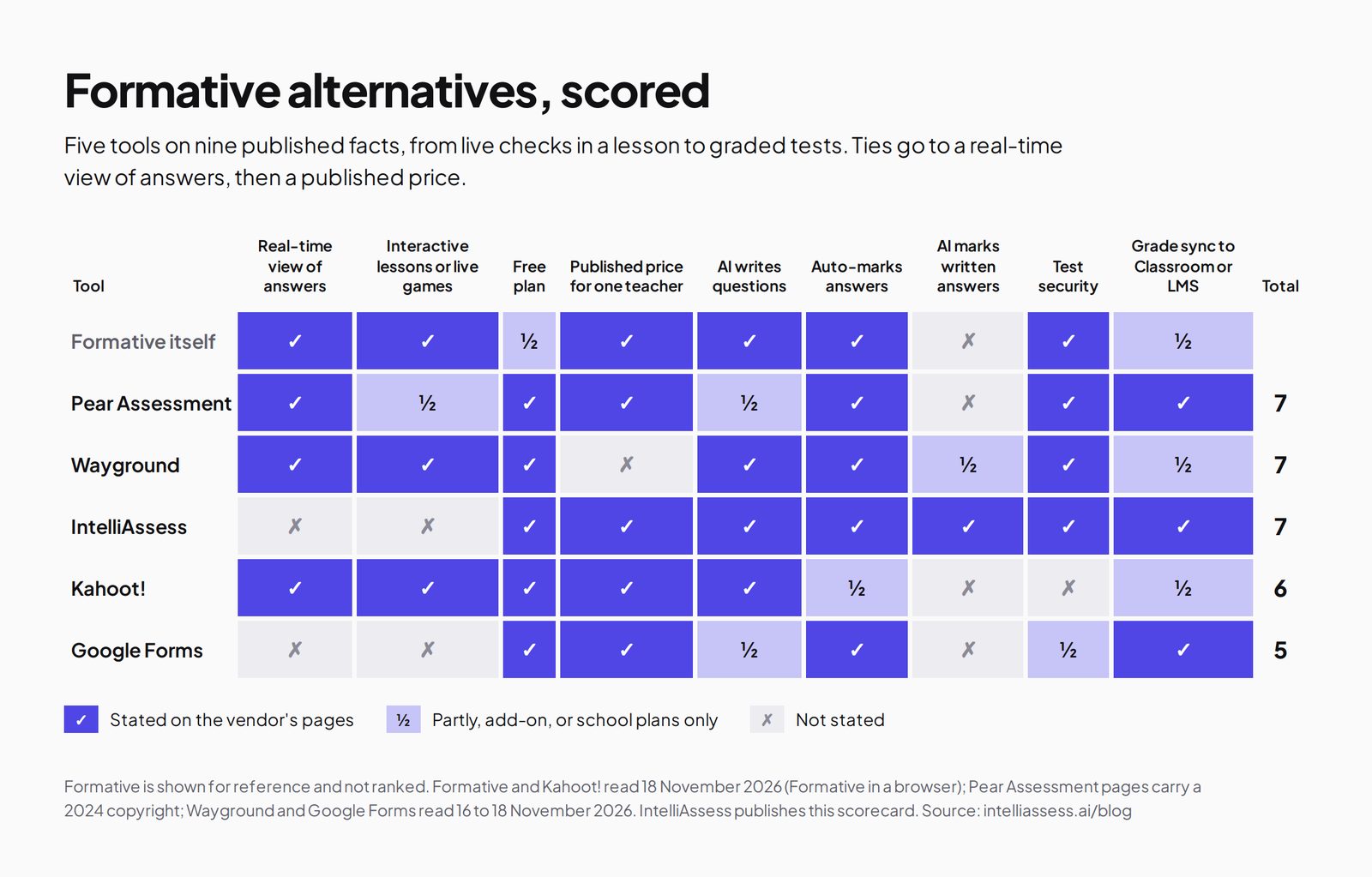
We scored each tool on what Formative users compare: the live view, lessons or games, price, AI, marking, security and grade sync. A tick means the vendor's own page says so; a half means partly, as an add-on, or on school plans only; a cross means its page does not say so. Ties go to a real-time view of answers, the reason most teachers choose Formative, then to a published price.
| Tool | Real-time view of answers | Interactive lessons or live games | Free plan | Published price for one teacher | AI writes questions | Auto-marks answers | AI marks written answers | Test security | Grade sync to Classroom or LMS | Total |
|---|---|---|---|---|---|---|---|---|---|---|
| Formative itself | ✓ | ✓ | ½ | ✓ | ✓ | ✓ | ✗ | ✓ | ½ | 7 |
| 1. Pear Assessment | ✓ | ½ | ✓ | ✓ | ½ | ✓ | ✗ | ✓ | ✓ | 7 |
| 2. Wayground | ✓ | ✓ | ✓ | ✗ | ✓ | ✓ | ½ | ✓ | ½ | 7 |
| 3. IntelliAssess | ✗ | ✗ | ✓ | ✓ | ✓ | ✓ | ✓ | ✓ | ✓ | 7 |
| 4. Kahoot! | ✓ | ✓ | ✓ | ✓ | ✓ | ½ | ✗ | ✗ | ½ | 6 |
| 5. Google Forms | ✗ | ✗ | ✓ | ✓ | ½ | ✓ | ✗ | ½ | ✓ | 5 |
Formative's halves: sign-up is free but no free plan is listed; roster sync with Google Classroom and Clever is listed on district plans, and grade sync is not stated. Pear Assessment's halves: interactive lessons are Pear Deck, a separate product in the same family; AI question generation appears as a school and district add-on. Wayground's halves: AI grading with rubrics is listed for School & District; Google Classroom grade passback appears in its plan table without a clear tier; it publishes no paid price for one teacher. Kahoot!'s halves: scores and reports rather than marking described; LMS integration and SSO are on EDU Pro. Google Forms: Gemini drafts quizzes from a topic on the free edition; locked mode needs school-managed Chromebooks; Google Forms is free with Education Fundamentals.
Three tools tie at 7 for different reasons. Pear Assessment and Wayground win the tie because they keep Formative's real-time view; IntelliAssess scores the same by doing the other job, marking written answers and securing tests, and it is the only one with a tick for AI marking.
1. Pear Assessment: the closest swap for live checks and tests
Best for: teachers who want Formative's mix of live response data, a large item bank and secure tests at a lower price.
Pear Assessment, formerly Edulastic, is "Part of the Pear Deck Learning platform" (Pear Assessment). Its pricing page lists "See student responses in real time as questions are answered", automatic grading, "Access to 80,000+ standards-aligned Edulastic Certified questions", and grade sync to Google Classroom, Schoology and Canvas; its product page offers "browser lockdowns to dynamic passwords" for test security, with advanced security on Premium. AI question generation "based on standards, DOK and difficulty level" appears as a school and district add-on.
Price (pricing): Teacher Free, $0; Teacher Premium $125 a year; Schools & Districts quoted. Pear Deck, for interactive slides, is a separate Teacher Premium at $149 a year. Where it falls short: its pages carry a 2024 copyright, some features sit on school plans, and AI marking of written answers is not described. See Pear Assessment alternatives.
2. Wayground: free live and self-paced activities
Best for: teachers who want live and student-paced activities, games and accommodations for free.
Wayground, formerly Quizizz, lists on its free Basic plan "Live and student-paced delivery", "Live instruction data with Classroom Pulse", AI to "generate, import, adapt, and explain", and "20+ accommodations, including Read Aloud" (plans). Its homepage adds "Auto-graded homework" and "Lockdown mode, tab-switching alerts, and academic integrity reports". School & District plans add "Full AI grading with custom and state rubrics" and Canvas, Schoology, Clever and ClassLink integrations.
Price: Basic is "Free for every teacher, forever", with limits including 100 students and limited question types; School & District is quoted. Where it falls short: no published paid plan for one teacher, and AI grading needs a school plan. See Wayground alternatives.
3. IntelliAssess: the graded test after the live checks
Best for: teachers who use live checks during the unit and need the end-of-unit test written, marked, including written answers, and secured for students at home.
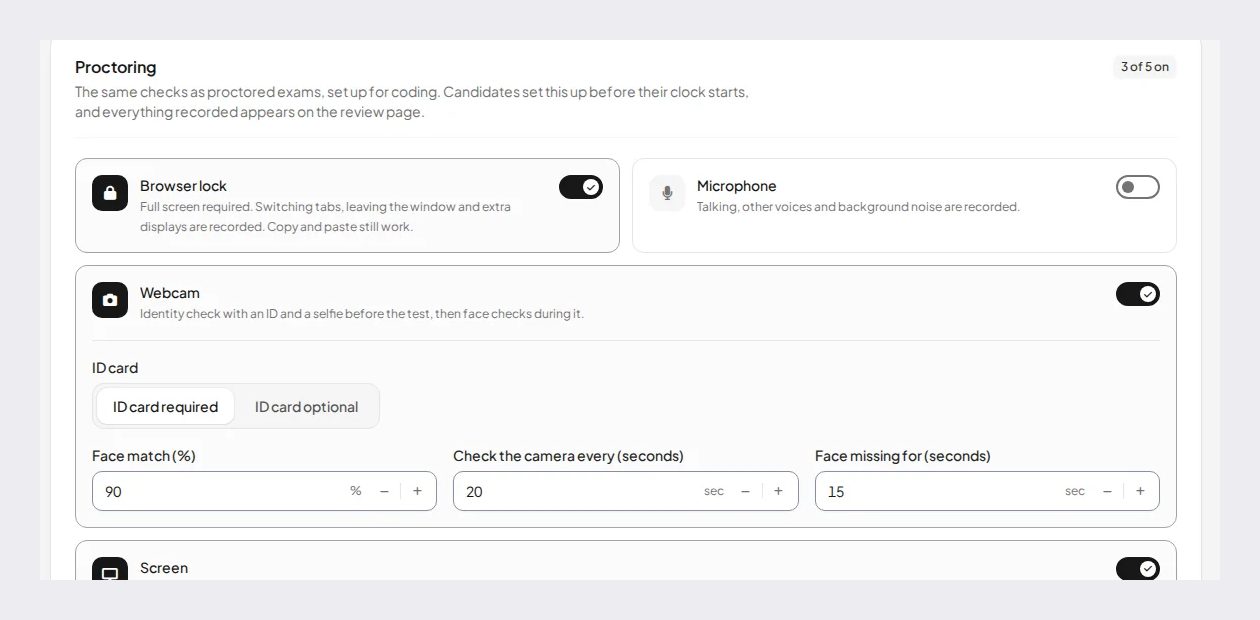
IntelliAssess's AI quiz generator writes tests from your PDF, Word or PowerPoint files, a YouTube video or a web page. Objective questions mark themselves, and AI grading scores each written answer on every rubric criterion with a reason, for the teacher to review before releasing results. Online proctoring adds an ID photo, selfie and face match, and webcam, microphone, screen and browser checks, with rules that warn and can submit an attempt. Tests post to Google Classroom with grades sent back, and assessment analytics show results across a class.
Price (from our pricing page): Free for 25 students; Starter $39 a month for 200; Pro $99 for 500; Intensive $249 for 2,000; yearly billing costs ten months. AI grading and proctoring start on Starter. Where it falls short: no live view of answers as students type, no interactive lessons or games, no standards tagging described, and Starter at $390 a year costs more than Formative's $249 Classroom Plan. See Formative vs IntelliAssess.
4. Kahoot!: live review games
Best for: teachers who want energetic live review and are happy to keep graded work elsewhere.
Kahoot! lets teachers "Host a live kahoot with questions displayed on a shared screen" on every plan, and says it shows where "every student stands, in real time, with class reporting" (Kahoot! for schools). Paid plans add AI creation from topics and trusted sources; the free Kahoot! Go plan can generate from PDFs and URLs in limited form. Open-ended questions let students "type a long free-form response", without AI marking described.
Price (plans): Kahoot! Go is free; Kahoot!+ Bronze is $36 a year, Silver $84, Gold $120 and One $228, billed annually; school plans start at $179.88 per host a year. A Black Friday offer was running when we read the page. Where it falls short: no test security described, and it is built for games and review rather than graded tests. See Kahoot! alternatives.
5. Google Forms: free quizzes in Classroom
Best for: schools on Google Workspace that want free self-marking quizzes with grades in Classroom.
Google Forms comes with Google Workspace for Education Fundamentals, which Google offers free to eligible schools. Quizzes can have an answer key on six question types, points and feedback; written answers are marked by hand. Locked mode works on school-managed Chromebooks, and Gemini in Classroom can draft a quiz from a topic; building a quiz from your own files in Forms needs a paid edition. Where it falls short: no live response view during a lesson, no AI marking of written answers, and locked mode only on managed Chromebooks. See Google Forms alternatives.
How each tool uses AI
AI shows up in different places in these tools, and the place matters more than the label.
- Formative: Luna AI builds activities from prompts, PDFs or documents, converts paper worksheets, and gives students hints and explanations of answer choices. District plans add AI guardrails and follow-up activities.
- Pear Assessment: question generation by standard, depth of knowledge and difficulty, listed as a school and district add-on; the wider Pear family offers 40+ AI tools on Pear Start.
- Wayground: AI to generate, import, adapt and explain on the free plan, and AI grading with rubrics on School & District.
- Kahoot!: AI-assisted creation from topics, documents and trusted sources, with an option for schools to switch generative AI off.
- Google Forms: Gemini drafts quizzes from a topic on the free edition, and from your files on paid editions.
- IntelliAssess: AI writes the test from your files, a video or a web page, checks the answer keys, drafts rubrics, and marks written answers per criterion for the teacher to review.
For in-lesson checks, AI that writes questions and explains answers is enough. For tests with written answers, AI that marks against a rubric saves the most time.
Data, standards and reports
Formative's data story runs from the lesson to the district: live response data in class, questions tagged to standards, and organisation-wide dashboards on school plans that "pinpoint specific teacher, class, or student needs". District plans add a centralised data engine and Luna Next Steps, which generates follow-up activities from student performance.
Pear Assessment lists data and reporting with automatic grading, and its item bank is aligned to standards and depth of knowledge. Wayground's Classroom Pulse gives live instruction data, and its plans list academic integrity reports. Kahoot! offers reports to assess learning on paid plans and "Basic reports" on Kahoot! Go. Google Forms shows a summary of responses and per-question results. IntelliAssess's assessment analytics show results across a class for each test, written-answer scores per rubric criterion, and students' strongest and weakest skills from graded tests and practice; standards tagging is not part of it.
If district standards dashboards are why your school bought Formative, none of these replaces them one for one; Pear Assessment's standards-aligned bank comes closest. If you mainly read results class by class, any of them will do, and the deciding factor is how quickly you can act on what you see.
Accommodations and languages
Wayground lists "20+ accommodations, including Read Aloud" on its free plan, the clearest accommodations offer on this list. Formative's district plans add translations "in over 50 languages". IntelliAssess sets time limits per test, generates questions and rubrics in the language you choose, and works in English and Arabic, right to left included. Check per-student settings such as extra time with each vendor before switching a class with individual plans.
Moving from Formative
- Export your content and results before your plan renews.
- Split your use: list what was live checks, what was homework and what was graded tests, and pick a tool for each.
- Rebuild standards tags if your new tool tracks them; if it does not, keep a simple spreadsheet for the standards you report on.
- Write rubrics for written questions if you move tests to a tool that marks them with AI.
- Tell students where each kind of activity now lives, and run one of each before it counts.
Prices compared
| Tool | Free | One teacher | School |
|---|---|---|---|
| Formative | Free sign-up; no free plan listed | $249 a year | $3,125 a year for up to 250 students; districts quoted |
| Pear Assessment | Teacher Free | $125 a year | Quoted |
| Wayground | Basic, up to 100 students | Not published | Quoted |
| IntelliAssess | 25 students | Starter $39 a month for 200 ($390 a year) | Pro $99 a month for 500; Intensive $249 for 2,000 |
| Kahoot! | Kahoot! Go | $36 to $228 a year | From $179.88 per host a year |
| Google Forms | Free with Education Fundamentals | Free | Paid editions for more AI |
For one teacher, Pear Assessment Premium at $125 a year is the cheapest paid swap for live checks plus tests, and Wayground and Google Forms cost nothing. IntelliAssess costs more than Formative's Classroom Plan for one teacher, but includes AI marking of written answers and proctoring, which Formative does not describe.
Which alternative for which teacher
- Live checks, item bank and secure tests at a lower price: Pear Assessment.
- Free live and self-paced activities with accommodations: Wayground.
- End-of-unit tests with written answers and checks at home: IntelliAssess, alongside a live-check tool.
- Live review games: Kahoot!.
- Free quizzes inside Google Classroom: Google Forms.
- Lessons, live data and district common assessments in one place: stay with Formative.
Where IntelliAssess is not the right choice
- You want to watch answers arrive during a lesson and reteach on the spot.
- You build interactive lessons with slides and embedded checks.
- You want games for review.
- You track progress against standards across a district.
Using a live-check tool and a test tool together
Because live checks and graded tests are different jobs, many teachers run two tools. A common pairing is a free live-check tool, such as Wayground, Pear Assessment's free plan or Kahoot! Go, for lessons, and a test platform for the end-of-unit test. If you pair Formative with IntelliAssess, use Formative's live view and lessons during the unit, and IntelliAssess for the marked test with written answers. Keep grades in one place by syncing both to Google Classroom where possible.
The cost of two tools need not be high. Pear Assessment's and Wayground's free teacher plans and Kahoot! Go cost nothing, and IntelliAssess is free for up to 25 students. For a single class, a teacher can try both halves of the week without paying, and decide later which one, if either, is worth a paid plan.
How to choose a Formative alternative
- List what you use Formative for: live checks, lessons, homework, tests or district data.
- Check what your school already pays for; Pear, Wayground, Kahoot! and Google all sell school plans.
- Decide whether written answers need marking help, or whether you mark them yourself.
- Check test security for tests taken in class and at home.
- Run one live check and one test on free plans before switching a whole course.
Browse every comparison, or see Pear Assessment alternatives and Kahoot! alternatives.
Frequently asked questions
What is the best alternative to Formative?
For live checks with an item bank and secure tests, Pear Assessment. For free live and self-paced activities, Wayground. For marked end-of-unit tests with written answers and checks at home, IntelliAssess, used alongside a live-check tool.
How much does Formative cost?
The Classroom Plan is $249 a year per teacher. The Small School Plan is $3,125 a year for up to 250 students, and district plans are quoted.
Is there a free version of Formative?
Formative offers free sign-up, but its plans page lists no free plan. Pear Assessment, Wayground, Kahoot! and Google Forms all have free options for teachers.
Which Formative alternative shows student answers in real time?
Pear Assessment, Wayground and Kahoot! all describe real-time views of student answers. IntelliAssess and Google Forms do not.
Can any Formative alternative mark written answers with AI?
IntelliAssess marks written answers against each rubric criterion with AI, for the teacher to review. Wayground lists AI grading with rubrics on its School & District plans.
Is Pear Assessment the same as Edulastic?
Yes. Edulastic's site now redirects to Pear Assessment, part of the Pear Deck Learning platform, and its pricing page still refers to Edulastic Certified questions in its item bank.
Keep reading
All articles
Read next
SchoolAI alternatives: 7 AI tools for teachers and students scored (2026)
Seven AI tools scored on the same nine facts, with SchoolAI as the reference, and what each lets teachers see when students use AI.

SchoolAI vs IntelliAssess: an AI tutor for students or feedback after a test?
SchoolAI puts students in supervised conversation with AI; IntelliAssess marks their tests and uses AI to help them learn from their own answers.
Motasem Aldiab 12 min read

Jotform and ProProfs alternatives for quizzes and exams (2026)
Jotform and ProProfs side by side, then the alternatives by forms, certificates or real exams.
Motasem Aldiab 2 min read