
Respondus vs IntelliAssess (2026): lock the device or record it?

By Motasem Aldiab, Technology Consultant and Trainer - Cloud, DevOps, Java, Data Science
Contents21
- The short answer
- At a glance
- What Respondus is
- LockDown Browser
- Respondus Monitor
- What IntelliAssess is
- Lock or record: the core difference
- What each one does about common problems
- Devices
- LMS and publisher fit
- Writing and marking the exam
- Setting up a test
- What you get after the exam
- Questions to ask before you decide
- Pricing compared
- What that means for three buyers
- Privacy and accessibility
- What students do on exam day
- Using both
- Who should choose which
- Where IntelliAssess falls short
Key takeaways
- 1Respondus LockDown Browser blocks other apps during LMS exams; IntelliAssess records screen, webcam and browser without locking.
- 2LockDown Browser starts at $3,295 a year for up to 2,000 students, with 200 Monitor seats included; Monitor is $4,950 the first year.
- 3Only IntelliAssess writes the questions and marks written answers, from $39 a month.
- 4Respondus supports iPads and Chromebooks; IntelliAssess proctoring needs a laptop or desktop.
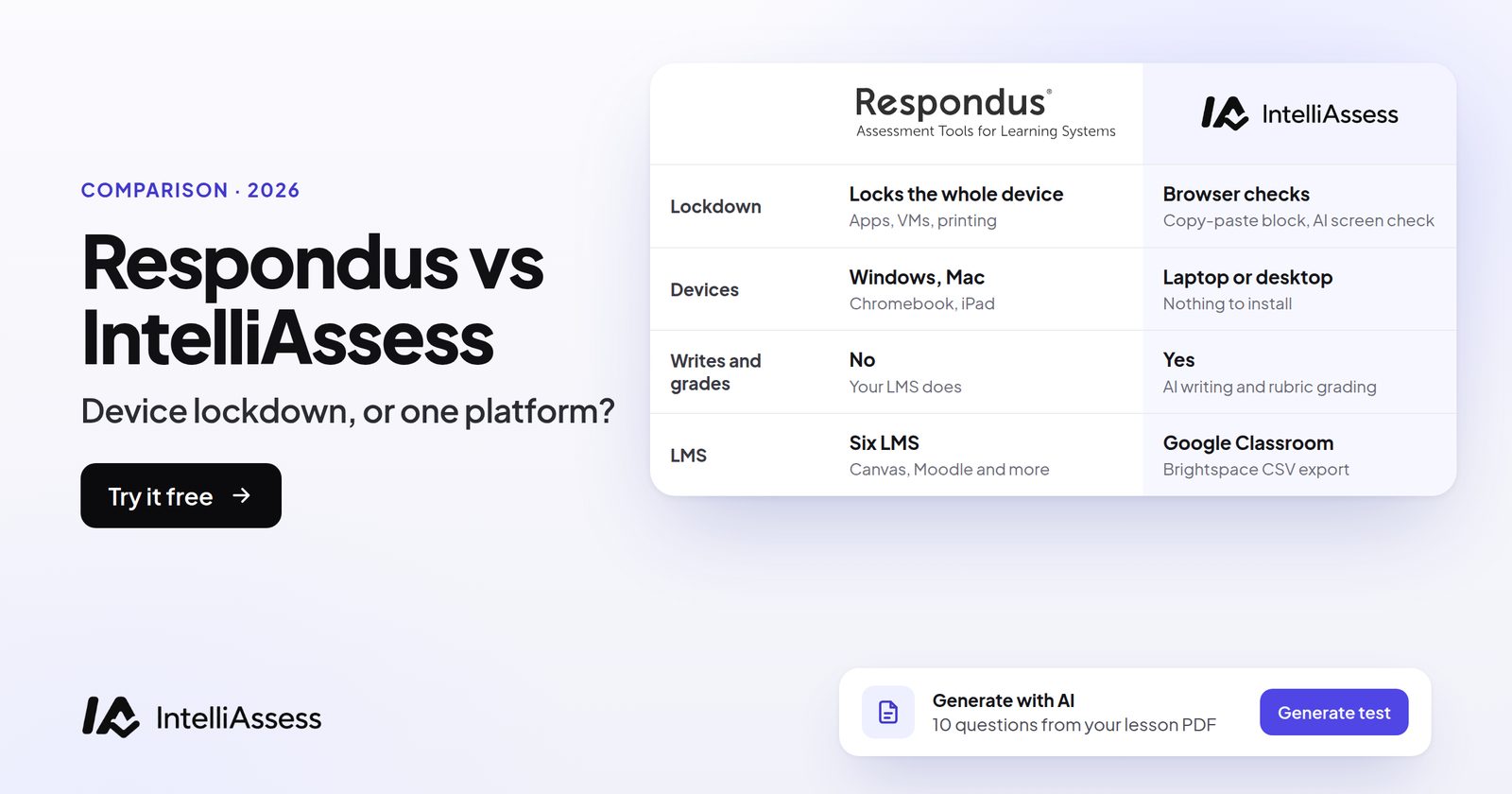
Respondus vs IntelliAssess compares two different answers to exam security. Respondus LockDown Browser locks the student's device during exams in your learning management system, and Respondus Monitor adds automated webcam proctoring on top. IntelliAssess is an assessment platform that writes the exam from your material, proctors it in the browser with nothing to install, and marks written answers with AI for the teacher to review. This page sets the two side by side: security, devices, LMS fit, writing and marking, both published price lists, and when to use both.
The short answer
Choose Respondus if your exams live in Canvas, Blackboard, Moodle, Brightspace, Schoology or Sakai, or in publisher systems such as ALEKS or Pearson MyLab, and you want the student's device locked for the length of the exam, on Windows, Mac, Chromebook or iPad. Choose IntelliAssess if you want the exam written, proctored and marked in one tool, students who install nothing, a monthly price for a single department, or exams in Arabic. Use both if you want LMS finals locked by Respondus and quizzes and coursework built and marked in IntelliAssess.
At a glance
| Respondus (LockDown Browser and Monitor) | IntelliAssess | |
|---|---|---|
| What it is | A locked browser for LMS exams, plus automated webcam proctoring | An assessment platform: writes, delivers, proctors and marks |
| Students install | LockDown Browser, once | Nothing |
| Locks the device | Yes: full screen, other apps, VMs and remote desktops blocked | No: enforces full screen and records leaving it, tabs, screen and webcam |
| Live human proctors | No; Monitor is automated, with instructor live proctoring over video tools | No; automated checks with a report per attempt |
| Devices | Windows 10 and 11, macOS 12 and later, Chromebook, iPadOS 15 and later with an LMS | A browser on a laptop or desktop with a webcam for proctored tests |
| Where exams live | Your LMS or publisher system | IntelliAssess, shared by link or Google Classroom |
| Writes questions | No | Yes, from files, YouTube videos or web pages |
| Marks written answers | No; your LMS does | AI against your rubric, teacher reviews |
| Languages | English, Spanish, French, German, Italian, Portuguese | English and Arabic, right to left included |
| Price | LockDown Browser from $3,295 a year; Monitor $4,950 first year | Free for 25 students; from $39 a month |
| Security credentials stated | FERPA, GDPR, CCPA, HECVAT, SOC 2, TX-RAMP | None listed |
What Respondus is
Respondus has built assessment software since 2000, and describes itself as employee owned with no outside investors (company pages, read 15 November 2026). Two products matter here.
LockDown Browser
LockDown Browser is "a custom browser that locks down the testing environment within a learning management system", used at "over 2000 higher educational institutions" (LockDown Browser, read 18 November 2026). Exams open full screen and cannot be minimised. It blocks other applications, messaging, screen sharing, virtual machines and remote desktops, and disables printing, screen capture, copy and paste, right-click and task switching. An exam "cannot be exited until the student submits it for grading", and exams set up for it cannot be opened in other browsers. It is built on Chromium, about 75 MB to download on Windows and 120 MB on Mac.
Respondus Monitor
Respondus Monitor is "fully automated proctoring" that runs inside LockDown Browser and cannot be used without it (Respondus Monitor). Students record themselves with a webcam and microphone; afterwards, "flagged events and proctoring results are available to the instructor for further review". There is no scheduling. Respondus says Monitor was used at 1,500 universities last year for over a billion minutes, that its algorithms are tested for fairness across age, gender and skin tone, and that students get 24/7 live chat support. Monitor also works in publisher systems including ALEKS, Pearson MyLab and Cengage WebAssign and MindTap.
Institutions with both products can also use Instructor Live Proctoring, where LockDown Browser locks the computer while the teacher watches over Zoom, Teams or Google Meet; when we read that page on 16 November, Respondus suggested it for classes of about 20 to 25.
Respondus secures exams; it does not write questions or mark answers. Those happen in your LMS.
What IntelliAssess is
IntelliAssess is a single place to build, run and mark tests. Its AI quiz generator writes questions from your PDF, Word or PowerPoint files, a YouTube video or a web page; you edit them before publishing. Tests are shared by link or published to Google Classroom. Online proctoring runs in the browser with nothing to install. AI grading scores written answers against your rubric, and the teacher reviews and confirms the marks. Students can see their results with feedback when the teacher releases them, ask for a re-mark, and practise the questions they missed. It works in English and Arabic.
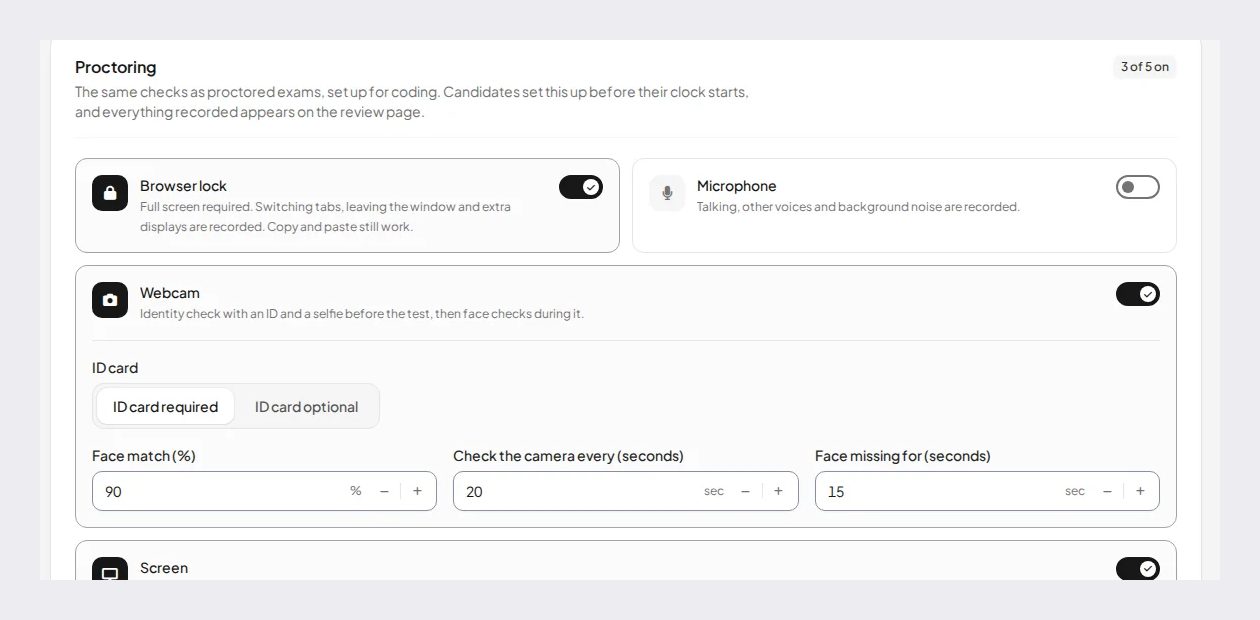
Proctoring is set per test. Before the test, a student takes an ID photo and a live selfie, passes a liveness check and a face match against the ID; during the test, the webcam, microphone, whole screen and browser are checked, and the teacher gets a report for each attempt with photos and events.
Lock or record: the core difference
Respondus prevents. While LockDown Browser is running, the student cannot open another application, copy text in or out, or reach the web outside the exam. Monitor then watches the student through the webcam and flags what looks wrong.
IntelliAssess records. It asks for full screen and logs every time the student leaves it, switches tabs or loses focus; it watches the shared screen, so a second application shows up in the evidence; and it checks the webcam and microphone through the test. But it does not stop a determined student from opening another program on the same machine. The teacher sees it afterwards, not before.
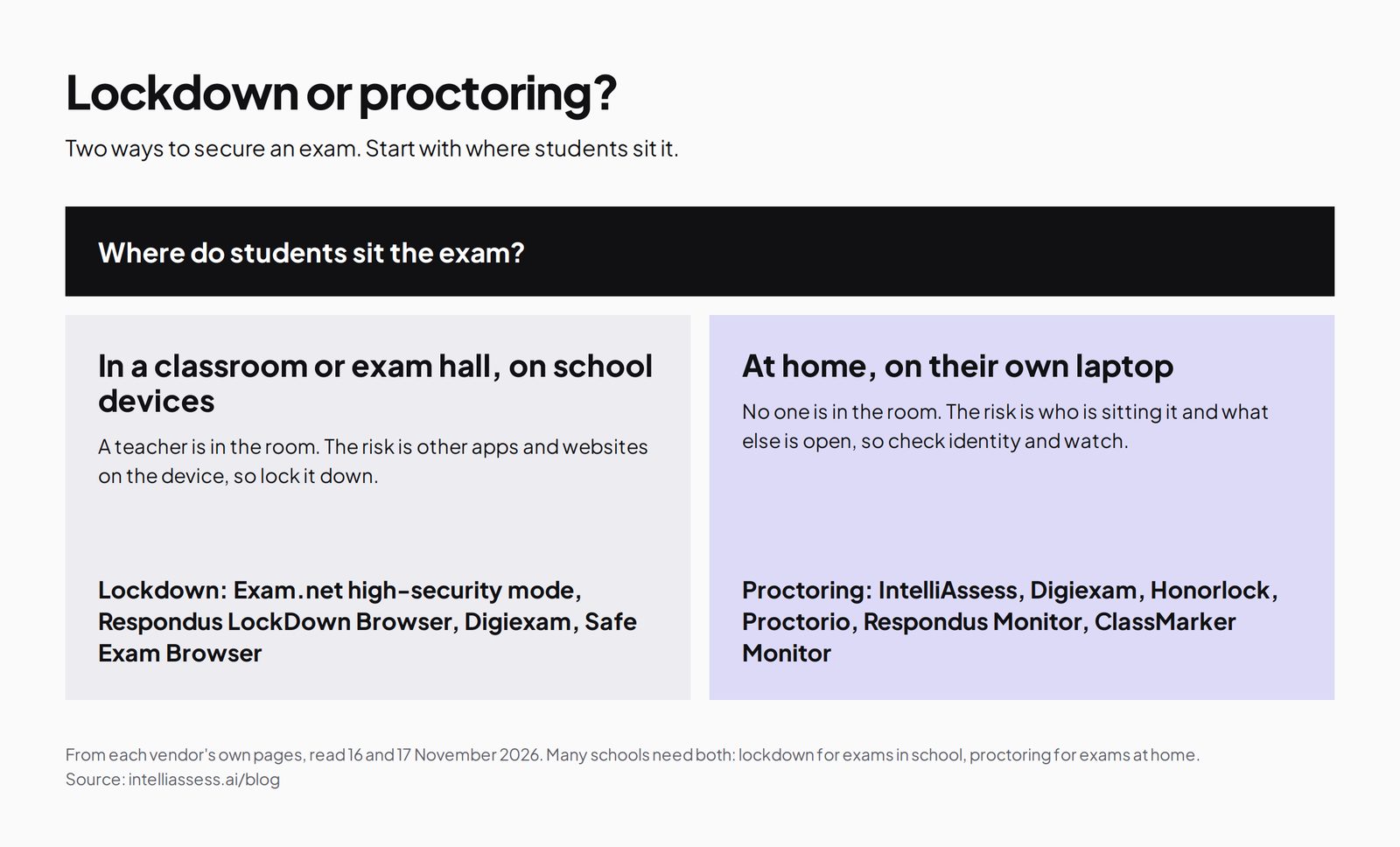
Neither approach covers everything. A locked browser cannot see a phone on the desk or a person in the room, which is why Respondus pairs it with Monitor. A browser-based check sees the room and the screen but cannot stop a second program. For high-stakes finals on devices you control, a lock is the stronger barrier. For quizzes and coursework at home on students' own devices, recording is often enough, and it removes the install.
What each one does about common problems
| Problem | Respondus (LockDown Browser with Monitor) | IntelliAssess |
|---|---|---|
| Opening another application | Blocked | Not blocked; visible in the whole-screen recording |
| Searching in another tab | Blocked; the exam is the only page | Not blocked; tab switches and leaving full screen are logged |
| Virtual machines and remote desktops | Blocked | Not stated |
| Someone else sitting the exam | Webcam recording, with flags for review | ID photo, live selfie, liveness check and face match before; camera checks during |
| Talking or help in the room | Webcam and microphone recording | Microphone checks for sound picked up; webcam checks |
| A phone on the desk | Not locked; only seen if the webcam catches it | Not locked; only seen if the webcam catches it |
The table is drawn from each product's own description; neither vendor claims to catch everything, and both leave the final judgement to a person.
Devices
Respondus supports Windows 11 and 10, macOS 12 and later, Chromebook, and iPadOS 15 and later, where the iPad version "must have a compatible LMS integration". Its pages do not list phones. IntelliAssess proctored tests need a browser on a laptop or desktop with a webcam; tablets and phones are not supported for proctoring, and we have not confirmed Chromebooks. Unproctored tests open on any device.
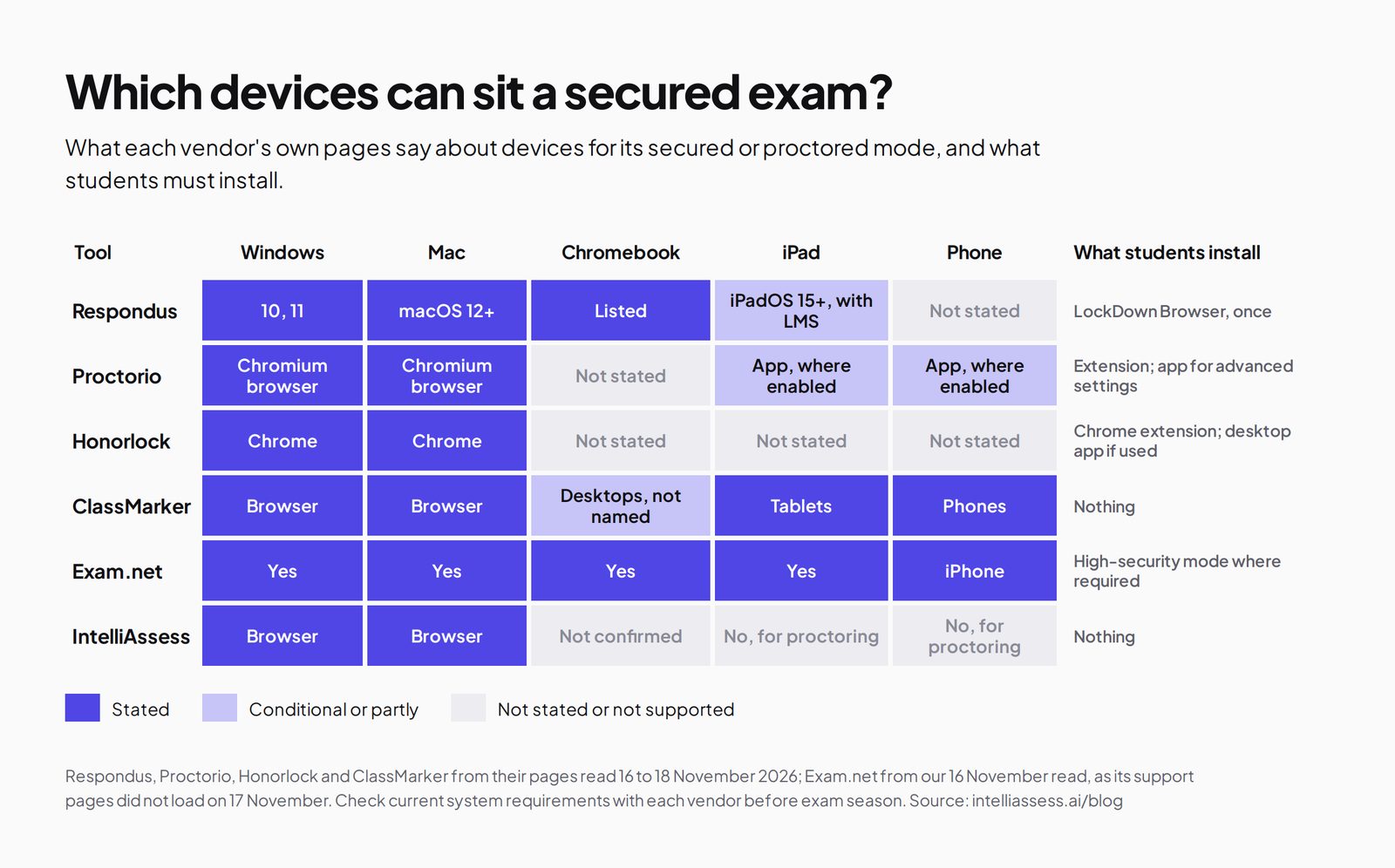
If your students sit exams on iPads or Chromebooks, Respondus covers more of them. If they use their own laptops at home and an install is the hurdle, IntelliAssess removes it.
LMS and publisher fit
Respondus works inside Blackboard, Brightspace, Canvas, Moodle, Schoology and Sakai, and Monitor inside several publisher systems. The exam, the gradebook and the course stay where they are; Respondus adds the lock. IntelliAssess integrates with Google Classroom only. If your institution runs on Canvas or Blackboard and wants grades to flow back automatically, Respondus fits and IntelliAssess does not. If you teach outside an LMS, or in Google Classroom, IntelliAssess needs no LMS at all.
Writing and marking the exam
This is where IntelliAssess does work Respondus does not attempt. A teacher uploads a chapter, slides or a video link and gets a draft test with a mix of question types; written answers are marked against the rubric, with a reason for each score that the teacher can change. With Respondus, questions are written in the LMS, objective questions are auto-marked there, and essays are marked by hand or with whatever the LMS offers.
So the time saved is in different places. Respondus saves invigilation time and reduces cheating in LMS exams. IntelliAssess saves writing and marking time, and adds proctoring to the same test.
Setting up a test
With Respondus, the teacher builds the exam in the LMS as usual, then switches LockDown Browser on for it, and Monitor too if webcam proctoring is wanted. Because LockDown Browser is licensed for the whole campus, the teacher does not buy anything; the institution's LMS administrator sets up the integration once. Questions, time limits and accommodations stay in the LMS settings the teacher already knows.
With IntelliAssess, the teacher uploads material or pastes a video or page link, picks question types and difficulty, edits the draft, and switches on the proctoring checks they want: browser lock with full screen, webcam identity check, face match threshold, how often the camera is checked, microphone and screen sharing. The test is then shared by link or posted to Google Classroom. A department can start on the free plan without involving IT.
The trade is familiar against new. Respondus fits into a workflow staff already use; IntelliAssess replaces that workflow, which saves writing time but means learning a new tool.
What you get after the exam
Respondus Monitor gives the instructor flagged events and proctoring results to review after the exam, alongside the recording. Marks come from the LMS: objective questions are auto-marked there and written answers are marked by the teacher.
IntelliAssess gives the teacher a report for each attempt with the identity photos, camera checks and logged events, next to the answers. Written answers have an AI mark with the reason for it, which the teacher can accept or change. When the teacher releases results, students see their marks and feedback, can ask for a re-mark, and can practise what they missed; on Pro and above, learning quizzes also offer study notes, study plans and an "Explain this to me" option.
Questions to ask before you decide
- Must exams stay in our LMS or publisher system, with grades flowing back automatically?
- Do students sit exams on iPads or Chromebooks?
- Is a device lock required by policy for high-stakes exams, or is recorded evidence enough?
- Where does staff time go now: invigilation, or writing and marking?
- Is the buyer the whole institution or one department?
- Does procurement require SOC 2, HECVAT or similar paperwork?
- Do we teach or assess in Arabic?
Answers of "yes" to the first three, or to the sixth, point to Respondus. Writing and marking time, a single department as buyer, or Arabic point to IntelliAssess.
Pricing compared
Both publish prices, which is rare in exam security. Respondus prices LockDown Browser as a campus-wide licence by student numbers, renewed each 1 August, in North America (LockDown Browser pricing, read 18 November 2026):
| Students (FTE) | LockDown Browser a year |
|---|---|
| Up to 2,000 | $3,295 |
| 2,001 to 2,500 | $3,795 |
| 2,501 to 5,000 | $4,445 |
| 5,001 to 10,000 | $5,395 |
| 10,001 to 15,000 | $5,945 |
| 15,001 to 20,000 | $6,295 |
| 20,001 to 25,000 | $6,745 |
| 25,001 to 30,000 | $7,095 |
| 30,001 to 35,000 | $7,595 |
| 35,001 to 40,000 | $8,045 |
| Over 40,000 | Quote |
Each LockDown Browser licence includes a free 200-seat Monitor licence a year. Beyond that, Monitor costs $4,950 for the first year regardless of institution size, then $5,950 for a 1,000-seat tier plus $1,950 for each further 1,000 seats, a quoted unlimited licence, or $15 per student for 12 months, paid by the student (Monitor pricing). A seat is one student in one course. When we read Respondus's pages on 16 November, they said the flat-rate pricing is not offered in some countries outside North America.
IntelliAssess has one price list (pricing): Free for 25 students; Starter $39 a month for 200 students; Pro $99 a month for 500; Intensive $249 a month for 2,000. Yearly billing costs ten months. AI grading and proctoring start on Starter, and each plan includes a monthly allowance of face checks.
What that means for three buyers
| Buyer | Respondus | IntelliAssess |
|---|---|---|
| One department, 150 students, wants proctored quizzes | Respondus is sold to the institution: $3,295 a year minimum for LockDown Browser, with 200 Monitor seats included | Starter, $390 a year billed yearly |
| A college of 2,000 students, finals in Canvas | $3,295 a year plus Monitor as needed ($4,950 first year) | Intensive, $2,490 a year, but exams move out of Canvas |
| A university of 20,000 students | $6,295 a year for LockDown Browser plus Monitor by seats or unlimited quote | Above our largest plan's student count; contact us |
The comparison is not like for like: Respondus buys a lock and proctoring for exams you already run, while IntelliAssess buys the whole test process for fewer students. Small departments outside the LMS usually pay less with IntelliAssess. Large institutions committed to an LMS usually get more from Respondus.
Privacy and accessibility
Respondus lists FERPA, GDPR, CCPA, HECVAT, SOC 2 and TX-RAMP among its credentials and says its algorithms are tested for fairness. IntelliAssess stores identity and evidence photos encrypted, opens them only through short-lived links, records location only if the teacher switches that check on, and lists no certifications. Institutions that require SOC 2 or HECVAT in procurement will find Respondus already has that paperwork.
For accommodations such as extra time, Respondus exams use the settings already in your LMS; in IntelliAssess, time limits are set per test, so check that it covers your students' needs before moving exams. Respondus works in six languages; IntelliAssess in English and Arabic, which matters for schools teaching in Arabic.
What students do on exam day
- Respondus: install LockDown Browser once, open it, sign in to the LMS and start; with Monitor, a webcam and microphone check runs first. Help is through 24/7 chat.
- IntelliAssess: open the test link on a laptop or desktop, take an ID photo and a selfie, allow the webcam, microphone and screen sharing, and start. Nothing to install.
In both cases, a practice test a week ahead catches camera and permission problems before they matter.
Using both
Respondus and IntelliAssess do not compete for every job, and some schools will use both. A common split: high-stakes finals stay in the LMS, locked by LockDown Browser and watched by Monitor, while weekly quizzes, homework checks and coursework are written and marked in IntelliAssess, where the marking time is saved. Because Respondus licenses the whole campus and IntelliAssess can be bought by one department, each department can decide which tests go where.
If you try this, keep the split simple for students: tell them at the start of term which tests need LockDown Browser and which open from a link, and run one practice test in each before anything counts. Staff should know where each kind of result lives, too: LMS grades for the locked exams, and IntelliAssess reports, with their identity checks and AI marks, for everything built there. Review the split after one term, using marking time saved and the number of exam-day support problems as the measures.
Who should choose which
- Choose Respondus for a university or college whose exams are in an LMS or publisher system, that wants device lockdown, supports iPads and Chromebooks, or needs SOC 2 and HECVAT in procurement.
- Choose IntelliAssess for a school or department that wants tests written and marked with AI, has no LMS or uses Google Classroom, wants nothing for students to install, needs Arabic, or wants a monthly price for a few hundred students.
- Choose both if finals need a lock and everything else needs less marking.
Where IntelliAssess falls short
- It does not lock the device; a second program on the same computer is recorded, not blocked.
- No live proctors, and no instructor live proctoring over video.
- No Canvas, Moodle, Blackboard or Brightspace integration.
- Proctored tests need a laptop or desktop; no iPads or phones, and Chromebooks are not confirmed.
- No published security certifications.
For other options, see Respondus alternatives, Honorlock vs IntelliAssess and Proctorio vs IntelliAssess, or browse every comparison.
Frequently asked questions
Is IntelliAssess a replacement for Respondus LockDown Browser?
Not directly. LockDown Browser locks the device during LMS exams; IntelliAssess records the screen, webcam and browser during its own tests without locking anything. It replaces Respondus only if you are also moving exams out of the LMS and are happy with recording rather than locking.
How much does Respondus cost compared with IntelliAssess?
LockDown Browser starts at $3,295 a year for up to 2,000 students, with 200 Monitor seats included; Monitor is $4,950 for the first year. IntelliAssess is free for 25 students and $39 a month for 200, with proctoring and AI grading included from that plan.
Do students need to install anything for IntelliAssess?
No. Proctored tests run in the browser on a laptop or desktop with a webcam. Respondus needs LockDown Browser installed once.
Does Respondus work on iPads and Chromebooks?
Yes, according to Respondus: iPadOS 15 and later with a compatible LMS integration, and Chromebook, as well as Windows and Mac. IntelliAssess proctoring needs a laptop or desktop.
Can Respondus write or mark exams?
No. Respondus secures exams that your LMS delivers. Questions and marking happen in the LMS. IntelliAssess writes questions from your material and marks written answers against your rubric for the teacher to review.
Can I use Respondus and IntelliAssess together?
Yes. Many schools could keep finals in the LMS under LockDown Browser and Monitor and use IntelliAssess for quizzes and coursework, where writing and marking take the most time.
Keep reading
All articles
Read next
SchoolAI alternatives: 7 AI tools for teachers and students scored (2026)
Seven AI tools scored on the same nine facts, with SchoolAI as the reference, and what each lets teachers see when students use AI.

SchoolAI vs IntelliAssess: an AI tutor for students or feedback after a test?
SchoolAI puts students in supervised conversation with AI; IntelliAssess marks their tests and uses AI to help them learn from their own answers.
Motasem Aldiab 12 min read

Jotform and ProProfs alternatives for quizzes and exams (2026)
Jotform and ProProfs side by side, then the alternatives by forms, certificates or real exams.
Motasem Aldiab 2 min read