
8 Respondus alternatives in 2026, scored on 7 published facts

By Motasem Aldiab, Technology Consultant and Trainer - Cloud, DevOps, Java, Data Science
Contents20
- What Respondus does well
- Respondus at a glance
- Why institutions look for a Respondus alternative
- Which devices can sit a secured exam?
- The scorecard: 8 Respondus alternatives on 7 published facts
- 1. ClassMarker: browser proctoring on any device
- 2. Digiexam: live proctors and ID checks
- 3. Exam.net: locked exams for a whole school
- 4. Proctorio: lockdown and live proctoring in your LMS
- 5. IntelliAssess: no install, plus writing and marking
- 6 to 8. Honorlock, ProctorU and Proctor360
- Install or no install?
- Prices compared
- Worked example: Respondus Monitor at three sizes
- What students do on exam day
- Moving from Respondus: a checklist
- Privacy
- Which alternative for which institution
- Where IntelliAssess is not the right choice
- How to choose a Respondus alternative
Key takeaways
- 1ClassMarker scores highest: published price, nothing to install, and proctoring on phones and tablets.
- 2For live proctors, look at Digiexam, Proctorio or Honorlock; for locked school-wide exams, Exam.net.
- 3IntelliAssess comes fifth: no install, and it writes and marks the exam, but it does not lock the device.
- 4Respondus publishes its prices: LockDown Browser from $3,295 a year, with 200 Monitor seats included.
The best Respondus LockDown Browser alternatives depend on why you are moving. For browser-based proctoring on any device with nothing to install, at a published price, look at ClassMarker. For live proctors and ID checks, look at Digiexam, Proctorio or Honorlock. For locked exams across a whole school with real-time teacher monitoring, look at Exam.net. For exams written and marked with AI and proctored in the browser, look at IntelliAssess, which comes fifth. Below, eight tools are scored on the same seven published facts, with Respondus as the reference, and a device-support table shows which ones work on Chromebooks, iPads and phones.
What Respondus does well
Respondus sells two products that work together. LockDown Browser is, in its own words, "a custom browser that locks down the testing environment within a learning management system", used at "over 2000 higher educational institutions" (LockDown Browser, read 18 November 2026). Exams run full screen and cannot be minimised; it blocks other applications, messaging, screen sharing, virtual machines and remote desktops, and disables printing, screen capture, copy and paste, right-click and task switching. "An assessment cannot be exited until the student submits it for grading", and exams set up for it "cannot be accessed with other browsers". It integrates with Blackboard, Brightspace, Canvas, Moodle, Schoology and Sakai.
Respondus Monitor is "fully automated proctoring" built on LockDown Browser: students "use a webcam to record themselves during an online exam", and afterwards "flagged events and proctoring results are available to the instructor for further review" (Respondus Monitor). It needs no scheduling, runs as a native app on Windows, Mac, Chromebook and iPad after a one-time install, and also works with publisher systems such as ALEKS, Pearson MyLab and Cengage WebAssign. Respondus says it was used at 1,500 universities last year "for over a billion minutes", and lists FERPA, GDPR, CCPA, HECVAT, SOC 2 and TX-RAMP among its privacy and security credentials.
Price: Respondus publishes its prices, which few in this market do. LockDown Browser is a campus-wide licence, renewed each August, priced by student numbers: from $3,295 a year for up to 2,000 students to $8,045 for 35,001 to 40,000, with a quote above that (LockDown Browser pricing). Each LockDown Browser licence includes a free 200-seat Monitor licence a year. Monitor's first year is $4,950 "regardless of the size of the institution", then $5,950 for a 1,000-seat tier plus $1,950 per extra 1,000 seats, a quoted unlimited licence, or $15 per student for 12 months (Monitor pricing). A free two-month pilot is available.
Respondus at a glance
| Fact | What Respondus says |
|---|---|
| Institutions using LockDown Browser | Over 2,000 higher education institutions |
| Monitor use last year | 1,500 universities, over a billion minutes |
| Built on | Chromium; about 75 MB on Windows and 120 MB on Mac |
| Learning systems | Blackboard, Brightspace, Canvas, Moodle, Schoology, Sakai |
| Publisher systems (Monitor) | Including ALEKS, Pearson MyLab and Cengage WebAssign and MindTap |
| Languages | English, Spanish, French, German, Italian, Portuguese |
| Student help | 24/7 live chat for Monitor |
| Trial | Free two-month pilot |
Those figures come from Respondus's own pages, read 18 November 2026. Two things stand out against most alternatives on this list: the published prices, and the publisher integrations, which matter if your courses use homework systems such as ALEKS or MyLab for graded tests. Few alternatives below say they secure exams inside publisher systems.
Why institutions look for a Respondus alternative
- Something to install. Students install LockDown Browser once, which can be a hurdle on shared or locked-down devices.
- No live proctors. Monitor is automated; problems are reviewed after the exam.
- Exams must live in the LMS. LockDown Browser secures LMS exams; schools moving exams out of the LMS need something else.
- No help with writing or marking. Respondus secures exams; questions and marking happen in your LMS.
- Phones are not covered. Its pages list Windows, Mac, Chromebook and iPad, not phones.
Which devices can sit a secured exam?
Device support is often the deciding factor, so here is what each vendor's own pages say about devices for its secured or proctored mode, and what students must install.
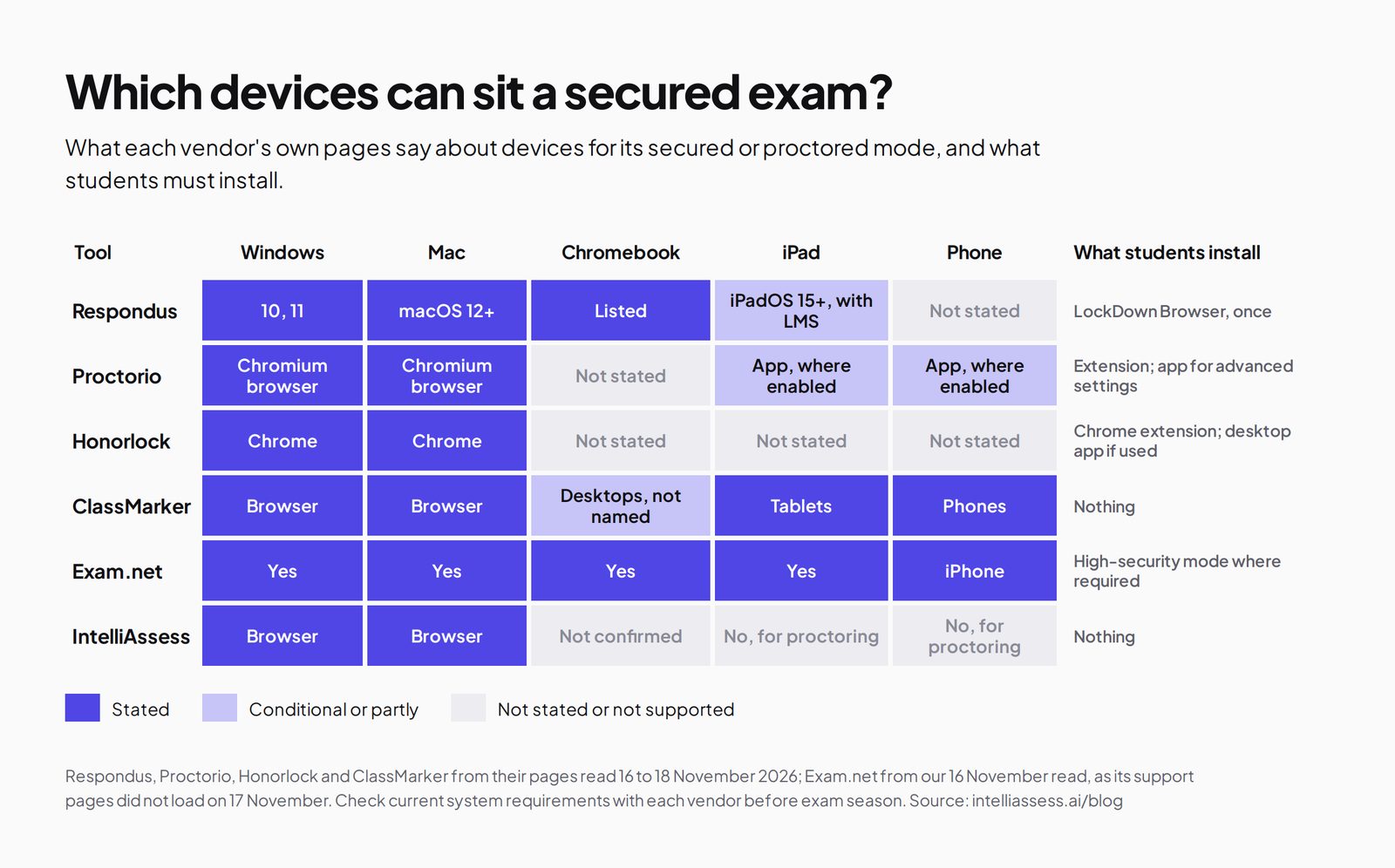
| Tool | Windows | Mac | Chromebook | iPad | Phone | What students install |
|---|---|---|---|---|---|---|
| Respondus | 10 and 11 | macOS 12 and later | Listed | iPadOS 15 and later, with LMS integration | Not stated | LockDown Browser, once |
| Proctorio | Chromium browser | Chromium browser | Not stated | App, where mobile testing is enabled | App, where enabled | Extension; desktop app for advanced settings |
| Honorlock | Chrome | Chrome | Not stated | Not stated | Not stated | Chrome extension; desktop app if used |
| ClassMarker | Browser | Browser | Desktops, not named | Tablets | Phones | Nothing |
| Exam.net | Yes | Yes | Yes | Yes | iPhone | High-security mode where required |
| IntelliAssess | Browser | Browser | Not confirmed | Not for proctoring | Not for proctoring | Nothing |
Exam.net's devices are from our 16 November read, as its support pages did not load on 17 November. Digiexam's Lockdown is a desktop application whose operating systems are not listed on the pages we read. Check current system requirements with each vendor before exam season.
The scorecard: 8 Respondus alternatives on 7 published facts
A tick means the vendor's own page says so; a half means partly; a cross means its page does not say so. The facts are a published price, nothing for students to install, live human proctors, working inside Canvas, Moodle or Blackboard, phones or tablets, writing and grading the exam, and locking the device or apps. Ties go to a published price, then to nothing for students to install.
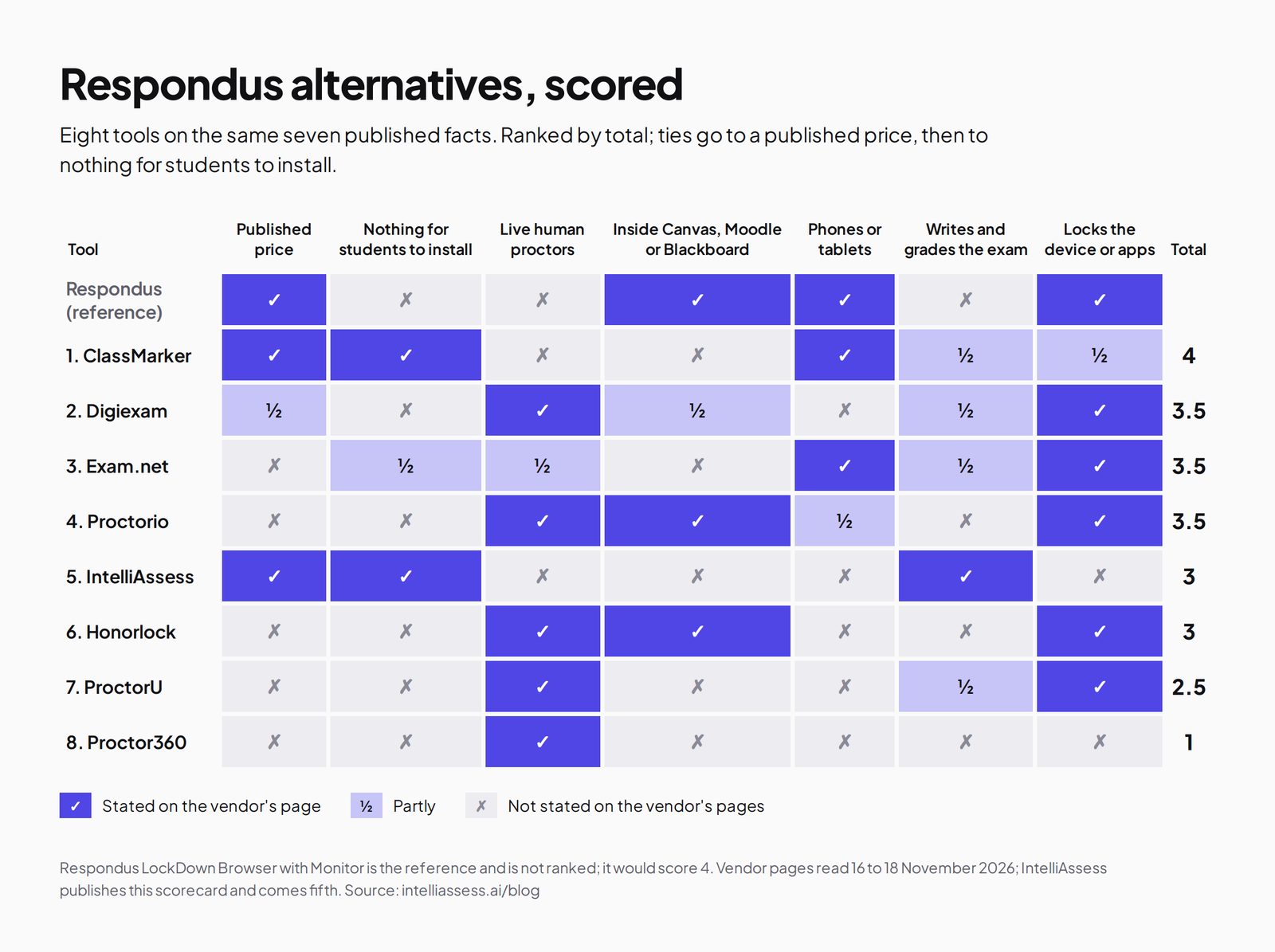
| Tool | Published price | Nothing for students to install | Live human proctors | Inside Canvas, Moodle or Blackboard | Phones or tablets | Writes and grades the exam | Locks the device or apps | Total |
|---|---|---|---|---|---|---|---|---|
| Respondus itself | ✓ | ✗ | ✗ | ✓ | ✓ | ✗ | ✓ | 4 |
| 1. ClassMarker | ✓ | ✓ | ✗ | ✗ | ✓ | ½ | ½ | 4 |
| 2. Digiexam | ½ | ✗ | ✓ | ½ | ✗ | ½ | ✓ | 3.5 |
| 3. Exam.net | ✗ | ½ | ½ | ✗ | ✓ | ½ | ✓ | 3.5 |
| 4. Proctorio | ✗ | ✗ | ✓ | ✓ | ½ | ✗ | ✓ | 3.5 |
| 5. IntelliAssess | ✓ | ✓ | ✗ | ✗ | ✗ | ✓ | ✗ | 3 |
| 6. Honorlock | ✗ | ✗ | ✓ | ✓ | ✗ | ✗ | ✓ | 3 |
| 7. ProctorU | ✗ | ✗ | ✓ | ✗ | ✗ | ½ | ✓ | 2.5 |
| 8. Proctor360 | ✗ | ✗ | ✓ | ✗ | ✗ | ✗ | ✗ | 1 |
Respondus's tablet tick is for iPad with an LMS integration. Digiexam's halves: a published Lockdown price but not its Exam Platform, and Canvas-only Lockdown in early access. Exam.net's halves: an optional high-security install and real-time teacher monitoring rather than proctors. A cross can mean "not stated on the pages we read".
1. ClassMarker: browser proctoring on any device
Best for: schools and trainers that want camera checks on phones and tablets as well as laptops, with nothing to install.
ClassMarker Monitor needs nothing installed and works on desktops, tablets and phones. It enforces full screen, logs tab switches and loss of focus, takes camera photos, flags a second face and can ask for a photo ID. Objective questions are graded instantly. Price: from $39.95 a month for 400 credits, with ten credits per camera-monitored attempt (pricing). Where it falls short: it enforces full screen but does not lock the device the way LockDown Browser does, has no LMS integration described, and marks essays by hand. See ClassMarker alternatives.
2. Digiexam: live proctors and ID checks
Digiexam's proctoring page describes ID checks by face photo or ID document, recorded screen and webcam with behavioural trackers, a phone as a second camera, and live proctors who can watch up to 30 students each, with automatic and anonymous grading. Its Lockdown for Canvas, in early access, is $1,995 a year or $2.99 per student; its Exam Platform is quoted. Best for: remote exams that need live supervision. See Digiexam alternatives.
3. Exam.net: locked exams for a whole school
Exam.net offers three security levels including a lockdown browser, background cheat detection, real-time teacher monitoring with chat, an AI question generator, rule-based auto-marking, anonymised answers and accommodations, with Google Classroom and Teams integrations, under a school licence on quote (pricing). It is the closest to LockDown Browser for exams on school devices, but it is a platform rather than an LMS add-on. See Exam.net alternatives.
4. Proctorio: lockdown and live proctoring in your LMS
Proctorio offers a live ID check, lockdown controls, recording and flagging, live proctoring or your own staff watching, content protection and checks for AI-written work, through a browser extension in Chromium browsers and a mobile app where enabled (Proctorio). Prices are on request. Best for: universities that want what Respondus does plus live proctoring. See Proctorio alternatives.
5. IntelliAssess: no install, plus writing and marking
Best for: schools and departments moving exams out of the LMS without a lockdown install, who also want exams written and marked with AI.
IntelliAssess's online proctoring runs in the browser with nothing to install: an ID photo, live selfie, liveness check and face match, then webcam, microphone, whole-screen and browser checks, with a report per attempt. Its AI quiz generator writes exams from your files, a YouTube video or a web page, and AI grading scores written answers against your rubric for the teacher to review. It publishes to Google Classroom and works in English and Arabic.
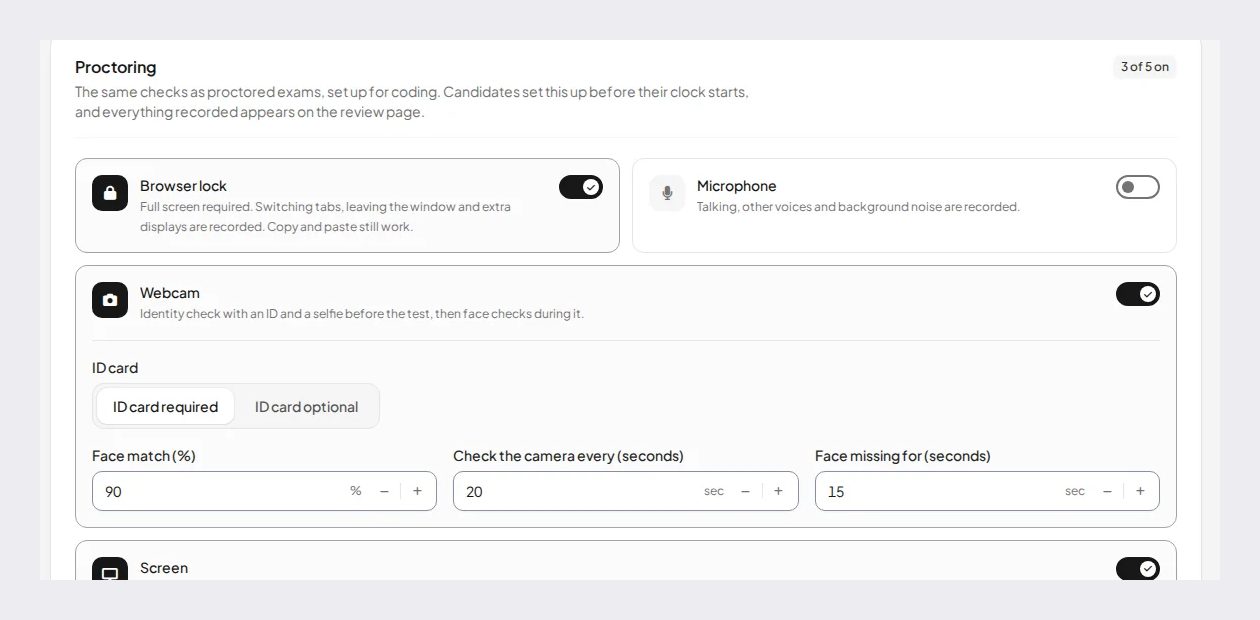
Price (from our pricing page): Free for 25 students; Starter $39 a month for 200; Pro $99 for 500; Intensive $249 for 2,000, with a monthly allowance of face checks. Where it falls short: no device lockdown, no live proctors, no LMS integration beyond Google Classroom, and proctored exams need a laptop or desktop, not a tablet or phone. See Respondus vs IntelliAssess.
6 to 8. Honorlock, ProctorU and Proctor360
Honorlock combines AI flags with live proctors who can join by chat, blocks AI chatbots through a desktop app, detects phones, and integrates with Canvas, Blackboard, Moodle and Brightspace; prices are quoted (Honorlock alternatives). ProctorU, from Meazure Learning, guarantees a professional proctor reviews every session, with its Guardian Browser. Proctor360 offers live and multi-camera proctoring with a phone as a second camera, with "affordable per-session pricing" but no figure.
Install or no install?
The plainest difference between Respondus and some alternatives is whether students install anything. A locked browser can stop students opening other apps, which is a stronger barrier than any browser-based check; that is why many institutions use it. The cost is setup: every student needs it installed and working before exam day, on a supported device. Browser-based tools such as ClassMarker and IntelliAssess ask students to install nothing, which makes exams at home easier to arrange, but they record what happens rather than prevent it. Exam.net sits in between, with an optional high-security install. Choose by where students sit the exam: lockdown for school devices you control, browser-based proctoring for students' own devices.
Prices compared
| Tool | Published starting price | How it is counted |
|---|---|---|
| Respondus LockDown Browser | $3,295 a year for up to 2,000 students | Campus licence by student numbers |
| Respondus Monitor | $4,950 first year; then $5,950 per 1,000 seats plus $1,950 per extra 1,000; or $15 per student | Seats (one student per course) or student purchase |
| ClassMarker | $39.95 a month for 400 credits | Credits per test taken; ten with the camera |
| Digiexam Lockdown | $1,995 a year, or $2.99 per student | Students and teachers |
| IntelliAssess | Free for 25; Starter $39 a month for 200 | Students at one time |
| Exam.net, Proctorio, Honorlock, ProctorU, Proctor360 | On quote | Licence or session |
For an institution of 2,000 students, LockDown Browser alone costs $3,295 a year and includes 200 Monitor seats; adding Monitor for the first year is $4,950. IntelliAssess Intensive covers up to 2,000 students for $2,490 a year, but replaces the exam platform rather than securing LMS exams.
Worked example: Respondus Monitor at three sizes
Monitor seats are counted per student per course, so the bill depends on how many courses use it, not only on how many students you have. Using the published tiered price after the first year ($5,950 for the first 1,000 seats, then $1,950 for each further 1,000) and the published LockDown Browser fees:
| Institution | LockDown Browser a year | Monitor seats needed | Monitor a year (tiered, after year one) |
|---|---|---|---|
| 1,500 students, one proctored course each | $3,295 | 1,500 (200 included free) | $7,900 for 2,000 seats, or about 1,300 seats paid at $15 each by students |
| 4,000 students, two proctored courses each | $4,445 | 8,000 | $19,600 |
| 8,000 students, three proctored courses each | $5,395 | 24,000 | $50,800, or ask for the unlimited licence |
Our arithmetic from Respondus's published tiers, rounding seats up to the next 1,000 and ignoring the 200 free seats in the tiered figures. The first year of Monitor is a flat $4,950 for any size. Check whether your contract counts seats differently before budgeting.
The worked example shows why the unlimited licence and the student-pays option exist: at higher course counts the tiered price climbs quickly. It also shows why some departments look for a cheaper route for low-stakes quizzes and keep Respondus for finals.
What students do on exam day
The number of steps a student takes before the first question is a practical difference between these tools, and it is where support tickets come from.
- Respondus: the student installs LockDown Browser once, opens it, signs in to the LMS and starts the exam; with Monitor, the webcam and microphone are checked before the exam begins. Respondus offers 24/7 live chat for Monitor problems.
- Proctorio and Honorlock: the student adds a browser extension in a supported browser, and may need a desktop app for some settings.
- ClassMarker: the student opens the test link in a browser on a laptop, tablet or phone and allows the camera.
- IntelliAssess: the student opens the test link on a laptop or desktop, takes an ID photo and a live selfie for the face match, allows the webcam, microphone and screen sharing, and starts.
- Exam.net: the student enters an exam key in a browser, or opens the high-security mode where the school requires it.
Whichever you choose, run a practice exam a week before the real one so that installs, camera permissions and screen sharing are sorted out when nothing is at stake.
Moving from Respondus: a checklist
- List every course that uses LockDown Browser or Monitor, and note which use publisher systems; those need a replacement that works there too, or stay on Respondus.
- Check your renewal date. LockDown Browser licences renew on 1 August, so plan a move to land before then rather than paying for another year.
- Export questions from your LMS before the switch, and check how the new tool imports them; some, including IntelliAssess, can also write new questions from your course files.
- Write down your accommodations (extra time, breaks, readers) and confirm the new tool can set them per student.
- Agree what is reviewed and by whom. Automated flags, as in Monitor, still need a person to look at them; decide who that is before the first exam.
- Tell students what is recorded, how long it is kept and who sees it, in the course page and the exam instructions.
Privacy
Respondus lists FERPA, GDPR, CCPA, HECVAT, SOC 2 and TX-RAMP, and says its algorithms are "systematically tested for fairness" across age, gender and skin tone. Honorlock states SOC 2 Type 2 and U.S.-based storage. IntelliAssess stores identity and evidence photos encrypted, opens them only through short-lived links, records location only if you switch that check on, and lists no certifications. Webcam proctoring collects personal data in students' homes, so tell students what is recorded and who reviews it.
Which alternative for which institution
- An institution that needs proctoring on phones and tablets with nothing to install: ClassMarker.
- A university that wants live proctors: Digiexam, Proctorio, Honorlock or ProctorU.
- A school that wants locked exams on school devices across the whole school: Exam.net.
- A department moving exams out of the LMS that wants AI to write and mark them: IntelliAssess.
- An institution happy with lockdown in its LMS: stay with Respondus, which publishes its prices and includes 200 Monitor seats a year.
Where IntelliAssess is not the right choice
- You need the device locked during the exam: Respondus, Exam.net or Digiexam.
- Exams must stay inside Canvas, Moodle, Blackboard or Brightspace.
- Students sit proctored exams on iPads, Chromebooks or phones.
- You need live proctors.
How to choose a Respondus alternative
- Decide whether exams stay in the LMS or move to a platform.
- List your students' devices and check them against the table above.
- Decide between lockdown and proctoring, or both, by where exams are sat.
- Compare published prices, and request quotes from the rest in the same week.
- Pilot one exam; Respondus offers a free two-month pilot too.
Browse every comparison or see best online proctoring software for schools.
Frequently asked questions
What is the best alternative to Respondus LockDown Browser?
For proctoring on any device with nothing to install, ClassMarker. For live proctors, Digiexam, Proctorio or Honorlock. For locked exams across a whole school, Exam.net. For exams written and marked with AI, IntelliAssess.
How much does Respondus LockDown Browser cost?
It is a campus-wide licence priced by student numbers, from $3,295 a year for up to 2,000 students, renewed each August, with a free 200-seat Monitor licence included each year.
How much does Respondus Monitor cost?
The first year is $4,950 regardless of institution size; then $5,950 for 1,000 seats plus $1,950 per extra 1,000, a quoted unlimited licence, or $15 per student for 12 months. It requires a LockDown Browser licence.
Does Respondus LockDown Browser work on Chromebooks?
Respondus lists Chromebook among supported platforms, with details on a separate page, alongside Windows 10 and 11, macOS 12 and later, and iPadOS 15 and later with an LMS integration.
Is there a lockdown browser alternative that needs no install?
Browser-based proctoring, such as ClassMarker Monitor and IntelliAssess, needs nothing installed but records activity rather than locking the device. For true lockdown, something is installed: LockDown Browser, Exam.net's high-security mode, Digiexam's desktop app or Safe Exam Browser.
Does Respondus have live proctoring?
Respondus Monitor is fully automated, with flagged events reviewed afterwards. Its site links to an instructor live proctoring option using video tools such as Zoom; for proctors provided by the vendor, look at Honorlock, Proctorio, Digiexam or ProctorU.
Keep reading
All articles
Read next
SchoolAI alternatives: 7 AI tools for teachers and students scored (2026)
Seven AI tools scored on the same nine facts, with SchoolAI as the reference, and what each lets teachers see when students use AI.

SchoolAI vs IntelliAssess: an AI tutor for students or feedback after a test?
SchoolAI puts students in supervised conversation with AI; IntelliAssess marks their tests and uses AI to help them learn from their own answers.
Motasem Aldiab 12 min read

Jotform and ProProfs alternatives for quizzes and exams (2026)
Jotform and ProProfs side by side, then the alternatives by forms, certificates or real exams.
Motasem Aldiab 2 min read