
Digiexam alternatives for Lockdown and the Exam Platform (2026)

By Motasem Aldiab, Technology Consultant and Trainer - Cloud, DevOps, Java, Data Science
Contents24
- Digiexam's two products
- Why schools look for a Digiexam alternative
- Which Digiexam are you replacing?
- The scorecard: 6 Digiexam alternatives in two groups
- Part 1: Replacing Digiexam Lockdown
- 1. Respondus Monitor
- 2. Proctorio
- 3. Honorlock
- Part 2: Replacing the Digiexam Exam Platform
- 1. ClassMarker
- 2. Exam.net
- 3. IntelliAssess
- Lockdown or proctoring?
- What students need on exam day
- When a person should watch
- How each tool flags cheating
- Marking: co-grading or an AI first pass
- Prices you can see
- Privacy
- Using IntelliAssess alongside Digiexam
- Which alternative for which school
- Where IntelliAssess is not the right choice
- Moving from Digiexam in five steps
- How to choose a Digiexam alternative
Key takeaways
- 1To replace Lockdown: Respondus Monitor, Proctorio, then Honorlock.
- 2To replace the Exam Platform: ClassMarker, Exam.net, then IntelliAssess.
- 3Digiexam's live proctors and anonymous co-grading are its strongest features.
- 4IntelliAssess adds AI writing and marking, but no lockdown or live proctors.
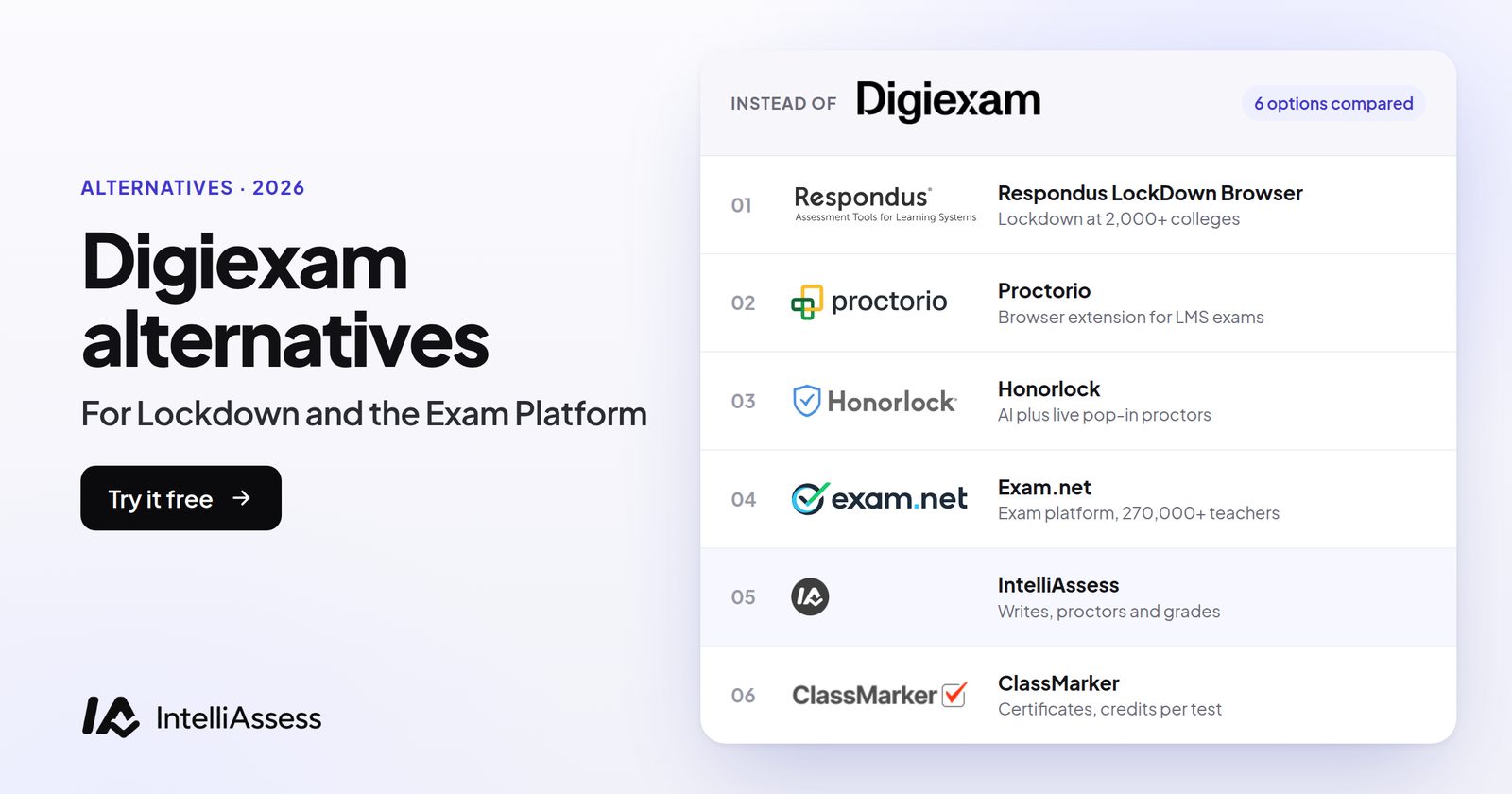
The best Digiexam alternatives depend on which Digiexam product you are replacing. To replace Digiexam Lockdown, which secures Canvas exams, look at Respondus Monitor for lockdown and automated proctoring at a published price, Proctorio for security with live proctoring inside your LMS, or Honorlock for live pop-in proctors. To replace the Digiexam Exam Platform, look at ClassMarker for browser proctoring on any device at a published price, Exam.net for whole-school lockdown with real-time teacher monitoring, or IntelliAssess for exams written and marked with AI and proctored at home. Below, six tools are scored on the same seven published facts, in two groups, with Digiexam as the reference.
Digiexam's two products
Digiexam's homepage (read 17 November 2026) offers two products, and the right alternative depends on which you use.
Digiexam Lockdown secures quizzes and assignments built in Canvas. Its Lockdown page describes a desktop application that students sign into with their school account, which locks the device while they take Canvas Classic Quizzes, New Quizzes or assignments, and publishes results back to the LMS, with users synced from Google Workspace or Microsoft Entra ID. It aims to "prevent students from using AI tools and other unauthorized resources". Lockdown was in early access when we read it. Its pricing page lists one plan with unlimited exams: $1,995 a year ($1,496 with 25% off the first year) or $2.99 per student.
The Digiexam Exam Platform lets you "create, deliver, and grade secure assessments". Its proctoring page describes ID checks by "a high-resolution face photo or submitting an identification card/passport", recorded screen and webcam with "automatic notifications from behavioral trackers", a phone as a second camera by QR code, in-person proctoring where "up to 30 students can be viewed simultaneously by one exam proctor", a credibility report, and "automatic and anonymous grading" with co-grading. Exam Platform pricing is not published.
Why schools look for a Digiexam alternative
- Lockdown is Canvas-only and in early access. Schools on Moodle, Blackboard or Brightspace need something else.
- The Exam Platform price is not published. Budgeting starts with a quote.
- Something to install. Lockdown runs as a desktop application, and the platform's pages do not name tablets or Chromebooks.
- No AI help with writing or marking. The pages we read do not describe AI question writing or AI grading of written answers.
Which Digiexam are you replacing?
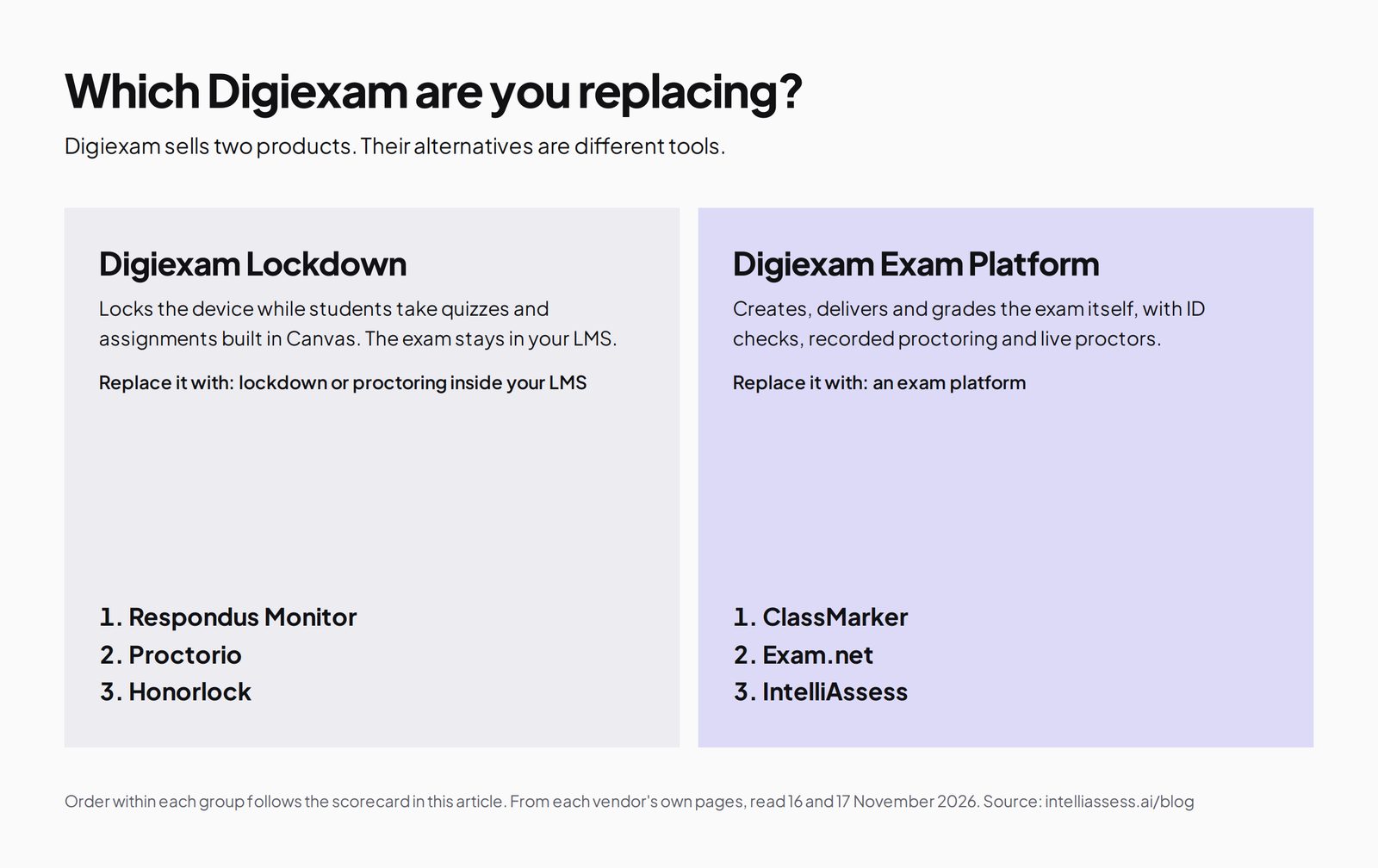
The two products have different alternatives. If your exams live in your LMS and Digiexam only locks them, you need a lockdown or proctoring add-on. If Digiexam runs the whole exam, you need another exam platform.
The scorecard: 6 Digiexam alternatives in two groups
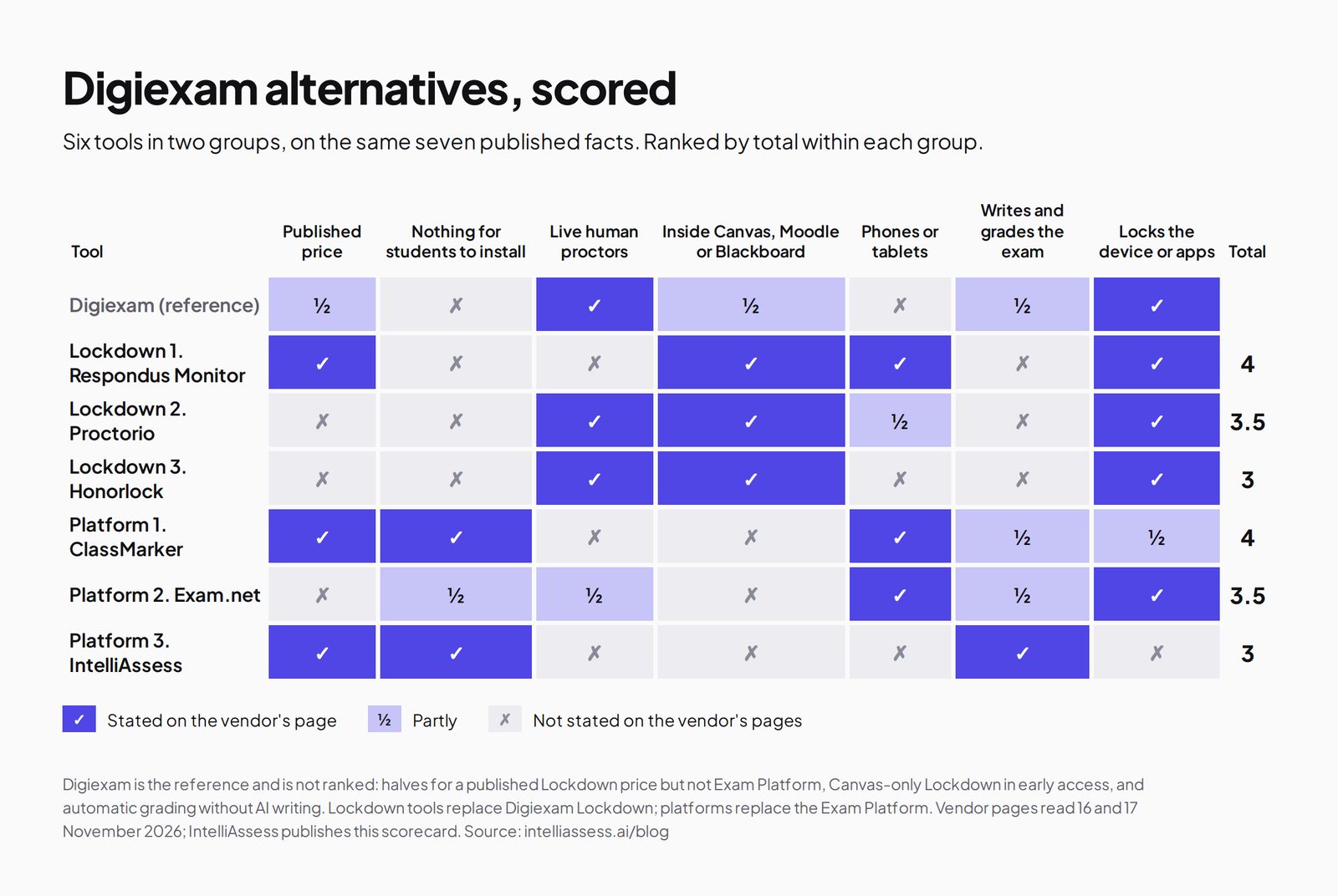
A tick means the vendor's own page says so; a half means partly; a cross means its page does not say so. The facts are a published price, nothing for students to install, live human proctors, working inside Canvas, Moodle or Blackboard, phones or tablets, writing and grading the exam, and locking the device or apps. Within each group, ties go to a published price, then to nothing for students to install.
| Tool | Published price | Nothing for students to install | Live human proctors | Inside Canvas, Moodle or Blackboard | Phones or tablets | Writes and grades the exam | Locks the device or apps | Total |
|---|---|---|---|---|---|---|---|---|
| Digiexam itself | ½ | ✗ | ✓ | ½ | ✗ | ½ | ✓ | 3.5 |
| Replacing Digiexam Lockdown | ||||||||
| 1. Respondus Monitor | ✓ | ✗ | ✗ | ✓ | ✓ | ✗ | ✓ | 4 |
| 2. Proctorio | ✗ | ✗ | ✓ | ✓ | ½ | ✗ | ✓ | 3.5 |
| 3. Honorlock | ✗ | ✗ | ✓ | ✓ | ✗ | ✗ | ✓ | 3 |
| Replacing the Digiexam Exam Platform | ||||||||
| 1. ClassMarker | ✓ | ✓ | ✗ | ✗ | ✓ | ½ | ½ | 4 |
| 2. Exam.net | ✗ | ½ | ½ | ✗ | ✓ | ½ | ✓ | 3.5 |
| 3. IntelliAssess | ✓ | ✓ | ✗ | ✗ | ✗ | ✓ | ✗ | 3 |
Digiexam's halves: Lockdown has a published price but the Exam Platform does not; Lockdown works inside Canvas only and is in early access; the platform grades automatically and anonymously but does not describe AI question writing. Its phone use is as a second camera, not as the exam device. Exam.net's devices are from our 16 November read. A cross can mean "not stated on the pages we read".
Part 1: Replacing Digiexam Lockdown
1. Respondus Monitor
Best for: schools that want lockdown and automated proctoring across any major LMS at a known price.
Respondus Monitor is "fully automated proctoring" built on Respondus LockDown Browser, a custom browser installed once on Windows, Mac, Chromebook or iPad, which integrates with the major LMSs; instructors review flagged events afterwards (Respondus Monitor). Unlike Digiexam Lockdown, it is not limited to Canvas. Price: a $4,950 first-year licence regardless of institution size, then tiers by seats, or $15 per student for 12 months (pricing). Where it falls short: no live proctors. See Respondus vs IntelliAssess.
2. Proctorio
Best for: universities that want lockdown controls, live ID checks and optional live proctoring inside their LMS.
Proctorio says it has proctored "300M+ exams". Its Integrity suite offers a live ID check, lockdown settings, recording and flagging, live proctoring or "Be Your Own Proctor" for your own staff, with Origin for checking human authorship and Vault for content protection. Students install its extension in a Chromium browser, and a mobile app covers phones where enabled (Proctorio). Prices are on request. See Proctorio alternatives.
3. Honorlock
Best for: institutions that want a person to step in during the exam.
Honorlock's pricing page describes Live Pop-In, where "human proctors review potential misconduct in real time and can intervene via live chat", inside Canvas, Blackboard, Brightspace and Moodle, with a desktop app that blocks apps such as chatbots; it states SOC 2 Type 2. Prices are quoted. See Honorlock vs IntelliAssess.
Part 2: Replacing the Digiexam Exam Platform
1. ClassMarker
Best for: schools and trainers that want browser proctoring on phones and tablets as well as laptops, at a published price.
ClassMarker Monitor needs nothing installed and works on desktops, tablets and phones. It can enforce full screen, log tab switches, take camera photos, flag a second face and ask for a photo ID. Objective questions are graded instantly, and certificates and an API are available. Its pricing charges one credit per test taken and ten with camera monitoring, from $39.95 a month. Where it falls short: no live proctors, no device lockdown, and essays marked by hand. See ClassMarker alternatives.
2. Exam.net
Best for: schools that want whole-school locked exams on school devices with real-time teacher monitoring.
Exam.net's pricing page lists three security levels including a lockdown browser, background cheat detection, real-time monitoring, an AI question generator, auto-marking by your rules, anonymised answers, accommodations and Google Classroom and Teams integrations. It is trusted by over 270,000 teachers. Price: a school licence on quote after a 30-day trial; no free plan. Where it falls short: no webcam or ID checks described. See Exam.net alternatives.
3. IntelliAssess
Best for: schools and departments that want exams written from their own material, written answers marked by AI against a rubric, and proctoring for exams at home, with a published price.
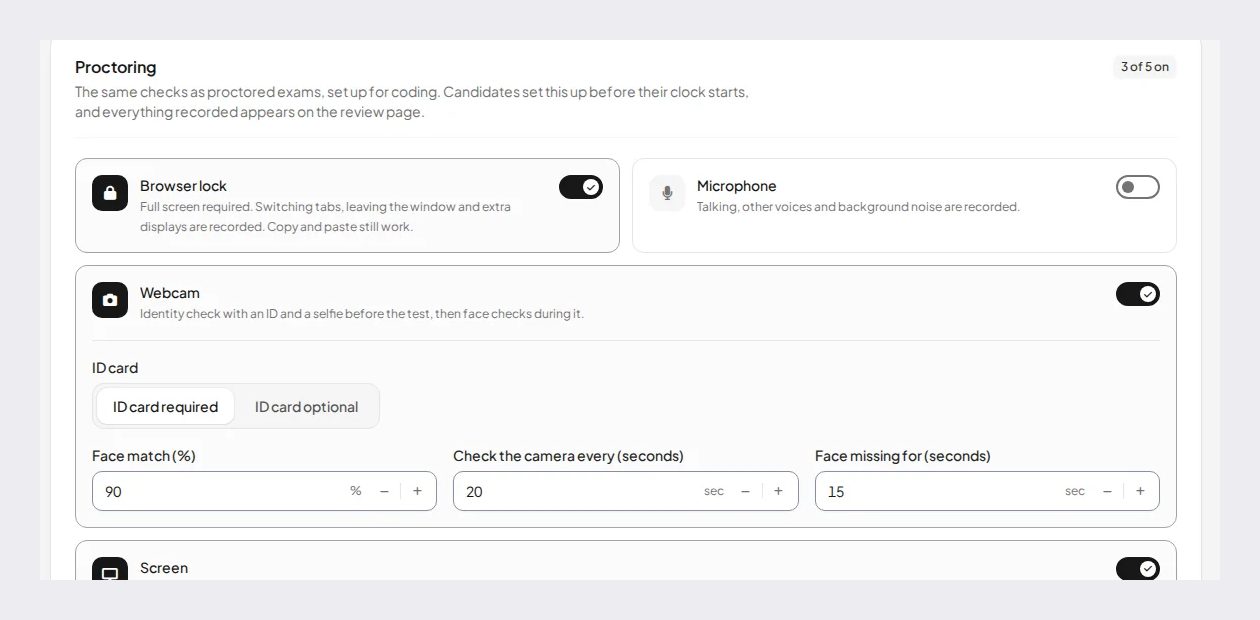
IntelliAssess's AI quiz generator writes exams from your files, a YouTube video or a web page, up to 100 questions across eight types with answer keys checked twice. Choice questions are marked at hand-in, and AI grading scores each written answer against every rubric criterion with a reason the teacher can change. Its online proctoring runs in the browser with an ID photo, selfie, liveness check and face match, then webcam, microphone, screen and browser checks. It publishes to Google Classroom and works in English and Arabic.
Price (from our pricing page): Free for 25 students; Starter $39 a month for 200; Pro $99 for 500; Intensive $249 for 2,000, with a monthly allowance of face checks. Where it falls short: no live proctors, no device lockdown, no Canvas, Moodle or Blackboard integration, and proctored exams need a laptop or desktop. See Digiexam vs IntelliAssess.
Lockdown or proctoring?
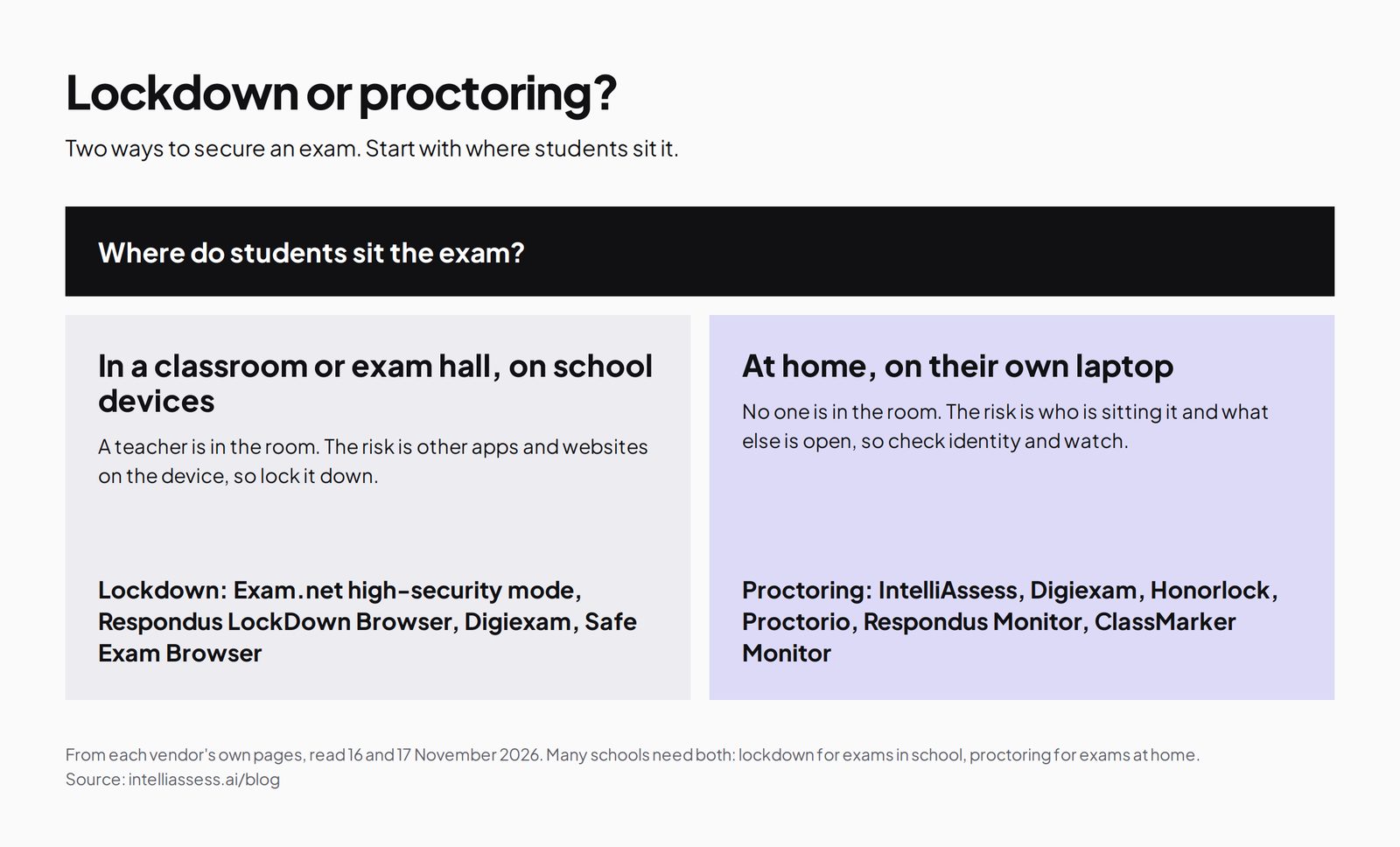
Digiexam combines both: Lockdown closes off other apps on the exam device, and the Exam Platform adds ID checks, recording and live proctors. Most alternatives lead with one or the other, so decide which you need for each kind of exam. Lockdown suits exams in a classroom or hall on school devices; proctoring suits exams sat at home, where the question is who is sitting the exam.
What students need on exam day
- Digiexam Lockdown: the desktop application, signed in with their school account, and the Canvas quiz.
- Digiexam Exam Platform: a face photo or ID document, webcam and screen recording, and a phone as a second camera if you use that option.
- Respondus Monitor: a one-time install of LockDown Browser on Windows, Mac, Chromebook or iPad, plus a webcam.
- Proctorio: its extension in Chrome, Edge, Brave or Opera, and a companion app for advanced settings, or its mobile app where enabled.
- Honorlock: a Chrome extension, webcam and microphone.
- ClassMarker: a browser on any device, with a camera if Monitor is on.
- Exam.net: an exam key, and its high-security mode installed where the school requires it.
- IntelliAssess: a browser on a laptop or desktop with a webcam, an ID document, and permission to share the screen; nothing to install.
Each requirement is a place where a student can get stuck on the day. Whatever you choose, run a practice exam with the same settings a week before, and give students a named contact if a check fails.
When a person should watch
Digiexam's live proctoring, where one proctor can watch up to 30 students, is one of its strongest features for high-stakes exams. Among the alternatives, Honorlock offers live pop-in proctors who intervene by chat, Proctorio offers live proctoring or your own staff watching in real time, and Exam.net lets teachers monitor students and chat with them during the exam. Respondus Monitor, ClassMarker and IntelliAssess are automated: they record events for a person to review afterwards. Live supervision costs more and is harder to schedule, so most schools keep it for final or certification exams and use automated proctoring for everything else.
How each tool flags cheating
Digiexam records screen and webcam with "automatic notifications from behavioral trackers" and sums up each session in a credibility report. Respondus Monitor flags events for instructors to review after the exam. Proctorio records and flags according to the settings you choose, and adds Origin for checking whether work was written by a person. Honorlock's AI flags possible misconduct for a live proctor to review in real time. ClassMarker logs tab switches and loss of focus and takes camera photos. Exam.net runs background cheat detection alongside its lockdown browser. IntelliAssess records events such as leaving the exam page or a missing face, each with a time and, for webcam events, a photo, and combines them into an integrity score and timeline. In every case, a flag is a reason for a person to look at the evidence and talk to the student, not proof of misconduct. Decide who reviews flags, and how a student can respond, before the first exam, and write it into your exam policy.
Marking: co-grading or an AI first pass
Digiexam's marking strength is fairness and shared work: automatic grading of objective questions, anonymous grading so markers do not see who wrote an answer, and co-grading so colleagues can share and check written answers. Exam.net offers similar anonymised and collaborative marking. ClassMarker grades objective questions and leaves essays to you. Respondus, Proctorio and Honorlock leave marking to your LMS. IntelliAssess takes a different route: AI scores each written answer against every rubric criterion with a reason, and the teacher reviews and changes scores before releasing results. Anonymous co-grading is better when several examiners share high-stakes marking; an AI first pass saves the most time on frequent tests with many short written answers.
Prices you can see
| Tool | Published starting price | How it is counted |
|---|---|---|
| Digiexam Lockdown | $1,995 a year, or $2.99 per student | Students and teachers |
| Respondus Monitor | $4,950 first-year licence, or $15 per student | Institution or student |
| ClassMarker | $39.95 a month (Professional 1) | Credits per test taken |
| IntelliAssess | Free for 25; Starter $39 a month for 200 | Students at one time |
| Digiexam Exam Platform, Proctorio, Honorlock, Exam.net | On quote | Licence |
For a school of 500 students, Digiexam Lockdown at $2.99 per student comes to about $1,495 a year, close to its $1,496 discounted first-year price, and Respondus Monitor at $15 per student would be $7,500, so its institution licence is the better route. IntelliAssess Pro covers 500 students for $990 a year billed yearly, though it replaces the platform rather than Lockdown.
Privacy
Digiexam's pages say it follows strict security measures without naming certifications or data location; ask for them. Honorlock states SOC 2 Type 2, and Exam.net states GDPR, FERPA, COPPA and SOPIPA compliance. IntelliAssess stores identity and evidence photos encrypted, opens them through short-lived links, and lists no certifications. Webcam proctoring collects more personal data than lockdown, so tell students and families what is recorded and who reviews it.
Using IntelliAssess alongside Digiexam
A school does not have to replace Digiexam to use IntelliAssess. Keep Digiexam for high-stakes exams that need live proctors or lockdown in Canvas, and use IntelliAssess for weekly tests and mid-terms with written answers, where an AI first pass on marking saves the most time and nothing needs to be installed. A department can start on IntelliAssess's free plan for 25 students; AI grading and proctoring start on Starter.
Which alternative for which school
- A Canvas school replacing Digiexam Lockdown, wanting a published price: Respondus Monitor.
- A university on Moodle, Blackboard or Brightspace: Respondus Monitor, Proctorio or Honorlock.
- An institution that needs a person watching live: Honorlock or Proctorio.
- A school that wants an exam platform working on tablets and phones: ClassMarker or Exam.net.
- A school locking exams on school devices with teacher monitoring: Exam.net.
- A department that wants AI to write and mark exams, and to proctor at home: IntelliAssess.
Where IntelliAssess is not the right choice
- You need exams locked inside Canvas, Moodle or Blackboard: the lockdown group above.
- You need live human proctors: Digiexam, Honorlock or Proctorio.
- Students sit exams on tablets or phones: ClassMarker, Exam.net or Respondus.
- Several examiners share anonymous marking of high-stakes exams: Digiexam or Exam.net.
Moving from Digiexam in five steps
- Name the product you are replacing, Lockdown or the Exam Platform.
- Check your contract dates and export results and credibility reports you need to keep.
- Match the security level: lockdown, recorded proctoring, or live proctors.
- Pilot one exam with a practice run so students can test their devices.
- Compare marking time and student problems before switching every course.
How to choose a Digiexam alternative
- Decide whether your exams stay in the LMS or move to a platform.
- Decide where students sit them: in school, where lockdown matters, or at home, where identity checks matter.
- Check devices and LMS support for each tool.
- Compare marking workflows, from anonymous co-grading to AI first passes.
Browse every comparison or see best online proctoring software for schools.
Frequently asked questions
What is the best alternative to Digiexam?
To replace Digiexam Lockdown, Respondus Monitor, which works across major LMSs at a published price. To replace the Exam Platform, ClassMarker for browser proctoring on any device, Exam.net for whole-school lockdown, or IntelliAssess for exams written and marked with AI.
How much does Digiexam cost?
Digiexam Lockdown is $1,995 a year ($1,496 with 25% off the first year) or $2.99 per student. The Exam Platform is priced on request.
Does Digiexam work with Moodle?
Digiexam Lockdown is built for Canvas. Its pages we read do not name Moodle, Blackboard or Brightspace. Respondus, Proctorio and Honorlock work with them.
Does Digiexam have live proctoring?
Yes. Its proctoring page says one exam proctor can view up to 30 students at once, alongside recorded screen and webcam and ID checks.
Which Digiexam alternative grades essays with AI?
IntelliAssess scores each written answer against every rubric criterion with AI, with a reason the teacher can change. Digiexam offers automatic and anonymous grading with co-grading by teachers.
Exam.net or Digiexam?
Exam.net suits whole-school exams on school devices with real-time teacher monitoring and Google Classroom or Teams. Digiexam suits remote exams that need ID checks and live proctors, and exams in Canvas. See our Exam.net alternatives for a side-by-side table.
Is Digiexam Lockdown available now?
When we read Digiexam's site on 17 November 2026, its navigation marked Lockdown as coming soon and its page offered early access. Respondus LockDown Browser and Proctorio are available today for Canvas and other LMSs.
Which Digiexam alternative works on iPads?
Respondus LockDown Browser runs on iPad after a one-time install, and ClassMarker Monitor works on tablets in the browser. IntelliAssess's proctored exams need a laptop or desktop.
Can I use Digiexam and IntelliAssess together?
Yes. Use Digiexam for high-stakes exams with live proctors or Canvas lockdown, and IntelliAssess for frequent tests with written answers marked by AI and proctored at home.
Does Digiexam have AI features?
The only AI mention on the Digiexam pages we read is that Lockdown aims to "prevent students from using AI tools and other unauthorized resources". AI question writing or AI grading of written answers is not described. Exam.net lists an AI question generator, and IntelliAssess writes and grades with AI.
Which Digiexam alternative has a free plan?
IntelliAssess is free for 25 students, without proctoring, and Testportal has a free education plan. Digiexam, Exam.net, Respondus, Proctorio and Honorlock do not describe free plans; Exam.net offers a 30-day trial per school and ClassMarker a 30-day trial. Respondus offers a free two-month pilot in North America, according to its pricing page.
Keep reading
All articles
Read next
SchoolAI alternatives: 7 AI tools for teachers and students scored (2026)
Seven AI tools scored on the same nine facts, with SchoolAI as the reference, and what each lets teachers see when students use AI.

SchoolAI vs IntelliAssess: an AI tutor for students or feedback after a test?
SchoolAI puts students in supervised conversation with AI; IntelliAssess marks their tests and uses AI to help them learn from their own answers.
Motasem Aldiab 12 min read

Jotform and ProProfs alternatives for quizzes and exams (2026)
Jotform and ProProfs side by side, then the alternatives by forms, certificates or real exams.
Motasem Aldiab 2 min read