
Microsoft Forms alternatives for quizzes and tests (2026)

By Motasem Aldiab, Technology Consultant and Trainer - Cloud, DevOps, Java, Data Science
Contents18
- First: what Microsoft 365 Education already gives you
- Where Microsoft Forms stops
- Written answers: what each tool does with them
- Where each alternative sits relative to Teams
- The scorecard: 5 Microsoft Forms alternatives on 7 published facts
- 1. IntelliAssess: tests that grade written answers, outside Teams
- 2. Wayground (formerly Quizizz): free practice you can assign from Teams
- 3. Testportal: a free test maker inside Teams
- 4. Digiexam: supervised exams with ID checks
- 5. Exam.net: locked exams for the whole school, linked to Teams
- Also worth knowing
- Prices side by side
- What Copilot in Forms costs a teacher over a year
- What students need on the day
- Which alternative for which school
- Moving from Microsoft Forms in five steps
- Where IntelliAssess is not the right choice
- How to choose a Microsoft Forms alternative
Key takeaways
- 1First check Microsoft: Teach writes quizzes from lesson files and Assignments drafts rubrics, at no extra cost.
- 2For AI scoring of written answers and identity checks, outside Teams: IntelliAssess.
- 3To stay inside Teams: Testportal's Teams app, or Exam.net for locked exams.
- 4For free practice you can assign from Teams: Wayground.
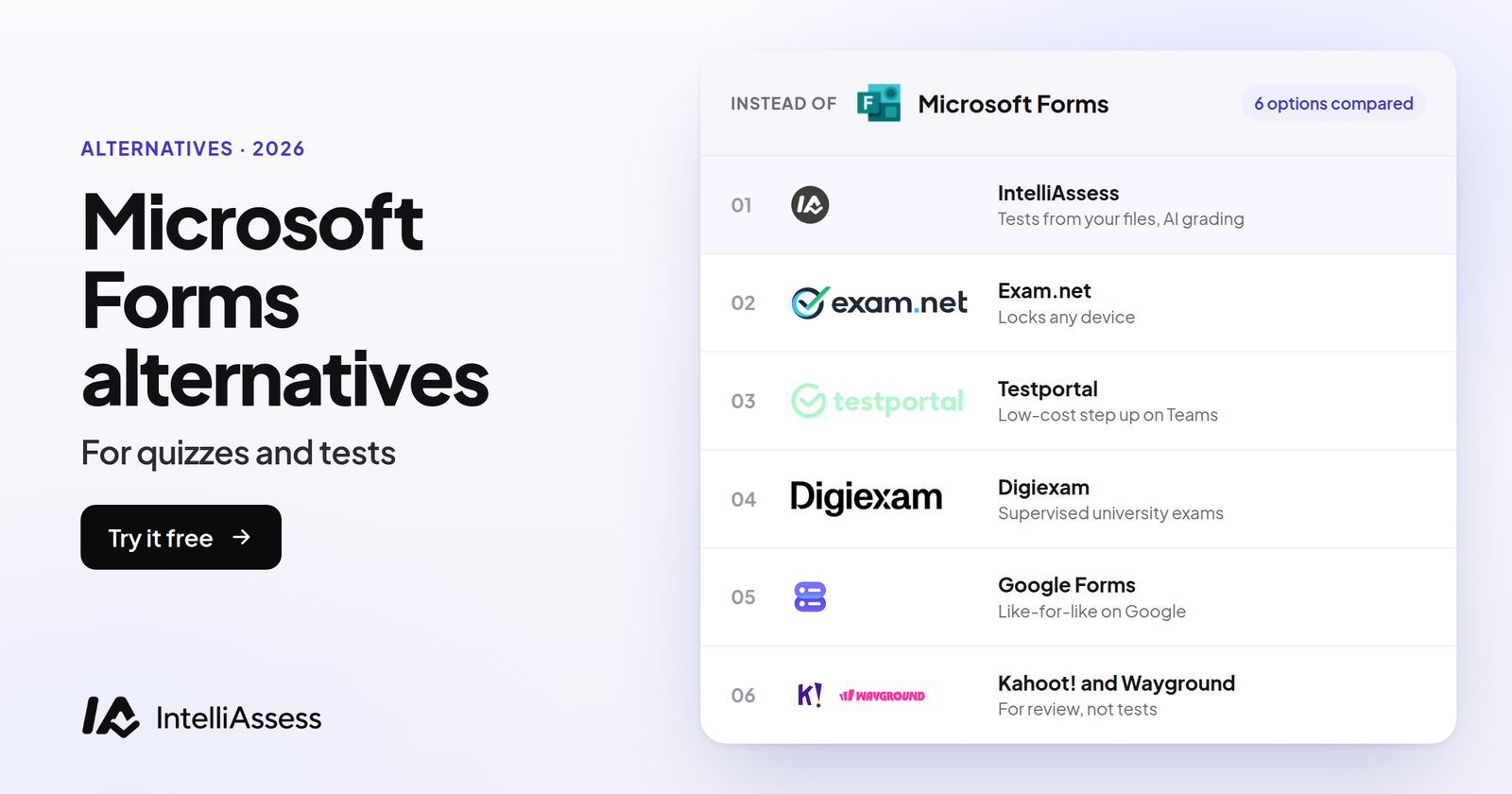
The best Microsoft Forms alternatives for quizzes and tests are IntelliAssess if you want written answers scored by AI against a rubric and identity checks for exams at home (outside Teams), Wayground for free game-style practice you can assign from Teams, Testportal for a free test maker that runs inside Teams, Digiexam for supervised exams with ID checks and a lockdown app, and Exam.net for locked exams across a whole school. Before switching, check what Microsoft 365 Education now includes: Teach writes Forms quizzes from your lesson files, and Teams Assignments drafts rubrics and feedback, at no extra cost. Below, five alternatives are scored on the same seven published facts.
First: what Microsoft 365 Education already gives you
Microsoft Forms comes with Microsoft 365, including school accounts. Per Microsoft's quiz help, you mark the correct answer or answers, give each question points, and can add a message students see when they choose an answer. Assigned through Teams Assignments, a quiz is scored for choice questions and you review written answers, add points and return it.
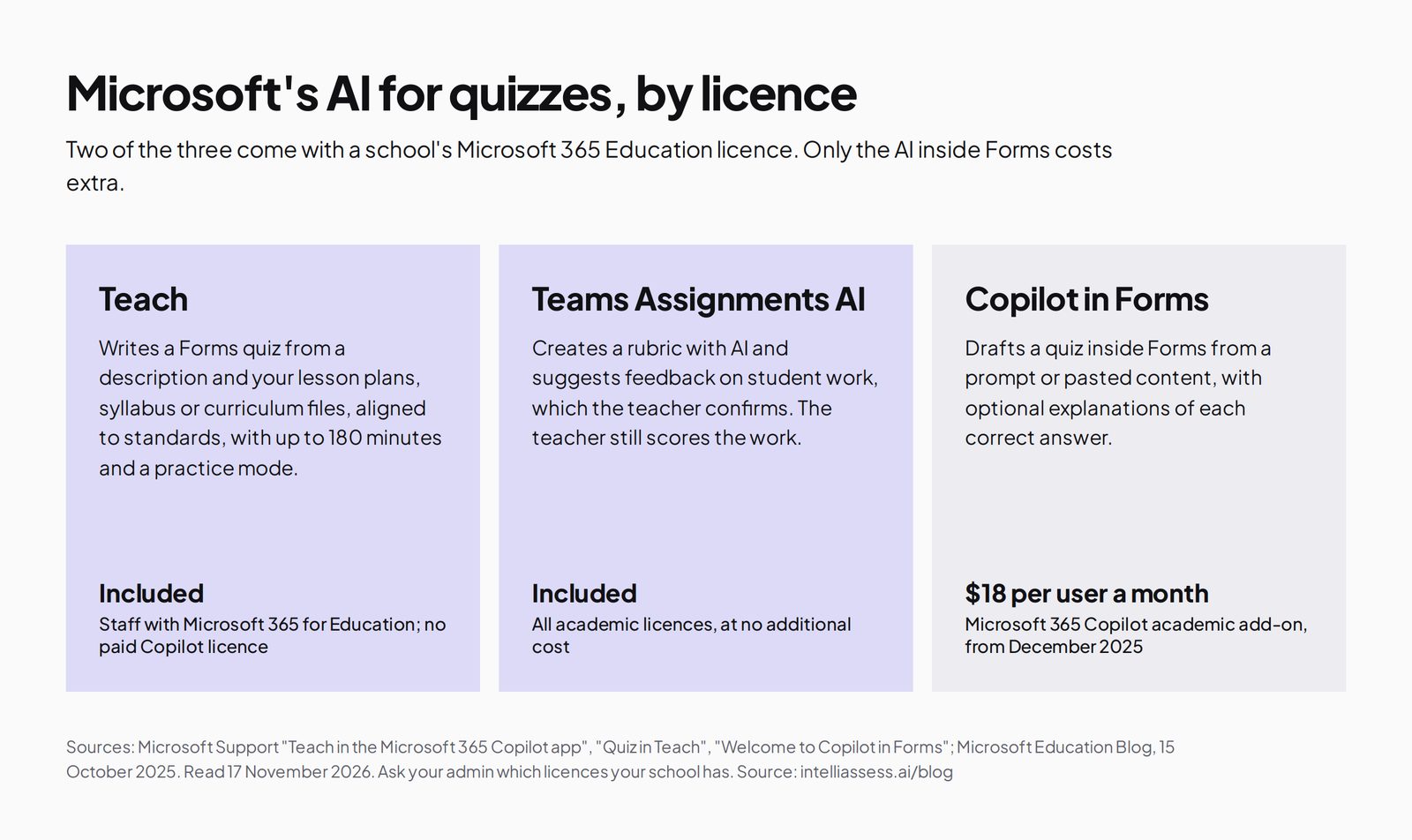
Three Microsoft AI features matter here, and they come with different licences:
- Teach in the Microsoft 365 Copilot app generates a Forms quiz from a description and your attached lesson plans, unit plans, syllabus or curriculum files, aligned to standards, with up to 180 minutes and a practice mode (Quiz in Teach). Microsoft says Teach is for faculty and staff with a Microsoft 365 for Education licence and "does not require a paid Microsoft Copilot license" (Teach help).
- Teams Assignments can create a rubric with AI and suggest feedback on student work, which "the educator must confirm" before it reaches the student. Microsoft's October 2025 announcement says these come with all academic licences at no additional cost.
- Copilot in Forms drafts a quiz inside Forms from a prompt, with optional answer explanations, but needs "a Microsoft 365 account and a Copilot license" (Copilot in Forms help). Microsoft priced the academic Microsoft 365 Copilot add-on at $18 per user per month from December 2025.
If your quizzes are mostly choice questions, your students are in Teams, and Teach writes the questions you need, you may not need another tool.
Where Microsoft Forms stops
- Written answers are scored by you. Teams Assignments' AI drafts rubrics and feedback suggestions, but the pages we read describe the teacher scoring the work, not AI scoring each criterion.
- No identity or webcam checks. The Forms and Teams quiz pages we read describe none, so exams at home run on trust.
- No device lockdown is described for Forms quizzes.
- AI inside Forms costs extra. Teach is included for staff; Copilot in Forms needs the paid add-on.
Written answers: what each tool does with them
For most teachers leaving Forms, the deciding question is what happens to the paragraph answers. Here is what each vendor's page says, in plain terms:
| Tool | Who scores a written answer | What the student gets back |
|---|---|---|
| Microsoft Forms with Teams Assignments | You, with an AI-drafted rubric to work from | Your score and feedback, with AI suggestions you confirm first |
| IntelliAssess | AI scores each rubric criterion when the student hands in; you can change any score | A score and a comment per criterion, released when you are ready |
| Wayground | AI grading with custom and state rubrics on the School and District plan | Not described on the pages we read |
| Testportal | Short open-ended answers self-grade; longer answers are marked by hand | The result of the test |
| Digiexam | You, with AI-assisted feedback | Your feedback |
| Exam.net | You, with answers anonymised if you choose | Results, which can go back through Teams |
If you set a few written questions a term, marking them yourself in Forms is fine. If you set them every week for several classes, a tool that drafts the score for you to check saves the most time, and it is worth trying one real test before deciding.
Where each alternative sits relative to Teams
For Microsoft schools, the first question is usually not features but whether teachers can stay in Teams.
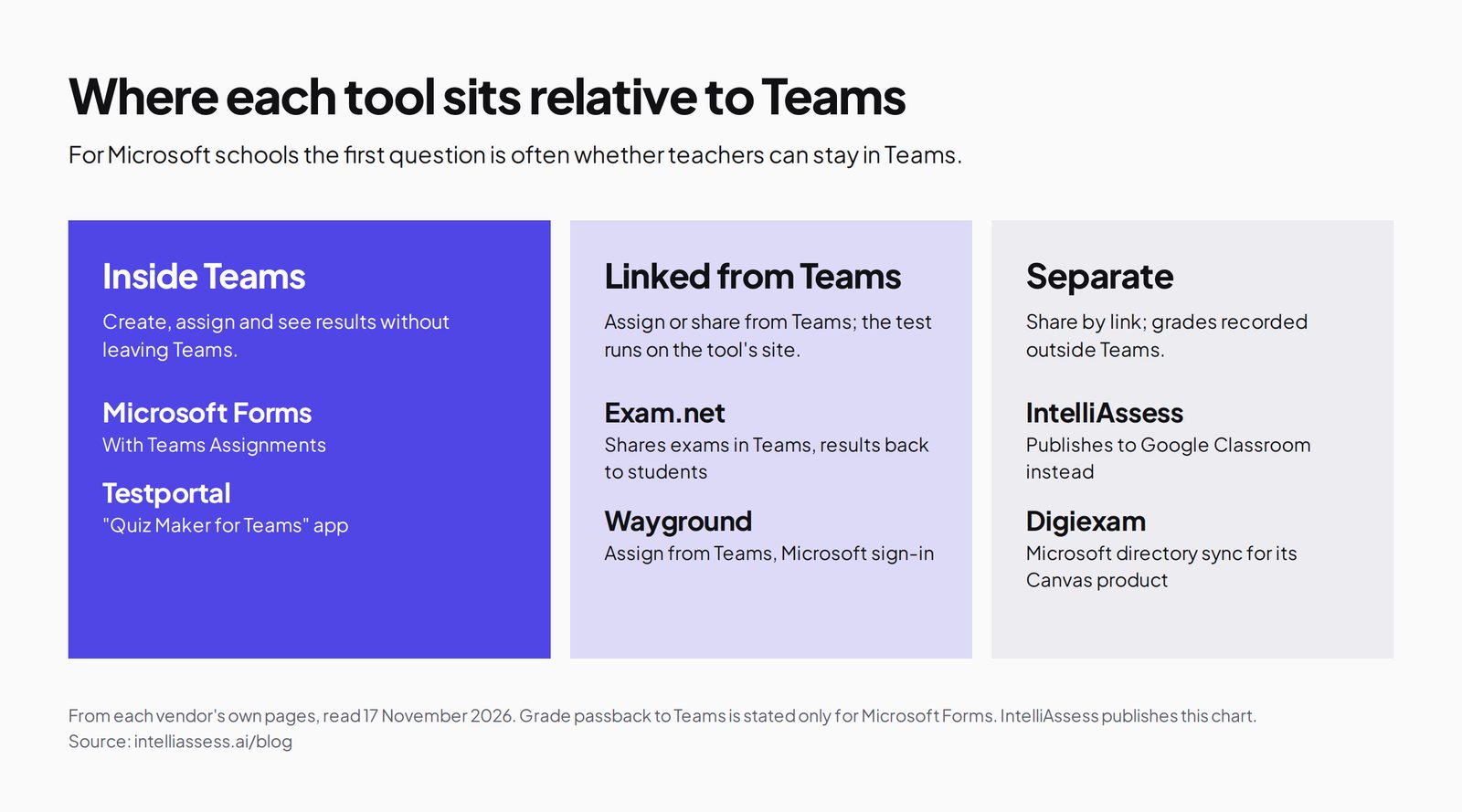
- Inside Teams: Forms with Teams Assignments; Testportal's "Quiz Maker for Teams" app lets you "create, share, and analyze" quizzes in Teams.
- Linked from Teams: Exam.net shares exams in Teams and returns results to students there; Wayground lets you assign its resources from Teams with Microsoft sign-in.
- Separate: IntelliAssess and Digiexam run in their own sites. IntelliAssess publishes to Google Classroom, not Teams.
The scorecard: 5 Microsoft Forms alternatives on 7 published facts
We scored each tool on the four gaps above, plus a free option, a published price, and staying in Teams. A tick means a single teacher can use it free or buy it on a published plan; a half means only on a school quote, partly, or with a limit; a cross means the vendor's page does not say so. The list follows the total; ties go to the tool with a free plan.
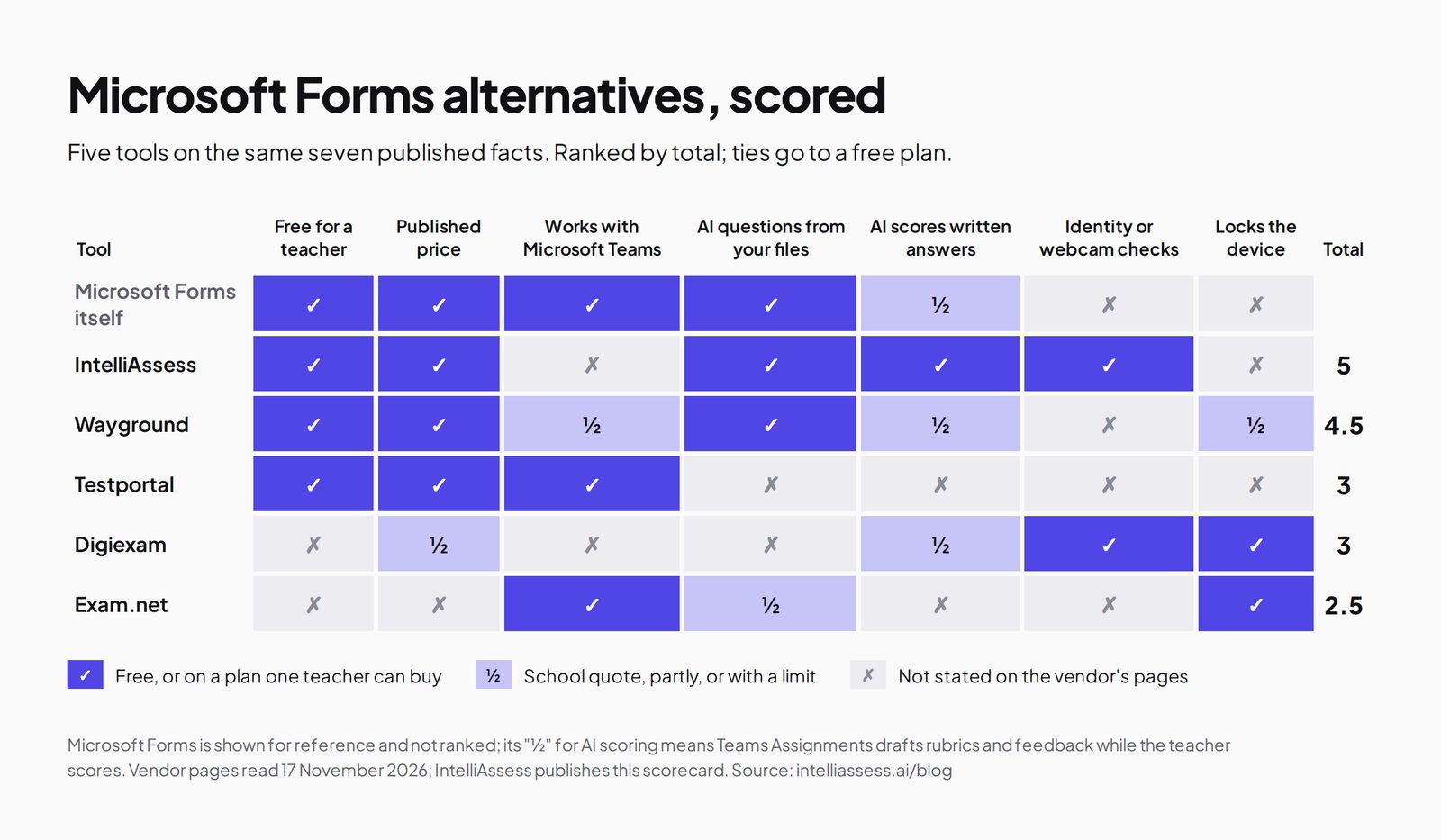
| Tool | Free for a teacher | Published price | Works with Microsoft Teams | AI questions from your files | AI scores written answers | Identity or webcam checks | Locks the device | Total |
|---|---|---|---|---|---|---|---|---|
| Microsoft Forms itself | ✓ | ✓ | ✓ | ✓ | ½ | ✗ | ✗ | |
| 1. IntelliAssess | ✓ | ✓ | ✗ | ✓ | ✓ | ✓ | ✗ | 5 |
| 2. Wayground | ✓ | ✓ | ½ | ✓ | ½ | ✗ | ½ | 4.5 |
| 3. Testportal | ✓ | ✓ | ✓ | ✗ | ✗ | ✗ | ✗ | 3 |
| 4. Digiexam | ✗ | ½ | ✗ | ✗ | ½ | ✓ | ✓ | 3 |
| 5. Exam.net | ✗ | ✗ | ✓ | ½ | ✗ | ✗ | ✓ | 2.5 |
Microsoft Forms' "½" for AI scoring: Teams Assignments drafts rubrics and feedback suggestions, and the teacher scores. Wayground's "½" for Teams: assign from Teams; grade passback to Teams is not stated. Digiexam's "½" price: Lockdown is published, the Exam Platform is on request.
1. IntelliAssess: tests that grade written answers, outside Teams
Best for: teachers whose quizzes became real tests, with written answers to score and exams sat at home, who can work outside Teams.
IntelliAssess's AI quiz generator writes a test from a topic, your PDF, Word or PowerPoint files, a YouTube video or a web page, across eight question types, and checks every answer key in a second pass, on every plan including Free.
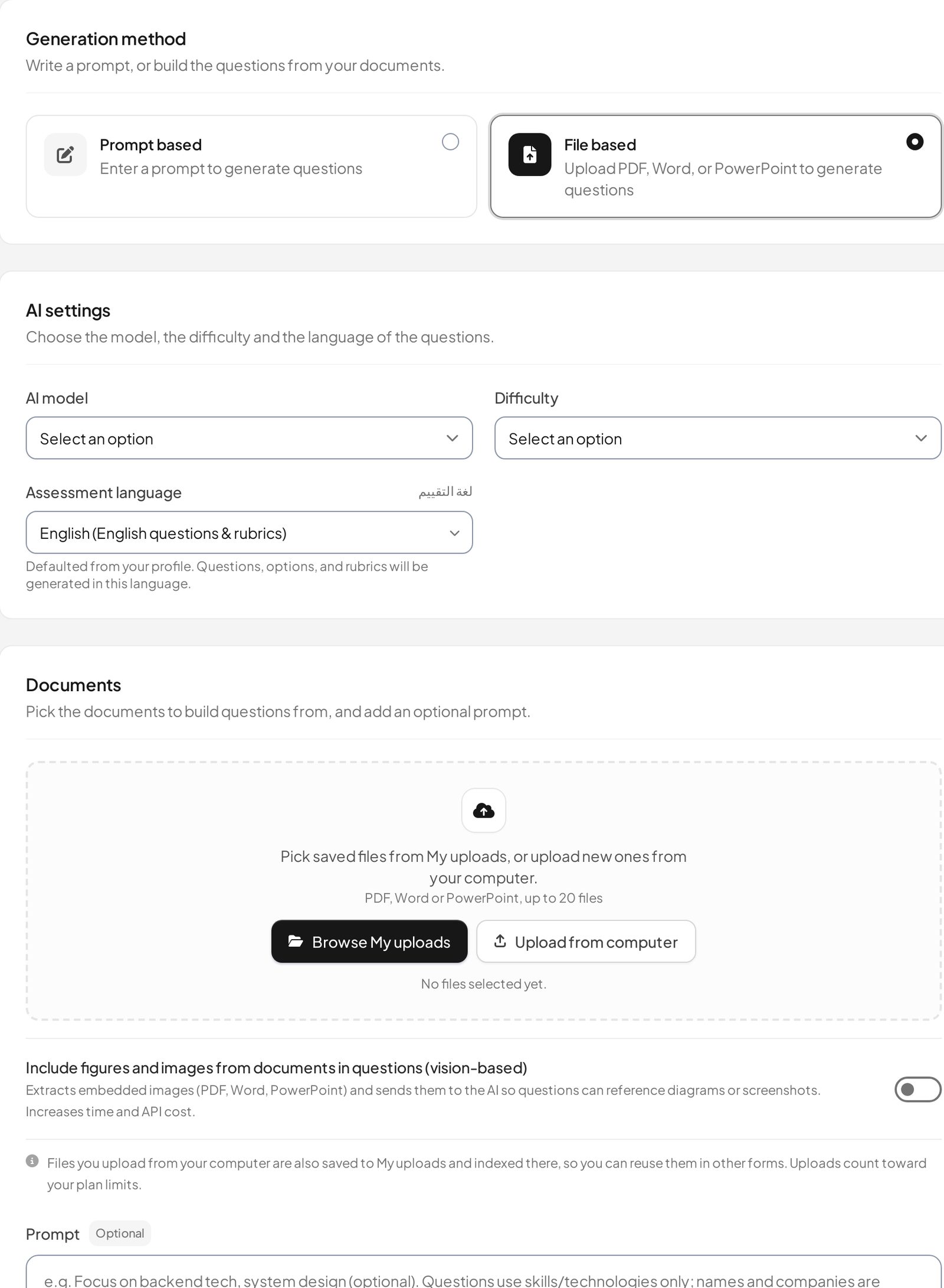
When students hand in, choice questions are marked and AI grading scores each written answer against every criterion of its rubric, with a comment per criterion that you can change before students see it. For exams at home, online proctoring checks identity with an ID photo, a selfie and a liveness check, then watches webcam, microphone, screen and browser. Questions, rubrics and feedback also work in Arabic.
Price (from our pricing page): Free for 25 students; Starter $39 a month for 200; Pro $99 for 500; Intensive $249 for 2,000; yearly costs ten months. AI grading and proctoring start on Starter.
Where it falls short: no Microsoft Teams integration and no import of Microsoft Forms quizzes (it publishes to Google Classroom instead), no device lockdown, and proctored tests need a laptop or desktop. See Microsoft Forms vs IntelliAssess.
2. Wayground (formerly Quizizz): free practice you can assign from Teams
Best for: engaging practice and quick checks, free for every teacher.
Wayground's site says it generates "a full activity" from "a topic, doc, standard, or upload" and lists lockdown mode, tab-switching alerts and integrity reports. Its Microsoft page lets teachers assign its resources from Teams, with students signing in through Microsoft. Its plans page lists AI grading with custom and state rubrics on the School and District plan.
Price: Basic is "free for every teacher, forever"; School and District on quote.
Where it falls short: AI rubric grading needs a school plan, grade passback to Teams is not stated, and no webcam or identity checks are described. See Wayground alternatives.
3. Testportal: a free test maker inside Teams
Best for: teachers who want self-marking tests without leaving Teams.
Testportal's Teams app lets you "create, share, and analyze your quiz results" in Teams. Its education pricing lists Free EDU ("free forever", 100 stored results) and an individual EDU plan at $39 a year. It self-grades yes/no, choice and short open-ended questions, and test takers need no account.
Where it falls short: its education plans do not list AI question writing, longer answers are marked by hand, and grade passback to Teams is not stated. See Testportal vs IntelliAssess.
4. Digiexam: supervised exams with ID checks
Best for: formal exams that need identity checks, live supervision and a locked device.
Digiexam's proctoring page describes ID checks by face photo or ID document, automated proctoring and live proctors who watch up to 30 students; its site lists a lockdown application and AI-assisted feedback. Its directory sync works with Microsoft Entra ID for its Canvas-based Lockdown product.
Price: Lockdown $1,995 a year ($1,496 with 25% off year one) or $2.99 per student on its pricing page; Exam Platform on request.
Where it falls short: no free plan and no Teams integration described. See Digiexam vs IntelliAssess.
5. Exam.net: locked exams for the whole school, linked to Teams
Best for: schools that need locked exams on many devices under one licence.
Exam.net's integration page says you can "share exams seamlessly within Teams" and students "receive their results directly in Teams". Its pricing page lists three security levels including a lockdown browser, an AI question generator, accommodations and anonymised answers. It says it is trusted by over 270,000 teachers.
Price: a school licence on quote after a 30-day trial; "We don't have a free plan."
Where it falls short: no free plan for one teacher, and no webcam proctoring or AI scoring of written answers described. See Exam.net vs IntelliAssess.
Also worth knowing
- Moving to Google? Google Forms is the like-for-like swap in Google Workspace; see Google Forms vs IntelliAssess.
- Using Forms for review games? A live game tool may suit better; see Kahoot! alternatives.
Prices side by side
Microsoft Forms is already paid for through your school's Microsoft 365 licence, so the real question is what an alternative adds and who pays for it.
| Tool | Free option | First paid option | Who usually buys |
|---|---|---|---|
| Microsoft Forms | Included with Microsoft 365, with Teach for staff | Copilot in Forms through the Microsoft 365 Copilot add-on, $18 per user per month for education | The school |
| IntelliAssess | 25 students, AI question writing, no proctoring | Starter $39 a month for 200 students, with AI grading and proctoring; yearly costs ten months | A teacher or department |
| Wayground | Basic, free for every teacher | School and District plans on quote | A teacher, then the school |
| Testportal | Free EDU, 100 stored results | EDU $39 a year | A teacher |
| Digiexam | None | Lockdown $1,995 a year or $2.99 per student; Exam Platform on quote | The school or university |
| Exam.net | 30-day trial per school | School licence on quote | The school |
Prices from each vendor's own page, read 17 November 2026; see each tool's section for the source link.
What Copilot in Forms costs a teacher over a year
If the only reason to look elsewhere is AI question writing, start with Teach, which is included for staff. If you want AI inside Forms itself, the academic Copilot add-on at $18 per user per month comes to $216 a year per teacher, and it covers Copilot across Microsoft 365, not only Forms. For comparison, a Testportal EDU plan is $39 a year and does not list AI question writing, and IntelliAssess Starter billed yearly is $390 (ten months at $39) and includes AI question writing, AI grading of written answers and proctoring for 200 students. These buy different things, so compare them against the gap you actually have: question writing, marking, or exam security.
What students need on the day
- Microsoft Forms: a browser, usually signed in with the school Microsoft account when the quiz is assigned through Teams.
- Testportal: a browser and the test link; test takers need no account.
- Wayground: a browser, signing in with Microsoft when the activity is assigned from Teams.
- IntelliAssess: a browser and the test link. For proctored tests, a laptop or desktop with a webcam, and an ID photo and selfie at the start.
- Digiexam and Exam.net: their lockdown application or browser on the exam device, set up in advance by the school.
Lockdown tools ask the most of IT on exam day; link-based tools ask the least. If your students sit exams at home on their own devices, check which of these your families can actually manage before you choose.
Which alternative for which school
- A primary or middle-school teacher in Teams who mostly gives quick quizzes: keep Microsoft Forms, let Teach write the questions, and add Wayground for practice.
- A teacher who wants self-marking tests without leaving Teams: Testportal's free Teams app, upgrading to EDU at $39 a year if you need more stored results.
- A secondary department setting end-of-unit tests with essays, some sat at home: IntelliAssess, so written answers are scored against a rubric and identity is checked, accepting that it runs outside Teams.
- A whole school running formal exams on school devices: Exam.net, which shares exams and results through Teams, or Digiexam, bought centrally.
- A university running supervised remote exams: Digiexam, for ID checks, live proctors and a lockdown app.
- An international school teaching in Arabic and English: IntelliAssess, which writes, delivers and grades in both.
Moving from Microsoft Forms in five steps
- Pick one real test with at least one written answer and one class, rather than moving everything at once.
- Bring the content across. None of the alternatives here describes importing Microsoft Forms quizzes directly, IntelliAssess included. In IntelliAssess, upload the lesson files the quiz was based on (PDF, Word or PowerPoint) and let it write the test, then edit the questions to match your original. In other tools, rebuild the quiz or use their own import options.
- Add what Forms could not do: a rubric for each written answer, and any identity or webcam checks, told to students in advance.
- Tell students where to find it. If the tool is outside Teams, post the link in your Teams class or channel so students still start from the place they know.
- Compare after one cycle: how long marking took, how many students had trouble starting, and whether the scores matched your own judgement.
Where IntelliAssess is not the right choice
- Teachers must stay inside Teams: Testportal, Exam.net, or Forms itself.
- Your choice questions mark themselves and Teach writes the quizzes you need: keep Forms.
- You need a locked device: Exam.net or Digiexam.
- Students take proctored tests on phones or tablets: IntelliAssess's proctoring needs a laptop or desktop.
How to choose a Microsoft Forms alternative
- Ask your admin what you already have. Teach and Assignments' AI rubrics and feedback come with Microsoft 365 Education; Copilot in Forms may not.
- Decide whether teachers must stay in Teams. If yes, Testportal or Exam.net; if not, the field is wider.
- Name the gap. Scoring written answers, checking identity at home, or locking devices each points to a different tool.
- Try one real test with one class and compare marking time.
For whole departments, see IntelliAssess for schools, or browse every comparison.
Frequently asked questions
What is the best Microsoft Forms alternative for tests?
For written answers scored by AI against a rubric and exams at home with identity checks, IntelliAssess, which works outside Teams. To stay inside Teams, Testportal. For locked devices, Exam.net or Digiexam. For free game-style practice assigned from Teams, Wayground.
Is there a free alternative to Microsoft Forms?
Wayground's Basic plan and Testportal's Free EDU plan are free for teachers, and IntelliAssess has a free plan for 25 students. Forms itself is included with Microsoft 365.
Does Microsoft Forms have AI quiz generation?
Yes. Teach in the Microsoft 365 Copilot app generates Forms quizzes from lesson files for staff with Microsoft 365 for Education, without a paid Copilot licence. Copilot inside Forms needs a Copilot licence.
Can Microsoft Forms grade essays with AI?
Not by itself. In Teams Assignments, AI can draft a rubric and suggest feedback that you confirm, but you score the work. IntelliAssess's AI scores each rubric criterion with a reason, and you can change any score.
Which alternatives work with Microsoft Teams?
Testportal has a Teams app for creating and sharing quizzes, Exam.net shares exams and results in Teams, and Wayground lets you assign from Teams. IntelliAssess and Digiexam do not describe a Teams integration.
Which alternative can stop cheating in exams taken at home?
IntelliAssess and Digiexam check identity and use the webcam during the exam; Exam.net and Digiexam can lock the device instead.
Can I import my Microsoft Forms quizzes into IntelliAssess?
Not directly. IntelliAssess imports Google Forms quizzes, but not Microsoft Forms. You can upload the lesson files a quiz came from and have it write a new test, then edit the questions.
Is Teach the same as Copilot in Forms?
No. Teach is a set of teaching tools in the Microsoft 365 Copilot app that can write a Forms quiz from your lesson files, and Microsoft says it does not need a paid Copilot licence for staff with Microsoft 365 for Education. Copilot in Forms drafts quizzes inside Forms itself and needs a Copilot licence.
Which Microsoft Forms alternative is cheapest for one teacher?
Wayground Basic and Testportal Free EDU are free; Testportal's paid EDU plan is $39 a year. IntelliAssess is free for 25 students, and Starter is $39 a month for 200 students with AI grading and proctoring.
Do I have to leave Teams to use a Microsoft Forms alternative?
Not always. Testportal has a Teams app, Exam.net shares exams and returns results in Teams, and Wayground lets you assign from Teams. IntelliAssess and Digiexam run on their own sites; with IntelliAssess you post the test link in your Teams class and enter marks in the Teams gradebook yourself.
Keep reading
All articles
Read next
SchoolAI alternatives: 7 AI tools for teachers and students scored (2026)
Seven AI tools scored on the same nine facts, with SchoolAI as the reference, and what each lets teachers see when students use AI.

SchoolAI vs IntelliAssess: an AI tutor for students or feedback after a test?
SchoolAI puts students in supervised conversation with AI; IntelliAssess marks their tests and uses AI to help them learn from their own answers.
Motasem Aldiab 12 min read

Jotform and ProProfs alternatives for quizzes and exams (2026)
Jotform and ProProfs side by side, then the alternatives by forms, certificates or real exams.
Motasem Aldiab 2 min read